

If you’ve ever stared at a blank WordPress editor, feeling the pressure of a blog deadline—or wrestled with writer’s block while knowing you need to keep your content calendar on track—you’re not alone. Many bloggers, marketers, and business owners struggle with creating consistent, high-quality blog posts while juggling SEO, ideas, and endless publishing demands. Time is short, search engine standards keep rising, and sometimes you just can’t find the words.
That’s why more people are turning to AI blog content generators for help beyond simple advice—they want practical tools that can generate ideas, organize structure, speed up drafting, and optimize posts for SEO. This guide will show you how AI blog generators work, how to use them responsibly, the features that matter most, and how WordPress users can streamline publishing with the right AI tools. By the end, you’ll have a clear roadmap to faster, more effective blogging—without sacrificing quality or originality.
What Is an AI Blog Content Generator?
An AI blog content generator is a writing tool that uses artificial intelligence to create blog ideas, outlines, drafts, titles, meta descriptions, and full articles from a topic, keyword, or prompt. It helps bloggers, marketers, and businesses write faster, but the best results still require human editing, fact-checking, and SEO optimization.
Put simply, these tools use generative AI models to transform your prompts—like a keyword or blog topic—into structured drafts or article sections. You can generate everything from introductions to FAQs, then refine the output with your own voice and insights. Think of an AI content generator as a productivity tool: it handles the heavy lifting so you can focus on what matters—quality, accuracy, and brand story.
How Does an AI Blog Content Generator Work?
AI blog content generators work by taking your prompt—be it a topic, keyword, or target audience—and turning it into a structured blog post. This process typically involves inputting your topic, generating an outline, expanding it into a draft, and then manually editing for SEO and clarity.
Let’s break down the workflow:
1. You Enter a Topic, Keyword, or Prompt
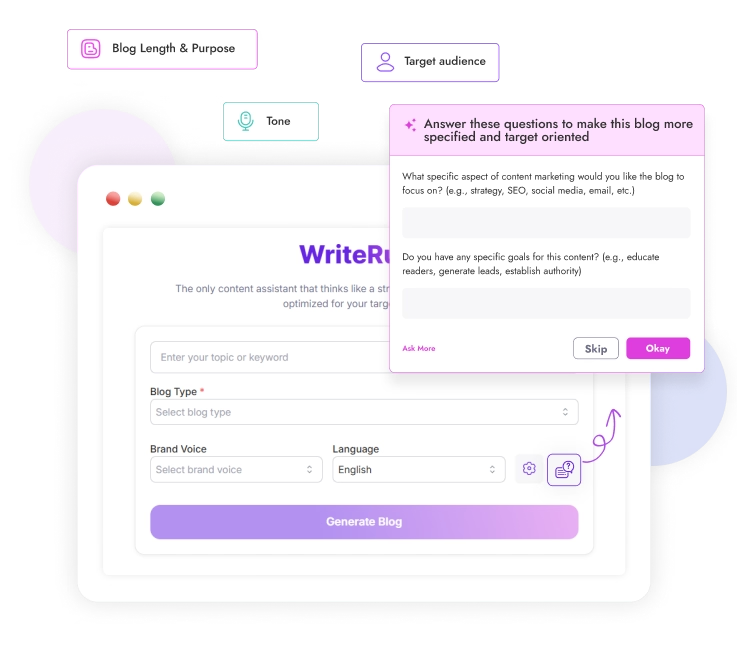
You start by telling the tool what you want—maybe “email marketing for small businesses,” “AI blog writer for WordPress,” or “a beginner-friendly guide on local SEO.” Many generators also ask for your audience, tone, or goal.
2. The Tool Generates Ideas or an Outline

AI quickly analyzes the input and creates a logical blog structure. This often includes suggested headings (H2s, H3s), an introduction, bullet points, potential FAQs, and a conclusion. A good outline gives your post direction, supporting both human readers and search engines.
3. The AI Expands the Outline Into a Draft
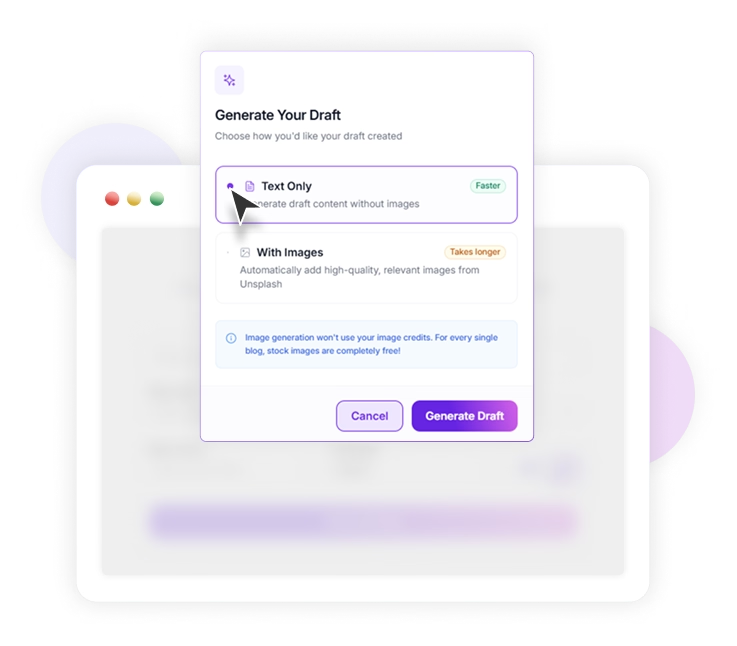
Next, the tool develops each section based on your instructions. Well-designed prompts—including intent, tone, and keywords—lead to more helpful, SEO-ready drafts. AI fills in details, transitions, and sometimes examples, saving hours of manual work.
4. You Edit, Fact-Check, and Optimize
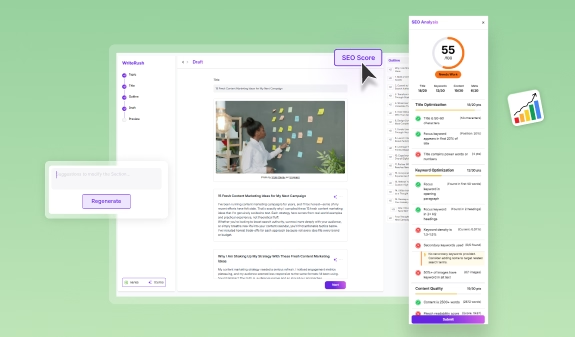
AI doesn’t replace you; it assists you. Fact-check claims, add your expertise, optimize for target keywords, update metadata, and ensure the post meets your brand’s voice. Human editing separates good AI output from great, trustworthy content.
5. You Publish or Repurpose the Content
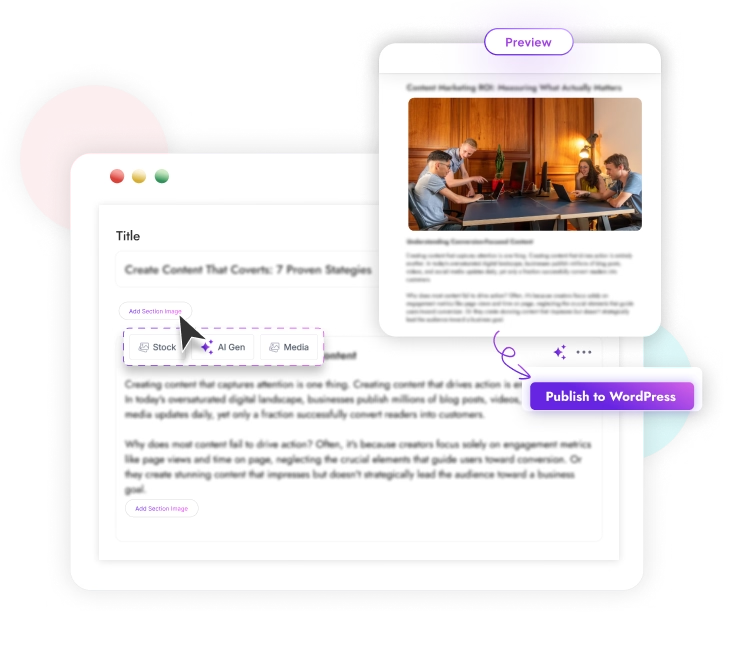
Publish your polished article on WordPress, repurpose it for a newsletter, spin off social posts, or use it to refresh existing content. With the right workflow, AI lets you do this faster and more consistently than before.
What Can You Create With an AI Blog Generator?
- Blog Ideas: Overcome topic fatigue by generating fresh article ideas based on trending keywords or your niche.
- Blog Outlines: Build ready-to-use outlines for SEO-focused articles, listicles, how-tos, and guides.
- Full Blog Drafts: Create entire posts—introductions, body, and conclusions—that you can edit and refine.
- SEO Titles and Meta Descriptions: Generate optimized titles and compelling meta descriptions to improve click-through rates.
- FAQs: Automatically develop question-and-answer sections that boost search visibility.
- Introductions and Conclusions: Draft catchy openers or actionable summaries.
- Content Refreshes: Update outdated articles by adding missing subtopics or improving clarity and SEO.
- Social Media Repurposing: Turn a blog post into tweet threads, LinkedIn summaries, or Facebook updates quickly.
These tools support bloggers, marketers, small businesses, and especially WordPress users who want to streamline their entire content pipeline.
Benefits of Using an AI Blog Content Generator
AI blog content generators make producing high-quality content and maintaining a publishing schedule much easier. You can quickly move from blank page to draft, break free from writer’s block, and focus more on editing and strategy.
- Save Time on First Drafts: Quickly generate article sections so you spend less time starting from scratch.
- Beat Writer’s Block: Get unstuck fast with pre-structured outlines and draft ideas.
- Publish More Consistently: Maintain your content calendar—even with limited resources or a busy schedule.
- Support SEO Workflows: Easily create keyword-rich headings, meta descriptions, and FAQs tailored for search engine optimization.
- Maintain Brand Voice: Customize tone and style to stay true to your brand, especially important for freelance and team writers.
- Scale Content Production: Increase your output without lowering editorial standards, freeing you to work on strategy or promotion.
- Reduce Content Costs: AI generation is generally more affordable than hiring for every draft.
The right tool—especially one that integrates directly with WordPress—reduces friction, helping you publish faster and more reliably.
Can AI-Generated Blog Posts Rank on Google?
AI-generated blog posts can rank on Google if they are useful, accurate, original, and reviewed by humans. Google focuses on content quality, not the method of creation, so meeting search intent and editorial standards is critical.
- Helpful Content Principles: Google wants content that demonstrates expertise, experience, authority, and trust (E-E-A-T). Useful, accurate, and unique information wins.
- SEO Value: AI-generated outlines and FAQs can help with keyword coverage, but success depends on understanding search intent, adding original insights, and optimizing for readers.
- Editing Matters: Unedited or thin AI content rarely ranks well. Layer your experience, examples, and real value, and always check for correctness before publishing.
Use AI as a productivity tool, but let human expertise be your differentiator in crowded SERPs.
How to Use an AI Blog Content Generator for SEO
The best way to create SEO-friendly blog posts with AI is to start from search intent, use keywords naturally, and round out your posts with internal links, strong meta descriptions, and FAQs.
- Start With Search Intent: Identify whether your keyword is informational, commercial, or transactional, and shape your blog post accordingly.
- Add a Primary Keyword: Use your focus keyword in the H1, introduction, definition, and at least one section heading.
- Create a Clear Heading Structure: Organize your article with logical H2s and H3s; this helps readers, search engines, and AI-powered summaries understand your structure.
- Use Related Keywords Naturally: Mix in anchor terms like “AI blog post generator,” “SEO content generator,” “WordPress AI plugin,” and “long-form blog content” where they make sense.
- Add Internal and External Links: Reference related posts and credible sources to keep users engaged and strengthen your site’s SEO signals.
- Write a Strong Meta Title and Meta Description: Summarize the main benefit and target keyword within 60 characters for title; under 160 characters for description.
- Include FAQs: Anticipate and answer common questions to capture additional search traffic and serve as snippet bait.
- Improve Readability: Use short paragraphs, bullet points, and simple language to make your post easy to scan.
- Add Original Insights: Sprinkle real examples, data, opinions, or case studies—even a quick story from your workflow.
Using an AI tool like WriteRush speeds up drafting and outline creation, but the strongest results happen when you apply your own strategies and insights before publishing.
AI Blog Generator vs Human Writer
AI blog generators and human writers each have their strengths—AI brings speed and structure, while human writers bring expertise, nuance, and trust. Combining the two creates the smartest content workflow.
| Factor | AI Blog Generator | Human Writer |
|---|---|---|
| Speed | Extremely fast | Slower |
| Cost | Lower on average | Higher |
| Original insight | Limited; needs guidance | Strong, based on experience |
| SEO structure | Good with detail in prompt | Excellent with expertise |
| Accuracy | Needs fact-checking | Needs review but usually higher |
| Best use | Drafting, outlines, ideation | Strategy, editing, brand voice |
The ideal process? Let AI handle the heavy lifting in drafting, but rely on human review for expertise, originality, and editorial decision-making.
AI Blog Generator vs Content Spinner
An AI blog generator creates unique content from scratch based on your inputs, while a content spinner simply rewrites existing text. Using a spinner can be risky for both quality and SEO.
- Blog Generator: Produces new drafts, outlines, and sections from prompts, supporting original content creation.
- Content Spinner: Modifies existing content, often resulting in thin, repetitive, or low-value articles. Google’s algorithms are good at detecting spun content and may penalize it.
Prioritize original writing and editing—spinning is not a shortcut to sustainable growth.
Features to Look for in an AI Blog Content Generator
Choosing the right tool starts with knowing your needs. Look for features that enable speed, structure, SEO alignment, editing, and workflow integration.
| Feature | Why It Matters |
|---|---|
| Blog outline generation | Structures posts before drafting |
| Long-form content support | Enables detailed, in-depth articles |
| Keyword input | Aligns output with SEO demand |
| Tone and voice controls | Keeps messaging consistent |
| Meta title and description generation | Boosts search visibility |
| Editing and rewriting tools | Refines clarity, tone, and flow |
| Multilingual support | Reaches wider/global audiences |
| WordPress integration | Reduces copy-paste and speeds publishing |
| Content refresh support | Updates and improves existing posts |
| Human review workflow | Maintains quality and trust |
If you publish on WordPress, prioritize tools with direct CMS integration. For example, WriteRush is designed to help you draft, edit, and optimize inside your WordPress workflow, bridging the gap between idea and published post.
AI Blog Content Generator for WordPress Users
WordPress bloggers and site owners often juggle multiple apps for research, writing, SEO, and publishing. This switching can slow you down and introduce errors. An integrated WordPress AI plugin streamlines your entire content workflow.
Key workflow improvements include:
- Drafting new posts directly inside or near your CMS—no more copy-pasting from external docs.
- Quickly generating blog sections, SEO titles, and meta descriptions.
- Consistently formatting headings, bullets, and internal links for your site.
- Updating or optimizing old posts with less friction.
- Reducing manual steps and keeping your content calendar on track.
For WordPress users, a tool like WriteRush brings AI-assisted drafting closer to your actual publishing routine. This lets you move efficiently from brainstorming to draft, optimize on the fly, and publish with confidence—helpful for solo bloggers, marketers, or teams struggling to maintain consistency.
WordPress Publishing Checklist
- Confirm the post matches search intent.
- Review heading structure and formatting.
- Add internal and external links.
- Write or refine SEO title and meta description.
- Include images with descriptive alt text.
- Check readability and mobile preview.
- Schedule or publish at the right time.
How to Write Better Prompts for AI Blog Content
Prompts are the foundation of strong AI-generated content. The clearer your instructions, the more relevant and helpful the result.
Here are practical templates for different blogging needs:
Write a blog post about [topic] for [audience]. Use a [tone] tone. Include a clear introduction, helpful subheadings, practical examples, and a concise conclusion.
Create an SEO-friendly blog post about [topic]. Target the primary keyword [keyword]. Include related keywords naturally, use H2 and H3 headings, answer common questions, and write a meta title and meta description.
Create a WordPress-ready blog post about [topic] for [audience]. Include an H1, H2s, H3s, short paragraphs, bullet points, FAQ questions, a meta description, and suggestions for internal links.
Write an educational blog post about [problem] for people considering [product/service category]. Explain the problem, compare possible solutions, include practical advice, and end with a soft call to action.
Improve this existing blog post for SEO and readability. Keep the original meaning, update outdated sections, add missing subtopics, suggest internal links, create FAQs, and write a stronger meta description.
Customizing these prompts helps get targeted, organized AI output—saving you editing time and improving SEO readiness.
Checklist Before Publishing AI-Generated Blog Content
Before you go live with any AI-generated content, review these essentials for quality assurance and SEO optimization:
- Fact-check all claims, statistics, and data.
- Add real-life examples, your own experience, or unique insights.
- Ensure originality and check for unintentional plagiarism.
- Improve the heading structure for readability and SEO.
- Add internal links to related posts and resources.
- Optimize your SEO title and meta description for clarity and keyword focus.
- Scan for a consistent tone that matches your brand.
- Format images with descriptive alt text.
- Have a human editor review, refine, and approve the final post.
Whether you use WriteRush or another tool, this checklist helps ensure your content is trustworthy, valuable, and reader-centric.
Common Mistakes to Avoid
Avoiding these pitfalls is just as important as using the right AI tool. Common mistakes can undermine your SEO—and your audience’s trust.
- Publishing raw AI output: Unedited drafts often sound generic or repetitive. Always review and adjust for clarity and impact.
- Ignoring search intent: Don’t write around keywords without addressing what the searcher really needs to know.
- Keyword stuffing: Overusing “AI blog content generator” or similar phrases hurts readability and can damage SEO.
- Skipping fact-checking: Always verify claims, especially statistics, technical advice, or product information.
- Creating thin or generic content: Add original insights, examples, or visuals to stand out and provide real value.
- Forgetting internal links: These guide readers and boost site SEO.
- Losing brand voice: AI needs prompt guidance to write in your tone or style—don’t leave that to chance.
- Treating AI as strategy: AI speeds up process, but effective content requires human strategy and quality control.
Conclusion
AI blog content generators can truly transform your writing workflow—helping you move from idea to SEO-optimized draft faster, break through creative blocks, and stay consistent with your publishing schedule. The best results, though, come from combining the speed and structure of AI with your human editing, expertise, and brand voice.
If you want to create blog drafts faster and keep your writing workflow close to WordPress, WriteRush can help you move from idea to publish-ready content with much less friction. Start with one article, test your workflow, and refine the process—giving yourself more time to focus on the stories that set your blog apart.
FAQs About AI Blog Content Generators
What is an AI blog content generator?
An AI blog content generator is a tool that uses artificial intelligence to automatically create blog ideas, outlines, drafts, and SEO elements like meta descriptions based on your prompts or keywords.
Can AI-generated blog posts rank on Google?
Yes, if they are accurate, genuinely helpful, well-structured, and reviewed by a human editor. Google prioritizes useful, original content that meets search intent, regardless of how it’s created.
Do I need to edit AI-generated blog posts before publishing?
Absolutely. Editing improves accuracy, originality, tone, structure, and trustworthiness—key factors for SEO and audience engagement.
Is AI blog content good for SEO?
AI can help with outlining, keyword coverage, metadata, and FAQs, but top-ranking content requires careful editing, original insights, and alignment with searcher intent.
What are the risks of using a content spinner instead of an AI generator?
Content spinners only rewrite existing text and often produce low-quality or repetitive articles, which can harm your search rankings. AI generators create new drafts, supporting better originality and SEO.
Are free AI blog generators good enough for business use?
Free tools work for basic drafts or brainstorming, but paid options usually offer better long-form quality, SEO control, workflow integrations, and WordPress publishing features.
How do I make AI-generated blog content sound more human?
Add your voice, personal experience, real-world examples, and make the writing flow naturally. Avoid repetition and generic phrases, and edit for clarity and engagement.
Can I use an AI blog generator for WordPress?
Yes. Many tools—including dedicated WordPress plugins—allow you to draft, optimize, and publish blog content inside your CMS, streamlining the workflow.
What should I check before publishing AI-written content?
Review for accuracy, originality, structure, search intent, internal links, metadata, readability, and consistency with your brand voice—plus a final human review before going live.
This page was last edited on 15 June 2026, at 4:24 pm






