Your writing can get flagged as AI even if you wrote it yourself because AI detectors analyze text for patterns like high predictability, formulaic structure, and lack of personal voice—traits often found in both AI-generated and overly polished human writing.
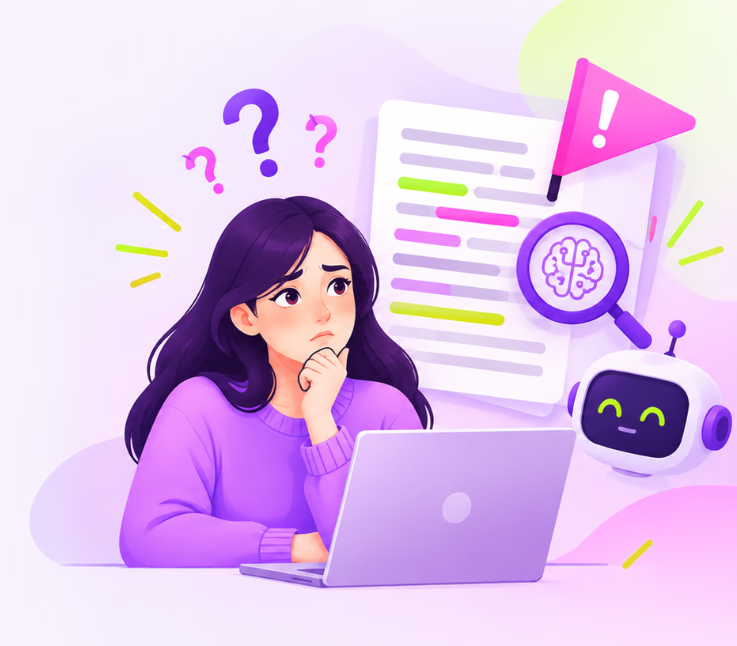
You spend hours crafting an article, blog post, or report, pouring in your research and experience. Then, out of nowhere, it gets flagged as “AI-generated.” You know your work is original—so why is it happening?
This isn’t just an academic headache or student complaint. We see bloggers, WordPress site owners, marketers, and business writers blindsided by AI content detectors. Tools meant to protect against spam and plagiarism are now mistakenly flagging carefully written, perfectly human content. The real risk? Unjust suspicion, lost credibility, and wasted time defending your own words.
If this sounds familiar, you’re not alone. In this guide, you’ll learn why writing—even your truly human writing—gets flagged as AI, how detection tools actually work, and what you can do to keep your original voice trusted and protected. Let’s dig into the realities of AI flags and practical workflow fixes, especially for WordPress creators.
What Does It Mean When Writing Is Flagged as AI?
When a content detector “flags” your writing as AI, it means the tool’s algorithm detected patterns usually found in machine-generated content—like highly predictable phrasing, uniform sentences, or missing human quirks.
AI content detectors (like GPTZero, Turnitin, or ZeroGPT) scan your text for statistical signals including perplexity and burstiness, then compare your writing’s features to massive databases of both human and AI content. If your work seems mechanically predictable, overly polished, or lacks clear stylistic fingerprints, it can trigger a false positive. Most important—being flagged does not mean plagiarism or dishonesty; it just means your text matches certain algorithmic profiles that often (but not always) align with AI writing.
Why Human Writing Gets Flagged by AI Detectors
Some perfectly real, human-written work can get flagged as AI because detection tools look for patterns—not intention. Here’s how that happens:
Over-Editing and Loss of Personal Voice
Texts that are over-edited—whether by professional editors or tools like Grammarly—can lose the messiness or quirks that usually signal a human writer. In our experience, when style becomes too uniform, detectors may interpret it as machine output.
Predictable Structure and Formulaic Language
Academic, business, and template-driven writing often repeats the same structures, phrases, and vocabulary. A blog post using the same generic intro, body, and outro every time? It’s a classic formula AI writers use as well—so detectors get suspicious.
Effects of Grammar and Editing Tools
Many writers rely on digital editors for spelling, clarity, and punctuation. The downside? Heavy use can strip out idiosyncratic turns of phrase or regional expressions, both of which are strong “human” signals.
ESL and Non-Native Writing Patterns
Writers using English as a second language—especially when translating thoughts literally—may use simpler sentences or avoid creative risk-taking. To AI detectors, this sometimes looks like the simple, pattern-filled writing style of a bot.
The Role of Perplexity & Burstiness
Detectors measure how surprising your word choices and sentence patterns are (perplexity), and how much variety appears (burstiness). If your writing is extremely smooth, repetitive, or consistent, it might not “pass” the unpredictability test built to spot AI.
Understanding these triggers is key. No detector can “read your mind”—they only see the finished text and make guesses based on statistical patterns.
How AI Content Detectors Actually Work
AI detectors are based on algorithms that score your writing’s predictability and stylistic patterns.
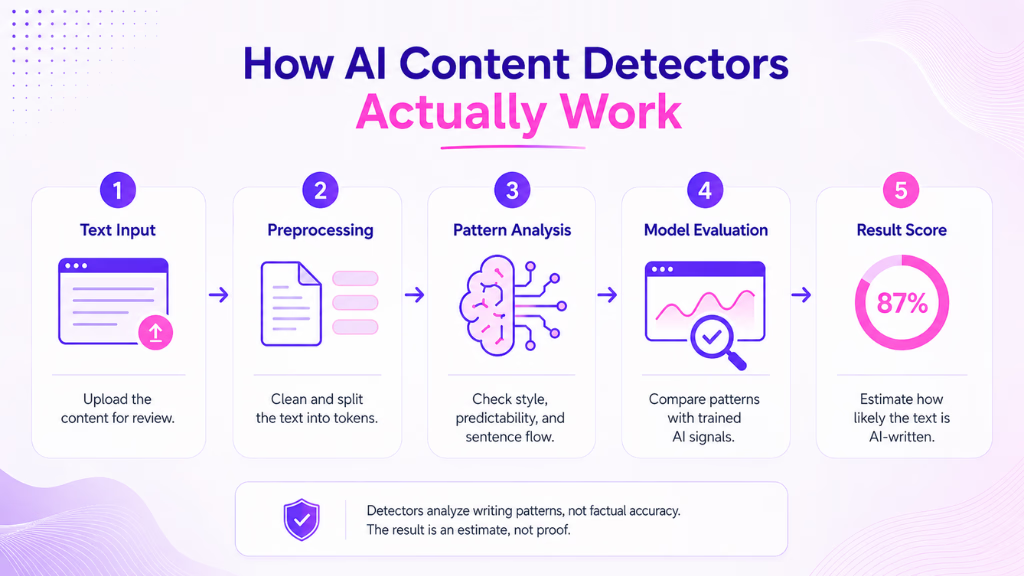
Key Metrics: Perplexity, Burstiness, and Predictability
At the core, detectors check how expected your next word is. High perplexity and burstiness mean the text has variety and surprises—hallmarks of human writing. Super-even, repetitive text? It gets flagged for being too much like AI.
Main Tools and Their Accuracy
Popular tools include GPTZero, Turnitin, ZeroGPT, and Originality.AI. Each looks for slightly different patterns, with varying sensitivity. None is perfect. According to recent industry reports, false positives—where genuine human text is flagged as AI—still occur surprisingly often, especially with highly polished or non-native English writing.
Why False Positives Are Inevitable
These tools analyze surface traits, not intent or creativity. Professional, concise, or well-edited text sometimes hits every “AI-like” marker. This means being flagged is a risk even in your best work—especially for content creators, marketers, and agencies pushing high volumes through tools like WordPress.
Practical Ways to Prevent Your Writing from Being Flagged as AI
Worried about getting unjustly flagged? Try these practical checks to reclaim your voice and minimize risk.
Human Writing Self-Check Checklist
- Vary sentence length and rhythm to avoid monotonous flow.
- Add anecdotes, real-life examples, or distinctive personal touches.
- Use references unique to your field or audience.
- Let some minor imperfections show—don’t “scrub” every sentence to textbook quality.
- Avoid recycled introductions, conclusions, or section templates.
Redrafting for Authenticity
After running content through spelling or grammar tools, reread and re-insert any phrases or expressions unique to your voice. For blogging teams, have at least one round where a human—not a tool—looks for missing personality.
Documenting Your Authorship
Save early drafts, track edits in Google Docs or WordPress, and keep timestamps. If your work is ever flagged, this evidence helps prove originality.
Tips for ESL/Non-Native Writers
Make sure to add personal viewpoints, cultural references, or local storytelling. These are signals of genuine authorship that detectors are often trained to spot.
The best safeguard is keeping your human perspective visible throughout the workflow. Teams using WriteRush, for example, can train the plugin on their authentic writing samples, helping the AI suggest phrases closer to real human prose.
Maintaining Authenticity with AI Writing Tools
- Always review and personalize AI-generated drafts before publishing.
- Train your tool on your own content, making future outputs truer to your style.
- Use section-by-section editing rather than rewriting entire drafts if problems arise.
- Leverage guidance features for tone and structure—like those in WriteRush—to steer towards conversational, engaging language.
This kind of workflow is especially useful at scale, when agencies, blogs, and eCommerce teams need to produce original content fast—without getting burned by false positives.
Ensuring Unique Voice in WordPress Content
- Brand Voice Training: Upload your own writing, so AI suggestions reflect your true style—not generic outputs.
- Section Regeneration: If only one paragraph triggers an AI flag, regenerate just that part—no need to rewrite a full article.
- Guided Workflow: Get real-time cues about originality, SEO structure, and voice as you write.
- Version Control and Proof: Direct WordPress publishing plus built-in version history mean you always have evidence of original drafts.
All these features help writers and teams prevent pattern-based flagging—before your post ever goes live.
Common Pitfalls to Avoid When Trying to Pass AI Detection
- Relying only on grammar editors or paraphrasing tools (they erase personal voice).
- Overusing cookie-cutter blog templates or section structures.
- Forgetting to update your own brand voice samples within AI writing tools.
- Not archiving drafts or proof stages, leaving your authorship unprotected.
- Generating bulk content without reviewing for flow, nuance, or personal touch.
A better approach? Blend smart automation with consistent, real human review.
Conclusion
Getting flagged as “AI” isn’t just a tech issue—it’s a real challenge for anyone sharing original work online. By understanding how detectors work, making your voice visible, and using tools like WriteRush to anchor your unique style, you can create and publish with confidence. For WordPress creators and growing content teams, now’s the time to build authenticity into every workflow.
Want to see how WriteRush keeps your work truly yours? Explore the plugin and strengthen your content’s credibility today.
Frequently Asked Questions
Why does my writing get flagged as AI even if I wrote it myself?
AI detectors score for formulaic patterns and predictability. Well-edited or template-driven writing—even when human—sometimes matches what detectors associate with machine-written text.
Does using Grammarly or editing tools make a false flag more likely?
It can. Over-editing often erases quirks and individuality. After using editing software, re-personalize your draft to restore natural style.
How do I prove my writing is original if challenged?
Maintain document history, include dated drafts, and use version control (in Google Docs or WordPress). These records help show authorship.
Are any AI detectors more accurate or fair than others?
None is perfect. GPTZero and Turnitin are widely used, but all can make mistakes—especially with academic, business, or ESL content.
Can ESL writers prevent being wrongly flagged?
Yes. Add personal anecdotes and cultural detail, and avoid simple, repetitive English patterns when possible.
What should I do if my writing is flagged as AI?
Stay calm. Prepare your authorship evidence, then reach out for a manual review. False positives are not proof of wrongdoing.
How does WriteRush help prevent false AI flags?
By integrating brand voice training and originality guidance, WriteRush helps you edit flagged sections, maintain distinct style, and document your workflow—all within WordPress.
This page was last edited on 18 August 2026, at 4:32 pm