Have you ever published a blog post you were genuinely proud of, only to watch it quietly fade into the internet?
NO sign-ups.
NO clicks.
NO conversions.
Just traffic numbers that look nice on a dashboard but don’t actually move your business forward.
If you’re a blogger, content marketer, or WordPress user, this probably feels familiar. You research keywords, write long posts, optimize for SEO… yet readers skim, scroll, and disappear. The effort is there, but the RESULTS aren’t.
Here’s the hard truth: most blog posts fail not because they’re poorly written, but because they’re not built to convert.
That’s where AI changes everything.
When used strategically, AI doesn’t just help you write faster; it helps you plan better, structure smarter, and guide readers toward action without sounding salesy or forced.
In this blog, we’ll walk through a clear, step-by-step journey from planning and writing to optimization and conversion, showing how to create conversion-focused blog posts with AI by applying the content funnel.
By the end, you’ll know exactly how to turn traffic into engagement and engagement into real results, one blog post at a time.
Why Conversion-Focused Blog Posts Matter
A conversion-focused blog post isn’t just about sharing knowledge; it’s about guiding your audience through a journey that ultimately leads them to take action. In the world of digital content, traffic is only valuable if it converts. And AI can make this process easier, faster, and smarter.
Key Elements of a Conversion-Focused Blog Post:
- Clear Purpose: Every post should align with a specific goal, whether it’s lead generation, sales, or engagement.
- Target Audience Awareness: Speak directly to the needs and pain points of your audience.
- Strategic CTAs: Calls to action (CTAs) should be thoughtfully placed, directing readers towards the next step in the funnel.
- Value-Driven Content: The content must answer questions, solve problems, and provide value at every step.
- Optimized for SEO: Ensure your post is discoverable by search engines so your ideal audience can find it.
Step-by-step Process to Create Conversion-Focused Blog Post with AI
Creating a conversion-focused blog post with AI isn’t about following rigid rules; it’s about using a clear process that keeps readers and results in mind. In the steps below, we’ll walk through a practical, end-to-end workflow that shows how to plan, write, optimize, and promote blog content with AI, while keeping conversions at the center.
Each step builds on the previous one, helping you move from idea to publish-ready content that attracts the right audience, keeps them engaged, and guides them toward action without sounding forced or salesy.
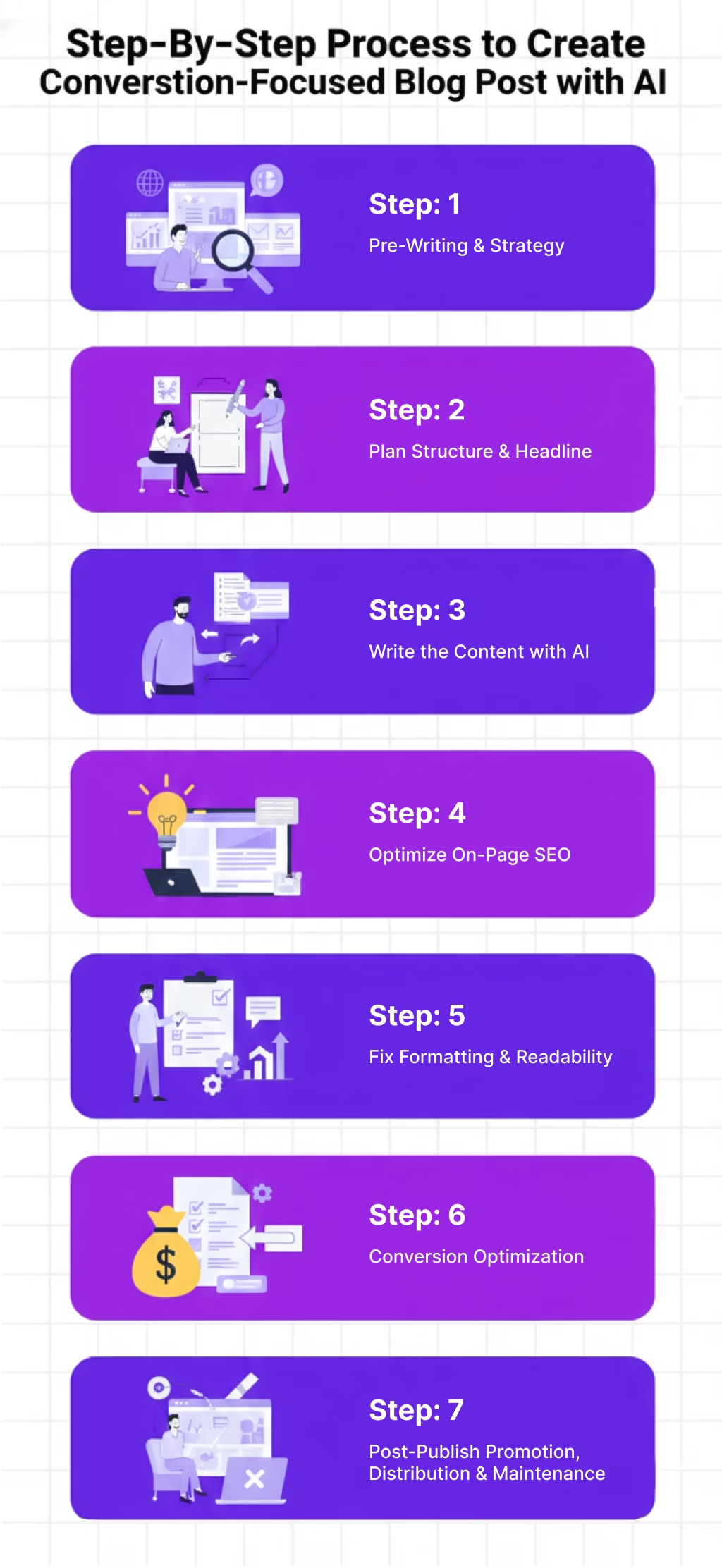
Step 1: Plan Your Blog Post Around Conversion Goals
Planning is key to creating a blog post that leads to conversions. Here’s how you can use AI tools to assist in this process:
1.1 Define the Core Objective
Before writing, determine your main goal. Do you want the reader to:
- Sign up for your newsletter?
- Download an eBook or other resource?
- Purchase a product or service?
AI can help clarify this by analyzing existing content that ranks well in your industry and determining which types of CTAs are working best.
1.2 Identify Your Target Audience
AI tools like WriteRush can analyze customer personas, search queries, and social media trends to help you target your ideal reader. Focus on:
- Demographics: Who are they (age, gender, profession)?
- Psychographics: What are their pain points, desires, and challenges?
1.3 Build a Content Outline Using AI
Once you’ve defined your goals and audience, use AI to generate an outline that keeps the conversion goal at the forefront. Use AI to create a framework that includes:
A well-placed call-to-action (CTA) in the conclusion.
A compelling introduction.
Sections focusing on the main problem and how your solution works.
Step 2: Write Your Blog Post with AI
Now comes the writing part. Here’s how to use AI to speed up content creation while maintaining quality.
2.1 Craft the Headline and Introduction
The headline is your first opportunity to grab attention. Use AI tools to generate compelling headlines based on high-performing keywords.
For example, instead of a generic headline like “How to Create Blog Posts with AI,” try:
“How to Write Conversion-Focused Blog Posts with AI: A Step-by-Step Guide”
Once you have a strong headline, use AI to draft the introduction. The introduction should establish:
- What the post will solve.
- Why it’s important.
- How the post will guide them step-by-step.
2.2 Write Engaging Body Content
AI tools like ChatGPT or WriteRush can help generate paragraphs that focus on your reader’s pain points, present your solution, and back up claims with facts and data. Break the content into sections, each focusing on a key part of your topic, and ensure each part has a clear call to action.
Some suggestions for structuring your post:
- Problem: Highlight the pain or challenge your audience is facing.
- Solution: Present how your AI-powered solution can help.
- Action: Encourage the reader to take the next step (e.g., sign up, download, buy).
2.3 Use AI for Content Optimization
AI isn’t just a tool for drafting. You can also use it to optimize your content:
- Check for keyword density (without stuffing).
- Identify missing opportunities for internal links.
- Analyze your writing for readability and tone.
Step 3: Optimize for Conversions
Writing great content is only part of the equation. To drive conversions, your content needs to be strategically optimized.
3.1 Place Your CTAs Thoughtfully
A conversion-focused blog post isn’t complete without well-placed CTAs that gently nudge your reader towards the desired action. Here’s where AI tools can help suggest:
- Primary CTAs (e.g., “Download Our Free eBook”)
- Secondary CTAs (e.g., “Read More Related Articles”)
- Soft CTAs (e.g., “Join Our Community”)
Inserting CTAs at natural points (after value-driven paragraphs, at the end of sections) will make them more effective.
3.2 Ensure Strong SEO
The higher your post ranks, the more likely you are to get conversions. AI can help with:
- Keyword optimization: AI tools can suggest long-tail keywords related to your topic.
- Meta descriptions: Craft an enticing, concise meta description that makes users want to click on your post.
Here’s an example of an SEO-optimized meta description:
Learn how to write AI-powered blog posts that convert traffic into leads. Step-by-step guide with actionable tips, AI tools, and more!
3.3 Add Visuals and Other Assets
People engage more with content that includes helpful images, diagrams, and videos. AI can help you create graphics (such as infographics, charts) or suggest where to add visuals for maximum impact.
Consider creating a downloadable checklist titled “Conversion-Focused Blog Post Checklist” to help readers implement your advice.
Step 4: Post-Publishing: Measure and Improve
Creating a blog post is just the start. Once your content is live, use AI tools to measure its performance.
4.1 Use Analytics to Track Conversions
Monitor how well your blog post performs by tracking key metrics such as:
- Page views
- Click-through rates (CTR) on CTAs
- Conversion rate (e.g., sign-ups, downloads)
AI-powered tools like Google Analytics or SEMrush can provide detailed insights, including bounce rates and engagement metrics.
4.2 A/B Test Your CTAs
AI tools also make it easy to A/B test your CTAs to see which ones perform better with your audience. Test different variations of your CTA copy, placement, and even the design.
4.3 Update Content Regularly
AI can help keep your content fresh and relevant. Use AI tools to check if your blog post still ranks well and make necessary updates based on new trends or changes in user behavior.
Now that you’ve seen the full process, the next question is obvious: why do so many blog posts still fail to convert when this framework exists? Let’s unpack what usually goes wrong and where AI makes the difference.
Why Most Blog Posts Don’t Convert (And How AI Fixes That)
Traditional blogging often follows this pattern:
Research a keyword → write a long article → publish → hope for conversions.
The problem?
Hope isn’t a strategy.
Most blogs focus heavily on information, not intent. They answer questions but forget to guide readers toward the next logical step.
Search engines like Google reward helpful content, but “helpful” doesn’t automatically mean conversion-focused. Without a clear goal, strong structure, and intentional CTAs, readers simply move on.
Most underperforming blogs struggle because they:
- Focus on keywords instead of reader intent
- Lack a clear purpose or action to take next
- Present information without context or flow
- End abruptly with no guidance
Sound familiar? You’re not alone.
How AI Fixes It
This is where AI makes a real difference.
AI writing plugins, especially when used inside WordPress, can analyze what’s already working, identify gaps, and help structure content around both user intent and conversions. Powered by models influenced by OpenAI, AI helps you:
- Plan content with a clear goal from the start
- Structure posts that lead readers naturally forward
- Place CTAs where readers are most engaged
AI doesn’t just help you write faster; it helps you write with purpose.
Understanding the problem is only half the solution; execution matters. And that’s where having the right AI content writing tool, especially inside WordPress, becomes a real competitive advantage.
Why an AI Content Writing Tool Inside WordPress Wins
At this point, the strategy is clear, but execution is where most blogs still struggle. Not because the ideas are weak, but because the workflow is fragmented. Research happens in one tool, outlining in another, and writing somewhere else. Visuals are handled separately, and publishing feels like a final chore.
This is where an AI content marketing tool inside WordPress quietly becomes a game-changer.

Instead of jumping between platforms, everything happens in one place, right where your content lives.
Smarter Planning, Not Guesswork
A WordPress-native AI tool can analyze live SERP data from Google to create SERP-based outlines that reflect what’s already ranking. Combined with AI outline generation and topic analysis, this ensures your blog structure is aligned with both search intent and audience needs from the very start.
You’re no longer asking, “What should I include?” You’re starting with a proven framework.
A Guided Writing Experience
Rather than generating one massive article and hoping for the best, a guided long-form workflow helps you write section by section. You can refine, regenerate, or expand individual sections using custom prompts without rewriting the entire post.
Powered by AI models influenced by OpenAI, this approach feels less like automation and more like collaboration.
Control Over Audience, Purpose & Brand Voice
One of the biggest advantages of an in-editor AI tool is control. You can define advanced parameters such as:
- Target audience
- Content purpose
- Tone and writing style
Over time, the AI can even learn your brand voice by referencing existing WordPress content or text samples, so your blogs stay consistent, not generic.
Text, Visuals, and Titles
Beyond writing, modern AI tools inside WordPress can also handle:
- Title generation and regeneration
- AI image creation and updates
- Visual alignment with the content
Because everything happens inside WordPress, there’s no extra uploading, formatting, or context switching.
From Publishing to Promotion
Finally, content doesn’t stop at publishing. A built-in workflow can help transform blog posts into ready-to-use social content, schedule distribution, and send publish-ready drafts straight into WordPress.
That means fewer tools, fewer delays, and a much smoother path from idea to impact.
When strategy, writing, optimization, and publishing live in one place, creating conversion-focused blog posts with AI stops feeling complex and starts feeling repeatable.
Final Thoughts
If there’s one thing to take away from this guide, it’s this: great blog posts don’t convert by accident.
They convert because there’s intention behind every step, from understanding the reader to structuring the content to guiding what happens next. AI simply makes that process clearer, faster, and far more repeatable.
When used thoughtfully, AI helps you move beyond “just publishing content” and toward building blog posts that actively support your goals. It keeps you focused on what matters, reduces guesswork, and helps you show up consistently with content that feels relevant and human.
Working inside a familiar environment like WordPress also removes friction. Instead of switching tools, you spend more time refining ideas and less time managing workflows while staying aligned with how search engines like Google evaluate helpful content.
In the end, conversion-focused blogging isn’t about writing more. It’s about writing with purpose. And with the right AI support, every blog post becomes an opportunity not just to be seen, but to make an impact.
Frequently Asked Questions (FAQs)
1. Can AI really help create conversion-focused blog posts?
Yes. AI helps analyze search intent, structure content, and suggest CTAs based on how users behave on platforms like Google, making blogs more intentional and conversion-ready.
2. Are AI-written blog posts safe for SEO?
AI-written content is safe for SEO as long as it’s helpful, original, and user-focused. When guided properly, AI aligns well with Google’s helpful content standards rather than violating them.
3. What makes a blog post “conversion-focused” instead of informational?
A conversion-focused blog post has a clear goal, guides readers through a logical journey, and includes strategic calls-to-action, rather than just sharing information and ending abruptly.
4. Is it better to use an AI tool inside WordPress or a standalone AI writer?
Using an AI tool inside WordPress is often more effective because it keeps research, writing, optimisation, and publishing in one workflow, reducing friction and saving time.
5. How do I keep AI-generated content from sounding generic?
You can avoid generic output by defining audience, purpose, tone, and brand voice upfront, and by reviewing and refining AI drafts instead of publishing them unchanged.
6. Where should CTAs be placed in a conversion-focused blog post?
CTAs work best when placed contextually within sections where readers gain value, near decision points, and again at the end of the post, rather than relying on a single CTA.
7. How long should a conversion-focused blog post be?
The ideal length depends on search intent and competition. In most cases, in-depth, well-structured posts perform better than short content because they answer questions thoroughly and build trust.
8. Do I need technical SEO knowledge to use AI for blogging?
No. AI simplifies SEO by guiding keyword usage, structure, and readability, making it accessible even for non-technical bloggers and marketers.
This page was last edited on 12 May 2026, at 2:56 pm