

Creating a blog post without a strong outline is like writing with your eyes closed.
You may know your target keyword. You may understand your topic. But unless your content structure matches what users expect to find on Google, your article can easily miss the search intent.
That is where SERP-based outlines help.
A SERP-based outline is built by analyzing the top-ranking search results for your target keyword. Instead of guessing which sections to include, you study what already ranks, identify search intent, collect common headings, review People Also Ask questions, and organize your article around the topics users actually care about.
But doing this manually takes time.
You need to open multiple ranking pages, compare their structures, collect heading ideas, identify content gaps, and then turn everything into a clean H2/H3 outline. For one article, that may be manageable. For a full content workflow, it becomes slow.
With AI, the process becomes much faster.
In this guide, you’ll learn how to generate SERP-based outlines using AI in WordPress, how to review them properly, and how tools like WriteRush can help you move from keyword to outline to blog draft without leaving your WordPress dashboard.
What Does It Mean to Generate a SERP-Based Outline with AI?
Generating a SERP-based outline with AI means using artificial intelligence to analyze search result patterns and turn them into a structured blog outline.
Instead of manually checking every competing article, AI can help identify:
- Search intent behind the keyword
- Common H2 and H3 topics used by ranking pages
- Questions users are asking
- Related semantic topics
- Missing subtopics your article should cover
- Possible content structure for better readability
- Outline sections that match the user journey
For example, if your keyword is “AI content writer for WordPress,” a SERP-based AI outline may include sections like:
- What is an AI content writer for WordPress?
- How AI writing tools work inside WordPress
- Benefits of using AI for blog writing
- How to generate SEO-friendly content
- Manual writing vs AI-assisted writing
- Best practices for editing AI-generated content
- FAQs about AI writing tools
The goal is not to copy competitors. The goal is to understand what Google already rewards, then create a more useful, complete, and original structure.
AI helps you speed up the research and planning stage, but the final outline should still be reviewed by a human.
Why Use AI for SERP-Based Outlining?
Manual SERP analysis is useful, but it can be repetitive.
You need to search for your keyword, open ranking pages, check their headings, compare topic coverage, look at People Also Ask questions, and then decide what your article should include.
AI can simplify this workflow by turning scattered SERP signals into an organized outline.
Here are the biggest benefits.
1. Faster Content Planning
AI can reduce the time spent on outline creation. Instead of spending 30–60 minutes manually reviewing competing pages, you can generate a first outline much faster and then improve it with human judgment.
This is especially helpful when you publish content regularly.
2. Better Search Intent Matching
Search intent is one of the most important parts of SEO content planning.
If users want a tutorial, your article should not read like a product page. If users want a comparison, your content should not only define the topic.
AI can help detect whether the SERP is mostly informational, commercial, transactional, or navigational. That helps you shape the article correctly from the start.
3. Stronger Topic Coverage
A good SERP-based outline not only includes the main keyword. It also includes supporting subtopics, related questions, and semantic terms.
AI can help you find topic clusters around the keyword so your article feels complete rather than thin.
4. Easier WordPress Workflow
If you use an AI writing tool inside WordPress, you do not need to switch between Google Docs, keyword tools, AI tools, and your CMS.
You can plan, outline, draft, edit, and publish from one place.
That is where a WordPress-based AI workflow becomes useful.
How AI Analyzes SERP Data for Content Outlines
AI-generated outlines are useful because they can organize different SEO signals into a logical structure.
When generating a SERP-based outline, AI typically looks at patterns such as:
Search Intent
Search intent tells you what the user wants to accomplish.
For example:
- “What is SERP-based outlining?” = informational intent
- “Best AI outline generator” = commercial intent
- “How to generate SERP-based outlines using AI” = tutorial intent
- “WriteRush pricing” = navigational or transactional intent
For this article, the intent is clearly tutorial-based. The user wants to learn how to do something.
That is why this page should focus on steps, examples, screenshots, workflow, and practical guidance.
Competitor Headings
Top-ranking pages often reveal the structure Google already understands for a topic.
AI can review common heading patterns and suggest sections that should be included.
For example, if most ranking pages explain “search intent,” “People Also Ask,” and “competitor analysis,” those are likely important subtopics.
But you should not copy headings exactly. Use them as inspiration, then create a better and more original outline.
People Also Ask Questions
People Also Ask questions are useful because they show real user questions related to the topic.
AI can help turn these questions into FAQ sections or supporting H2/H3 sections.
For example:
- Can AI create SEO outlines?
- How do you create a blog outline in WordPress?
- Are AI-generated outlines good for SEO?
- Should you edit AI-generated content before publishing?
These questions can improve topical coverage and help your article answer user concerns directly.
Semantic Topics
Semantic topics are related ideas that support the main keyword.
For this topic, semantic terms may include:
- AI content writing
- WordPress SEO
- Content outline generator
- SERP analysis
- Search intent
- Blog structure
- H2 and H3 headings
- SEO content workflow
- AI writing assistant
- Content optimization
Including these naturally helps your article cover the topic more completely.
Step-by-Step: How to Generate SERP-Based Outlines Using AI in WordPress
To truly appreciate the value of AI-generated SERP-based outlines, it’s important to understand how methodical and data-driven the process really is. AI doesn’t shortcut SEO; it systematizes it. Each step builds on the previous one to ensure the final outline aligns with how both users search and Google evaluates content.
Now let’s walk through the actual process.
This section should be the main focus of the blog because the title promises a practical guide.Let’s walk through the process in more depth.
Step 1: Choose Your Target Keyword
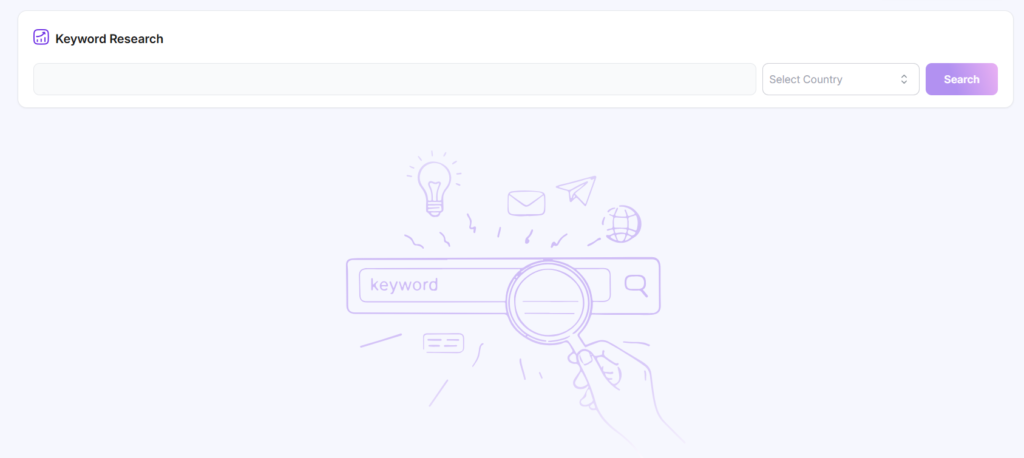
Start with one clear keyword.
Your keyword should represent the main topic of your article. Avoid choosing a keyword that is too broad or unclear.
For example:
Weak keyword:
AI writing
Better keyword:
AI content writer for WordPress
Even better keyword:
how to use AI to write blog posts in WordPress
The more specific your keyword is, the easier it becomes to understand the user intent and create a useful outline.
Before generating an AI outline, ask yourself:
- What is the user trying to learn?
- Is the keyword informational, commercial, or transactional?
- Should the article be a tutorial, listicle, comparison, or product guide?
- What would the reader expect to see first?
For this article, the target keyword is:
how to generate SERP-based outlines using AI in WordPress
The intent is tutorial-based. That means the outline should be step-by-step, practical, and focused on workflow.
Step 2: Let AI Analyze SERP Intent

Once you have your keyword, the next step is identifying search intent.
In a WordPress AI workflow, this is where a tool like WriteRush can help. Instead of manually checking every result, you can use AI to understand what kind of content the SERP prefers.
For example, AI may identify that the SERP includes:
- How-to guides
- SEO content planning tutorials
- AI writing tool pages
- Blog outline templates
- Content optimization guides
This tells you that your article should not be just a definition-based post. It needs a practical tutorial angle.
A good AI-generated intent summary may look like this:
Users searching this keyword want to learn how to create SEO-friendly blog outlines using AI inside WordPress. They likely need a step-by-step workflow, examples, tool recommendations, and tips for reviewing AI-generated outlines before drafting content.
That intent summary gives your article direction.
Without this step, your blog may become too generic.
Step 3: Generate H2 and H3 Suggestions
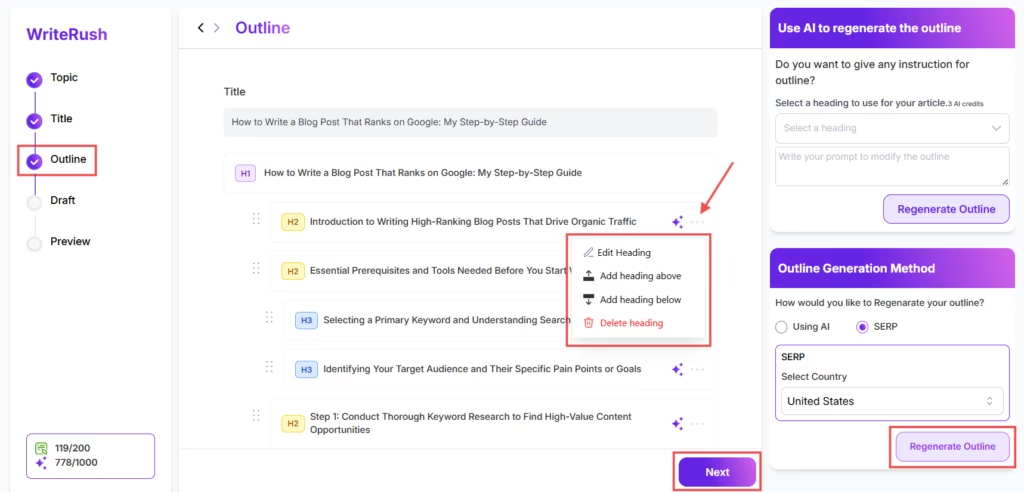
After identifying intent, use AI to generate heading ideas.
A strong SERP-based outline should usually include:
- One clear H1
- Several helpful H2 sections
- Supporting H3 subsections
- FAQ questions
- A clear conclusion or CTA
For example, an AI-generated outline for this topic may look like this:
How to Generate SERP-Based Outlines Using AI in WordPress
What Is a SERP-Based Outline?
Why AI Makes SERP-Based Outlining Faster
How AI Analyzes SERP Data
Step-by-Step: How to Generate SERP-Based Outlines in WordPress
Step 1: Choose Your Target Keyword
Step 2: Analyze Search Intent
Step 3: Generate Heading Suggestions
Step 4: Add Semantic Topics
Step 5: Include People Also Ask Questions
Step 6: Review and Edit the Outline
Step 7: Turn the Outline into a Blog Draft
Example AI-Generated SERP-Based Outline
Manual vs AI SERP-Based Outline Generation
Best Practices for AI-Generated Outlines
FAQs
This gives you a strong starting point.
However, do not publish the first AI outline without editing. AI can suggest a useful structure, but it may also include repetitive sections or miss product-specific details.
Step 4: Add Semantic SEO Topics
A basic outline may only include obvious headings. A better outline includes related topics that make the content more complete.
For this article, useful semantic topics include:
- Search intent analysis
- SERP features
- People Also Ask
- Competitor heading analysis
- Content gaps
- AI content workflow
- WordPress publishing
- SEO-friendly headings
- Blog structure
- Content optimization
- Human editing
- EEAT signals
You do not need to force every term into the article. Instead, use them naturally where they help the reader.
For example, under a section about reviewing AI outlines, you can mention content gaps, originality, and human editing.
Under a section about WordPress workflow, you can mention drafting, formatting, SEO plugins, and publishing.
Semantic coverage helps your content feel deeper and more useful.
Step 5: Include People Also Ask-Style Questions
People Also Ask questions are useful for building FAQ sections and supporting subheadings.
For this topic, you can include questions like:
- Can AI generate SERP-based outlines?
- Are AI-generated outlines good for SEO?
- How do I create a blog outline in WordPress?
- Should I edit an AI-generated outline?
- What should a SERP-based outline include?
- Can I turn an AI outline into a full blog post?
These questions work well near the end of the article as FAQs.
You can also use some of them as H2 or H3 sections if they are important enough.
This is better than hiding an important topic only in the FAQ section.
Step 6: Review and Edit the AI Outline
This is one of the most important steps.
AI can generate outlines quickly, but human review is what makes the outline useful, accurate, and original.
Before using an AI-generated outline, check these things:
Does the Outline Match the Search Intent?
If the keyword is tutorial-based, the outline should include steps.
If the keyword is commercial, the outline should include comparisons, benefits, use cases, and buying considerations.
If the keyword is informational, the outline should explain the concept clearly.
For this article, a good outline must include a detailed process for generating SERP-based outlines using AI in WordPress.
Is the Outline Too Generic?
Remove vague sections like:
- Introduction
- Why it matters
- Benefits
- Conclusion
Replace them with specific headings like:
- How AI Analyzes SERP Data for Content Outlines
- Step-by-Step: How to Generate SERP-Based Outlines in WordPress
- Example AI-Generated SERP-Based Outline
- How to Review AI-Generated Outlines Before Drafting
Specific headings are better for readers and SEO.
Does It Include Original Value?
Your article should not only repeat what ranking pages already say.
Add original value through:
- Product screenshots
- Workflow examples
- Real outline samples
- Templates
- Checklists
- Mistakes to avoid
- WordPress-specific instructions
This is especially important if you want Google to index and rank the page.
Are the H2s and H3s Logical?
A good outline should move in a natural order:
- Explain the concept
- Explain why it matters
- Show how AI helps
- Walk through the process
- Give an example
- Explain best practices
- Answer FAQs
- Add CTA
If the outline jumps between ideas randomly, edit it before writing.
Step 7: Turn the Outline into a Blog Draft
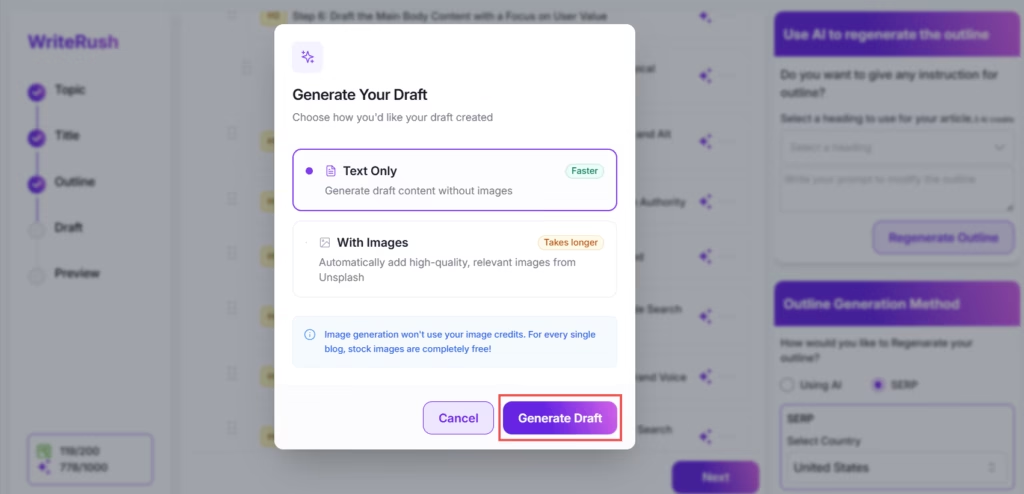
Once the outline is ready, you can turn it into a full article.
In WordPress, this workflow becomes easier when your AI writing assistant is already inside the editor.
With WriteRush, the workflow can look like this:
- Enter your target keyword
- Generate a SERP-based outline
- Review the suggested H2 and H3 structure
- Edit the outline based on your brand and audience
- Generate the first draft
- Add screenshots, examples, and internal links
- Optimize the title, meta description, and headings
- Publish from WordPress
The key benefit is speed.
Instead of moving from keyword tool to AI tool to Google Docs to WordPress, you can keep your workflow inside WordPress.
That saves time and reduces friction.
That process might sound impressive, but it’s not magic. To really understand why AI works so well here, we need to look at the technology doing the thinking.
Example: AI-Generated SERP-Based Outline
Let’s say your target keyword is:
best AI content writer for WordPress
A basic AI outline might look like this:
# Best AI Content Writer for WordPress
## What Is an AI Content Writer for WordPress?
## Why Use an AI Content Writer in WordPress?
## Key Features to Look For
### SEO Content Generation
### SERP-Based Outlines
### WordPress Editor Integration
### Blog Draft Creation
### Content Optimization
## How AI Content Writers Help with SEO
## Manual Writing vs AI-Assisted Writing
## How to Choose the Best AI Content Writer for WordPress
## Why WriteRush Is Built for WordPress Content Teams
## FAQs
This is a decent starting point, but it can be improved.
A stronger SERP-based AI outline would be:
# Best AI Content Writer for WordPress: Features, Use Cases, and Workflow
## What Is an AI Content Writer for WordPress?
## Why WordPress Users Need AI Content Writing Tools
## How AI Content Writers Work Inside WordPress
## Key Features of the Best AI Content Writer for WordPress
### SERP-Based Outline Generation
### SEO-Friendly Blog Drafting
### Keyword and Topic Suggestions
### WordPress Editor Compatibility
### Human Editing and Review Workflow
## Benefits of Using an AI Content Writer in WordPress
## AI Content Writer vs General AI Writing Tool
## How to Use WriteRush to Create SEO Blog Posts in WordPress
## Common Mistakes to Avoid When Using AI Content Writers
## FAQs About AI Content Writers for WordPress
The improved version is better because it is more specific, more WordPress-focused, and more connected to product use cases.
That is the kind of outline you want AI to help create.
Manual vs AI SERP-Based Outline Generation
Now that you know how SERP-based outlines are created, the difference between doing this manually and using AI becomes much clearer. Instead of long explanations, the comparison below shows how both approaches perform in real-world content workflows, especially for bloggers, content marketers, and WordPress users.
| Aspect | Manual SERP-Based Outlining | AI-Powered SERP-Based Outlining |
|---|---|---|
| SERP Analysis | Requires opening and reviewing multiple results on the Search Engine Results Page one by one | Analyzes top-ranking pages instantly using automation |
| Search Intent Detection | Relies on personal interpretation of Search Intent | Accurately identifies intent patterns using data and AI models |
| Structural Accuracy | Manually copies Header Tags and often misses patterns | Detects recurring structural patterns across multiple ranking pages |
| Semantic Coverage | Easy to miss related concepts and subtopics | Applies Semantic SEO and Entity Extraction for full topic coverage |
| Use of SERP Features | Requires manual review of People Also Ask and featured snippets | Automatically extracts People Also Ask and featured snippet insights |
| Time Investment | Time-consuming and repetitive | Fast and scalable, outlines generated in minutes |
| Content Quality Impact | Inconsistent depth and structure | Improves Readability Score and Dwell Time |
| Scalability | Difficult to repeat consistently | Easily scalable for blogs, teams, and agencies |
| Ideal Use Case | One-off articles or small projects | Ongoing content production and growth-focused strategies |
After seeing the difference, one question usually comes up: Where does all this actually fit into your everyday workflow? The answer is closer than you think.
How WriteRush Helps Generate SERP-Based Outlines in WordPress
WriteRush is designed to help WordPress users create SEO-friendly content faster.
Instead of using separate tools for outline generation, AI drafting, and publishing, WriteRush brings the content workflow closer to your WordPress dashboard.
With WriteRush, you can use AI to:
- Generate blog outlines
- Create SERP-informed content structures
- Build SEO-friendly H2 and H3 sections
- Draft blog posts faster
- Improve content workflow inside WordPress
- Move from idea to published article with fewer steps
This is especially useful for:
- Bloggers
- SEO writers
- Affiliate site owners
- Agencies
- WordPress site managers
- Content teams
- SaaS marketers
The main benefit is not just AI writing. It is workflow speed.
When your outline, draft, and publishing process happen inside WordPress, you can create content more consistently.
When outlining and writing happen in the same place, everything starts to feel easier, and that brings us to the bigger takeaway of this entire process.
Best Practices for AI-Generated SERP-Based Outlines
AI can help you create better outlines faster, but only when you use it correctly.
Follow these best practices before publishing content based on an AI outline.
1. Do Not Copy Competitor Structure Exactly
SERP analysis is for learning, not copying.
Use competitor headings to understand topic expectations, but create your own structure.
Your article should be more helpful, clearer, and more complete than existing results.
2. Add First-Hand Experience
AI-generated outlines can feel generic if you do not add real experience.
Improve the article with:
- Screenshots
- Product examples
- Case studies
- Personal workflow notes
- Original templates
- Expert tips
- Common mistakes from real use
This makes your content more trustworthy.
3. Keep the Reader Journey Clear
A good outline should answer questions in the right order.
For example, do not explain advanced optimization before explaining how to generate the outline.
Move from simple to advanced.
4. Use Descriptive Headings
Avoid vague headings like:
- Overview
- Benefits
- More Details
- Final Thoughts
Use specific headings like:
- How AI Analyzes Search Intent
- How to Review AI-Generated Outlines
- How to Turn an Outline into a Blog Draft
Specific headings help both users and search engines understand your content.
5. Add Internal Links
Internal links help users explore related content and help search engines understand your site structure.
For this article, you can link to:
- Your manual SERP-based outline creation guide
- Your AI writing assistant page
- Your WordPress content workflow page
- Your pricing page
- Your plugin features page
- Related blog posts about SEO content writing
Use descriptive anchor text.
For example:
If you are new to the process, read our complete guide to SERP-based outline creation.
And:
To speed up the workflow, try generating SERP-based outlines directly inside WordPress with WriteRush.
Common Mistakes to Avoid
When using AI to generate SERP-based outlines, avoid these mistakes.
Mistake 1: Using AI Without Checking the SERP
AI can help summarize patterns, but you should still understand the actual search results.
Always check whether the SERP is informational, commercial, local, product-focused, or comparison-based.
Mistake 2: Publishing the First AI Draft
An AI outline is a starting point, not the final version.
Review it for:
- Accuracy
- Flow
- Repetition
- Missing sections
- Brand relevance
- Search intent
- Original insight
Mistake 3: Targeting the Same Intent on Multiple Pages
If you already have a manual guide about SERP-based outline creation, do not make your AI page repeat the same content.
The manual guide should teach the process.
The AI page should show how to speed up that process using AI inside WordPress.
This keeps your content strategy clean and reduces keyword cannibalization.
Mistake 4: Forgetting Product Context
If your article is meant to drive traffic for a WordPress AI tool, show the actual workflow.
Add screenshots, examples, and practical product use cases.
Do not make the post only educational. Make it useful and product-connected.
AI SERP-Based Outline Checklist
Before turning your outline into a blog post, use this checklist:
- Does the outline match the target keyword?
- Does it satisfy search intent?
- Does it include clear H2 and H3 sections?
- Does it cover People Also Ask-style questions?
- Does it include semantic SEO topics?
- Does it avoid copying competitor headings exactly?
- Does it include original examples?
- Does it include WordPress-specific workflow steps?
- Does it include internal linking opportunities?
- Does it naturally lead to your product CTA?
If the answer is yes, your outline is ready for drafting.
Final Thoughts
SERP-based outlines help you create content that matches what users are already searching for.
AI makes that process faster.
Instead of manually reviewing every ranking page, collecting headings, checking questions, and building the structure from scratch, you can use AI to generate a strong first outline. Then, with human editing, you can improve the structure, add original value, and turn it into a useful blog post.
For WordPress users, the biggest advantage is workflow.
When you can generate outlines, create drafts, edit content, and publish from the same place, content production becomes easier and more consistent.
If you want to speed up your SEO content workflow, try generating SERP-based outlines directly inside WordPress with WriteRush.
Frequently Asked Questions (FAQs)
Can AI generate SERP-based outlines?
Yes. AI can help generate SERP-based outlines by identifying search intent, common topics, heading patterns, related questions, and semantic keywords. However, the final outline should be reviewed and edited by a human before writing or publishing.
Are AI-generated outlines good for SEO?
AI-generated outlines can be good for SEO when they are based on search intent and SERP patterns. They become stronger when you add original insights, examples, screenshots, internal links, and expert editing.
How do I create a blog outline in WordPress?
You can create a blog outline in WordPress manually or with an AI writing plugin. With an AI workflow, you enter your keyword, generate outline suggestions, review the H2/H3 structure, edit the outline, and then turn it into a draft.
Should I edit an AI-generated outline?
Yes. Always edit an AI-generated outline. AI can speed up research and structure, but human review improves accuracy, originality, tone, and usefulness.
What should a SERP-based outline include?
A SERP-based outline should include the target keyword, search intent, main H2 sections, supporting H3 sections, related questions, semantic topics, content gaps, and a logical structure that helps the reader solve their problem.
Can I use AI to turn an outline into a full blog post?
Yes. Once your outline is ready, AI can help turn it into a blog draft. However, you should still edit the draft, add examples, check facts, improve readability, and optimize it before publishing.
This page was last edited on 7 May 2026, at 2:37 pm






