Staring at a blank page is a familiar pain for bloggers, marketers, and small business owners. You need to write blog posts, product descriptions, emails, or social media captions, sometimes all before lunch. But hiring help or adding one more paid software subscription isn’t always an option. Free AI writing tools look promising, but sorting hype from reality isn’t easy.
Whether you’re a WordPress user, freelancer, or business owner juggling way too many hats, this guide will demystify the free AI writer. You’ll learn what to expect, where these tools shine, how to avoid their pitfalls, and how to actually use them to create and refine content without sacrificing quality, originality, or your own voice.
What Is a Free AI Writer?
A free AI writer is an online tool powered by artificial intelligence and large language models that generates written content from user prompts at no cost. It can create blog posts, emails, social media captions, product descriptions, website copy, outlines, and other text formats without requiring manual drafting.
Think of a free AI writer as a smart digital assistant for writing; it takes your request (“Write a product description for a handmade coffee mug”), analyzes it, and produces a draft in seconds. These tools help creators, marketers, students, and business owners work faster by jump-starting first drafts, but the best results still need clear instructions and thoughtful human editing.
How Does a Free AI Writer Work?
A free AI writer creates content by interpreting your prompt, predicting likely word patterns, and assembling a draft using training data from a vast range of topics and writing styles. While the algorithms are advanced, the outcome depends a lot on what you ask and how specifically you guide the tool.
For example, giving a broad request like “write about SEO” will often result in a generic answer. But if you prompt, “write a beginner-friendly blog intro about SEO tips for small businesses in under 150 words,” you’re far more likely to get something practical.
- These tools use artificial intelligence, natural language processing, and machine learning.
- They can adapt to different tones: professional, conversational, persuasive, or technical.
- Output quality improves with context about the audience, goal, structure, and desired length.
However, AI-generated content can be vague or miss key details. That’s why human review for accuracy, creativity, and a natural voice remains essential.
What Can You Create with a Free AI Writer?
Free AI writers are very flexible. With the right prompt, you can create nearly any short- or medium-length content you need for work, marketing, or your website.
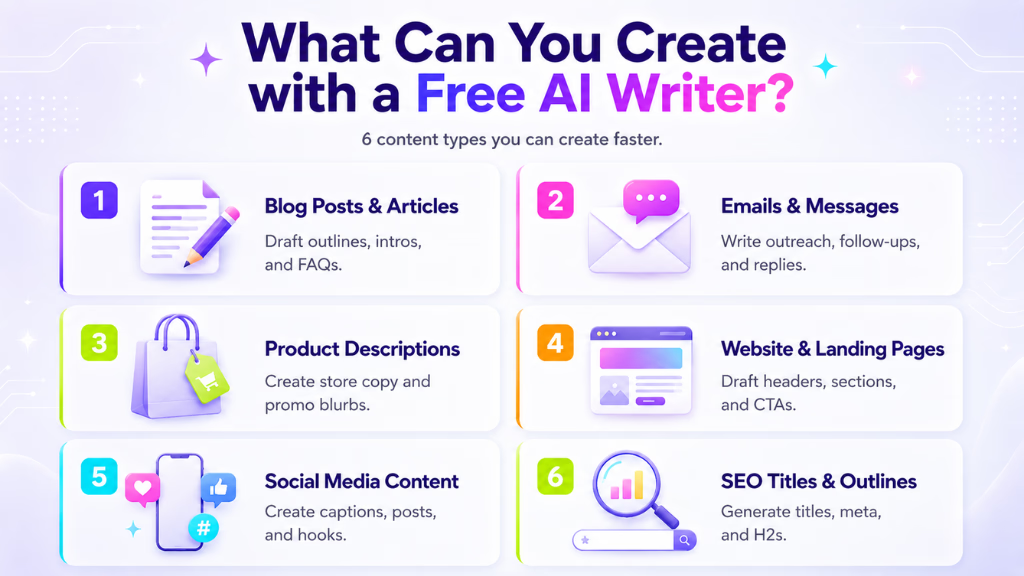
A free AI writer can create blog posts, emails, product descriptions, website copy, social captions, meta descriptions, outlines, and rewrites, helping users draft faster and brainstorm new ideas.
Blog Posts and Articles
Generate blog outlines, introductions, section drafts, FAQs, and conclusions. Use AI for quick topic brainstorming or to flesh out an existing idea when you’re stuck.
Emails and Professional Messages
Draft outreach emails, follow-ups, newsletters, customer responses, and concise business communications. Specify your audience and tone for more engaging results.
Product Descriptions and eCommerce Copy
Get a head start with WooCommerce descriptions, benefit-driven features, category blurbs, or short promo copy. This is especially helpful for eCommerce stores managing lots of products on a tight budget.
Website Copy and Landing Pages
AI can help draft homepage headers, service descriptions, “About” page content, CTAs, or landing page sections, saving time on the basics so you can customize as needed.
Social Media Captions and Short-Form Content
Quickly create Instagram captions, LinkedIn posts, Twitter threads, Facebook updates, or repurpose content for multiple channels. AI can suggest hooks, hashtags, or call-to-actions in your chosen voice.
SEO Titles, Meta Descriptions, and Outlines
Give your posts a search advantage by using AI to generate SEO-friendly titles, meta tags, URL slugs, and H2/H3 outline structures for clearer, scannable content.
Why Use a Free AI Writer?
Free AI writers matter because they erase hours of grunt work between your idea and a workable draft. For time-starved creators and small teams, they’re the shortcut to momentum when nothing else is flowing.
A free AI writer helps users save time, overcome writer’s block, generate ideas, strengthen structure, and scale content, all while lowering costs.
- Save hours: Generate outlines or first drafts instantly instead of fretting over the perfect sentence.
- Jumpstart ideas: Get past the blank page problem with topic starters, subheadings, or example FAQs.
- Stay consistent: Maintain quality across blog posts, emails, or product pages, especially helpful for solo site owners.
- Scale up effortlessly: Create the base copy for multiple products or posts without hiring extra help.
- Accessible to all: Anyone can experiment, regardless of experience or budget.
For WordPress users, browser-based tools are helpful, but the next productivity step is to integrate AI writing into the content management workflow. Tools like WriteRush, a WordPress AI plugin, allow bloggers and marketers to generate and refine content directly where they publish, reducing copy-paste friction and making the process more seamless.
How to Use a Free AI Writer Effectively
To get real value from a free AI writer, treat it as a drafting partner, not a finished-product machine. The results you get depend on how you prompt, review, and shape the output.
The most effective way to use a free AI writer is to set clear goals, give audience context, specify tone, guide structure, and improve the draft before publishing.
- Define your goal: Know whether you need a blog section, product description, email, or outline.
- Add audience details: Tell the AI who you’re writing for (e.g., “Write for small business owners looking to improve website SEO”).
- Choose your tone: State if the copy should sound friendly, professional, or conversational.
- Request structure: Rather than asking for “an article about X,” request “an outline with H2 and H3 headings about X, plus three practical examples.”
- Refine the result: Use follow-up prompts like “make this more concise,” “rewrite in a warmer tone,” or “add an example from eCommerce.”
- Add human value: Layer in your own ideas, stories, brand details, screenshots, or customer quotes so the draft sounds natural and original.
WriteRush and other integrated AI plugins for WordPress can put these techniques to work within your blog editing experience, letting you review and polish content without switching tools.
Free AI Writer Prompt Examples
Well-crafted prompts unlock better, more targeted AI drafts. Here are some proven examples you can copy, customize, and use in a free AI writer, chatbot, or a WordPress plugin like WriteRush:
Stronger, context-rich prompts help AI writers generate more useful, specific content in less time.
- Blog post outline: Write a beginner-friendly blog outline about [topic] for [audience]. Include H2/H3 headings and a short FAQ section.
- SEO article draft: Create an SEO-friendly article draft about [keyword]. Use clear headings and write for [target audience].
- Product description: Write a persuasive product description for [product]. Highlight benefits, key features, and include a short call-to-action.
- Follow-up email: Write a professional, concise follow-up email to [audience] about [topic], with one next step included.
- LinkedIn post ideas: Suggest five LinkedIn post ideas about [topic] for [audience], each with a strong opening.
- WordPress blog draft: Create a WordPress blog draft about [topic]. Include an SEO title, meta description, H2 headings, and FAQ ideas.
- Content rewrite: Rewrite this paragraph to make it sound clearer and more natural while keeping the main idea.
For best results, follow up with clarifying prompts and always tweak for your real audience.
Can a Free AI Writer Help with SEO?
A free AI writer can support SEO by generating optimized titles, meta descriptions, structured outlines, and keyword-rich drafts, but it’s not a guaranteed ticket to higher Google rankings. Content must still be thorough, accurate, original, and user-focused.
Free AI writers can speed up SEO writing, but top results need human editing, real examples, clear structure, and intent-focused topics.
- Match search intent: Before you write, make sure your post answers what searchers actually want (tutorial, checklist, product info, etc).
- Use keywords and related terms: AI can help include important phrases, but reviewing for natural placement is vital.
- Improve heading structure: Ask AI to format with H2s and H3s; clean, scannable headings help search engines and readers alike.
- Write meta descriptions: AI can generate options, but ensure they’re concise, accurate, and enticing.
- Suggest internal links: Some AI tools can recommend related topics or FAQ ideas, making it easier to build topical authority.
- Avoid thin content: Always add your original insights, examples, or data, and don’t just rely on auto-generated drafts.
How to Use a Free AI Writer for WordPress Content
Many free AI writers work in your browser, but WordPress users face extra steps like copying, pasting, and formatting before a post goes live. The right workflow can help WordPress bloggers and store owners publish more often, with less hassle.
In summary:
Integrating free AI writing tools into WordPress helps users draft blog posts, SEO titles, meta descriptions, product pages, and refresh old content faster.
- Draft your blog post: Use AI to quickly create outlines, intros, sections, FAQs, and even entire first drafts.
- Generate SEO essentials: Get help writing compelling SEO titles, meta descriptions, post excerpts, and social sharing snippets.
- Write better product pages: For WooCommerce stores, AI can draft short or long product descriptions, benefit lists, and category blurbs.
- Update old posts: AI can help you rewrite outdated content, expand thin sections, or generate new FAQs and headings.
- Reduce copy-paste friction: Instead of flipping between tabs, WordPress AI writing plugins (like WriteRush) let you generate, edit, and optimize directly within your blog or store dashboard, with no formatting headaches.
Free AI Writer vs Paid AI Writer: What Changes?
Free AI writers offer great value for quick drafts, but paid or integrated tools usually provide more advanced features, flexible limits, and workflow-friendly integrations, especially for heavy content creators.
Free AI writers help with basic drafts and ideas, while paid versions often add longer outputs, SEO support, advanced templates, brand voice options, and smoother WordPress workflows.
| Feature | Free AI Writer | Paid or Integrated Tool |
|---|---|---|
| Usage limits | Often restricted | Higher or unlimited |
| Output length | Short/moderate | Supports long-form drafts |
| Templates | Basic | Content-specific/advanced |
| SEO tools | Limited | More robust |
| Brand voice control | Minimal | Customizable |
| WordPress workflow | External, copy-paste | Integrated, seamless |
| Support | Limited | Priority/help desk available |
If you write or publish occasionally, free tools are usually enough. If you need to manage lots of content or multiple WordPress sites, a tool with integrated workflow features, like WriteRush, may save significant time.
AI Writer, AI Rewriter, and Grammar Checker: What’s the Difference?
Knowing which AI tool to use helps you get the job done right. Free AI writers generate new content, rewriters improve existing text, and grammar checkers focus on error correction.
An AI writer creates new text from prompts; an AI rewriter refines what you already have; a grammar checker spots and fixes mistakes. Some advanced tools combine all three.
| Tool Type | Best For | Example Use |
|---|---|---|
| AI writer | Creating new drafts | Blog posts, emails, web copy |
| AI rewriter | Improving existing text | Rephrasing weak or generic content |
| Grammar checker | Fixing errors | Correcting spelling and grammar |
| AI chatbot | Brainstorming, Q&A | FAQs, idea generation |
| SEO AI writer | Search-focused content | Keyword-based articles |
| WordPress AI plugin | Publishing workflow | Drafting inside WP editor |
Each tool serves a different content creation need, and choosing wisely can boost your productivity.
Limitations of Free AI Writers
While free AI writers are powerful, they come with some real-world limits you should know before relying on them for professional content.
Free AI writers often have caps, risk generic or inaccurate output, offer less SEO or brand voice control, and may not fit all privacy needs
- Usage limits: Many restrict word counts, daily generations, or template types.
- Generic output risk: Without clear prompts or careful editing, AI drafts can sound similar to competing content online.
- Potential factual errors: AI isn’t perfect, always verify stats, quotes, and claims before publishing.
- Less brand voice control: Most free tools have limited personality or nuance options.
- Privacy concerns: Avoid entering sensitive or confidential business information.
- SEO is not automatic: AI can help with SEO structure, but actual rankings depend on your expertise and post-publication work.
How to Improve AI-Generated Content Before Publishing
Strong content comes from collaboration between human and machine. The last step before publishing is editing with an eye for clarity, accuracy, and authenticity.
Always review, edit, and customize AI drafts by fact-checking, adding personal experience, clarifying examples, and polishing language for readability and your brand voice.
- Fact-check claims: Double-check product specs, statistics, and legal or health information.
- Add original value: Weave in customer stories, case studies, screenshots, or your lessons learned.
- Rewrite intros/endings: AI often writes bland openings and conclusions; rewrite these to hook your audience and end with purpose.
- Improve headings and formatting: Use clear H2s/H3s, bullet lists, and short paragraphs for scannability.
- Match your voice: Edit for personality, formality, and consistency with your brand’s style.
- Scan for grammar and readability: Fix awkward or robotic phrasing, remove repetition, and use a grammar checker for the final pass.
For WordPress users, editing directly in the post editor, or with a plugin like WriteRush, can make polishing these drafts and preparing to publish much faster and more efficiently.
Conclusion
Free AI writers have transformed how bloggers, marketers, and small business owners generate content. They’re fast, flexible, and accessible, especially for drafting blog posts, product descriptions, emails, and social media copy when you don’t have a writer on hand. But the best results come from clear prompts, thoughtful editing, and adding your unique insights.
If you’re ready to streamline your workflow, especially as a WordPress user, consider exploring WriteRush. It’s designed to help you create, refine, and publish AI-assisted content straight from your WordPress dashboard, so you can go from idea to live post in less time, with higher quality.
FAQs About Free AI Writers
What is the best free AI writer?
The best free AI writer depends on your needs. Some tools excel at blog outlines and drafts, while others are stronger for rewriting or SEO support. Choose based on your primary content type and desired workflow.
Is a free AI writer really free?
Most free AI writers do offer unlimited access, but many limit usage by word count, number of daily generations, or access to certain advanced features.
Can I use a free AI writer for SEO blog posts?
Yes, you can use free AI writers to draft SEO-friendly posts, headlines, and meta descriptions. Just make sure you edit the draft, refine keyword placement, and add unique insights.
Can I use an AI writer inside WordPress?
Yes, some tools allow direct drafting within WordPress via plugins, such as WriteRush, which helps reduce copy-paste steps and improve workflow efficiency.
Are AI-generated writings plagiarism-free?
AI writers typically create original, unique text. Still, always check for duplicate phrases and ensure your final draft is plagiarism-free before hitting publish.
How do I get more human-like AI writing?
Give specific audience details, request a natural tone, use examples, and always review the AI draft, editing for personality and clarity.
Is AI-written content safe for business websites?
As long as you review, fact-check, and ensure the content fits your brand, AI-generated drafts can be safely adapted for professional use.
What are the biggest limitations of free AI writers?
Expect word or usage caps, occasional generic or inaccurate output, and less flexibility than paid or integrated solutions; always plan for review and editing.
Can AI writers create product descriptions?
Absolutely. With a clear prompt and product details, AI can generate persuasive short or long eCommerce copy suitable for quick editing and upload.
This page was last edited on 13 June 2026, at 6:01 pm