To avoid AI detection in writing WordPress blogs, follow a three-step workflow: draft content with AI, check drafts using AI detection tools, then humanize by rewriting flagged parts, adding personal insights, and varying your writing style before publishing.
Ever finished a shiny new blog post—only to have it flagged by an AI detector or, worse, see it struggle in Google rankings? If you rely on WordPress and AI content tools for speed and scale, you’re not alone. But lately, bloggers, agencies, and publishers are running into an uncomfortable truth: automated writing is getting easier to spot, risking hard-earned search positions and audience trust.
It’s frustrating. You want the efficiency of AI, but not at the cost of credibility or traffic. What’s the way forward? This guide walks you through proven tactics and real workflows for making sure your next WordPress blog looks, feels, and ranks like the work of a true expert—even if AI helps you along the way.
You’ll learn exactly how detectors work, where most AI-assisted posts go wrong, and practical steps to produce undetectable, high-value content every time.
How to Avoid AI Detection in Writing WordPress Blogs: Proven Tips
Avoiding AI detection should not mean trying to trick detection tools. The better approach is to transform AI-generated content into original, accurate, and genuinely helpful writing.
AI detectors are not always reliable. Human-written content may sometimes be marked as AI-generated, while AI-written content may pass undetected. Therefore, your main goal should be improving content quality rather than achieving a specific detector score.
The following methods can help you create more natural and trustworthy WordPress blog posts.
1. Use AI Content as a First Draft

Do not publish AI-generated content immediately after it is created. Treat it as a starting point that requires research, editing, and personal input.
AI can help you generate:
- Blog outlines
- Title ideas
- Frequently asked questions
- Initial drafts
- Topic suggestions
- Meta descriptions
After generating the draft, review every section and decide whether it provides useful information. Remove repetitive explanations, unnecessary introductions, and generic statements.
A strong blog post should reflect human judgment rather than simply repeat everything suggested by an AI tool.
2. Add Your Own Experience and Knowledge
AI-generated content often sounds generic because it lacks first-hand experience.
Add information based on your own knowledge, including:
- Problems you have faced
- Solutions you have tested
- Personal opinions
- Customer questions
- Real project examples
- Product-testing results
- Mistakes and lessons learned
- Original recommendations
For example, instead of writing:
WordPress plugins can improve website performance.
Write:
During our website speed test, we discovered that two inactive plugins were still loading unnecessary scripts. Removing them and optimizing the remaining plugins helped reduce the page loading time.
The second version sounds more natural because it contains specific experience and useful context.
3. Rewrite the Content in Your Natural Voice
Replacing a few words with synonyms is not enough to humanize AI content. You need to rewrite the ideas using your own communication style.
Read each paragraph, understand the main message, and then explain it as if you were speaking directly to your readers.
You should:
- Use words your audience understands
- Shorten complicated sentences
- Add direct explanations
- Include opinions where appropriate
- Change repetitive sentence structures
- Remove overly formal expressions
- Use contractions naturally
- Add conversational transitions
Avoid common phrases such as:
- In today’s digital world
- It is important to note
- In this comprehensive guide
- In the ever-evolving landscape
- Moreover
- Furthermore
- In conclusion
These phrases are not always wrong, but repeating them throughout an article can make the content feel predictable and automated.
4. Remove Repetitive and Generic Information
AI tools often repeat the same idea in different words. This increases the article length without adding real value.
Check whether the introduction, main sections, and conclusion communicate the same information repeatedly.
Delete or rewrite sentences such as:
This strategy provides many benefits.
Businesses can use this method to achieve better results.
This is an effective solution for website owners.
These statements are too broad. Replace them with specific information.
For example:
Adding descriptive image alt text helps screen-reader users understand the purpose of an image and gives search engines more context about the page.
Specific explanations make your content more useful and credible.
5. Vary Sentence and Paragraph Structure
AI-generated writing frequently follows a predictable pattern. Every paragraph may have a similar length, and every section may use the same structure.
Make the writing feel more natural by combining:
- Short sentences
- Medium-length explanations
- Occasional longer sentences
- Questions
- Examples
- Bullet points
- Step-by-step instructions
- Short observations
However, do not make sentences unnecessarily complicated just to create variation. Readability should always remain the priority.
Keep most paragraphs between two and four sentences. Longer paragraphs can be divided when they cover multiple ideas.
6. Verify Facts and Information
AI tools can generate outdated, inaccurate, or completely invented information. Every important claim must be checked before publication.
Verify:
- Statistics
- Dates
- Product features
- WordPress settings
- Plugin instructions
- Prices
- Quotes
- Research findings
- Legal information
- Technical recommendations
Use trustworthy sources such as official WordPress documentation, plugin documentation, research reports, government websites, and recognized industry publications.
When writing a WordPress tutorial, test every step on a staging website. Confirm that buttons, menu names, and plugin settings match the current version.
7. Include WordPress-Specific Instructions
A blog targeting WordPress users should provide more than general writing advice.
Add practical details such as:
- Where to find a setting in the WordPress dashboard
- How to install or configure a plugin
- How to format content in Gutenberg
- How to add image alt text
- How to preview a blog post
- How to edit the URL slug
- How to add internal links
- How to optimize headings
- How to update an existing article
Instead of saying, “Optimize your images,” explain how to do it.
For example:
Open the image from the WordPress Media Library, add descriptive alt text, compress the file, and use a modern format such as WebP before inserting it into the post.
Detailed instructions make the article more valuable and less likely to appear generic.
8. Add Original Screenshots and Visuals
Original visuals can significantly improve the quality of a WordPress article.
Consider adding:
- WordPress dashboard screenshots
- Plugin setting screenshots
- Before-and-after comparisons
- Custom diagrams
- Workflow illustrations
- Performance results
- Comparison charts
- Short tutorial videos
Screenshots demonstrate that you have actually used the tool or completed the process.
Make sure each image has a clear purpose. Add descriptive alt text, compress the file, and explain what readers should notice in the image.
9. Match the Reader’s Search Intent
A blog post should solve the problem behind the search query.
Someone searching for “how to avoid AI detection in writing WordPress blogs” may want to learn:
- How to improve AI-generated writing
- How to make blog content sound natural
- Whether AI content affects SEO
- How to edit AI content in WordPress
- How to add originality
- How to verify AI-generated information
- Which mistakes to avoid before publishing
Your content should address these questions directly.
Do not repeat the exact keyword in every paragraph. Use related terms naturally, such as:
- Humanize AI content
- Edit AI-generated blog posts
- Improve AI writing
- Make AI content sound natural
- AI-assisted WordPress blogging
- Create original WordPress content
- Edit AI content for SEO
Keyword usage should support readability rather than interrupt it.
10. Improve Content With Expert Review
A human review is one of the most important steps in publishing AI-assisted content.
The editor should check:
- Accuracy
- Tone
- Readability
- Grammar
- Brand voice
- Logical flow
- Search intent
- Examples
- Sources
- WordPress instructions
- Internal links
- Calls to action
For technical, medical, financial, or legal topics, the article should also be reviewed by someone with relevant expertise.
Human review helps identify errors that automated editing tools may miss.
11. Add Author Information and Transparency
Readers are more likely to trust content when they know who created or reviewed it.
Add an author box containing:
- Author name
- Professional role
- Relevant experience
- Area of expertise
- Social or professional profile links
You may also include a transparent AI-use statement when appropriate.
For example:
AI tools were used to support outlining and editing. The final article was reviewed, verified, and expanded by a human editor.
Do not claim that an article was personally tested or written entirely by a human if that is not true.
12. Avoid AI Humanizer and Article-Spinning Tools
Some tools claim to rewrite AI content so it can bypass detection. These tools often replace normal words with strange synonyms, damage sentence structure, and introduce factual errors.
Avoid methods such as:
- Adding intentional spelling mistakes
- Using invisible characters
- Replacing words randomly
- Translating content multiple times
- Using article-spinning software
- Adding irrelevant personal stories
- Changing punctuation without purpose
- Publishing automatically rewritten content
These techniques may lower content quality and harm reader trust.
The safest way to make content more human is to add real human contribution.
13. Edit the Article Inside WordPress
Once the draft is ready, upload it to WordPress and review the page carefully.
Check:
- Heading hierarchy
- Paragraph length
- Image placement
- Mobile responsiveness
- Internal links
- External links
- Featured image
- Category
- Tags
- URL slug
- Meta title
- Meta description
- Author information
- Call-to-action placement
Use the WordPress preview option to inspect the post on desktop, tablet, and mobile.
The final article should be easy to scan, visually balanced, and free from formatting errors.
Embedding AI-Human Workflow Tools into WordPress
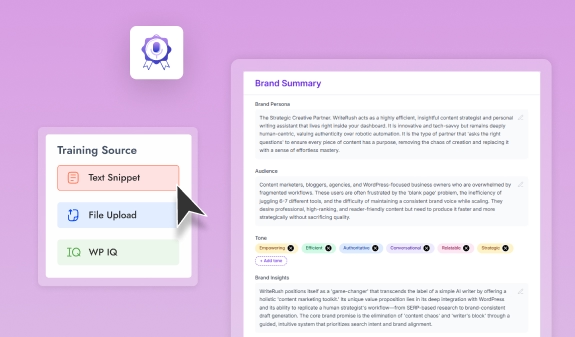
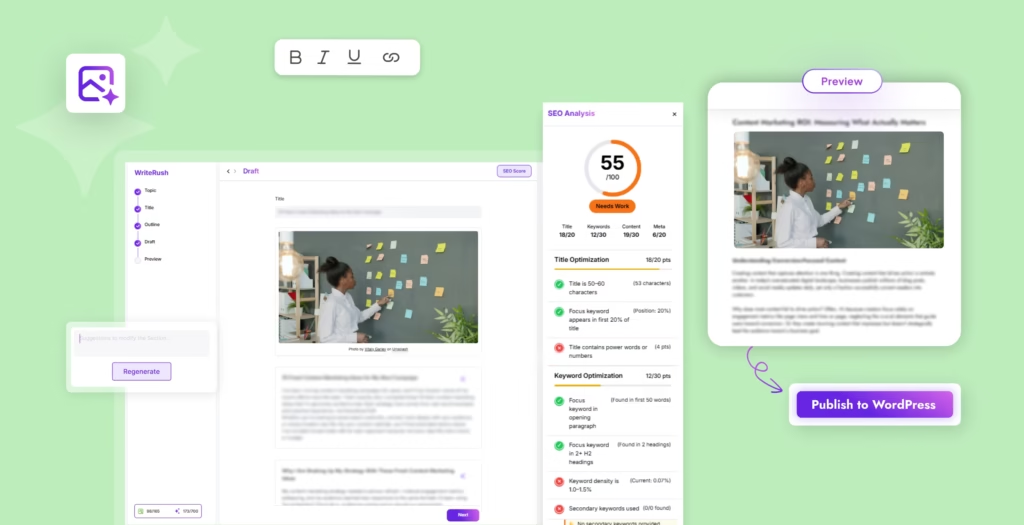
Direct integration of your writing, checking, and refining workflow is key. WriteRush, for instance, brings the full content pipeline into your WordPress dashboard.
- Generate drafts, scan for “AI-sounding” sections, and get on-the-spot humanization prompts.
- Use meta-tagging to track which posts have been manually reviewed or where human content was added.
- Easily compare your content flow with external tools for maximum confidence.
Embedded plugins like WriteRush let you move from headline to publish—without jumping between tools or losing oversight. For larger teams, this means faster publishing and tighter quality control, all inside WordPress.
Common Mistakes When Trying to Avoid AI Detection
Even with the right tools, content creators often fall into predictable traps. Common mistakes include:
- Relying only on rephrasing or paraphrase tools without adding depth or insight.
- Ignoring Google’s E-E-A-T standards, leaving content weak and less credible.
- Using formulaic or repetitive structures typical of AI-generated writing.
- Skipping manual review, assuming plugins will catch every issue.
- Attempting to trick detectors with shortcuts; this is risky and often leads to penalties.
In our experience, the most robust strategy is always a blend: AI efficiency combined with real, human editorial input.
Wrapping Up
Navigating AI detection is an ongoing challenge, but with the right steps, you can achieve both speed and credibility for your WordPress blog. Use an integrated workflow—AI drafts, robust detection checks, thoughtful human edits, and ongoing reviews—to safeguard your rankings and reputation.
Tools like WriteRush help simplify this process, merging AI efficiency and real editorial oversight right inside WordPress. When your content reads as expert, personal, and original, search engines and readers both win.
Ready to bring your content workflow into one seamless dashboard? Explore how WriteRush streamlines undetectable, top-quality blogging for every WordPress creator.
Frequently Asked Questions
Can AI detection tools accurately spot AI-written content in WordPress blogs?
Most AI detectors are good at identifying generic, repetitive, or pattern-heavy content, but they are not perfect. False positives and missed detections can occur, especially with well-edited posts.
What happens if my AI-assisted WordPress blog post gets flagged?
Flagged content can lose SEO rankings, be removed from search results, or damage your site’s trustworthiness. For monetized blogs, there’s also a risk of losing ad placements or affiliate partnerships.
Are there plugins that help humanize AI content in WordPress?
Yes. Plugins like WriteRush integrate drafting, AI detection scans, and humanization prompts directly into WordPress. Other plugins may focus on editing or quality checks only.
Should I tell my readers or Google when I use AI in my blogs?
Transparency is good for trust, but it’s not always required. Google cares most about content quality, originality, and value. Still, consider a short note if AI heavily shaped your post, especially on sensitive topics.
Does Google penalize all AI-generated content, or just low-quality posts?
Google’s primary concern is content value, experience, and usefulness—not the tool used. High-quality, original content that demonstrates real expertise is safest, regardless of AI involvement.
How can I check if my WordPress post will be flagged by AI detectors before publishing?
Use detection tools like Originality.ai or GPTZero before you publish. Plugins like WriteRush also allow real-time scans inside WordPress for immediate feedback.
What’s the best way to “humanize” text created by AI?
Revise for natural sentence flow, add anecdotes or real stories, reference up-to-date facts, and inject your unique perspective. Manual review remains essential.
Is trying to avoid AI detection ethical for blogs or businesses?
It depends on intent and honesty with your audience. Humanizing AI content is ethical when focused on quality and value, not on tricking readers or misleading for gain.
How often should I review older WordPress blogs for potential AI detection?
Check cornerstone or high-traffic content every 6–12 months, especially after major Google updates or if you notice a ranking drop.
Is WriteRush compatible with other editing or detection workflows?
Yes. WriteRush can work alongside external detection tools and fits into established editorial processes, making it easier to combine automated and manual review.
This page was last edited on 13 July 2026, at 3:16 pm