A few months ago, AI writing felt like a cheat code.
You could publish faster. Cover more topics. Never stare at a blank page again.
But then reality hit.
Your AI-written blogs weren’t ranking.
Traffic stayed flat.
Some posts even dropped after publishing.
And suddenly, every question started circling your head: Is Google punishing AI content?
Am I doing SEO wrong?
Is WordPress even set up correctly for this?
Here’s the truth most people learn the hard way: AI can help you write content, but it won’t automatically make that content SEO-ready.
Search engines don’t reward speed. They reward quality, structure, intent alignment, and trust.
That’s exactly what this guide is about.
In this blog, you’ll learn a step-by-step, practical on-page SEO checklist for AI-written content.
If you’re using AI to write content and want it to rank safely, consistently, and long-term, this checklist will change how you publish.
What Is an On-Page SEO Checklist for AI-Written Content?
An on-page SEO checklist for AI-written content is a structured set of optimization steps that ensures AI-generated articles meet Google’s quality, relevance, and E-E-A-T standards through proper content structure, metadata, internal linking, and human review, especially within WordPress environments.
Unlike traditional SEO checklists, this approach focuses not only on keywords and tags but also on content quality validation, originality, and intent alignment, which are critical when AI is involved.
In simple terms, it’s the process of turning an AI draft into content that search engines trust and users actually find helpful.
TL;DR: On-page SEO Checklist for AI-Written Content
If you want the quick version, here it is:
- Validate AI content accuracy and intent before optimizing
- Optimize title, meta description, and URL manually
- Use clear H1-H3 heading structure
- Improve readability and remove generic AI phrasing
- Add internal and authoritative external links
- Optimize images with descriptive alt text
- Implement FAQ or HowTo schema where relevant
- Ensure mobile friendliness and fast load times
- Demonstrate E-E-A-T with human insight and credibility
- Publish inside WordPress with proper SEO checks
Now let’s break down how and why each step matters.
Why AI-Written Content Needs a Different On-page SEO Checklist
Traditional on-page SEO quietly assumes one thing: a human wrote the content with intention, choosing what to include, what to skip, and how to guide the reader from question to answer. The moment you bring AI into the workflow, that assumption changes.
AI tools are genuinely helpful for speed and structure. They can:
- Draft a full article in minutes
- Cover a topic broadly (sometimes too broadly)
- Suggest headings, subtopics, and even FAQs
However, the parts that often decide whether a page ranks aren’t just “words on a page.” They’re the human signals that Google and readers look for, especially after updates that prioritize helpful, people-first content.
Where AI drafts typically fall short (and why it matters)
Even strong AI-written drafts can struggle with:
- Search intent precision: AI may explain a topic, but miss what the searcher actually wants (a checklist, steps, templates, or quick answers).
- First-hand experience (E-E-A-T “Experience”): AI can summarize advice, but it can’t replace real-world examples, lessons learned, or “here’s what worked for us.”
- Original insights and unique value: Many AI drafts sound similar because they pull from common patterns, making your content blend into the SERP instead of standing out.
- Natural language flow: AI often repeats phrases, uses generic transitions, or writes in a “flat” tone that hurts readability and engagement.
- Trust signals: Things like accurate details, credible references, clear author perspective, and consistent formatting help users trust the page, and that trust influences performance.
The key point is simple: Google doesn’t judge content by who wrote it (human or AI). It judges it by quality like helpfulness, accuracy, structure, and trustworthiness.
So AI-written content isn’t risky by default. The risky part is publishing it without human review and on-page polish.
That’s exactly why this on-page SEO checklist is different. It doesn’t just cover title tags, headings, internal links, and schema markup; it also includes the extra “quality gate” AI content needs: intent alignment, originality upgrades, and E-E-A-T-friendly improvements. When you combine those, AI becomes an advantage, not a liability.
The AI Content Quality Gate (Do This Before SEO)
Before you touch keywords, titles, meta descriptions, or schema markup, AI-written content needs to pass one essential checkpoint: the AI Content Quality Gate.
Think of this as your safety net. It ensures the content is accurate, valuable, and genuinely helpful before you start applying any on-page SEO tactics. Skipping this step is one of the biggest reasons AI-written content struggles to rank.
1. Accuracy Check: Trust Comes First
AI can sound confident, even when it’s wrong. So the first step is verifying facts.
Before optimizing anything:
- Double-check statistics, dates, definitions, and claims
- Remove statements that sound impressive but lack clear sources
- Clarify vague explanations that don’t fully make sense
If you pause and think, “That sounds right… but I’m not 100% sure,” that’s your cue to verify.
2. Originality & Value Check: Avoid Generic AI Output
Search engines don’t reward content just for being unique; they reward content that adds value.
Ask yourself:
- Does this section bring something new to the conversation?
- Or does it simply rephrase what’s already ranking in the SERPs?
Strengthen the content by adding:
- Practical examples readers can relate to
- Real-world scenarios or use cases
- Clear explanations written in your own voice
Even small additions here can separate your content from dozens of near-identical AI articles.
3. Human Experience Layer: Show Real Expertise
Google increasingly rewards content that reflects experience, not just information.
To build trust:
- Share personal insights or observations
- Include lessons learned from real situations
- Add practical warnings, tips, or nuances that AI often misses
You don’t need a long story; a single human perspective is enough to make the content feel credible and authentic.
4. Intent Match Check: Answer the Real Question
AI is good at covering topics, but users search with questions and goals in mind.
Before moving on, confirm that the content clearly answers:
- Why did someone search for this topic
- What they expect to understand or do next
If the intent isn’t obvious within the first few sections, refine it now; SEO can’t fix a mismatch later.
Optional tip: If you’re using a WordPress AI plugin like WriteRush, you can generate a well-structured draft first and then apply this quality gate manually to refine clarity, accuracy, and intent before starting on-page SEO optimization.
Once your content passes this gate, you’re ready to move forward confidently, knowing you’re optimizing something Google and readers can actually trust.
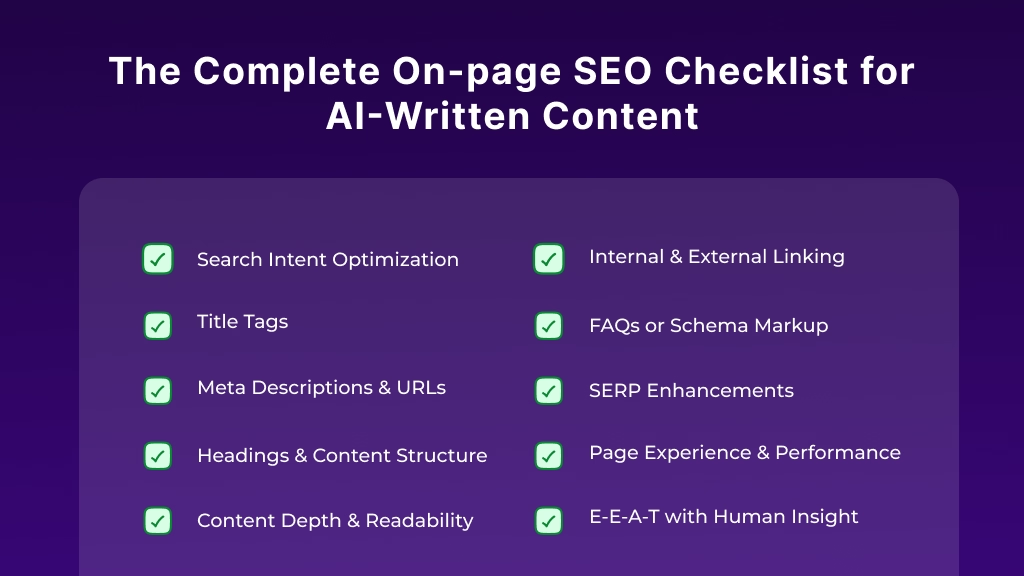
The Complete On-page SEO Checklist for AI-Written Content
Now that your AI-written content has passed quality checks, it’s time to optimize it properly. This is where on-page SEO turns a “good draft” into content that both readers and search engines can easily understand, trust, and rank.
Below is a practical, step-by-step checklist designed specifically for AI-written content, where clarity, structure, and intent matter more than raw keyword usage.
1. Understand User Intent and Create High-Quality Content
The first rule of SEO is creating content that answers the user’s questions and aligns with their search intent. AI-generated content can sometimes be too generic, so it’s essential to add value and meet the specific needs of your audience.
Key Strategies to Improve Content Quality:
- User-Centric Content: Identify what users are searching for using tools like Google’s People Also Ask (PAA) or Answer The Public. Tailor your content to address these questions directly, with in-depth answers and examples.
- Add Unique Insights: AI can summarize information, but it lacks personal experiences, case studies, and unique perspectives. These elements will set your content apart from other AI-generated posts.
- Engagement: Use clear headings, bullet points, and short paragraphs to make your content easily digestible. Google values content that is easy for users to read and navigate.
2. Optimize Your Title and Meta Description
Your title tag and meta description are essential elements of on-page SEO, as they serve as your content’s introduction to both users and search engines.
Optimizing Title Tags:
- Keep your title under 60 characters so it’s fully visible in search results.
- Ensure it includes your target keyword naturally.
Optimizing Meta Descriptions:
- Write a compelling meta description that summarizes the content in 150-160 characters.
- Include the main keyword to improve click-through rates (CTR).
Example:
- Title: “The Ultimate On-Page SEO Checklist for AI-Written Content”
- Meta Description: “Learn how to optimize your AI-generated content for SEO with our step-by-step checklist. Improve rankings, engagement, and user experience.”
3. Use Strategic Keyword Placement
Keywords are still one of the most important ranking factors. Proper keyword research and strategic placement within the content will help ensure that search engines understand what your content is about.
Tips for Keyword Optimization:
- Long-Tail Keywords: Use specific keywords that your audience is more likely to search for, such as “how to optimize AI content for SEO”.
- Natural Keyword Integration: Include keywords in the following areas:
- Title tags
- URL
- Introduction
- Headings (H1, H2, etc.)
- Body content (but avoid keyword stuffing)
Example: If you’re writing about AI content optimization, mention related terms like “AI content marketing,” “AI writing tools,” and “SEO for AI-generated content” naturally throughout the post.
4. Focus on User Experience (UX)
User experience plays a significant role in how Google ranks content. A poor user experience can result in higher bounce rates and lower rankings.
Key Factors for Improved UX:
- Mobile-Friendly Design: Ensure your content is responsive and easily accessible on mobile devices. With Google’s mobile-first indexing, having a mobile-optimized site is crucial.
- Page Speed: A slow website can deter users and negatively impact your SEO. Use tools like Google PageSpeed Insights to identify issues affecting load times and improve them.
- Clear Call-to-Actions (CTA): Add CTAs throughout the content, such as “Get a free SEO audit” or “Download our SEO checklist,” to encourage user interaction and guide them to the next step.
5. Internal and External Linking
Linking to both internal and external sources can improve the overall authority and trustworthiness of your content.
How to Improve Link Building:
- Internal Links: Link to other relevant posts or pages on your website. This helps users explore related content and allows search engines to crawl your site more effectively.
- External Links: Link to authoritative sources, studies, or articles that back up your claims. This signals to Google that your content is credible.
Example:
- Internal Link: “Learn more about AI content writing in our [comprehensive guide].”
- External Link: “According to a study by Search Engine Journal, AI-generated content is becoming more important for SEO.”
6. Add Structured Data (Schema Markup)
Structured data (schema markup) helps search engines better understand your content, which can lead to rich snippets and enhanced visibility in search results.
Types of Schema to Implement:
- FAQ Schema: If your content answers frequently asked questions, implement the FAQ schema so that they appear directly in search results.
- HowTo Schema: For articles that provide step-by-step instructions, use the HowTo schema to highlight individual steps in search results.
Example:
For a blog post with a list of SEO steps, adding HowTo schema can help display the process directly in search snippets, making your content more clickable.
7. Optimize Images for SEO
Images improve the user experience, but they also need to be optimized for SEO to avoid negatively affecting your page’s speed.
Image Optimization Tips:
- Alt Text: Use descriptive alt text that includes relevant keywords. This helps Google understand what the image is about and also improves accessibility.
- File Size: Compress image files to reduce page load time without compromising quality.
- Captions: Whenever possible, include captions for your images. This not only provides context but can also include keywords for SEO.
8. Maintain E-E-A-T (Expertise, Experience, Authority, and Trustworthiness)
Google’s E-E-A-T (Expertise, Experience, Authority, and Trustworthiness) guidelines are essential for SEO success, especially in competitive industries or topics like AI and SEO.
How to Improve E-E-A-T:
- Show Expertise: Include statistics, case studies, or industry expert insights to demonstrate authority and knowledge.
- Link to Authoritative Sources: Cite studies, articles, and authoritative sources to back up your claims.
- Trust Signals: Display trust signals like customer reviews or industry certifications to boost credibility.
9. Regularly Update Your Content
SEO is an ongoing effort, and it’s essential to keep your content fresh and up-to-date.
How to Keep Content Updated:
- Revise Old Posts: Periodically update older content to reflect the latest information, data, or trends.
- Check for Broken Links: Use tools like Screaming Frog or Google Search Console to identify broken links and fix them.
You can handle this manually or speed up the process using WriteRush to generate and refine titles and a detailed blog directly inside WordPress, while still reviewing them before publishing.
How to Execute This Checklist in WordPress
WordPress makes on-page SEO far more manageable, but only if you know where each optimization step actually lives. The key is to combine in-editor best practices with plugin-level checks so nothing slips through the cracks.

Inside the WordPress Editor
Start where the content is created. As you write or edit the post:
- Set the SEO title and meta description with clear, benefit-driven language that reflects search intent. Avoid auto-filled text without review.
- Structure headings correctly (one H1, logical H2s, supportive H3s). This helps both readers and search engines understand the page.
- Add internal links while writing, not as an afterthought. Contextual links are easier to place when the topic is fresh in your mind.
With SEO Plugins
Next, use your SEO plugin as a quality-control layer:
- Validate schema (FAQ or HowTo) to enhance SERP visibility and eligibility for rich results.
- Check readability and SEO warnings to spot issues like long sentences, missing alt text, or thin sections.
- Review performance hints related to mobile friendliness and page experience.
When using WriteRush in WordPress, you can handle topic analysis, section outlining, and drafting directly when you create the content. You still review and refine everything, but the workflow becomes faster and more consistent, which is especially helpful when publishing AI-assisted content at scale.
Common On-Page SEO Mistakes with AI-Written Content
Even if your AI-written draft is “technically correct,” a few common on-page SEO mistakes can quietly stop it from ranking. The tricky part? Most of these aren’t dramatic errors; they’re small shortcuts that add up and make your content feel generic, untrustworthy, or misaligned with search intent.
Here are the biggest ones to watch for.
Publishing AI drafts without human review
AI-generated content often sounds polished, but it can include inaccurate details, vague claims, or missing context. If you publish without a quick human edit, you risk creating content that fails Google’s helpful content expectations, especially in topics where accuracy, experience, and trust matter.
A simple fix: read the draft once like a real reader. Ask, “Would I trust this?” If the answer is “maybe,” tighten it.
Keyword stuffing (or forcing awkward phrases)
It’s tempting to repeat your target keyword everywhere because it feels like SEO. However, modern on-page SEO is about relevance and readability, not stuffing. Keyword-heavy AI writing can also trigger a robotic tone and lower user engagement, which hurts performance.
Instead, aim for:
- Natural keyword placement in the title tag, H1, first paragraph, and a few subheadings
- Semantic terms and related phrases that support topical depth
- Clear answers that match what users are actually searching for
Generic intros, conclusions, and “template sections”
A classic AI footprint is the same predictable structure: broad intro, generic tips, shallow conclusion. Even if the information is correct, it often lacks originality and feels like something users have already read 20 times.
Try adding:
- A real example or quick scenario (even one sentence helps)
- A specific takeaway or “what to do next” step
- A short insight based on experience (E-E-A-T boost)
Scaling content before proving quality
Publishing 30 AI articles quickly sounds productive, until none of them rank. Scaling too early often leads to thin, repetitive pages that don’t offer unique value. Google’s systems reward helpful, people-first content, not mass-produced pages that repeat the same ideas.
A smarter approach is:
- Publish a few posts
- Apply the full on-page checklist (including internal linking, schema markup, and readability)
- Track performance and improve the workflow before scaling
Ignoring credibility signals (E-E-A-T)
AI content can lack the “trust layer” that Google and users look for. If your page has no proof of expertise, no author info, no updates, no references, and no real-world context, it’s harder to compete.
At minimum, strengthen trust with:
- An author bio or “reviewed by” note (when appropriate)
- A visible “last updated” date
- External citations for important claims
- Internal links to supporting pages on your site
Final Thoughts
AI isn’t replacing SEO, it’s changing what “good” looks like.
With AI-written content, you can publish faster, but speed alone doesn’t earn rankings. Google still rewards the same fundamentals: helpful answers, clean structure, and real trust signals like E-E-A-T (Experience, Expertise, Authoritativeness, Trustworthiness). The difference is that AI drafts often need extra human polish to meet those standards consistently.
So here’s the simple mindset shift: use AI as your drafting partner, not your publishing autopilot. Run every post through a quick quality gate (accuracy, originality, and intent match), then apply the on-page essentials: strong title tags, clear H1-H3 headings, natural keyword placement, smart internal linking, optimized meta descriptions, descriptive alt text, and the right schema markup when it helps.
If you do that, you’re not just “optimizing AI content.” You’re building pages that are easier to read, easier for WordPress to manage, and easier for search engines (and AI answer systems) to understand.
Frequently Asked Questions (FAQs)
What is an on-page SEO checklist for AI-written content?
It’s a set of optimization steps that ensure AI-written content meets search intent, quality, structure, and E-E-A-T standards, especially when publishing on WordPress.
Does Google penalize AI-written content?
No. Google evaluates content by helpfulness and quality, not by whether it’s written by AI.
Why does AI-written content need a different SEO checklist?
AI drafts often miss intent precision, originality, and experience signals, so they require extra quality checks and structure refinement.
What are the most important on-page SEO factors for AI content?
Search intent alignment, clear headings, natural keyword placement, strong internal linking, accurate metadata, content depth, and visible E-E-A-T.
How much human editing does AI content need?
Enough to ensure accuracy, originality, intent match, and readability. AI should assist drafting, not replace review.
Can AI-written content rank on Google?
Yes, when it’s human-reviewed, well-structured, and optimized using solid on-page SEO practices.
Is it safe to scale AI-written content?
Only with strict quality gates. Scaling thin or repetitive AI content can hurt performance.
What’s the best workflow for publishing AI-written content?
AI draft → quality review → on-page SEO optimization → WordPress publishing → final human check.
This page was last edited on 12 May 2026, at 12:11 pm