Quick Answer
An auto blogging WordPress plugin is a tool that automatically imports, creates, or curates content for your WordPress site from sources like RSS feeds, social media, or AI generators. It saves time by reducing the need for manual content creation.
If you’ve ever looked at your WordPress dashboard and felt a mix of overwhelm and guilt about your blog’s content drought, you’re not alone. Consistently publishing fresh, quality posts eats up hours—whether you’re a solo blogger, a content marketer juggling campaigns, or a business owner trying to keep your site relevant. It’s no wonder many site owners fall off their publishing schedules or struggle to grow.
But what if automation could handle the heavy lifting? The rise of auto blogging plugins, paired with ethical AI tools, is reshaping how sites source, generate, and optimize posts. In this guide, we’ll break down how auto blogging plugins work, where they shine (and stumble), the crucial features to look for, and how to use AI-powered options like WriteRush to create sustainable, scalable, and monetized content workflows—without sacrificing the human touch.
Why Auto Blogging Plugins Matter for Modern Content Strategies
- Save time: Eliminate hours spent on manual research and posting.
- Scale up: Expand your site’s reach by publishing across multiple categories and sources.
- Monetize efficiently: Automatically integrate affiliate products, links, or feeds.
- Stay competitive: Use AI to boost topical relevance and adapt to trending topics quickly.
From our experience, the biggest wins come when plugins are used to both import and enhance content—combining automation with targeted, human-shaped adjustments. This blend positions your site for both digital growth and lasting authority.
How Auto Blogging Works in WordPress
- RSS Feeds: Pull posts from news sites, blogs, podcasts, or video platforms. You select the feeds or keywords, schedule import frequency, and customize what’s published.
- Social and Media Feeds: Import updates from channels like YouTube, Reddit, or Instagram. This is especially popular for niche aggregators or multi-format blogs.
- AI Content Generation: Newer plugins—such as WriteRush—can generate unique articles, summaries, or topic clusters on demand using advanced AI models.
- Hybrid Workflows: The most effective setups combine classic RSS-based curation with AI-powered rewriting or summarization, balancing freshness with originality.
Typical setup looks like this:
- Install an auto blogging plugin (e.g., WP Automatic, Feedzy, WPeMatico, or WriteRush for AI workflows).
- Connect external sources or define content topics/keywords.
- Customize rules—categories, tags, publishing schedules, or post templates.
- Activate optional features: affiliate integration, image/video imports, or SEO settings.
- Regularly review imported or AI-generated posts to maintain quality and compliance.
With WriteRush, you can go a step further—automating not just the flow, but also the generation of high-quality, unique articles perfectly aligned to your strategy.
Essential Features to Look for in an Auto Blogging WordPress Plugin
Choosing the right auto blogging WordPress plugin is important because not every plugin offers the same level of content quality, SEO support, automation, or publishing control. A good plugin should not only generate blog posts but also help you plan topics, optimize content for search engines, maintain your brand voice, and publish smoothly inside WordPress.
Before selecting an auto blogging plugin for WordPress, look for the following essential features.
1. AI-Powered Blog Content Generation
The main purpose of an auto blogging plugin is to create blog content faster. That is why AI-powered content generation should be one of the first features you check.
A reliable plugin should be able to generate complete blog posts based on your topic, keyword, audience, and preferred content style. It should help you create introductions, headings, body sections, FAQs, conclusions, and other important parts of a blog post.
The best auto blogging WordPress plugin should also allow you to customize the output instead of producing generic content. For example, you should be able to choose the blog type, writing tone, article length, target audience, and content structure. This gives you more control over the final result and helps you create posts that match your website’s purpose.
2. Keyword Research and Topic Planning
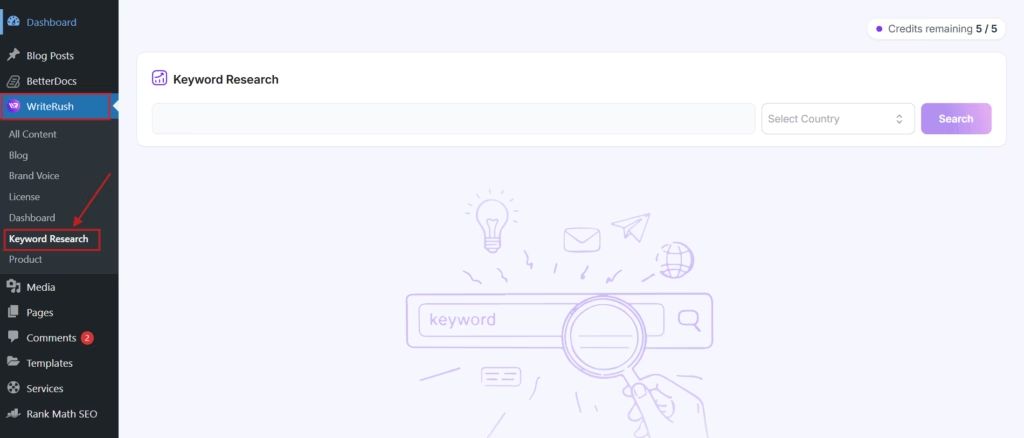
Auto blogging works best when it is based on the right keywords. Without proper keyword planning, even well-written content may fail to attract organic traffic.
Look for a plugin that includes keyword research or helps you plan content around search queries your audience is already using. A strong auto blogging tool should help you find relevant keywords, related search terms, long-tail keywords, and content ideas for your niche.
This feature is especially useful for bloggers, affiliate marketers, agencies, and business owners who publish content regularly. Instead of guessing what to write about, you can build a content plan based on actual search intent.
3. SEO-Friendly Content Structure
An auto blogging WordPress plugin should do more than simply generate paragraphs. It should create content that is structured for SEO.
A good plugin should help you use proper heading tags, organize sections clearly, include the main keyword naturally, and cover related subtopics. It should also support SEO elements such as meta titles, meta descriptions, FAQs, and internal linking suggestions.
Search engines prefer helpful, well-structured content that answers user questions clearly. So, your auto blogging plugin should help you create articles that are easy for both readers and search engines to understand.
4. SERP-Based Outline Generation

One of the most valuable features in an auto blogging plugin is SERP-based outline generation. This means the plugin can analyze top-ranking pages for a keyword and help you create a better content outline.
Instead of starting from a blank page, you can understand what competitors are covering, which sections are important, and what searchers expect from the topic. This helps you build a more complete and competitive blog post.
A SERP-based outline can include suggested headings, important subtopics, common questions, and content gaps. This gives your blog a stronger foundation before the writing process begins.
5. Brand Voice and Tone Customization
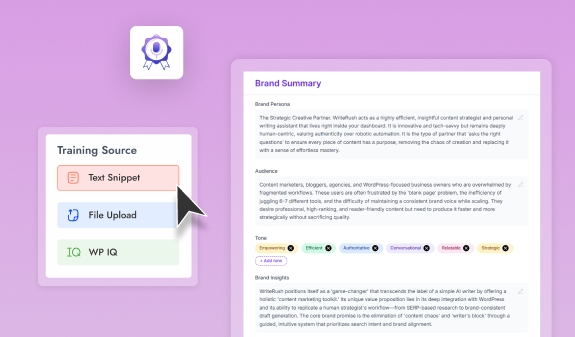
Every website has its own style. Some brands prefer a professional tone, while others want a friendly, simple, persuasive, or educational tone. That is why brand voice customization is an important feature to look for.
A quality auto blogging plugin should allow you to guide the AI so that the content sounds consistent with your brand. This is especially important for agencies, SaaS companies, service businesses, and personal brands that want to maintain a recognizable voice across all blog posts.
Without this feature, your content may sound too robotic, too generic, or inconsistent from one article to another.
6. WordPress Draft Publishing
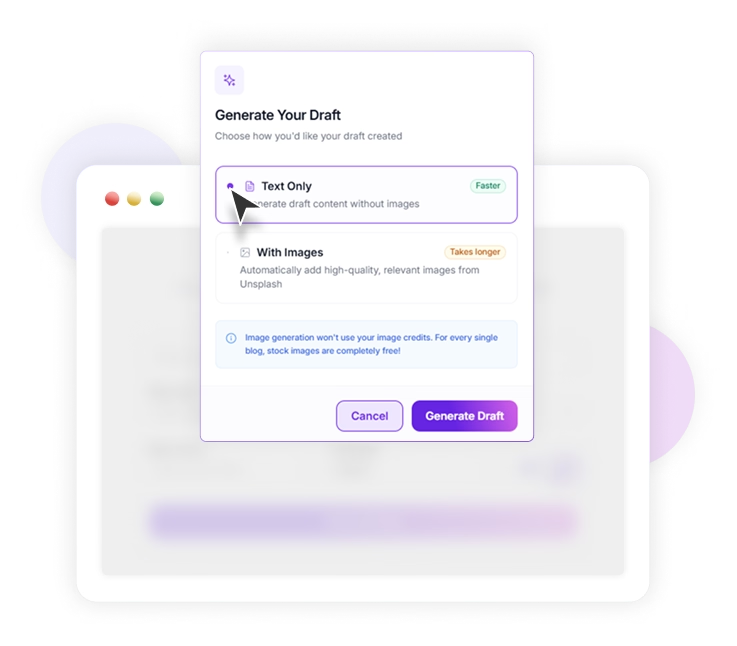
A smooth WordPress publishing workflow can save a lot of time. The best auto blogging WordPress plugin should allow you to send generated content directly to your WordPress drafts.
This is useful because you can review, edit, format, and optimize the article before publishing it live. Direct draft publishing reduces the need to copy and paste content from external tools, which makes the workflow faster and cleaner.
It is also helpful if the plugin supports popular WordPress editors such as Gutenberg, Elementor, or Classic Editor. This makes it easier to manage content inside your existing WordPress setup.
7. Content Editing and Regeneration Options
AI-generated content is useful, but it should still be editable. A good auto blogging plugin should let you regenerate sections, rewrite paragraphs, expand ideas, shorten content, or adjust the tone.
This gives you flexibility during the editing process. For example, if a section sounds too short, you should be able to expand it. If a paragraph feels too complex, you should be able to simplify it. If the introduction is not engaging enough, you should be able to rewrite it.
These editing controls help you improve content quality without starting over from the beginning.
8. AI Image Generation or Media Support

Blog posts perform better when they include relevant visuals. So, it is helpful if your auto blogging plugin supports AI image generation or media suggestions.
This feature can help you create featured images, inside blog images, or visual concepts based on the article topic. For WordPress users, this can save time because you do not need to use multiple tools for writing and image creation.
Even if the plugin does not generate images, it should make it easy to add media, optimize images, and format the blog post visually.
9. Scheduling and Publishing Control
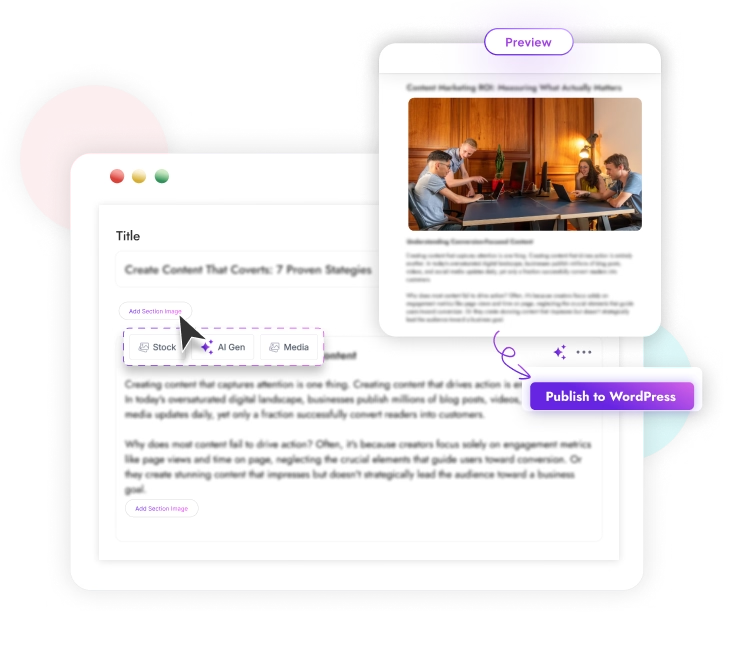
Auto blogging does not always mean publishing instantly. In many cases, you may want to review the content first, schedule it for later, or publish posts in a planned sequence.
That is why publishing control is important. Look for a plugin that allows you to save posts as drafts, schedule articles, manage publishing frequency, and avoid accidental publishing.
This is especially useful for websites that follow a content calendar. It helps you stay consistent without losing control over quality.
10. SEO Score or Optimization Guidance
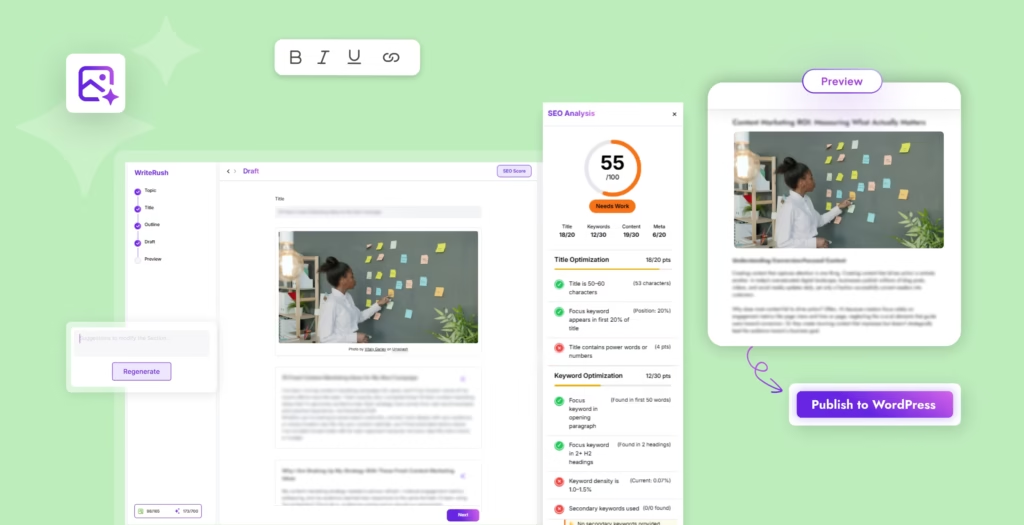
Some auto blogging plugins include an SEO score or optimization checklist. This can be very helpful for improving your content before publishing.
An SEO score can show whether your article includes the target keyword, proper headings, enough content depth, readable paragraphs, and other optimization elements. It can also help you identify missing sections, weak titles, or incomplete meta descriptions.
This feature is useful for beginners as well as experienced marketers because it turns SEO optimization into a guided process.
11. Support for Different Content Types
A strong auto blogging WordPress plugin should support more than one type of content. Besides standard blog posts, it may help you create listicles, how-to guides, product reviews, comparison posts, tutorials, service pages, and affiliate content.
Different websites need different types of content. For example, an affiliate website may need product comparison articles, while a business website may need educational blog posts and service-related content.
The more flexible the plugin is, the easier it becomes to create content for different goals.
12. Easy-to-Use Interface
An auto blogging plugin should make content creation easier, not more complicated. A clean and simple interface is important, especially for users who are not technical.
The plugin should guide you through the process step by step, from entering a topic or keyword to generating an outline, creating the article, and sending it to WordPress drafts.
If the interface is confusing, you may spend more time learning the tool than actually creating content. A user-friendly workflow helps you publish faster and stay productive.
13. Content Quality and Human Review Support
Automation should support your content workflow, not replace quality control. The best auto blogging plugins encourage human review before publishing.
Look for a plugin that gives you enough control to edit, fact-check, improve, and personalize the content. This is important because AI can help with speed, but human review ensures accuracy, originality, and brand consistency.
Before publishing any auto-generated blog post, always check the facts, add your own examples, improve the structure, and make sure the content truly helps your readers.
14. Integration With Existing WordPress Workflow
A good auto blogging plugin should fit naturally into your WordPress workflow. It should work well with your theme, editor, SEO plugin, and content management process.
Compatibility with Gutenberg, Elementor, Classic Editor, and common SEO tools can make a big difference. The plugin should not slow down your site or create formatting issues inside your posts.
The goal is to simplify blogging inside WordPress, not add extra technical problems.
15. Scalability for Regular Publishing
If you plan to publish content regularly, scalability matters. The plugin should be able to support a consistent content schedule without making the process difficult.
For example, agencies may need to create content for multiple clients. Bloggers may need to publish several articles per week. Businesses may need to cover many keywords in their niche.
A scalable auto blogging plugin should help you manage repeated content creation while keeping quality, structure, and SEO in focus.
| Feature | Why It Matters |
|---|---|
| Diverse content sources | Maximize blog variety and reach |
| Automation flexibility | Target posts more effectively, avoid overload |
| AI-powered content | Ensure uniqueness and topical authority |
| SEO safeguards | Protect rankings and avoid duplicate issues |
| Affiliate integration | Monetize seamlessly within automation workflows |
| User-friendly interface | Makes setup and maintenance quick and painless |
Benefits of an Auto Blogging WordPress Plugin
An auto blogging WordPress plugin helps website owners, bloggers, agencies, and marketers create and manage blog content faster without handling every step manually. Instead of spending hours researching topics, preparing outlines, writing drafts, formatting posts, and publishing content, an auto blogging plugin can simplify the entire workflow from idea generation to WordPress publishing. This makes it especially useful for websites that need fresh, consistent, and SEO-focused content on a regular basis.
1. Saves Time on Content Creation
One of the biggest benefits of using an auto blogging WordPress plugin is time savings. Traditional blog writing involves several steps, including keyword research, topic planning, outline creation, drafting, editing, formatting, and publishing. Doing all of this manually can take hours for a single post.
An auto blogging plugin reduces that workload by automating major parts of the process. It can help generate blog ideas, create structured outlines, write draft content, and send posts directly to WordPress. This allows bloggers and business owners to focus more on strategy, editing, promotion, and improving the overall quality of their website.
For agencies and freelancers, this can also make client work easier. Instead of building every blog post from scratch, they can use automation to speed up the first draft and then refine the content based on the client’s tone, niche, and SEO goals.
2. Helps Maintain a Consistent Publishing Schedule
Consistency is important for growing a blog. Search engines and readers both prefer websites that publish helpful and updated content regularly. However, staying consistent can be difficult when you have limited time, a small team, or multiple websites to manage.
An auto blogging WordPress plugin helps you maintain a steady publishing schedule by making content production faster and more organized. You can plan topics in advance, generate drafts more quickly, and prepare posts for publishing without constantly starting from zero.
This is especially helpful for niche blogs, affiliate websites, SaaS blogs, agency websites, and business blogs where regular content updates can support organic traffic growth.
3. Supports SEO-Focused Content Planning
A good auto blogging plugin does more than just generate text. Many advanced tools help with SEO planning by assisting with keyword research, search intent, headings, meta descriptions, and content structure. This helps you create blog posts that are not only readable but also better optimized for search engines.
By using SEO-focused outlines and keyword-based content suggestions, you can target the search queries your audience is already looking for. This improves your chances of ranking for relevant terms and attracting visitors who are interested in your products, services, or content.
For example, instead of writing random blog posts, you can create content around specific keywords, questions, and long-tail search terms. This makes your content strategy more intentional and helps your website build topical authority over time.
4. Reduces Writer’s Block
Writer’s block is one of the most common problems for bloggers and content creators. Sometimes you know the topic you want to cover, but you do not know how to start, what headings to include, or how to explain the idea clearly.
An auto blogging WordPress plugin can help solve this problem by generating topic ideas, introductions, outlines, subheadings, and draft content. This gives you a strong starting point instead of a blank page.
Even if you do not use the generated content exactly as it is, it can help you move faster. You can edit, rewrite, expand, or personalize the draft based on your brand voice and audience needs.
5. Improves Content Workflow for Teams
For content teams, managing blog production can become complicated. Writers, editors, SEO specialists, designers, and website managers often need to work together to publish a single article. Without a clear workflow, content can get delayed or lost between planning, writing, editing, and publishing.
An auto blogging WordPress plugin can make the workflow smoother by keeping more steps inside WordPress or directly connected to WordPress. Teams can create drafts faster, review content more easily, and publish posts without switching between too many different tools.
This is useful for agencies, marketing teams, and businesses that need to produce content at scale while still keeping the process organized.
6. Helps Scale Content Production
If you want to grow a website, you often need more than one or two blog posts per month. You may need content for different keywords, product pages, service pages, comparison posts, tutorials, listicles, and informational guides.
Manual content creation can limit how much you can publish. An auto blogging WordPress plugin helps you scale content production by reducing the time needed to prepare each post. This allows you to cover more topics, answer more audience questions, and build a stronger content library.
However, scaling content does not mean publishing low-quality articles. The best results come when automation is combined with human review, editing, fact-checking, and brand customization.
7. Makes WordPress Publishing Easier
Another major benefit is direct WordPress integration. Instead of writing content in one tool, copying it into WordPress, formatting it again, adding headings, and saving it as a draft, an auto blogging plugin can simplify the publishing process.
Many plugins allow you to generate or prepare content directly inside WordPress. Some tools can also send completed posts to WordPress drafts, making it easier to review and publish when ready.
This saves time and reduces formatting issues, especially for users who publish content frequently.
8. Useful for Different Types of Websites
An auto blogging WordPress plugin can be useful for many types of websites, including business websites, affiliate blogs, news-style blogs, niche sites, eCommerce stores, SaaS websites, agency blogs, and personal blogs.
For business websites, it can help publish educational content that attracts potential customers. For affiliate websites, it can support product reviews, comparison posts, and buying guides. For agencies, it can speed up content delivery for multiple clients. For bloggers, it can make content creation less stressful and more consistent.
Because of this flexibility, auto blogging plugins are becoming a practical solution for anyone who wants to grow content without spending all day writing manually.
9. Helps Improve Productivity and Focus
When repetitive content tasks are automated, you can spend more time on high-value work. Instead of focusing only on drafting, you can focus on improving content quality, adding real examples, updating old posts, building internal links, optimizing calls to action, and promoting your content.
This makes your overall blogging process more productive. The plugin handles the heavy starting work, while you add the human touch that makes the article useful, trustworthy, and unique.
10. Cost-Effective for Bloggers and Businesses
Hiring writers for every blog post can be expensive, especially for small businesses, startups, and solo website owners. While human editing is still important, an auto blogging WordPress plugin can reduce the cost of producing first drafts and planning content.
It gives users a more affordable way to create content regularly. Businesses can use it to support their SEO strategy, agencies can use it to speed up client work, and bloggers can use it to publish more consistently without needing a large content team.
Use Cases of Auto Blogging WordPress Plugin
An auto blogging WordPress plugin can be useful for many types of website owners, bloggers, marketers, and agencies. It helps automate repetitive content tasks, reduce manual writing time, and keep a website active with fresh content. Instead of starting every blog post from scratch, users can plan topics, generate content ideas, create outlines, write drafts, and publish posts more efficiently from the WordPress dashboard.
Below are some of the most common use cases of an auto blogging WordPress plugin.
1. Publishing Regular Blog Posts Faster
One of the biggest use cases of an auto blogging WordPress plugin is speeding up regular blog publishing. Many website owners know they need consistent content, but they struggle to write and publish posts every week. An auto blogging plugin helps solve this problem by generating blog drafts based on selected topics, keywords, or content instructions.
For example, a business website can use the plugin to create weekly educational posts, how-to guides, listicles, product-related articles, or industry updates. This helps maintain a consistent publishing schedule without spending hours on every single article.
It is especially helpful for small teams, solo bloggers, and business owners who do not have a full-time content team.
2. Creating SEO-Focused Content at Scale
Auto blogging plugins are also useful for creating SEO-focused content. Many plugins allow users to enter target keywords, generate blog outlines, create headings, and write content around search intent. This makes it easier to produce content that targets specific search queries.
For example, a website owner can create blog posts around long-tail keywords such as “best WordPress plugin for small business,” “how to automate blog writing in WordPress,” or “AI content writing plugin for WordPress.” By targeting these search terms, the website can attract more organic traffic over time.
This use case is valuable for marketers, SEO specialists, affiliate bloggers, SaaS companies, and niche website owners who want to build topical authority.
3. Managing Niche Affiliate Blogs
Affiliate marketers often need to publish product reviews, comparison articles, buying guides, and informational content. An auto blogging WordPress plugin can help them create content faster for multiple product categories or niche topics.
For example, an affiliate website about WordPress tools can publish posts like:
- Best WordPress plugins for bloggers
- Top AI writing tools for WordPress
- Best hosting providers for small businesses
- Comparison between different SEO tools
The plugin can help generate first drafts, outlines, product-focused sections, FAQs, and meta descriptions. This allows affiliate marketers to focus more on strategy, editing, link placement, and conversion optimization.
However, affiliate content should still be reviewed carefully before publishing to ensure accuracy, originality, and trustworthiness.
4. Supporting Content Agencies and Freelancers
Content agencies and freelance writers often manage multiple clients at the same time. Writing every article manually can become time-consuming, especially when clients need regular blog posts, SEO content, or website copy.
An auto blogging WordPress plugin can help agencies speed up their workflow by generating article drafts, outlines, topic ideas, introductions, FAQs, and content briefs. This allows the team to handle more content projects without reducing quality.
For example, an agency can use the plugin to prepare first drafts for client blogs, then have writers and editors improve the structure, tone, examples, and accuracy. This creates a faster content production system while keeping human review in the process.
5. Keeping Business Websites Active
Many business websites become inactive because the owners are busy managing their services, customers, and operations. An auto blogging plugin helps businesses keep their blog updated with useful content.
For example, a digital marketing agency can publish posts about SEO tips, social media trends, WordPress tutorials, and marketing strategies. A real estate website can publish neighborhood guides, home-buying tips, and market updates. A fitness business can publish workout guides, wellness tips, and nutrition-related articles.
Fresh content helps build trust, educate visitors, and improve the chances of ranking for relevant search terms.
6. Creating Educational and How-To Content
How-to content is one of the best formats for attracting search traffic because users often search for step-by-step solutions. An auto blogging WordPress plugin can help create tutorials, guides, and educational posts based on user questions.
For example, a WordPress tutorial site can create articles like:
- How to add custom CSS in WordPress
- How to create a landing page in WordPress
- How to optimize images for faster loading
- How to add schema markup to a blog post
The plugin can generate the structure, headings, explanations, and draft content. Then the website owner can add screenshots, examples, code snippets, and personal experience to make the article more helpful.
7. Generating Content Ideas and Blog Outlines
Auto blogging is not only about publishing complete articles. It is also useful for planning content. Many users struggle to decide what to write next. An auto blogging plugin can help generate topic ideas, title suggestions, outlines, subheadings, and FAQ sections.
This is useful when building a content calendar. Instead of manually brainstorming ideas, the plugin can suggest topics based on keywords, audience needs, or industry categories.
For example, a SaaS company can use it to plan content around product use cases, customer pain points, competitor alternatives, and industry trends.
8. Improving WordPress Content Workflow
A good auto blogging WordPress plugin can make the entire content workflow smoother. Instead of using separate tools for keyword research, outline creation, writing, formatting, and publishing, users can manage much of the process inside WordPress.
This helps reduce tool switching and saves time. Users can generate a draft, edit it, optimize headings, add images, adjust formatting, and send the content directly to WordPress drafts or posts.
This use case is especially helpful for WordPress users who want a faster, more organized publishing process without leaving their website dashboard.
9. Creating Drafts for Human Editing
Auto blogging plugins are most effective when they are used to create strong first drafts. The plugin can handle the initial writing, while humans improve the content with personal insights, examples, expert opinions, internal links, images, and final editing.
This approach is useful because it combines automation with quality control. The plugin saves time, but the final article still feels helpful, accurate, and unique.
For businesses and bloggers, this is one of the safest ways to use auto blogging. Instead of publishing AI-generated content without review, they can use the plugin as a writing assistant and improve the content before it goes live.
10. Repurposing Existing Content
Another useful case is content repurposing. Website owners can use an auto blogging plugin to turn existing ideas into new blog formats. For example, a YouTube video, podcast episode, webinar, product page, or old blog post can be turned into a fresh article or supporting blog content.
This helps users get more value from content they already have. A single topic can become a tutorial, listicle, FAQ article, comparison post, or beginner-friendly guide.
For content teams, this is a smart way to create more content without constantly starting from zero.
11. Supporting WooCommerce and Product-Based Websites
WooCommerce store owners can also benefit from auto blogging plugins. They can create product guides, buying tips, comparison articles, seasonal content, and educational posts related to their products.
For example, an online clothing store can publish styling tips, seasonal fashion guides, or product care instructions. A tech store can publish buying guides, product comparisons, and troubleshooting content.
This type of content can help attract visitors who are still researching before they buy. It can also support internal linking to product pages and improve the overall SEO structure of the website.
12. Building Topical Authority
To rank well in search engines, websites often need to cover a topic in depth. An auto blogging plugin can help create multiple related articles around one main topic.
For example, a website focused on WordPress automation can publish content around:
- Auto blogging plugins
- AI writing tools
- WordPress content automation
- SEO content workflows
- Blog publishing schedules
- AI-generated images for blogs
By covering related topics consistently, the website can build topical authority and become more useful for readers.
Leveraging AI Auto Blogging With WriteRush
If you’re frustrated by generic, duplicate, or thin auto-imported content, AI plugins like WriteRush unlock a new path forward. WriteRush isn’t just another RSS-to-post tool—it actively researches trending topics, generates unique articles right from your WordPress dashboard, and adapts content for SEO and audience engagement.
- How it helps: WriteRush crafts original articles based on keywords or curated sources, automates summaries, and can layer opinions or context on top of imported news.
- Workflow example: Pull breaking industry news via Feedzy, then prompt WriteRush to instantly generate timely summary posts or expert commentary in your own brand voice.
- Ideal users: Bloggers scaling content without staff, marketers needing reliable content volume, and business owners wanting hands-off but high-quality automation.
In practice, we’ve seen sites combine WriteRush with classic RSS importers to build a flywheel—curated news comes in, AI turns it into fresh insights, and monetization features like affiliate links activate automatically. Used thoughtfully, this hybrid workflow delivers both freshness and unmatched originality.
Common Pitfalls and How to Avoid Them
While auto blogging can be a game-changer, it’s not foolproof. Here’s what to watch out for, and solutions we lean on in real-world content operations:
Major pitfalls:
- Duplicate content risks: Direct imports without value-add can tank SEO.
- Thin, low-value posts: Automation gone unchecked leads to junk content that hurts credibility.
- Copyright landmines: Some sources don’t allow full republishing; always review usage rights.
- Over-automation: Zero editorial checks = public mistakes, branding problems, or platform bans.
- Plugin pileups: Stacking too many auto blogging tools slows your site and increases chances of errors.
Best practices:
- Always enhance imported content—use WriteRush or similar to generate unique takeaways, summaries, or commentary.
- Review and edit before publishing; automate the workflow, not the final click.
- Audit content regularly for SEO health, originality, and relevance.
- Attribute sources and avoid full-text reposting where not permitted.
Avoiding these mistakes means your auto blogging setup can truly scale, instead of exposing your site to unnecessary risk.
Conclusion
Auto blogging WordPress plugins can be your secret weapon for keeping content pipelines flowing—without burning out or blowing your budget. The magic is in using automation wisely: curate from trusted sources, embrace AI tools like WriteRush for original content, and always maintain editorial oversight. That way, your site stays fresh, authoritative, and profitable.
Curious how easy it is to get started? Explore WriteRush and unlock a new era of smart, AI-powered publishing on WordPress—so you can focus on ideas, not just busywork.
Frequently Asked Questions
What is a WordPress auto blogging plugin?
It’s a tool that automates the import, creation, or curation of content on your WordPress site from external sources like RSS feeds, social media, or AI generators.
Is auto blogging with WordPress legal and ethical?
Yes, as long as you respect copyright laws, give attribution, and avoid simply copying copyrighted content. Adding original value or insights is best practice.
Can auto blogging plugins harm SEO?
They can if you publish duplicated or low-quality posts. Use plugins that create unique content, implement canonical tags, and focus on content originality.
Are there free auto blogging plugins for WordPress?
Some basic RSS-importer plugins are free. More advanced options, especially those integrating AI, typically offer premium features.
Can WriteRush auto-generate unique posts in WordPress?
Absolutely. WriteRush can create original, keyword or trend-driven articles directly within your site, streamlining content creation.
Which sources work best for auto blogging?
Popular sources include news RSS feeds, YouTube channels, Reddit threads, affiliate product feeds, and industry-specific blogs.
How do I automate affiliate content in WordPress?
Choose plugins with affiliate integration that allow automatic link insertion or product showcase, and use AI for context-rich, relevant posts.
Is it possible to auto-import images and videos?
Many plugins can pull visuals from sources like YouTube or RSS feeds. Always check licenses and attribute media as needed.
How do I prevent duplicate content issues?
Transform, summarize, or rewrite imported material. Add your perspective and always credit original sources.
This page was last edited on 22 June 2026, at 3:05 pm