
Quick Answer
An AI content writer WordPress tool is a plugin or platform that helps generate, edit, optimize, and publish content directly inside WordPress using AI models like ChatGPT or Gemini. Human review is key to ensuring SEO quality and content relevance.
Keeping your WordPress site fresh with valuable, search-friendly content is harder than ever. Bloggers struggle to keep up with demanding editorial calendars. Marketers juggle dozens of drafts, chasing rankings that seem just out of reach. Agencies and businesses need fast, scalable workflows, but every shortcut risks hurting quality or SEO performance.
It’s no wonder so many turn to AI content writers for WordPress. Yet choosing the right plugin or tool isn’t simple—are you looking for a plugin, a SaaS platform, or both? Can AI-generated content actually help your site, or is it just another shiny distraction? If these questions sound familiar, you’re in the right place.
This guide explains—in practical terms—what an AI content writer for WordPress is, how the tools work, which features really matter, and what it takes to create content that actually ranks. You’ll walk away with a clear path to faster publishing, improved workflows, and higher-quality results, whether you’re a solo blogger or running multiple sites.
What Is an AI Content Writer for WordPress?
An AI content writer for WordPress is a plugin or integrated tool that uses artificial intelligence (like ChatGPT, GPT-4, or Google Gemini) to help generate blog posts, outlines, titles, meta descriptions, product descriptions, and more within your WordPress website.
These tools connect directly into your WordPress dashboard—often working alongside the Gutenberg block editor, Classic Editor, Elementor, or WooCommerce. Some act as native WordPress plugins, while others link to external AI writing platforms through API integrations. Depending on the tool, you might enter a focus keyword, prompt, or topic, and the AI will suggest structure, draft paragraphs, or fill in on-page SEO elements. The best ones streamline your publishing workflow, keep content SEO-friendly, and still leave space for your expertise.
So, think of a WordPress AI content writer as a smart assistant: it accelerates routine writing tasks but depends on your editorial judgment for accuracy, brand voice, and useful insights.
How Does a WordPress AI Content Writer Work?
WordPress AI content writers streamline the process from keyword to published post by combining AI models with your publishing workflow.
Most tools start with a prompt, keyword, or topic. For example:
- “Write a blog post about eco-friendly home office setups.”
- “Generate a WooCommerce product description for bamboo standing desks.”
- “Create an outline for ‘best WordPress SEO plugins.’”
Once you enter your prompt, the plugin connects to an AI model (like GPT-4 via OpenAI, Gemini via Google, or a proprietary engine) through API integration. Some plugins make you provide your own API key, while others manage the backend complexity for you.
The AI generates content in structured blocks—headings, sections, FAQs, product fields—mirroring how articles are built inside WordPress. The editor then gives you a chance to tweak, add links, check accuracy, and optimize meta tags before you publish, schedule, or save as a draft.
In our experience, the most practical tools are those that let you:
- Edit sections directly in WordPress.
- Generate SEO titles and meta descriptions.
- Link internal pages and add images.
- Save work as draft or publish in one click.
All these pieces combine to speed up your workflow—without cutting out editorial review, which remains essential for SEO and credibility.
Why Use an AI Content Writer for WordPress?
AI content writers have become popular because they help solve key bottlenecks for bloggers, marketers, and content teams. Let’s look at the main benefits.
- Faster drafting: AI tools reduce blank-page paralysis. You can quickly generate outlines, introductions, or even full blog drafts to kickstart the writing process.
- Consistent publishing: Struggling to keep your blog or content calendar updated? AI can help fill gaps with topic suggestions, rewrites, or regular draft generation, freeing up your time for deeper edits and optimization.
- Stronger SEO planning: With keyword-based drafting and search intent mapping, AI writers assist with meta tag generation, FAQ expansion, and coverage of semantic SEO topics that might otherwise be missed.
- Lower production cost: While no tool replaces writing or subject expertise, AI tools speed up the repetitive, early-stage drafting tasks—allowing you or your team to focus on quality control and your unique voice.
- Improved workflows for agencies & businesses: Agencies can scale content production (especially outlines, rewrites, and briefs), small businesses can refresh service and product pages, and WooCommerce stores can upgrade product copy—all with less manual effort.
Put simply: these plugins and tools take much of the legwork out of content creation, letting you move quicker and publish more consistently—provided you review, optimize, and add your own expertise before hitting “publish.”
WordPress AI Plugin vs Standalone AI Writing Tool
| Option | Best For | Main Benefit | Main Limitation |
|---|---|---|---|
| Native WordPress AI plugin | Writing inside WordPress | Direct publishing workflow | May need API setup |
| Standalone AI writer | Long-form drafting | Better writing environment | manual WordPress transfer |
| ChatGPT/Gemini manually | Flexible ideation | Low-friction prompting | No native publishing |
| SEO optimizer | Ranking improvement | Search-driven recommendations | Not always a full writer |
| Hybrid workflow | Balance of control/efficiency | Combined drafting & publishing | Tool-dependent capabilities |
Plugins work best if you want to draft, edit, and publish without leaving WordPress. Standalone AI writers are ideal for teams who need advanced templates, long-form drafting, or multi-channel output—but you’ll have to copy-paste into WordPress manually unless the tool offers an integration. If you’re brainstorming or creating one-off content, you might use ChatGPT directly, but beware of the extra formatting work.
A hybrid tool—such as a WordPress-connected writer like WriteRush—bridges the gap by letting you generate, refine, and quickly move content into your WordPress workflow with less fuss.
Key Features to Look For in a WordPress AI Content Writer
Start with what matters for real publishing, not just flashy features. Here’s a checklist that covers the essentials:
- Direct WordPress integration: Save as draft, publish or schedule from inside your dashboard; reduces copy-paste and reformatting.
- Gutenberg and page builder compatibility: Supports Block Editor, Classic Editor, Elementor, Divi, or WooCommerce for seamless editing and publishing.
- SEO title/meta description/headings: Generates on-page SEO elements (H1/H2/H3, FAQs) to match search intent.
- Keyword and outline generation: Drafts based on your keywords, brief, or topic, letting you avoid generic filler.
- Brand voice and editing controls: Lets you set tone, target audience, article length, and custom instructions, so content stays true to your style.
- Bulk content and auto-posting controls: Supports campaign generation, but make sure there’s an easy way to review drafts before auto-publishing.
- Image/media support: Offers featured image suggestions, stock image integrations (like Pexels), and even AI-generated images or alt text.
- Multilingual support: Creates or translates content for international sites or global WooCommerce stores.
- API model support and pricing transparency: Clarifies if you need an OpenAI or Gemini API key, what usage fees apply, or if AI credits are included.
- Security, privacy, and regular updates: Data stays safe, API keys are protected, and the plugin is well-maintained with clear documentation and recent reviews.
If a tool ticks these boxes, it’s likely to fit a wide range of workflows—from solo bloggers to SEOs or agencies managing dozens of sites.
Best Use Cases for AI Content Writers on WordPress
AI content writers aren’t just for blog posts. In practice, users successfully apply them to generate or optimize:
- Blog articles: Long-form posts, pillar pages, or quick updates.
- SEO titles and meta descriptions: For pages, posts, and products.
- Content outlines: To structure drafts and avoid thin content.
- Product descriptions: Especially with WooCommerce for variant SKUs or updating catalogs.
- Service pages: Local landing pages, business offerings, contact/about info.
- Affiliate articles: Review comparisons, pros/cons, buying guides.
- FAQs: Simple Q&A blocks for blogs, products, or support pages.
- Local SEO pages: City- or specialty-focused content.
- Content refreshes: Update old posts for new trends, keywords, or seasons.
- Social media repurposing: Turn blog highlights into shareable promos.
Success with these use cases comes down to workflow: start with a clear brief, build a strong structure, and layer in your real-world insights on top of what AI provides.
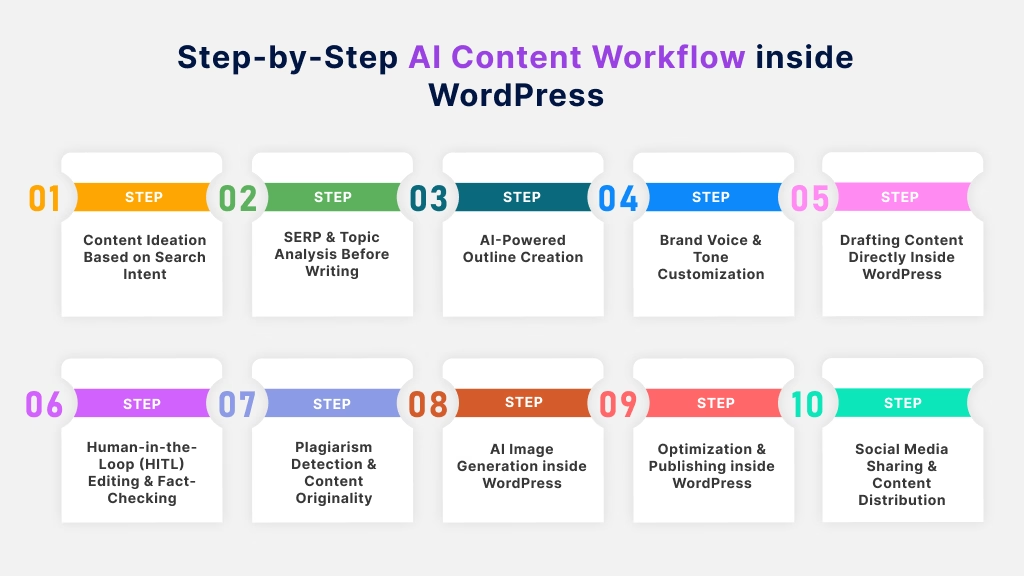
How to Use an AI Content Writer in WordPress: Step-by-Step Workflow
A practical workflow is the key to content quality and publishing speed. Here’s how we recommend you approach the process for SEO-friendly results:
- Choose your keyword or topic with search intent
Start with a clear target—what problem or question does your audience have? Identify if the content should be informational, commercial, or local in nature. - Generate a structured outline first
Outlines are your quality safeguard. Use your AI tool to suggest sections, subtopics, and FAQs organized logically. Refine the outline before generating the full draft. - Create the first draft with AI assistance
Either draft the entire article at once or work section by section—most tools allow both. Do not expect a publish-ready result; treat this as a starting draft. - Add expertise, examples, and original context
This is where you stand out. Insert your personal experience, add product comparisons, screenshots, business details, or case studies relevant to your audience. - Optimize the article for WordPress SEO
Adjust headings, refine the title tag and meta description, use semantic keywords naturally, and add internal links. Fill in image alt text and format the URL slug. - Review facts, claims, and sources
Double-check any stats, quotes, numbers, or sensitive claims. AI can “hallucinate” or misstate details, so always verify. - Publish, monitor, and improve
Save as a draft first. Schedule or publish after a final review. Track how the post performs, and update based on ongoing results.
A WordPress-connected AI writer like WriteRush can help streamline these steps—moving from keyword or idea to editable, WordPress-ready draft with less manual formatting and copy-paste work.
Can AI-Generated WordPress Content Rank on Google?
AI-generated content can rank on Google if it’s helpful, original, accurate, and fits real search intent—regardless of whether it was written by a human or with AI assistance.
The real risk isn’t “AI content” itself, but low-quality, thin, unedited drafts that add no real value. Google’s Helpful Content guidelines emphasize usefulness over authorship. If you auto-generate and mass-publish articles with no editorial review, you risk producing generic, repetitive, or even factually wrong material—and that rarely performs well in search.
The solution? Combine AI draft speed with human editing:
- Add expertise, real examples, screenshots, and brand voice.
- Double-check claims, update numbers, and fill in context.
- Strengthen intros and conclusions, and insert internal links.
For high-stakes topics or those involving money, health, or safety (Google calls this E-E-A-T: Experience, Expertise, Authoritativeness, and Trustworthiness), your hands-on review matters even more. Responsible automation means using AI for drafts and efficiency, but never skipping final checks.
Common Mistakes That Turn AI Drafts Into Low-Quality Content
Content teams, bloggers, and site owners often fall into predictable traps with AI writing tools. Here are the big ones—and how to avoid them:
- Publishing unedited drafts: Raw AI output is usually generic, misses your brand voice, and can even get facts wrong. Always add your input before publishing.
- Ignoring search intent: If your post format doesn’t match what searchers expect (for example, a “best plugin” keyword gets only a definition instead of a comparison), rankings will suffer.
- Overusing auto-posting: Mass-publishing without human review often leads to thin, repetitive, or off-topic articles.
- Skipping fact-checking: AI sometimes invents stats, features, or details—especially with newer models.
- Not adding internal links: Failing to connect related posts or category pages weakens both SEO and user navigation.
- Using generic prompts: Brief, contextless prompts yield generic AI content. Specify audience, tone, output structure, and desired result.
- Forgetting brand voice: Uniform, AI-style writing won’t earn reader trust or encourage conversions. Apply your business personality and style to every post.
In our experience, the best workflows combine structure, clear instructions, and dedicated review.
AI Content Writer WordPress Plugin Checklist
Before you commit to a tool, review this buyer’s checklist to ensure it actually fits your workflow:
- Does it integrate directly with WordPress?
- Is it compatible with my editor? (Gutenberg, Classic Editor, Elementor, etc.)
- Does it support my content types? (Posts, pages, WooCommerce products)
- What AI models does it use? (ChatGPT, OpenAI, Gemini)
- Is an API key required, or included?
- Can it generate SEO titles, meta descriptions, and outlines?
- Does it support bulk content or campaigns?
- Is there a human review step before publishing?
- Does it offer image/media support?
- Will it work for multilingual sites?
- How is security handled? (API keys, privacy, user roles)
- Is the plugin actively updated and supported?
- Are pricing and usage limits clear?
WriteRush is one example of a tool designed specifically for bloggers, marketers, and agencies who want AI-assisted content writing to fit smoothly into the WordPress publishing process.
Where WriteRush Fits Into a WordPress AI Content Workflow
AI writing tools work best when they support—not replace—your publishing process. The biggest win comes from frictionless integration: moving from idea, to outline, to draft, to WordPress-ready content, all in one connected workflow.
WriteRush fits perfectly here. It’s built for WordPress users who want to:
- Generate and edit drafts that are ready for SEO optimization.
- Create and structure blog articles, product descriptions, or FAQs, without messy copy-paste steps.
- Reduce manual formatting and keep content creation close to the publishing environment.
- Streamline agency or business content schedules with less time spent on routine drafting.
If you want to create AI-assisted drafts and bring them closer to your WordPress publishing workflow, explore how WriteRush can help you move faster—without sacrificing editorial control or quality.
Conclusion
AI content writers for WordPress can dramatically speed up your workflow and help you publish more consistently—but only if you choose the right tool and combine automation with careful editorial review. The strongest results come from blending AI drafting with your own expertise, SEO know-how, and a publishing process that keeps you in control.
Want to finally break free from blank-page frustration and streamline your WordPress workflow? Take a closer look at WriteRush—it puts smart, SEO-aware content creation right at your fingertips, while still leaving you in charge of quality and brand voice.
FAQs
What is the best AI content writer for WordPress?
The best tool depends on your workflow. Plugin-based AI writers work well for drafting and publishing inside WordPress, while standalone AI platforms may offer more writing features but require manual import. A hybrid tool with WordPress integration delivers the smoothest workflow for many users.
Can I use ChatGPT to write WordPress blog posts?
Yes. ChatGPT can generate blog posts, outlines, and meta descriptions for WordPress content, but you’ll need to format, optimize, and publish the content manually—unless you use a WordPress plugin that directly integrates ChatGPT or OpenAI’s API.
Is it possible to auto-publish AI-generated articles in WordPress?
Some plugins allow auto-posting or bulk scheduling, but it’s always safer to save new content as drafts for human review, editing, and SEO optimization before publishing live.
Do AI content writer plugins work with the Gutenberg block editor?
Most modern tools are compatible with Gutenberg (the WordPress block editor), and many also support Classic Editor or popular page builders like Elementor and Divi. Always check compatibility before installing.
Do I need an API key for OpenAI or Gemini to use these plugins?
Many plugins require an API key for services like OpenAI or Gemini to access the latest models. Some tools include built-in AI credits or let you connect your own key—check their documentation and pricing for details.
Can AI-generated content rank on Google?
Yes, if the content is helpful, original, meets search intent, and passes editorial review. Avoid mass-publishing unedited drafts or thin AI content—Google rewards quality and user value over method of creation.
Are there free AI content writer plugins for WordPress?
Some plugins offer free tiers, but most advanced features, integrations, and higher usage limits are paid. Watch for additional costs tied to AI API usage or campaign volume.
Can these tools help with WooCommerce product descriptions?
Absolutely. Many AI writers can generate or improve product and category copy, create buying guides, and add FAQs—saving you time on repetitive catalog updates.
How should I edit AI-generated content before publishing?
Review the intro, body, and conclusion for clarity, add your expertise, fact-check all claims, ensure brand voice and tone, optimize for SEO, and integrate internal links or images.
What’s the difference between an AI writer and an SEO plugin for WordPress?
An AI writer generates or drafts your content, while an SEO plugin (like Yoast or Rank Math) helps optimize technical and on-page SEO elements. Many successful workflows combine both.
This page was last edited on 18 June 2026, at 4:54 pm






