

You sit down to write a blog post, stare at a blank screen, and feel that familiar mix of pressure and panic. Deadlines are piling up. SEO keeps changing. And somewhere in the back of your mind, there’s that question you don’t quite trust yourself to ask out loud:
Can AI actually help me write blog posts… without getting me in trouble with Google?
If you’re a blogger, content marketer, or WordPress user, you’re not alone. Many people turn to AI hoping it will save time, only to worry about generic content, ranking drops, or sounding like a robot. Others avoid AI altogether because they don’t know where it fits or where it goes wrong.
This guide is here to clear the confusion.
You’ll learn how to write conversion-focused blog posts with AI the right way : safely, strategically, and in a way that still sounds like you . We’ll walk through a practical, step-by-step workflow, explain what Google actually cares about, and show where AI helps most (and where it doesn’t).
By the end, you’ll know exactly how to use AI as a writing partner, not a shortcut that backfires.
Is It Safe to Use AI to Write Blog Posts for SEO?
This is usually the first real concern, and it’s a fair one. Many bloggers worry that using AI might quietly hurt their rankings or trigger penalties.
The good news is that the risk doesn’t come from AI itself. It comes from how the content is used.
What Google Actually Thinks About AI Content
Google doesn’t penalize content simply because it’s created with AI writing tools. What it targets is unhelpful content.
In practical terms, that means:
- Helpful, original, and well-edited content can rank, regardless of whether a human, AI, or both were involved.
- Thin, generic, or misleading content tends to struggle, whether it was written by AI or entirely by hand.
Google’s core focus is on usefulness, relevance, and trust. If AI helps you create content that genuinely answers search intent and serves readers well, it’s not a problem; it’s just part of the workflow.
Why Some AI Content Fails to Rank
This is where many bloggers get confused. When AI content performs poorly, the issue is usually misuse, not the technology itself. Common problems include:
- Publishing AI-generated drafts without proper human editing
- Skipping search intent research and writing off-topic content
- Over-optimizing keywords in an attempt to “game” SEO
- Failing to add real expertise, examples, or original insights
In practice, this means AI often amplifies what’s already there. Used thoughtfully, it supports SEO by speeding up research and drafting. Used carelessly, it exposes weak strategy, shallow ideas, or a lack of editing much faster.
Read more: How Is AI Overview Affecting SEO for Blogging?
A Step-by-Step Workflow to Write Blog Posts with AI
This is the core process most successful bloggers follow when learning how to write blog posts with AI. Instead of handing everything over to automation, this workflow shows how to use AI intentionally at each stage, so the final post is helpful, readable, and search-friendly.
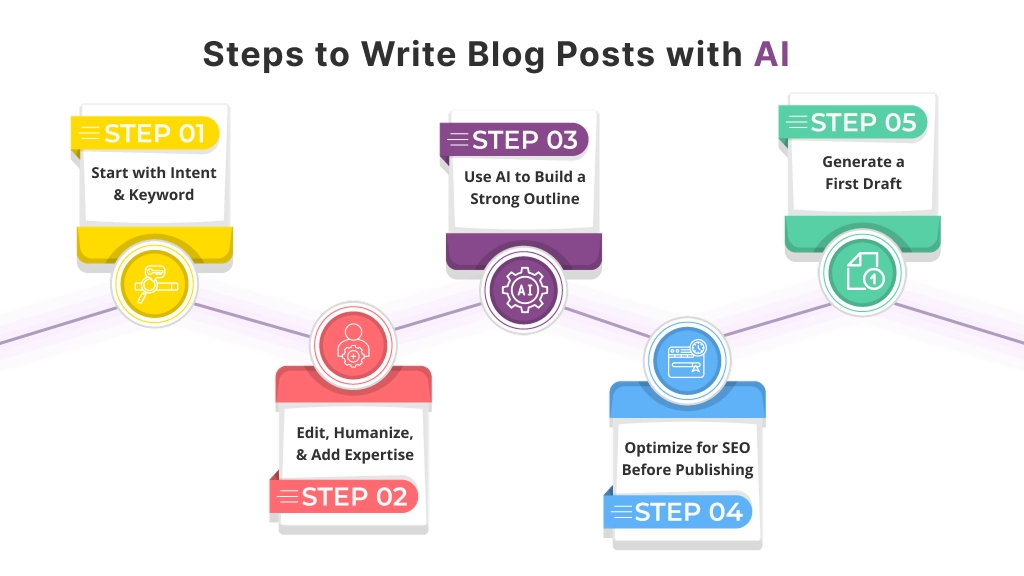
Step 1: Start with Search Intent and Keywords
Before AI writes a single word, clarity matters more than speed. This is where many bloggers get confused and accidentally create content that looks fine but doesn’t rank.
Begin by grounding the topic in real user intent:
- What problem is the reader trying to solve right now?
- Are they looking for information, a step-by-step guide, or a comparison?
- What follow-up questions appear in People Also Ask or related searches?
AI writing tools can help surface keyword ideas, variations, and related topics quickly. However, choosing the right keyword is still a human decision. You’re aligning the post with what readers expect to find, not just what sounds relevant. When intent is clear, every section that follows becomes easier to write and more likely to perform.
Step 2: Use AI to Build a Strong Outline
Once intent is locked in, outlining is one of AI’s strongest contributions.
With clear prompts, AI can help you:
- Organize ideas into a logical, reader-friendly flow
- Suggest H2 and H3 subheadings that match SERP patterns
- Identify gaps where additional explanation or context is needed
A well-structured outline prevents rambling and keeps the post focused on solving one core problem. In practice, this is where many WordPress users benefit from AI tools built directly into the editor, since outlines can be generated, adjusted, and expanded without leaving the publishing environment.
Step 3: Generate a First Draft (Section by Section)
Instead of asking AI to write the entire blog post at once, break the draft into manageable sections. This approach leads to much better results.
Writing section by section allows you to:
- Guide tone, depth, and examples more precisely
- Keep the content aligned with the outline
- Reduce repetitive or overly generic phrasing
Think of AI output as a starting point. By treating each section as a draft, not a finished product, you maintain control over quality while still saving time on initial writing.
Step 4: Edit, Humanize, and Add Expertise
This is where the post truly becomes yours.
AI can organize thoughts and speed up drafting, but editing is what adds trust and authority. During this stage:
- Add personal insights, opinions, or real-world context
- Clarify vague statements and simplify complex sentences
- Remove filler and repeated ideas
- Fact-check details to ensure accuracy
This step transforms AI-generated text into content that feels thoughtful, credible, and genuinely helpful. AI gives you momentum; human editing gives the post its voice.
Step 5: Optimize for SEO Before Publishing
Before publishing, take time to refine the post for both readers and search engines.
Key areas to review include:
- Headings that clearly reflect search intent
- Internal links that guide readers to related content
- A concise, accurate meta description
- Overall readability and flow
Some bloggers streamline this final stage by using WordPress AI writing plugins that assist with on-page SEO checks and content refinement directly inside the dashboard. This helps ensure the post is polished and optimized without disrupting the writing process.
AI Writing Tools: What to Look For (Not Which One to Buy)
This is where many bloggers get confused. It’s tempting to compare long lists of AI tools, but that rarely helps you write better content. What actually matters is what the tool can do for your workflow, not how many features it advertises.
When you’re learning how to write blog posts with AI, focus on capabilities that support clarity, quality, and SEO rather than speed alone.
Helpful Features for Bloggers
The most useful AI writing tools tend to support the same core tasks:
- Outline generation to structure posts around search intent and key topics
- Section-by-section drafting so you can guide depth and tone instead of accepting a single long draft
- Tone and style control to keep content aligned with your brand voice
- Editing and rewriting assistance to improve clarity, flow, and readability
- SEO-aware suggestions that help with headings, phrasing, and topical coverage
In practice, this means the AI should help you think and refine, not just produce text.
WordPress AI Plugins vs Standalone Tools
Both approaches can work, depending on how you prefer to write.
Standalone AI tools are often useful for:
- Brainstorming ideas
- Testing angles or introductions
- Drafting content outside your CMS
WordPress AI plugins, on the other hand, shine when you want:
- Fewer copy-paste steps
- Drafts created directly inside the editor
- Faster publishing and editing workflows
Here’s what actually matters: neither option is universally better. The right choice depends on whether you value flexibility outside WordPress or tighter integration within it. Many bloggers even use both at different stages of the writing process.
If the tool fits naturally into how you write and edit, you’re far more likely to use AI in a way that improves quality, rather than rushing content out the door.
How to Make AI-Written Blog Posts Sound Human
This is where many bloggers get stuck. AI can generate clean sentences quickly, but without thoughtful editing, the result often feels flat or generic. The goal isn’t to hide the fact that AI helped; it’s to make sure the final post still sounds like it was written by a real person, for real readers.

Add Your Voice on Purpose
AI works best when it handles structure and drafts, while you handle personality and perspective. One simple habit that makes a big difference is rewriting the introduction and conclusion yourself. These sections set the tone and leave the final impression, so they should sound unmistakably human.
You can also:
- Share a brief opinion or lesson learned
- Add a small real-world observation
- Use natural phrasing instead of overly polished language
In practice, this means letting the content sound conversational rather than perfect.
Edit for Clarity, Not Cleverness
AI tends to over-explain or dress up simple ideas. Editing with clarity in mind keeps readers engaged and improves SEO readability.
Focus on:
- Shorter sentences that are easy to scan
- Active voice instead of formal or passive phrasing
- Removing words or sentences that feel vague, repetitive, or unnecessary
If a sentence doesn’t add value or clarity, it doesn’t belong.
Know When Not to Use AI
Here’s what actually matters: AI is a support tool, not a stand-in for experience. Certain parts of a blog post should almost always come from you.
Avoid relying on AI for:
- Strong opinions or personal viewpoints
- Personal stories or lived experiences
- Deep industry expertise that requires judgment or context
Used this way, AI supports creativity and efficiency, but it doesn’t replace the human insight that builds trust and keeps readers coming back.
Common Mistakes to Avoid When Writing Blog Posts With AI
This is where many bloggers get tripped up, not because AI is unreliable, but because it’s often used the wrong way.
The most common mistake is publishing AI-generated drafts without proper editing. AI writing tools can create solid first drafts, but they don’t understand your audience, brand voice, or real-world context. Without human editing, content can feel generic, unclear, or slightly “off,” which hurts both trust and SEO.
Another frequent issue is letting AI choose keywords without checking search intent. AI can suggest keywords quickly, but it doesn’t always grasp why people are searching. In practice, this means content may target the wrong intent and fail to rank, even if it’s well written.
You’ll also see problems when bloggers repeat the same phrases and structures across multiple posts. AI tends to reuse patterns unless guided carefully. Over time, this creates content that feels repetitive to readers and signals low originality to search engines.
Finally, many people over-rely on AI for authority or expertise. AI can summarize information, but it can’t replace lived experience, opinions, or original insights. Google’s guidelines consistently reward content that demonstrates real understanding and human judgment.
Here’s what actually matters:
- Use AI to support ideation, structure, and drafting
- Apply human editing for clarity, accuracy, and voice
- Make strategic decisions about keywords and intent yourself
The fix isn’t complicated. Use AI as part of the process, not the entire process. When AI handles the heavy lifting, and humans handle the thinking, the content becomes both helpful and trustworthy.
When AI Fits Best Into a Blogging Workflow
This is where many bloggers get confused. AI works best when it supports specific parts of the blogging process rather than trying to do everything at once.
In practice, AI writing tools are most helpful when you need to:
- Overcome writer’s block by turning rough ideas or keywords into a workable starting point
- Speed up early drafts, especially for introductions, outlines, or routine sections
- Maintain consistency across posts, such as tone, structure, and formatting
- Refresh or repurpose existing content, like updating older blog posts or adapting them for new keywords
Here’s what actually matters: AI shines in repetitive, time-consuming tasks. It reduces friction in the writing process so you can focus on decisions that require human judgment, like strategy, clarity, and originality.
Many bloggers use AI content marketing plugins inside WordPress to handle these supporting steps within the editor. By offloading drafting and refinement tasks to AI, they free up time for research, editing, and shaping content that truly serves readers.
That balance, like AI for efficiency and humans for direction and quality, is where AI fits best in a modern content workflow.
Final Thoughts
Learning how to write blog posts with AI isn’t about chasing shortcuts or letting a tool do all the thinking for you. It’s about working smarter while protecting the quality, clarity, and intent of your content.
When AI is used to support the blog writing workflow, brainstorming ideas, shaping outlines, or drafting early versions, it frees up time for the parts that matter most: human judgment, editing, and experience. This is where many bloggers get confused. AI adds speed, but quality still comes from you.
In practice, the strongest results come from combining:
- AI’s ability to move fast and handle repetitive tasks
- Human insight to refine tone, accuracy, and relevance
- An intent-driven structure that aligns with SEO and real reader needs
Done thoughtfully, AI helps content feel more natural, not less. It supports readers instead of overwhelming them, and it holds up in search results because it stays focused on usefulness and clarity.
Used this way, AI doesn’t replace your voice; it gives you more space to use it with purpose.
Frequently Asked Questions (FAQs)
Can AI help write blog posts that actually rank in search results?
Yes, AI can support blog posts that rank when it’s used to assist with research, structure, and drafting, while humans handle editing, accuracy, and intent alignment. Search engines reward helpful, well-structured content, not how it was created. Quality and usefulness matter most.
How much human editing does an AI-written blog post need?
AI-generated drafts should always be reviewed and edited by a human. Editing improves clarity, adds real insight, checks facts, and ensures the content matches the reader’s intent. Treat AI output as a starting point, not a finished article.
Is it okay to publish blog posts written with AI on a WordPress site?
Yes, publishing AI-assisted blog posts on WordPress is fine when the content is original, helpful, and properly edited. Many WordPress users combine AI drafting with manual optimization inside the editor. The key is maintaining quality and relevance.
What parts of blog writing should AI handle, and which should humans control?
AI works best for brainstorming ideas, creating outlines, drafting sections, and rephrasing content. Humans should control strategy, search intent decisions, expertise, tone, and final edits. This balance keeps content natural and trustworthy.
Can AI-written content sound human and conversational?
Yes, but only after human refinement. AI can generate clean drafts, but tone, voice, and nuance come from editing. Adding examples, simplifying language, and removing generic phrasing help content feel more natural.
Will search engines penalize blog posts written with AI?
Search engines penalize low-quality or unhelpful content, not AI usage itself. AI-written content performs well when it meets user intent, provides value, and avoids thin or misleading information. The focus is always on usefulness.
How do bloggers avoid generic or repetitive AI content?
Avoid asking AI to write entire posts in one prompt. Generate content section by section, guide the tone, and rewrite key areas manually. Adding unique perspectives and examples prevents repetitive or generic results.
Is AI suitable for beginner bloggers with no SEO experience?
Yes, AI can help beginners overcome writer’s block and understand structure, but it shouldn’t replace learning SEO basics. Beginners benefit most when AI is paired with simple SEO checks and manual review.
Can AI help update or refresh old blog posts?
AI is especially useful for refreshing existing content. It can summarize sections, suggest updates, and improve clarity while humans ensure accuracy and relevance. This makes content maintenance faster and more consistent.
How often should AI be used in a blogging workflow?
AI works best as a regular support tool, not a constant replacement. Many bloggers use it for early drafts and optimization while relying on human input for final quality. Consistent but thoughtful use delivers the best results.
This page was last edited on 1 April 2026, at 12:50 pm






