

Quick Answer
An AI blog writing workflow is a structured system that uses AI writing tools to help generate, refine, and publish blog content efficiently. It covers key stages—ideation, outlining, drafting, editing, SEO optimization, and publishing—to improve quality, speed, and consistency in blogging.
If you’ve ever stared down a blank post in WordPress, wondering how to get from a vague topic to a polished, published article, you’re in good company. Most bloggers and content marketers know the feeling—idea droughts, endless edits, struggle with SEO, or just not having enough time in the day to keep up. It’s tough to balance creativity with the grinding routine of content production.
But the landscape is changing fast. With AI-powered workflows, tedious steps shrink, and you get more space to focus on ideas and strategy, not just logistics. In this guide, we’ll walk through what an AI blog writing workflow actually looks like, break down each stage, and show you how tools (especially for WordPress) can help you create a sustainable process that relieves bottlenecks and gets you publishing more confidently.
What Is an AI Blog Writing Workflow?
An AI blog writing workflow is an end-to-end content creation process that integrates AI tools into every stage of blogging. The main entities include writing assistants (like WriteRush, ChatGPT, Jasper), content management systems (like WordPress), and specific steps such as ideation, outlining, drafting, editing, optimizing for SEO, and publishing.
Instead of only automating text generation, an AI workflow brings automation and smart suggestions to every point—from brainstorming to promotion. With the right setup, you speed up repetitive work while still shaping the post with your expertise and brand voice. This unity ensures you can scale production, reduce manual busywork, and keep content standards high.
Why AI Blog Writing Workflows Matter for Modern Bloggers and Businesses
AI blog writing workflows matter because they free up creative energy and remove common content bottlenecks. By automating routine work—like generating ideas or formatting drafts—bloggers, marketers, and businesses get more done in less time. This is especially significant with today’s pressure to publish more, faster, and across more channels.
When you add AI-powered tools to your content cycle, you can:
- Brainstorm ideas on demand, with data-driven insights.
- Draft posts quickly and consistently.
- Optimize for SEO without manual guesswork.
- Seamlessly publish directly to platforms like WordPress.
The result? Smarter workflows, higher-quality output, and more time to focus on what makes your perspective valuable.
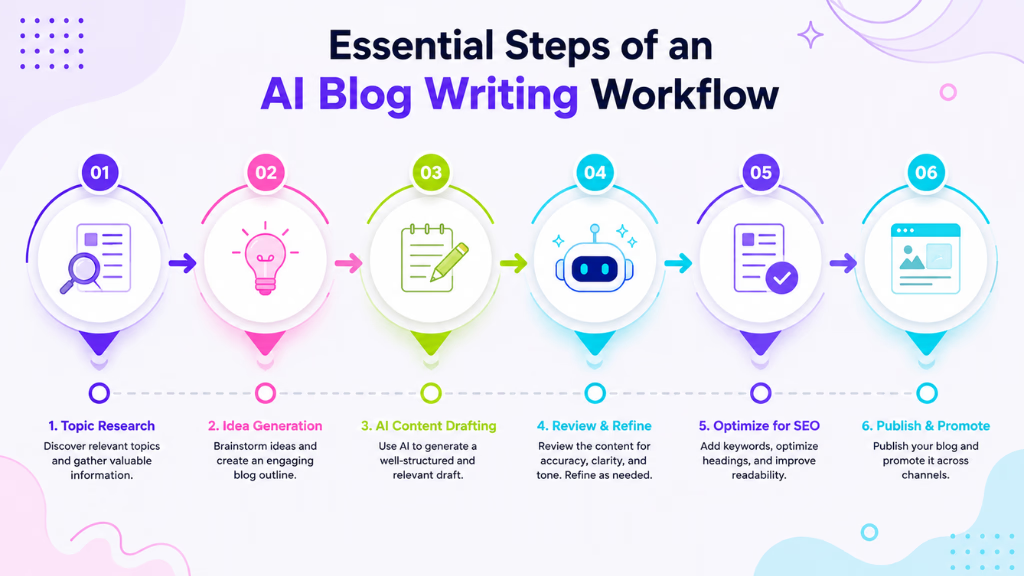
Essential Steps of an AI Blog Writing Workflow
Each stage of the workflow benefits from AI in a different way, ultimately streamlining the entire process.
Content Ideation and Research with AI
AI tools for article writing help you brainstorm and validate content ideas quickly. You can analyze audience pain points, trending topics, and keyword gaps using platforms like ChatGPT, Jasper, WriteRush’s Idea Engine, or Google Trends.
- Enter broad topics or seed keywords to generate lists of post ideas.
- Use AI to explore related questions, gaps in competitor coverage, or emerging search trends.
- Save researched ideas into your editorial calendar for future reference.
Outlining and Structuring Your Post
Creating a solid outline is simpler with AI-generated suggestions. Tools like WriteRush or Jasper can propose section headers and logical flow.
- Input your working title or focus keyword.
- Let the AI generate a detailed outline, including H2s/H3s and supporting points.
- Tweak the structure so it meets both SEO requirements and your readers’ needs.
Drafting Your Blog Content with AI Assistance
Drafting becomes faster with AI support—but quality still counts. Use AI tools to create the first draft while maintaining your unique voice.
- Generate paragraph-sized drafts using tools like WriteRush or ChatGPT directly inside your WordPress editor.
- Adjust AI-suggested text and integrate personal stories or expert perspective.
- Steer clear of overly generic output. Always review to ensure the writing matches your tone and audience expectations.
Editing and Refinement: Blending Human and AI Oversight
Editing is where human skill and AI suggestions really come together. Use grammar tools (like Grammarly or WriteRush’s built-in editor), then apply your judgment for clarity, tone, and accuracy.
- Run the draft through AI for grammar and clarity checks.
- Manually review for facts, brand voice, and engaging flow.
- Edit sections as needed—AI can make suggestions, but you are the final filter.
SEO Optimization within the Workflow
SEO is no longer a separate step. Modern AI tools help you optimize as you write.
- Use built-in modules (like WriteRush, Surfer SEO, or Copy.ai) for real-time keyword, title, and meta description suggestions.
- Compare rankings and check for on-page SEO best practices.
- Update meta tags, slugs, and internal links all in one place.
Publishing to WordPress and Distribution
Seamless integration with WordPress is key for efficiency.
- Transfer finished drafts into WordPress—with plugins like WriteRush, this can be done instantly from the editor, preserving formatting.
- Schedule posts, format media, and prepare for promotion across email or social channels.
- If you target global audiences, consider AI-powered translation or localization as an optional stage.
Optimizing Your Workflow in WordPress with AI Plugins
WordPress users benefit most when AI tools sit directly inside the posting workflow. An integrated plugin—like WriteRush—removes the hassle of copying, reformatting, or switching tabs between tools.
With WriteRush, for example, you can brainstorm, outline, draft, edit, and even optimize posts without leaving the familiar WordPress editor. Real-time outlining and in-editor AI help mean your content team (or solo workflow) stays in sync, formatting is never lost, and collaboration is effortless. This all-in-one approach eliminates classic workflow friction and helps you move from idea to publish in less time.
Common Pitfalls to Avoid in AI Blog Writing Workflows
While AI can turbocharge your content process, there are a few traps to watch for:
- Relying on AI output without editing for originality and voice can make posts sound generic.
- Ignoring SEO strategies or keyword updates misses organic growth potential.
- Fragmented workflows slow you down—integrate planning, writing, and publishing tools where possible.
- Publishing without human oversight can lead to errors or credibility issues.
- Formatting or image glitches often arise when copying between docs and WordPress; using a plugin like WriteRush helps avoid this.
Conclusion
Adapting to an AI blog writing workflow not only saves you time but elevates quality and consistency—whether you’re a solo blogger or scaling for a content team. With end-to-end solutions like WriteRush, WordPress users can work smarter by uniting idea generation, drafting, editing, optimizing, and publishing—right where content lives.
If you’re ready to create more impactful blog posts, explore how these AI-powered workflows can unlock your publishing potential.
Frequently Asked Questions
What are the main steps in an AI blog writing workflow?
The workflow usually includes ideation, outlining, drafting, editing, SEO optimization, publishing, and post-publish distribution, all enhanced by AI tools.
Which AI tools work best at each workflow stage?
Tools like ChatGPT and Jasper are great for ideation and drafting. WriteRush and Surfer SEO excel at outlining, editing, and optimizing within WordPress. Grammarly helps with editing tone and grammar.
Can AI fully automate high-quality blog writing?
AI streamlines many steps but human editing is crucial for quality, originality, and voice. Fully automated posts often miss context or personal insights.
How does AI integration enhance WordPress blogging?
AI plugins let you brainstorm, draft, edit, optimize, and publish within WordPress—reducing tool-hopping, saving time, and keeping formatting consistent.
Does using AI affect SEO rankings?
AI tools can improve SEO by providing optimized keywords, meta tags, and readability tips. However, human oversight is needed to avoid duplicate or irrelevant content.
How can I maintain my unique brand voice with AI assistance?
Personalize AI drafts, add original stories or analysis, and edit for tone. Plugins like WriteRush let you set voice guidelines and maintain consistency across posts.
Is it possible to scale blog production with AI for teams?
Yes. AI workflows and collaborative plugins make it easier for teams to brainstorm, draft, and edit posts together, quickly ramping up output while managing quality.
How do I ensure AI content passes detection or compliance checks?
Always review and personalize AI output. Blend in first-hand insights, check facts, and use tools to flag overly generic sections.
What are common mistakes to avoid with AI in blogging?
Overdependence on unedited AI text, skipping SEO, and failing to integrate tools often undermine results. Always blend automation with thoughtful human review.
Are there template workflows available for beginners?
Yes. Some plugins and knowledge bases (like WriteRush) offer step-by-step workflow templates or downloadable checklists for new AI blog writers.
This page was last edited on 23 June 2026, at 3:11 pm






