
Creating high-quality blog posts takes time. You need to choose the right topic, understand search intent, build an outline, write a clear draft, optimize the content for SEO, add internal links, create a meta description, and publish everything properly.
For bloggers, marketers, agencies, and WordPress site owners, this process can become overwhelming, especially when you need to publish content consistently. If you are new to this topic, start by understanding the basics of AI blog writing and how it supports planning, drafting, editing, and publishing content faster.
That is where an AI blog writer can help.
An AI blog writer is a tool that helps you plan, write, edit, and optimize blog content faster. It can help generate topic ideas, outlines, first drafts, headings, FAQs, meta descriptions, and even social media content based on your blog post.
But an AI blog writer is not a complete replacement for human creativity, research, or editing. The best results come when you combine AI speed with human strategy, search intent analysis, fact-checking, brand voice, and SEO experience.
Google’s guidance focuses on helpful, reliable, people-first content rather than whether content was created with AI or by a human. Google also recommends creating useful content that serves readers, not content made only to manipulate rankings.
In this guide, you will learn what an AI blog writer is, how it works, how to use it for SEO blog writing, what features to look for, and how WordPress users can simplify the process with WriteRush.
What Is an AI Blog Writer?
An AI blog writer is a software tool that uses artificial intelligence to help create blog content. It can generate ideas, outlines, introductions, full drafts, summaries, FAQs, SEO titles, meta descriptions, and content improvements based on your instructions.
For example, you can give an AI blog writing tool a keyword like “AI blog writer” and ask it to create an outline for a beginner-friendly blog post. The tool can suggest headings, subheadings, related topics, and questions that users may want answered.
A good AI blog writer can help with:
- Blog topic ideas
- SEO-friendly outlines
- First drafts
- Blog introductions and conclusions
- Headline ideas
- Meta descriptions
- FAQ sections
- Content rewriting
- Tone improvement
- Readability improvement
- Social media repurposing
However, AI-generated content still needs human review. You should check accuracy, add real examples, improve weak sections, include internal links, and make sure the final blog post sounds helpful and trustworthy. An AI blog writer is especially useful when combined with a clear process for how to use AI for blog writing, from idea generation to final editing.
AI Blog Writer vs AI Blog Generator vs AI Writing Assistant
Many people use terms like AI blog writer, AI blog generator, AI article writer, AI content writer, and AI writing assistant as if they mean the same thing. They are related, but there are small differences.
| Term | Meaning | Best Use |
|---|---|---|
| AI blog writer | A tool that helps plan, write, edit, and optimize blog content | Complete blog writing workflow |
| AI blog generator | A tool that creates a blog draft from a prompt or keyword | Fast first drafts |
| AI article writer | A broader tool for creating long-form articles and guides | Informational articles |
| AI writing assistant | A general writing helper for blogs, emails, ads, and social posts | Multi-purpose writing |
| AI SEO blog writer | A tool focused on keywords, headings, meta descriptions, and search intent | SEO-focused blog posts |
| WordPress AI blog writer plugin | A tool that helps create and publish AI content inside WordPress | WordPress publishing workflow |
If you only need a quick draft, an AI blog generator may be enough. But if you want to create optimized, well-structured, publish-ready content, you need a complete AI blog writer that supports SEO, editing, and publishing.
How Does an AI Blog Writer Work?
An AI blog writer works by using natural language processing and machine learning models to understand your input and generate content based on patterns, instructions, and context.
Usually, the process looks like this:
- You enter a keyword, topic, title, or prompt.
- The AI analyzes your instruction.
- It generates content based on your request.
- You review, edit, and improve the output.
- You optimize the content for SEO and publish it.
For example, you might enter:
“Write an SEO-friendly blog outline for the keyword AI blog writer. The audience is WordPress bloggers, small business owners, and content marketers.”
The AI can then generate a structured outline with headings, subheadings, FAQs, and content ideas.
But the quality of the output depends heavily on the quality of your input. A short prompt often creates generic content. A detailed prompt creates a more useful and focused result.
Why Bloggers and Marketers Use AI Blog Writers
AI blog writers are popular because they make content creation faster and easier. Instead of starting from a blank page, you can use AI to create a strong starting point.
Here are the biggest benefits.
1. Faster Blog Creation
Writing a blog post from scratch can take hours. You need to research, structure, write, revise, and optimize the content.
An AI blog writer can speed up the early stages by helping you create outlines, introductions, drafts, and FAQs quickly. This is especially useful for bloggers and agencies that publish multiple posts each month.
AI does not remove the need for editing, but it helps you move faster from idea to draft.
2. Better Content Planning
A strong blog post starts with a strong structure. If the outline is weak, the final article may feel confusing or incomplete.
An AI blog writing tool can help you organize ideas into a clear structure. It can suggest H2 and H3 headings, related questions, examples, and supporting topics.
For SEO, this matters because well-structured content is easier for both readers and search engines to understand.
3. SEO-Friendly Drafts
An AI SEO blog writer can help include the right keywords, related search terms, headings, and meta descriptions.
For example, if your main keyword is AI blog writer, the tool can also help you include related terms like:
- AI blog generator
- AI blog post generator
- AI article writer
- AI content writer
- AI writing assistant
- AI SEO blog writer
- SEO blog generator
- AI blog writer for WordPress
- WordPress AI blog writer plugin
The goal is not to stuff keywords into the content. The goal is to cover the topic naturally and completely so readers find the answer they need.
4. Easier Content Repurposing
A blog post can become more than one piece of content. You can turn it into:
- LinkedIn posts
- Facebook posts
- X posts
- Email newsletters
- Pinterest descriptions
- Short video scripts
- Product education content
- FAQ snippets
An AI blog writer can help repurpose long-form content into different formats. This helps you get more value from each blog post. After publishing, you can also turn AI blog posts into multimedia content such as social posts, visuals, videos, and other promotional assets.
5. Improved Consistency
Publishing consistently is one of the hardest parts of content marketing. Many blogs fail because they publish a few posts and then stop.
AI helps reduce the workload by supporting idea generation, outlining, drafting, and optimization. This makes it easier to maintain a regular content schedule.
For small businesses and agencies, consistency can make a big difference in building topical authority and organic traffic over time.
How to Use an AI Blog Writer for SEO Blog Posts
Using an AI blog writer for SEO is not just about generating a quick article. To create content that can rank, you need a proper workflow.
Here is a step-by-step process.
Step 1: Choose the Main Keyword
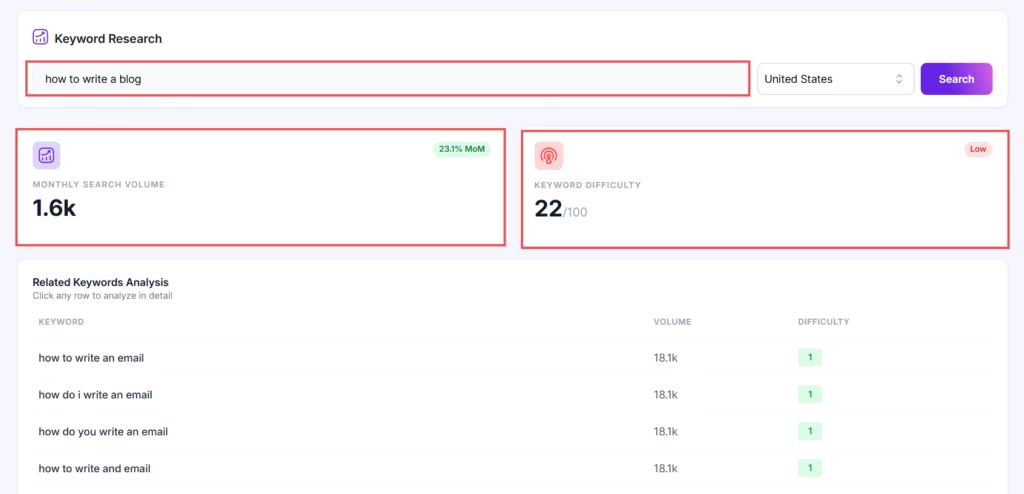
Start with one primary keyword.
For this article, the primary keyword is:
AI blog writer
Then collect related search queries, such as:
- AI blog generator
- AI blog post generator
- AI writing assistant
- AI SEO blog writer
- AI blog writer for WordPress
- free AI blog writer
- SEO blog generator
- AI content writer
- AI article writer
These related terms help you understand what users are searching for. They also help you create a more complete article.
Step 2: Understand Search Intent
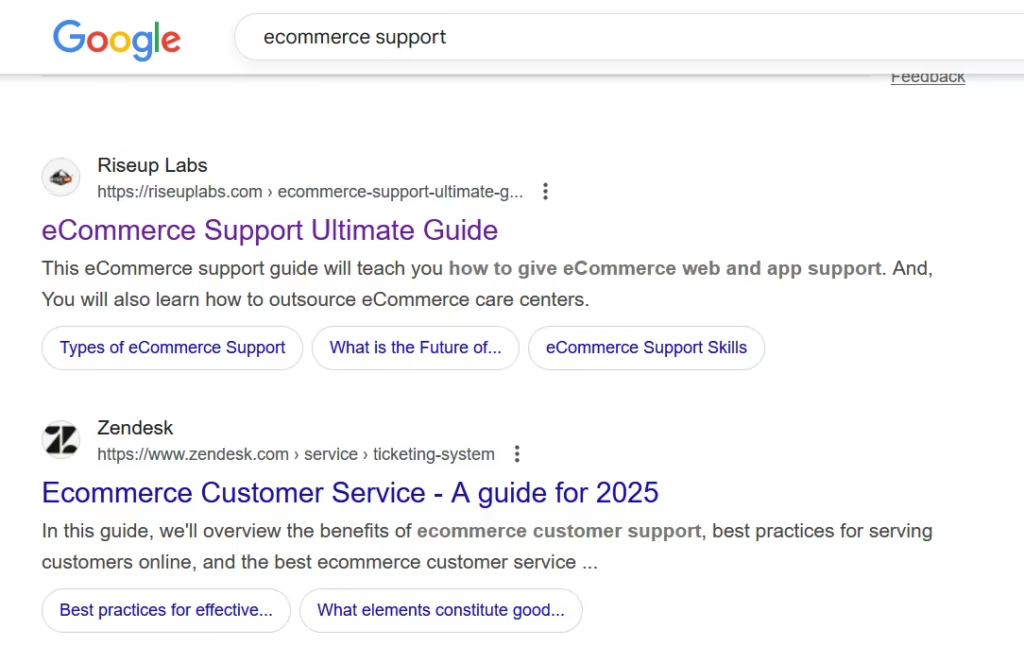
Before writing, ask yourself what the reader wants.
For the keyword AI blog writer, users may want to know:
- What is an AI blog writer?
- How does an AI blog writer work?
- Can AI blog writers create SEO-friendly content?
- What is the best AI blog writer for WordPress?
- Is there a free AI blog writer?
- Can AI-written blogs rank on Google?
- How do I edit AI-generated blog posts?
- What are the best AI blog writing prompts?
When your blog answers these questions clearly, it becomes more useful for readers.
For a more detailed WordPress-focused process, you can also follow this guide on how to write SEO blog posts with AI.
Step 3: Create an SEO-Friendly Outline

A good outline helps the article stay focused. It also makes the content easier to scan.
Your outline should include:
- Definition
- Benefits
- Limitations
- Use cases
- SEO workflow
- Tool features
- WordPress workflow
- Prompt examples
- Common mistakes
- FAQs
You can use an AI blog writer to create the first outline, but you should still review it manually. Remove duplicate sections, add missing topics, and make sure the headings match search intent.
If you need a practical structure before writing, use a content outline example to organize your title, headings, keywords, internal links, and conclusion before generating the draft.
Step 4: Generate the First Draft
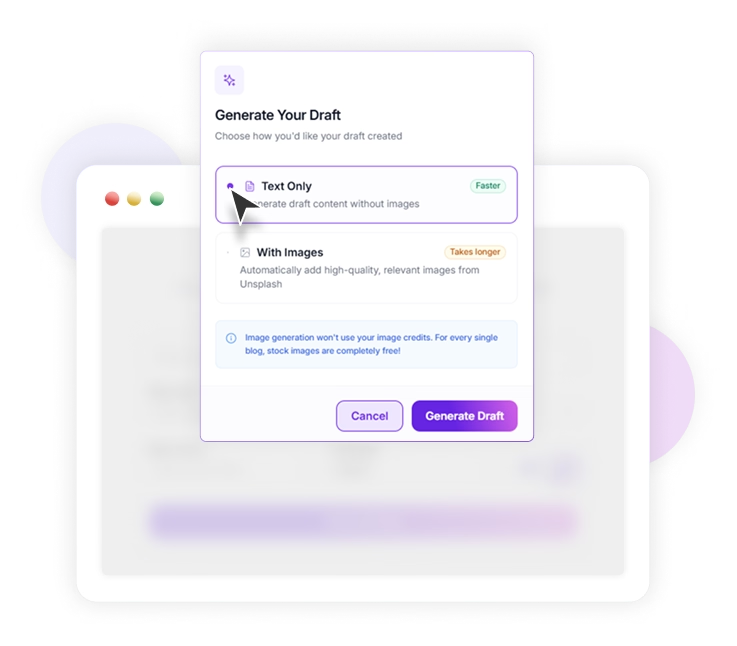
After creating the outline, use AI to generate the first draft.
Avoid short prompts like:
“Write a blog about AI blog writer.”
Instead, use a detailed prompt like:
“Write a detailed, SEO-friendly blog post about AI blog writers. The audience is WordPress bloggers, small business owners, and content marketers. Explain what an AI blog writer is, how it works, its benefits, limitations, SEO use cases, editing tips, and WordPress workflow. Use a helpful and beginner-friendly tone.”
A better prompt gives the AI more direction and usually produces a better draft.
Step 5: Add Human Editing
AI can create content quickly, but it can also produce generic sentences, repeated ideas, or inaccurate claims.
Human editing is essential.
During editing, check:
- Is the information accurate?
- Does the article answer search intent?
- Are the examples useful?
- Is the tone natural?
- Are there any repeated points?
- Are the headings clear?
- Are the keywords used naturally?
- Does the content include original insight?
AI should support your writing process, not replace your judgment.
Step 6: Optimize On-Page SEO
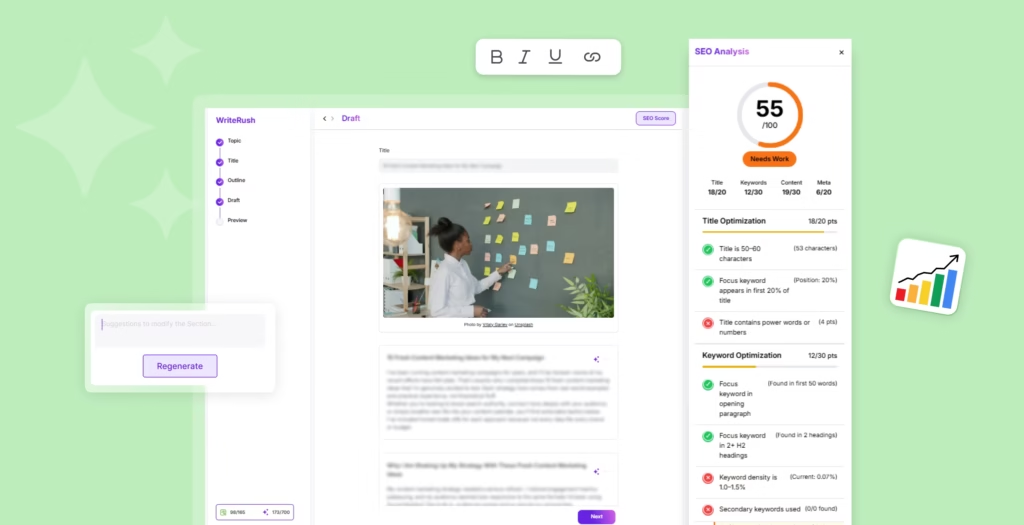
After editing the draft, optimize the page for search.
Add the primary keyword naturally in:
- SEO title
- H1
- Introduction
- Some H2 headings
- Meta description
- Image alt text
- Conclusion
Also add related keywords naturally across the article. Do not force them into every paragraph.
Google’s Search Essentials recommends using words that people would use to search for your content and placing those words in prominent locations like titles, headings, alt text, and link text.
Step 7: Add Internal Links
Internal links help users discover related content. They also help search engines understand the relationship between your pages.
For example, inside this article, you can link to related posts about:
- AI blog writing
- AI writer for WordPress
- AI prompt examples for bloggers
- Common AI writing mistakes
- Content outline examples
- AI content strategy
- WordPress AI content marketing tools
Use natural anchor text instead of generic text like “click here.”
Step 8: Publish and Monitor Performance
After publishing, monitor the article in Google Search Console.
Check which queries bring impressions and clicks. If you see relevant queries that are not fully covered in the article, add new paragraphs or FAQs to answer them.
This is one of the best ways to update an already-ranking blog post and increase traffic over time. If you want to scale this process further, AI content automation for WordPress can help organize repeated tasks like drafting, optimizing, and publishing content.
Best AI Blog Writer Features to Look For
Not all AI blog writing tools are the same. Some tools only generate text. Others support the full content workflow from keyword to publishing.
Here are the most important features to look for.
| Feature | Why It Matters |
|---|---|
| Keyword-based content creation | Helps create content around real search terms |
| SEO outline generation | Makes the structure more search-friendly |
| Long-form blog writing | Supports complete blog drafts |
| Brand voice control | Keeps the content consistent with your tone |
| Meta title and description generation | Helps improve on-page SEO |
| FAQ generation | Answers related user questions |
| Internal linking suggestions | Improves site structure and content discovery |
| WordPress integration | Reduces copy-paste work |
| Content repurposing | Turns blogs into social media posts |
| Editing support | Improves quality and readability |
You can also compare different best WordPress AI content marketing tools to understand which solution fits your content workflow, budget, and publishing goals.
A good AI blog writer should help with planning, writing, editing, optimization, and publishing. This is especially important if you manage a WordPress website and publish content regularly.
Free AI Blog Writer vs Paid AI Blog Writer
Many users search for a free AI blog writer or AI blog writer free online. Free tools can be useful, but they usually have limitations.
A free AI blog writer can help with:
- Topic ideas
- Short outlines
- Basic drafts
- Intro paragraphs
- Simple rewriting
- FAQ ideas
However, free tools may limit word count, SEO features, brand voice, long-form content quality, or publishing options.
A paid AI blog writer is usually better for businesses, bloggers, agencies, and marketers who need consistent, optimized content.
| Option | Best For | Limitation |
|---|---|---|
| Free AI blog writer | Beginners and quick drafts | Limited features and control |
| Paid AI blog writer | Serious bloggers, agencies, and businesses | Requires budget |
| WordPress AI blog writer plugin | WordPress users who publish often | Best when connected to a full workflow |
| General AI writing assistant | Multi-purpose writing | May not be focused on SEO or WordPress |
If you only need a quick idea or short draft, a free AI blog generator may be enough. But if you want to create SEO-friendly blog posts regularly, a complete AI blog writer is a better choice.
Can AI-Written Blog Posts Rank on Google?
Yes, AI-assisted blog posts can rank if they are helpful, accurate, original, and created for readers.
The important point is quality.
Google’s documentation explains that using automation, including AI, is not automatically against its guidelines. The problem is using AI or automation to create content mainly to manipulate search rankings.
So instead of asking, “Can AI content rank?” ask:
- Is this content helpful?
- Does it answer the user’s question?
- Is it accurate?
- Does it include original value?
- Is it better than generic AI output?
- Has a human reviewed it?
- Does it match search intent?
AI can help you create the draft, but human editing helps make the content trustworthy and useful.
Common Limitations of AI Blog Writers
AI blog writers are powerful, but they are not perfect. You should understand their limitations before relying on them.
1. AI Can Produce Generic Content
AI tools often create broad, basic content if the prompt is too simple. The output may sound polished but lack depth, examples, or original insight.
To fix this, add:
- Personal experience
- Product examples
- Screenshots
- Case studies
- Stronger explanations
- Specific use cases
- Data or expert input where relevant
2. AI Can Make Factual Mistakes
AI may generate outdated, incomplete, or incorrect information. Always fact-check important claims before publishing.
This is especially important for topics involving SEO, software tools, pricing, legal information, finance, health, or technical instructions.
3. AI May Repeat Ideas
Sometimes AI repeats the same point in different words. This makes the article feel longer but not more useful.
During editing, remove repeated paragraphs and combine similar ideas.
4. AI May Miss Brand Voice
A basic AI draft may not sound like your brand. It may feel too formal, too generic, or too promotional.
Use brand voice instructions in your prompt. Then edit the final draft so it sounds consistent with your website.
5. AI Cannot Fully Understand Your Audience
AI can predict what readers may want, but it does not know your real customers the way you do.
Use your own customer questions, support tickets, sales calls, and Search Console queries to improve the content.
How to Edit AI-Generated Blog Posts
Editing is the most important step in AI-assisted blogging.
Here is a practical editing process.
Check the Search Intent
Read the article and ask: does this answer what the searcher actually wants?
If the keyword is AI blog writer, the article should not only explain AI writing. It should also help users understand tools, features, SEO use cases, WordPress workflows, limitations, and how to choose the right solution.
Improve the Introduction
The introduction should quickly explain the problem and promise a clear solution. Avoid long generic openings.
A strong intro should answer:
- Who is this for?
- What problem does it solve?
- What will the reader learn?
- Why should they keep reading?
Add Real Examples
Generic content is easy to ignore. Examples make the article more useful.
Add examples like:
- A sample AI blog writing prompt
- A sample SEO outline
- A sample meta description
- A sample editing checklist
- A WordPress publishing workflow
- A comparison between free and paid tools
Make the Content Easier to Scan
Use short paragraphs, H2 headings, H3 headings, tables, bullets, and checklists.
Most readers scan before they read. If the article looks easy to navigate, they are more likely to stay.
Add Internal Links
Internal links help readers move to related topics. They also help search engines discover and understand your content.
For example, from this article, you can link to posts about AI blog writing, AI writing tools for WordPress, AI prompt examples, and common AI writing mistakes.
If your AI draft sounds too robotic, use AI prompts for human-like writing to improve flow, clarity, tone, and readability before publishing.
WriteRush: AI Blog Writer for WordPress
If you use WordPress, your blog writing process usually involves several steps. You may research keywords in one tool, create an outline in another, write the draft somewhere else, check SEO separately, and then copy everything into WordPress.
If your main focus is WordPress publishing, an AI writing tool for WordPress can help you create, optimize, and manage blog content without switching between too many platforms. Beginners can also learn what an AI writer for WordPress is and how it fits into a complete content creation workflow.
This can slow down your content workflow.
WriteRush is designed to simplify AI blog writing for WordPress users. It helps bloggers, marketers, agencies, and businesses create content faster while keeping SEO and publishing workflow in mind.
With WriteRush, you can use AI to support different stages of blog creation, including planning, writing, optimization, and promotion.
Why WriteRush Is Useful for WordPress Blog Writing
WriteRush is useful because it reduces the need to switch between multiple tools during content creation.
Instead of moving from a keyword tool to a writing tool to an SEO tool and then to WordPress, you can manage more of the workflow in one place.
WriteRush can help with:
- Blog topic planning
- SEO-focused outlines
- AI-generated drafts
- Meta title ideas
- Meta description ideas
- FAQ generation
- Brand voice consistency
- WordPress publishing workflow
- Social media content repurposing
- Faster content production
This makes it useful for:
- Bloggers
- Small business owners
- Affiliate marketers
- SEO teams
- Content agencies
- WordPress website owners
- SaaS marketers
- Niche site owners
If you publish blog posts regularly, a WordPress AI blog writer can save time and make your workflow more organized.
WriteRush vs General AI Writing Tools
General AI writing tools can help you write content, but they may not be built specifically for WordPress publishing or SEO blog workflows.
Here is a simple comparison.
| Feature | General AI Writing Tool | WriteRush |
|---|---|---|
| Blog draft generation | Yes | Yes |
| SEO-focused workflow | Sometimes | Yes |
| WordPress-focused process | Usually no | Yes |
| Blog outline support | Yes | Yes |
| Meta title and description support | Sometimes | Yes |
| Content repurposing | Sometimes | Yes |
| Publishing workflow support | Limited | WordPress-focused |
| Best for | General writing | WordPress blog creation |
If your main goal is casual writing, a general AI writing assistant may be enough. But if your goal is to create SEO-friendly blog posts for WordPress, a dedicated AI blog writer for WordPress is more practical.
Best Use Cases for an AI Blog Writer
An AI blog writer can support many types of users and content workflows.
Bloggers
Bloggers can use AI to create topic ideas, outlines, first drafts, and FAQs. This helps reduce writer’s block and speed up publishing.
Small Businesses
Small businesses can use AI blog writing tools to create educational content, product guides, service pages, and local SEO blog posts.
Agencies
Agencies can use AI to speed up content production for multiple clients. AI can help with outlines, drafts, meta descriptions, and content refreshes. For client work, an AI blog writing plugin for WordPress agencies can help teams create outlines, drafts, and meta information faster inside the WordPress workflow.
Affiliate Marketers
Affiliate marketers can use AI to create comparison posts, buying guides, tutorials, and informational articles. However, they should add real product knowledge and avoid thin, generic content.
WordPress Site Owners
WordPress users can benefit from an AI blog writer that connects with their publishing workflow. This reduces manual work and helps keep content creation more organized.
Content Marketers
Content marketers can use AI to build content clusters, repurpose blog posts, and create supporting content for campaigns. A complete AI content marketing for WordPress workflow can help marketers plan topics, create outlines, draft content, optimize posts, and repurpose content after publishing.
AI Blog Writer Prompt Examples
The quality of AI content depends heavily on the prompt. A detailed prompt gives better results than a vague one. For more ready-to-use ideas, explore these AI prompt examples for bloggers to create outlines, drafts, SEO sections, FAQs, and editing instructions faster.
Here are some useful AI blog writing prompts.
Prompt for Blog Topic Ideas
Generate 20 blog topic ideas for the keyword “AI blog writer.” The target audience is WordPress bloggers, small business owners, and content marketers. Include informational, commercial, and how-to topics.
Prompt for Blog Outline
Create an SEO-friendly blog outline for the keyword “AI blog writer.” Include H2 and H3 headings, related keywords, search intent, FAQs, and internal linking opportunities.
Prompt for First Draft
Write a detailed blog post about “AI blog writer” for WordPress users. Explain what it is, how it works, benefits, limitations, SEO workflow, editing tips, and how it helps bloggers create content faster. Use a clear and beginner-friendly tone.
Prompt for SEO Optimization
Optimize this blog section for the keyword “AI SEO blog writer.” Add related terms naturally, improve clarity, remove repeated ideas, and make the section more helpful for readers.
Prompt for Meta Description
Write 5 SEO-friendly meta descriptions for a blog post targeting the keyword “AI blog writer.” Keep each description under 160 characters and include a benefit for WordPress users.
Prompt for FAQs
Generate 8 concise FAQs for a blog post about AI blog writers. Include questions about SEO, Google ranking, WordPress, human editing, free tools, and AI-generated content quality.
Prompt for Humanizing AI Content
Rewrite this AI-generated blog section so it sounds more natural, helpful, and human. Keep the meaning the same, but improve clarity, flow, examples, and readability.
ou can also use AI prompts for blog writing when you need specific instructions for introductions, headings, meta descriptions, and content improvements.
Common AI Blog Writing Mistakes to Avoid
Before publishing, review the most common AI writing mistakes so you can avoid generic content, weak prompts, poor fact-checking, and repetitive writing. AI can improve your content workflow, but only if you use it correctly. Avoid these common mistakes.
Mistake 1: Publishing Without Editing
Never publish AI-generated content without reviewing it. AI drafts need editing, fact-checking, formatting, and optimization.
Mistake 2: Using Thin Prompts
Short prompts usually produce generic results. Give the AI clear instructions about audience, tone, keyword, structure, and purpose.
Mistake 3: Ignoring Search Intent
A blog post can include the right keyword and still fail if it does not match search intent.
Before publishing, check whether the article answers what users actually want to know.
Mistake 4: Keyword Stuffing
Do not repeat the main keyword unnaturally. Use related terms and write naturally.
For example, instead of repeating AI blog writer in every paragraph, use variations like AI blog generator, AI writing assistant, AI SEO blog writer, and AI content writing tool where they fit.
Mistake 5: Not Adding Original Value
AI can summarize common information, but your blog should add something extra.
Add:
- Your own experience
- Product screenshots
- Workflow examples
- Unique tips
- Internal data
- Customer questions
- Practical checklists
Google’s AI optimization guidance also recommends creating unique, expert-led, non-commodity content that provides value beyond common knowledge.
Mistake 6: Forgetting Internal Links
Internal links are important for both users and SEO. Do not leave your AI-written blog as an isolated page.
Link it to relevant content across your site.
AI Blog Writer Checklist Before Publishing
Before publishing an AI-assisted blog post, check the following:
- The primary keyword is used naturally
- The title is clear and search-friendly
- The introduction explains the reader’s problem
- The article matches search intent
- The outline is easy to scan
- The information is accurate
- The content includes original insight
- Repeated AI-generated ideas are removed
- Examples are added
- Internal links are included
- The meta description is optimized
- Image alt text is descriptive
- FAQs answer real user questions
- The final draft sounds human and helpful
Conclusion
An AI blog writer can help bloggers, marketers, agencies, and WordPress site owners create content faster. It can support topic planning, outline creation, first drafts, SEO optimization, FAQs, meta descriptions, and content repurposing.
But AI should not be used as a shortcut for publishing low-quality content. To get the best results, you need to combine AI with human editing, search intent analysis, fact-checking, internal linking, and original insight.
If you use WordPress, a tool like WriteRush can make the process easier by helping you manage AI blog writing, SEO optimization, and publishing workflow in one place.
The best approach is simple: use AI to speed up the process, then use human expertise to make the content accurate, helpful, and worth reading.
Frequently Asked Questions
What is an AI blog writer?
An AI blog writer is a tool that helps create blog content using artificial intelligence. It can help with topic ideas, outlines, drafts, SEO titles, meta descriptions, FAQs, and content improvements.
What is the best AI blog writer for WordPress?
The best AI blog writer for WordPress is one that supports the full blog workflow, including planning, writing, SEO optimization, editing, and publishing. WriteRush is designed for WordPress users who want to create blog content faster and more efficiently.
Is an AI blog writer good for SEO?
Yes, an AI blog writer can help with SEO by creating keyword-based outlines, optimized headings, meta descriptions, FAQs, and first drafts. However, human editing, fact-checking, internal linking, and search intent optimization are still important.
Can AI-written blog posts rank on Google?
Yes, AI-assisted blog posts can rank if they are helpful, accurate, original, and created for readers. The quality and usefulness of the content matter more than whether AI helped create the first draft.
What is the difference between an AI blog writer and an AI blog generator?
An AI blog generator usually creates a quick draft from a prompt. An AI blog writer supports a broader workflow, including planning, writing, editing, SEO optimization, and publishing.
Should I use a free AI blog writer?
A free AI blog writer is useful for testing ideas, creating outlines, or writing short drafts. For regular SEO blogging, a paid or WordPress-integrated AI blog writer usually gives more control, better workflow, and stronger optimization features.
How do I make AI-generated blog posts sound human?
To make AI-generated blog posts sound human, add examples, rewrite generic sections, remove repeated ideas, include your own experience, fact-check claims, and adjust the tone to match your brand voice.
Can an AI blog writer replace human writers?
An AI blog writer can support human writers, but it should not fully replace human strategy, creativity, research, and editing. The best workflow combines AI speed with human judgment.
Is FAQ schema still useful for blog posts?
FAQs are still useful for readers because they answer common questions clearly. However, Google announced that FAQ rich results are no longer appearing in Google Search as of May 7, 2026, so FAQs should be added for user value and content clarity, not only for rich results.
This page was last edited on 25 May 2026, at 6:02 pm