Ever stare at a blank screen, knowing you need to publish another SEO blog post, fast? Maybe you’ve tried an AI writing tool, only to find the results sound canned or miss the mark entirely. You want to grow your blog, rank in Google, and save time. But you also want to sound human and provide real value, not churn out forgettable, generic posts.
If that struggle feels all too familiar, you’re in good company. Bloggers, marketers, and WordPress users everywhere are searching for ways to write better blog posts, faster, without sacrificing quality or their unique voice. The good news? Combining AI tools with a smart, human-led workflow can dramatically speed up your content process while keeping your brand (and rankings) safe.
In this guide, I’ll walk you through a step-by-step method for writing SEO-optimized blog posts with AI. You’ll learn how to blend search strategy, AI-powered drafting, and hands-on editing for results that actually rank and sound like you.
How Do You Write SEO Blog Posts With AI?
To write SEO blog posts with AI, start by choosing a target keyword, analyzing search intent, and creating a content brief. Then use AI to generate an outline and draft the article section by section. Before publishing, edit the content for accuracy, originality, brand voice, keyword placement, internal links, metadata, and readability.
How to write SEO blog posts with AI:
- Choose a target keyword.
- Analyze search intent.
- Review the top-ranking pages.
- Create a content brief.
- Generate an outline with AI.
- Draft the article section by section.
- Add human expertise and examples.
- Fact-check and edit the draft.
- Optimize on-page SEO.
- Publish in WordPress.
- Track rankings and update the post.
What You’ll Need
- An AI writing tool (e.g., WriteRush, ChatGPT, Jasper)
- SEO platform for keyword research (e.g., SEMrush, Ahrefs, Google Search Console)
- Access to WordPress (if publishing there)
- Basic understanding of SEO (keywords, search intent, metadata)
- Time for research, editing, and quality review
What Makes an AI-Written Blog Post SEO-Friendly?
A successful AI-written blog post ranks because it does more than just hit the right keywords; it satisfies user intent and feels genuinely helpful. Let’s break down the essentials:
- Matches Search Intent: It answers the questions users bring to Google.
- Uses Keywords Naturally: Primary and secondary keywords fit smoothly into headings, intro, and body content.
- Covers the Topic Thoroughly: It goes beyond basics, addressing subtopics, related FAQs, and supplemental information.
- Includes Human Expertise: Real-life examples, case studies, and unique perspectives make content memorable.
- Is Properly Optimized Before Publishing: On-page SEO, metadata, internal links, and clear formatting give your post the edge.
The best results come from pairing AI’s speed with your own insights, a true human + machine collaboration.
How to Write SEO Blog Posts With AI Step by Step
Every great SEO blog post starts with a plan. The steps below walk you through each part of a modern, human-led, AI-assisted process.
Step 1: Choose a Target Keyword
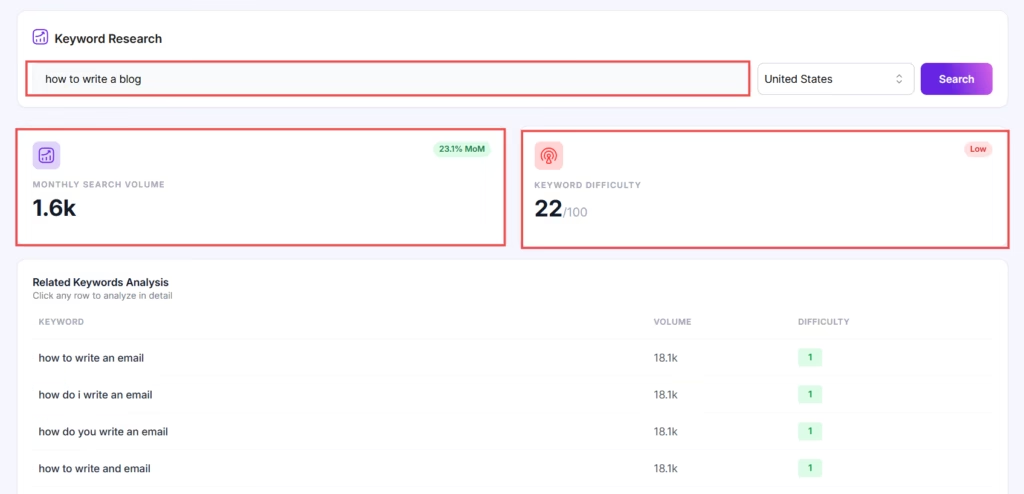
Start with intentional keyword research to find a phrase that fits your niche and audience goals.
- Use tools like SEMrush, Ahrefs, or Google Search Console to gather data on keyword volume, difficulty, and relevance.
- Look for clear search intent (what does the searcher want?), realistic competition, and alignment with your expertise or product.
- Example: For this guide, we targeted “write SEO blog posts with AI” for its growing demand and actionable intent.
Step 2: Analyze Search Intent
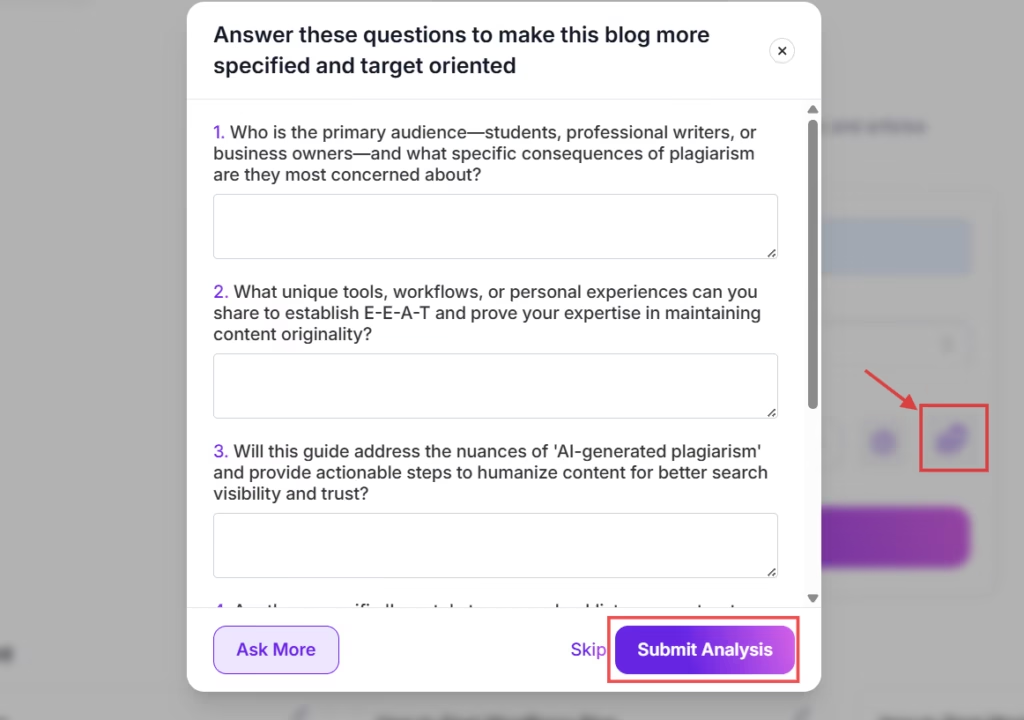
Success on Google comes from truly understanding what users expect to find.
- Review the SERP for your keyword, what kinds of questions do top posts answer? What’s the format?
- Identify whether users want a how-to, list, case study, or detailed explanation.
- Note any missing angles or gaps in the top results.
Step 3: Study the SERP

Before drafting anything, scope out the competition.
- Click into top-ranking pages and skim their structure, what topics, headings, or FAQs do they hit?
- Check for depth: Do they include SEO checklists, prompt examples, or WordPress advice?
- Use this data to shape your own brief and find spots to add value.
Step 4: Build a Content Brief
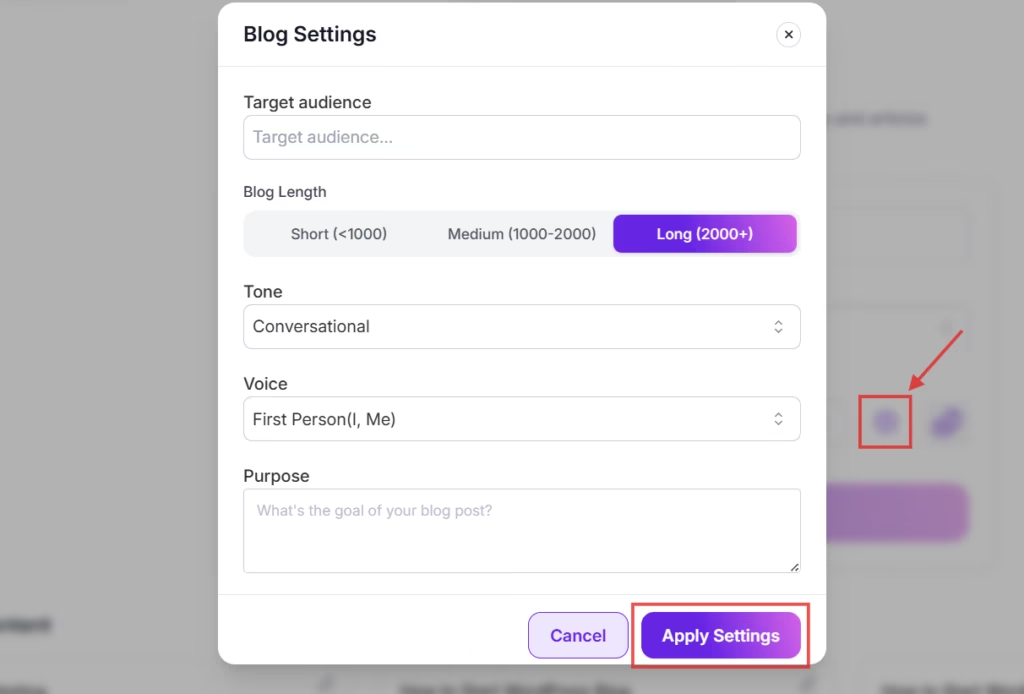
A good content brief serves as your roadmap.
- Outline the main topics, questions, and target word count.
- Specify the audience (blogger, marketer, WordPress user) and desired tone of voice.
- List any must-have keywords, required sections (like FAQs), or calls to action.
Step 5: Generate an SEO Outline

Transform your brief into a detailed blog outline.
- Use your AI tool to create a section-by-section outline based on your brief and SERP research.
- Include H2s and H3s for all major subtopics (e.g., keyword research, on-page optimization, and publishing checklist).
- Customize or reorder sections as needed for logical flow.
Pro Tip: Workflow tools like WriteRush can quickly generate a draft outline from your brief, saving you time and mental energy.
Step 6: Draft the Blog Post Section by Section
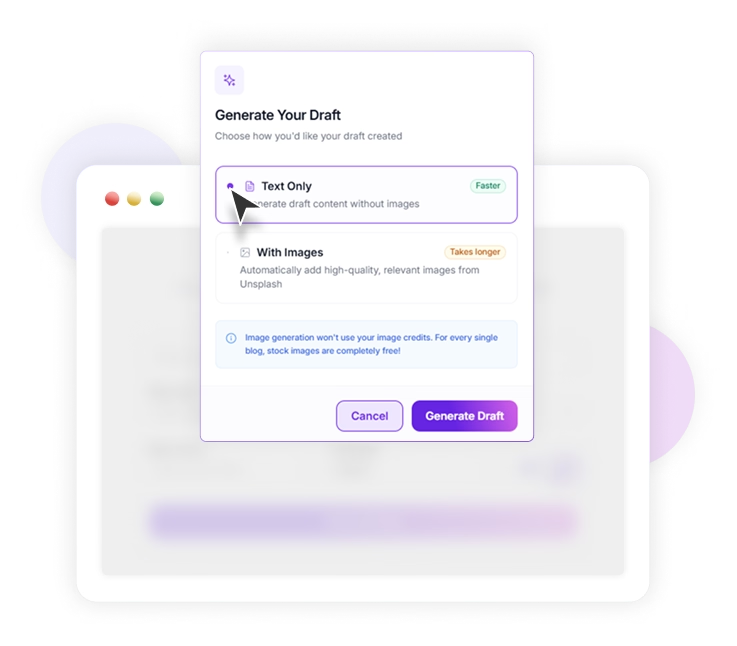
Writing in sections keeps both you and the AI focused and helps avoid rambling and generic output.
- Prompt your AI tool to draft each section separately. For example:
- Intro: “Write a 100-word introduction about the struggles of SEO blog writing and how combining AI and human editing can help.”
- H2: “Write a clear, educational section defining what it means to write SEO blog posts with AI.”
- H3: “Explain the top 3 mistakes to avoid when using AI for SEO blogging.”
- Always give context: who is the audience, what is the goal?
With tools like WriteRush, you can stay inside WordPress and generate or rewrite each section as you build out the post.
Step 7: Add Human Experience and Examples
AI content is a starting point. To stand out, infuse your draft with personal insights and specifics.
- Share a quick case study from your own blog or business.
- Add unique lessons, analogies, or frameworks that aren’t in the AI draft.
- Include relevant screenshots, stats from Google Search Console, or curated expert quotes.
Step 8: Fact-Check and Edit the Draft
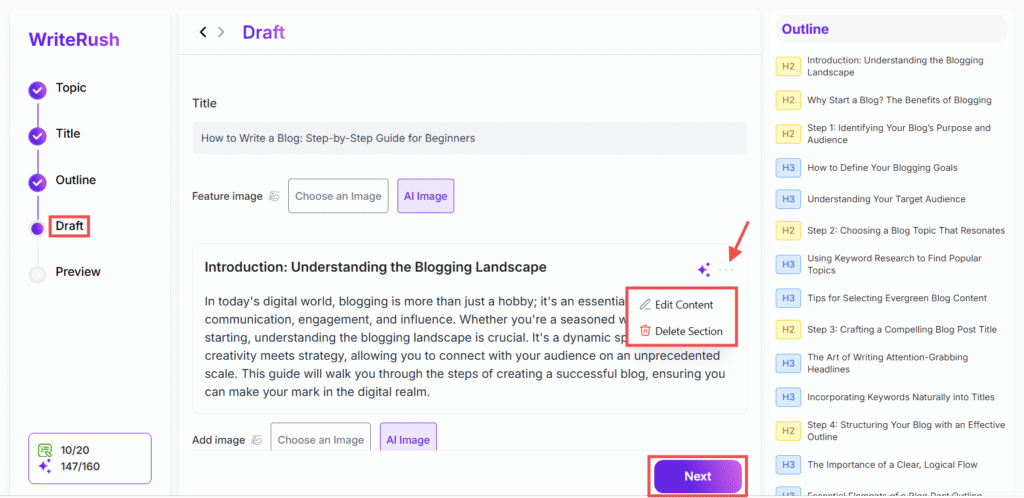
Don’t trust AI output blindly; errors happen, and credibility matters.
- Review every claim, statistic, or recommendation.
- Cross-check facts using reputable sources.
- Edit phrasing for clarity, conciseness, and voice.
- Remove filler, reiterate key points only where needed, and avoid keyword stuffing.
Step 9: Optimize On-Page SEO
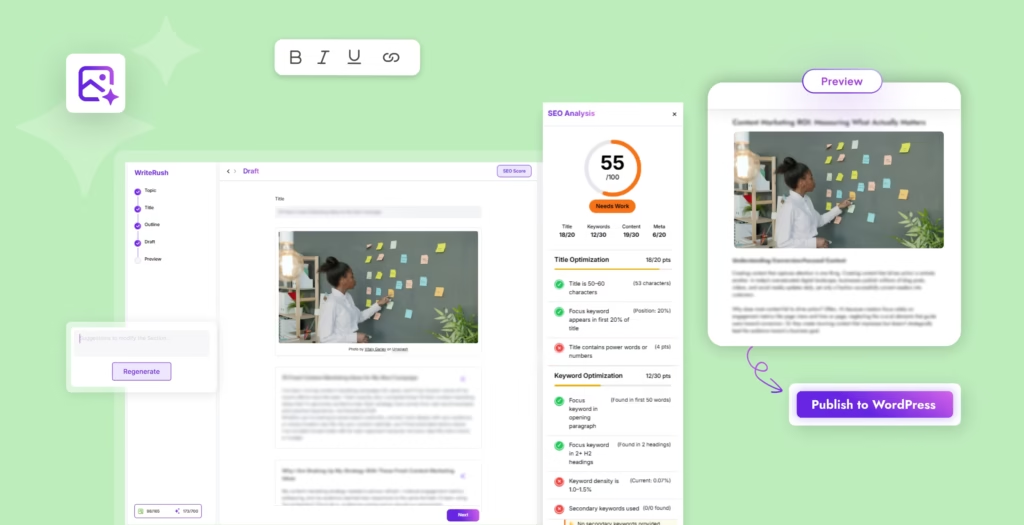
Proper optimization helps search engines (and readers) understand your content.
- Use your primary keyword in the title, main headline, and introduction.
- Naturally incorporate semantically related terms and secondary keywords.
- Add internal and external links for depth and authority.
- Write a unique meta title and description.
- Use H1, H2, and H3 headings for a clear structure.
- Add image alt text and, where relevant, FAQ schema for richer SERP results.
WriteRush and similar plugins can help automate metadata and FAQ generation inside WordPress.
Step 10: Publish and Format in WordPress
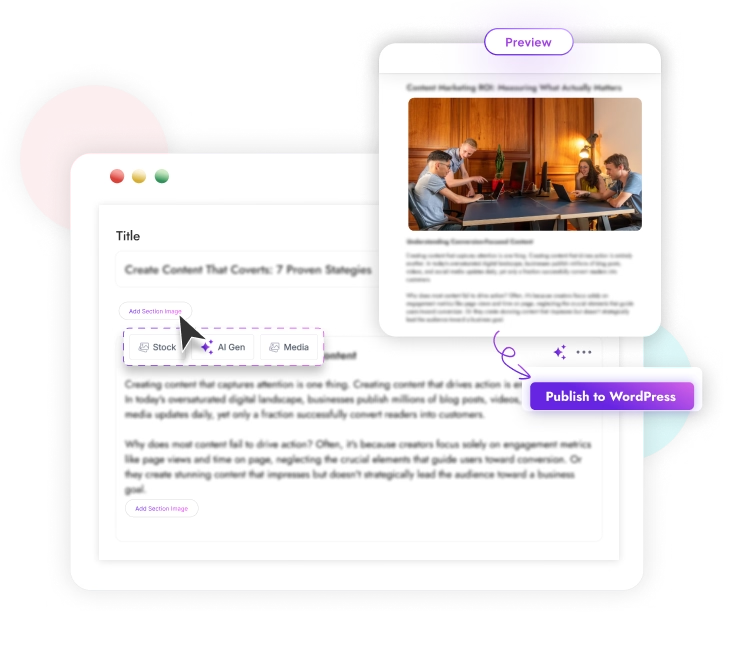
Final presentation and technical SEO matter just as much as your draft.
- Format headings, bulleted lists, and tables for scannability.
- Insert relevant images and set alt text.
- Assign categories, tags, and optimize your URL slug.
- Preview the post on desktop and mobile before publishing.
- Add a featured image, author bio, and check internal link placement.
If you use WordPress, an AI writing plugin like WriteRush can save time by letting you write, optimize, and rewrite sections without leaving your editor.
Step 11: Track Results and Update the Post
SEO is ongoing, your work doesn’t end at “Publish.”
- Use Google Search Console to monitor impressions, clicks, rankings, and queries.
- Set reminders to refresh your content as SERPs shift or new questions emerge.
- Use AI to audit your existing post, identify outdated sections, and suggest improvements.
Once you’ve completed all these steps, you’re ready to hit publish with confidence.
Best AI Tools & Plugins for WordPress Blogging
Creating SEO-optimized blog posts in WordPress is faster and more effective when you use the right AI tools and plugins. These solutions not only help you generate content but also ensure your posts are SEO-friendly, structured, and aligned with user search intent. Below are some of the most effective options, organized by purpose, with secondary keywords and search queries.
1. AI Writing Tools for WordPress
Purpose: Draft content, suggest headings, and improve readability.
Examples & Plugins:
- WriteRush: A complete WordPress AI content platform for keyword research, AI outline generation, blog type selection, long-form workflows, and one-click blog creation.
- ChatGPT for WordPress: Generate full blog drafts, meta descriptions, and content outlines.
- Jasper AI: AI content generator with tone customization and SEO integration.
- Writesonic: Quickly create blog introductions, headings, and paragraph content.
Pro tip: Use prompts with your primary keyword and semantic variations to ensure AI-generated drafts match both user intent and search intent.
2. AI SEO & Optimization Plugins
Purpose: Optimize AI-generated content for search engines and readability.
Examples & Plugins:
- WriteRush SEO Integration: Tracks SEO score in real-time and provides AI suggestions for improving keyword density, headings, and meta information.
- Rank Math AI: AI-assisted SEO recommendations and on-page optimization.
- Yoast SEO Premium: Content analysis, keyword suggestions, and readability scoring.
- SEOPress AI: Auto-suggests meta titles, descriptions, and structured data integration.
3. Content Planning & Automation Tools
Purpose: Streamline content ideation, scheduling, and workflow for AI-driven blogging.
Examples & Plugins:
- WriteRush: Provides guided long-form blog workflows, AI section regeneration, brand voice training, and automated WordPress drafts.
- GetGenie AI: Topic analysis, outline generation, and AI blog writing automation.
- Jetpack AI: WordPress content assistance with AI-powered insights and recommendations.
4. Image & Media AI Tools
Purpose: Enhance blog posts with AI-generated visuals, infographics, and featured images.
Examples & Plugins:
- WriteRush AI Image Generation: Create and regenerate AI images directly in WordPress.
- AI Image Generator Plugins: Generate visuals based on blog topics or prompts.
- Unsplash Integration: Quickly add royalty-free images with AI suggestions.
AI Prompts for SEO Blog Writing
AI writing is all about the inputs. The right prompts get you focused on relevant drafts.
Prompt for Search Intent
“Summarize the primary search intent for the keyword ‘[insert keyword]’. What does the typical Google user want to learn or achieve?”
Prompt for Content Brief
“Create a detailed content brief for a blog post targeting ‘[keyword]’. Include primary and secondary keywords, target audience, content structure, and word count recommendations.”
Prompt for Blog Outline
“Based on this content brief, generate a comprehensive blog post outline with H2s and H3s covering all key subtopics, FAQs, and supporting ideas.”
Prompt for Drafting a Section
“Write a [length] section under the heading ‘[H2/H3 title]’ for [audience]. The section should: 1) Answer the key question, 2) Use active voice, 3) Include practical tips.”
Prompt for Humanizing AI Content
“Revise the following draft to sound more personal and authentic. Add real-world examples, conversational transitions, and remove generic phrases: [paste AI draft section].”
Prompt for SEO Optimization
“Optimize this paragraph for the keyword ‘[keyword]’ while keeping the tone natural and avoiding keyword stuffing: [paste section].”
Prompt for Meta Title and Description
“Write an SEO title (max 60 characters) and a meta description (max 155 characters) for a blog post about ‘[topic]’.”
Prompt for Refreshing Old Blog Posts
“Analyze this blog post and suggest improvements or additional sections to align it with the current search intent for ‘[keyword]’. Highlight outdated sections, content gaps, and FAQ opportunities.”
Whether you’re using ChatGPT, Claude, Gemini, or WriteRush inside WordPress, strong prompts help you guide the AI to useful, on-topic, and original output.
AI is your assistant, not a replacement for strategy, expertise, or authenticity.
How to Optimize AI Blog Posts in WordPress
Publishing blog content in WordPress requires SEO and technical checks for maximum impact. Here’s how to align your AI-created draft with platform best practices:
SEO Title
Write a descriptive, keyword-rich title (max 60 characters) that matches user intent.
Meta Description
Summarize the post with a compelling meta description (max 155 characters), using your main keyword naturally.
URL Slug
Edit the URL slug to be short, relevant, and include your primary keyword.
Headings
Use H1 for your main title, H2s for key sections, and H3s for subsections. Ensure clarity and scannability.
Internal Links
Link to related posts or important pages within your blog to boost authority and keep users engaged.
Images and Alt Text
Add at least one image, set descriptive alt text, and compress images for site speed.
Schema and FAQs
Use FAQ blocks or schema plugins to enhance your post’s visibility in SERPs with rich snippets.
Categories and Tags
Assign logical categories and tags for organization and navigation.
Publishing with a WordPress AI content marketing plugin like WriteRush can streamline this process, helping you generate, optimize, and update posts without ever leaving your editor.
Common Mistakes When Writing SEO Blog Posts With AI
Avoiding these pitfalls can mean the difference between a top-ranking post and one lost in the shuffle:
Publishing Raw AI Output
Unedited AI drafts often include errors, vague statements, or thin content. Always review, rewrite, and fact-check before publishing.
Ignoring Search Intent
If your content doesn’t answer the core question users have, it won’t rank, no matter how good the keywords are.
Trusting AI Facts Without Checking
AI may “hallucinate” facts. Cross-verify every statistic, claim, or source for accuracy.
Keyword Stuffing
Shoehorning too many keywords into a paragraph hurts readability and can trigger Google penalties. Prioritize natural language and flow.
Creating Generic Content
Bland, repetitive introductions or conclusions alienate readers. Add your unique stories, detailed examples, and voice.
Forgetting Internal Links
Internal links signal relevance and keep readers engaged; missing them leaves ranking potential untapped.
Not Updating Content
SEO is not set-and-forget. Posts that aren’t updated over time will lose relevance and rankings.
AI SEO Blog Post Checklist Before Publishing
Go through this quick list to ensure your AI-generated blog post is ready to compete:
- Main keyword in title, H1, and introduction
- Clearly matches search intent and answers the core question
- Logical, scannable heading structure (H2, H3)
- All claims and statistics fact-checked
- Unique examples, opinions, or insights added
- Internal links to related posts included
- External sources and citations added where needed
- Custom meta title and description written
- Slug, category, and tags optimized
- At least one image with descriptive alt text
- FAQ section included if relevant
- Mobile and desktop previews before publishing
- Author or editor attribution added
If some of these steps feel time-consuming, a workflow tool like WriteRush can help automate outlines, draft sections, and metadata while you retain the final say on quality.
Conclusion
Writing SEO blog posts with AI isn’t about letting the robots do all the work; it’s about building a workflow where AI handles the repetitive parts, and you add strategy, insights, and voice. With the right steps, keyword research, intent analysis, guided AI drafting, and thoughtful human editing, you can publish optimized content faster, keep your WordPress site fresh, and grow your organic reach.
Ready to streamline your own process? Try integrating a WordPress-friendly AI tool like WriteRush into your workflow. You’ll save hours, and keep your unique style and quality at the heart of every post.
FAQs About Writing SEO Blog Posts With AI
Can AI write SEO blog posts that actually rank?
Yes, when you combine AI’s speed with human editing, expertise, and SEO optimization. The best results require search intent alignment, originality, and practical value.
Is AI-generated content safe for SEO?
AI content is safe for SEO if it’s useful, fact-checked, and tailored to your readers. Avoid publishing unedited drafts or aiming for mass content scaling without human review.
How do I make AI-generated content sound human and unique?
Personalize your post by adding first-hand examples, strong transitions, clear arguments, and case studies. Edit for tone, clarity, and brand voice, don’t settle for generic AI output.
Which AI tools are best for writing SEO blog posts in WordPress?
WordPress users benefit most from AI plugins like WriteRush that let you generate outlines, write sections, optimize SEO metadata, and update posts directly inside your editor.
Can I use ChatGPT to write SEO blog posts?
ChatGPT is useful for brainstorming, drafting, and rewriting. However, always validate keywords, study search intent, and edit the results before publishing.
Does Google penalize AI-written blog content?
Not inherently. Google prioritizes people-first content, useful, accurate, and valuable, regardless of whether it’s human- or AI-assisted.
How much editing do AI SEO blog drafts need?
Most drafts need fact-checking, flow improvement, personal touches, and full on-page SEO optimization. Think of AI as a co-writer, not a replacement editor.
Can AI help update and refresh my old blog content?
Absolutely. AI is excellent for reviewing existing posts, suggesting fresh FAQs, rewriting outdated intros, and filling information gaps. Always review updates before publishing.
What’s the risk of publishing raw AI content?
Unedited AI drafts may contain errors, off-brand messaging, or thin content, which can hurt trust and rankings. Human review is essential.
How do I track the results of my AI-written SEO blog posts?
Use tools like Google Search Console to monitor rankings, traffic, and engagement. Update your posts as search intent or industry trends evolve.
This page was last edited on 21 May 2026, at 1:03 pm