

Quick Answer
AI content writing services for WordPress help you create blog posts, product descriptions, landing pages, and SEO content faster, as well as keyword optimization, editing control, and human review to publish high-quality content without slowing down your workflow.
Publishing consistent, quality content on WordPress is a challenge many bloggers, marketers, and business owners know well. Between managing keyword research, crafting posts, optimizing for SEO, handling images, and actually hitting publish, it’s easy for content calendars to slip, especially when you have to wear many hats.
Maybe you’ve considered handing part of this process to AI. But there’s a lot to think about: Will AI-powered content sound robotic? Can Google penalize you? Are plugins hard to set up? Is auto-publishing risky? Will API costs spiral? Can you actually trust what AI writes, or will it end up just like everyone else’s generic output?
If you’ve wrestled with these questions, you’re in the right place. This guide breaks down what AI content writing services for WordPress are (and what they aren’t), how they compare to plugins and automation tools, the features that really matter, and, most importantly, how to use AI-generated content safely and successfully on your site.
What Are AI Content Writing Services?
AI content writing services for WordPress are AI-powered tools, plugins, or managed services that help create, optimize, and sometimes publish content on WordPress websites. They can generate blog posts, outlines, WooCommerce product descriptions, SEO titles, meta descriptions, and drafts, but the best results come from human editing, fact-checking, and search intent optimization.
In simple terms, these services work by letting you enter a topic, keyword, or brief. The system then uses advanced language models, like OpenAI’s ChatGPT or Google Gemini, to generate content, from article drafts to SEO metadata and even image ideas. Instead of “robots writing blog posts,” think of these tools as workflow accelerators. They help you start faster, structure better, and keep up with publishing needs, but they still need your expertise to shine.
AI Content Writing Services for WordPress vs WordPress AI Plugins
AI content writing support comes in several flavors. The right option depends on your workflow, technical comfort, and how much control you want.
AI-Assisted Content Writing Services
AI-assisted content writing services typically provide either fully managed content (handled by humans, powered by AI) or “done-with-you” drafts for review. They’re best for site owners or businesses who want content delivered without complex setup.
- Benefits: Less technical overhead, more editorial oversight, tends to match brand voice better.
- Drawbacks: Can be pricier per article, less direct control over content, and slower than self-serve tools.
Native WordPress AI Writing Plugins
WordPress AI plugins bring content generation directly into your dashboard. You enter a prompt, press a button, and see a draft post appear in the block editor or as a saved draft.
- Benefits: Seamless with your workflow, less copy-pasting, easier draft management, compatibility with Gutenberg/block editor.
- Drawbacks: Requires plugin setup, often needs API keys, may have usage limits and will rely on your editorial discipline.
SaaS AI Writers with WordPress Integration
Some AI platforms generate SEO briefs, outlines, or content in their own dashboard, then let you export or publish directly to WordPress.
- Benefits: Richer strategy and collaboration features, strong SEO tools, and team-based workflows.
- Drawbacks: Subscription-based costs, occasional WordPress integration limits, and may require extra steps for publishing.
Automation and Auto-Blogging Plugins
These tools focus on scale, generating and/or publishing content on a campaign basis, triggered by events like RSS feeds or schedules.
- Benefits: Great for agencies or large sites, campaign-style workflows, and time-saving in bulk.
- Drawbacks: Higher risk of low-quality output and a real chance for mistakes if you skip review.
Hybrid Human and AI Workflows
For most SEO-focused WordPress sites, this is the sweet spot. Use AI to handle the heavy lifting like outlines, drafts, and metadata, then refine with your own expertise, examples, links, and fact checks.
Comparison Table:
| Solution Type | Best For | Pros | Cons |
|---|---|---|---|
| AI Content Service | Hands-off, brand-focused | Less setup, human-edited output | Higher cost, less direct control |
| WordPress Plugin | DIY bloggers, teams | In-dashboard workflow, fast drafts | Needs setup, editorial discipline |
| SaaS AI Writer | Marketers, agencies | Strong SEO, briefs, collab tools | Subscription and export steps |
| Automation Plugin | Bulk publishers/agencies | Scalable, automatic workflows | Quality risks, needs strict review |
| Hybrid (AI+Human) | SEO-driven, high-impact | Best quality, rankable content | Takes more effort per piece |
For example, WordPress plugins like WriteRush support this hybrid style, making it easier to generate drafts while keeping editing control in your hands.
How AI Content Writing Works Inside WordPress
Here’s how the typical workflow plays out inside WordPress, especially when using an AI writing plugin like WriteRush or a direct integration:
Topic, Keyword, or Prompt Input
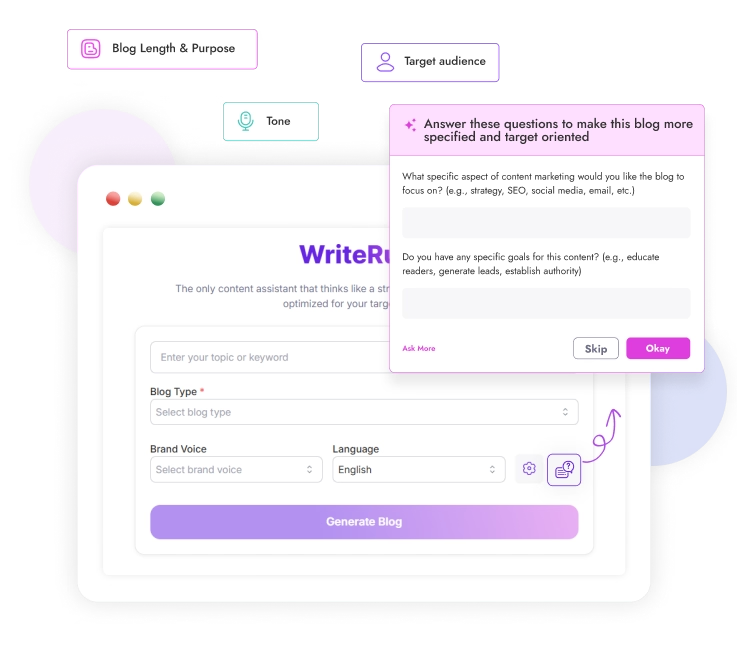
Every great post starts with a clear focus, such as a keyword, blog title, product name, or detailed brief. The more specific you are, the better the AI output. Vague prompts lead to shallow, generic drafts.
- Pro tip: Always define the search intent (informational, commercial, local, etc.) before you start.
Outline and Article Draft Generation

Once you enter your prompt, AI generates an outline (H2s, H3s, and intro) and then the article body. A good outline ensures the final post covers the right questions and matches how people search.
– Outlines often include FAQs, summary sections, and suggested calls to action.
SEO Metadata and On-Page Elements
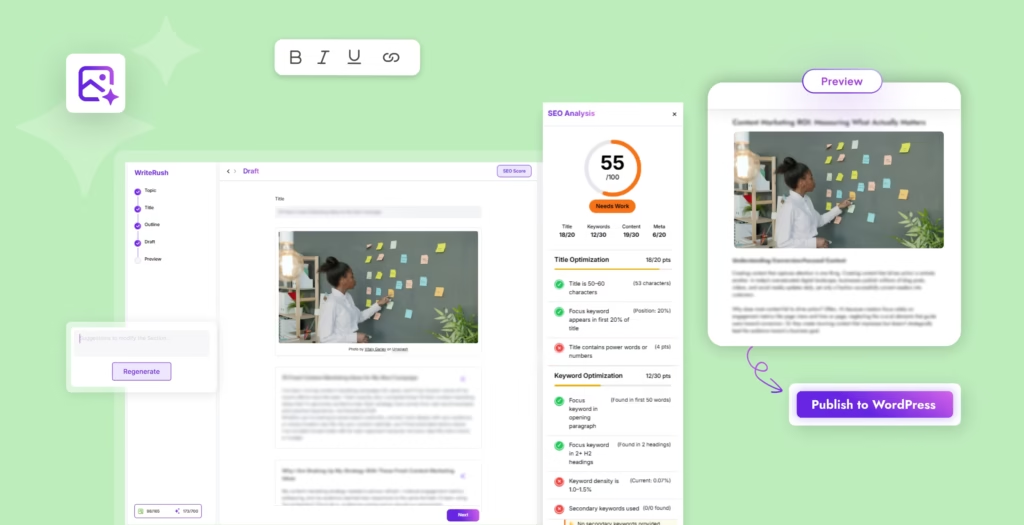
Most modern AI writing tools can suggest (or generate) your SEO title, meta description, slug, tags, and even internal linking prompts. Compatibility with your SEO plugin is key to a smooth workflow.
Images, Featured Media, and Supporting Assets
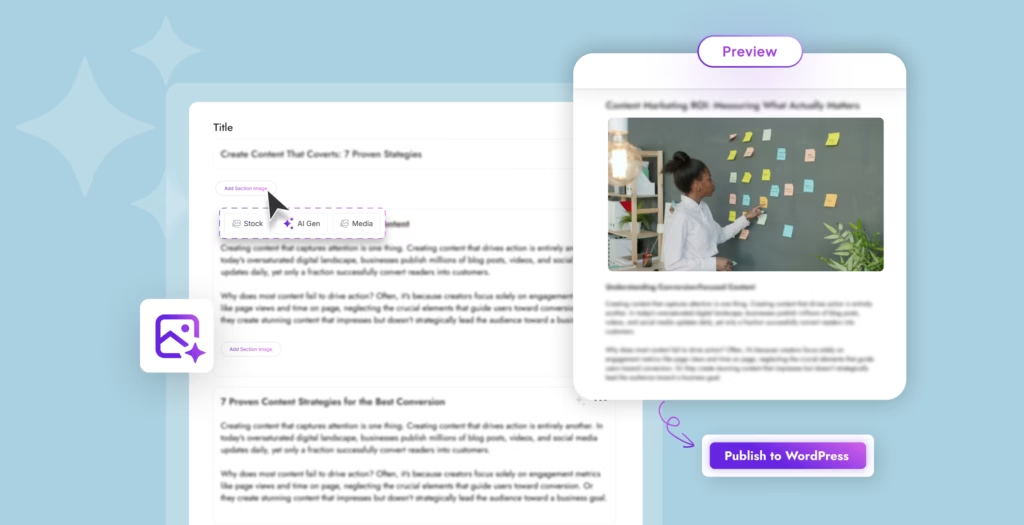
Some plugins generate images with AI or suggest stock photos through integrations like Pexels. The best posts include original screenshots or relevant visuals to back up claims and boost trust.
Review, Publishing, and Scheduling
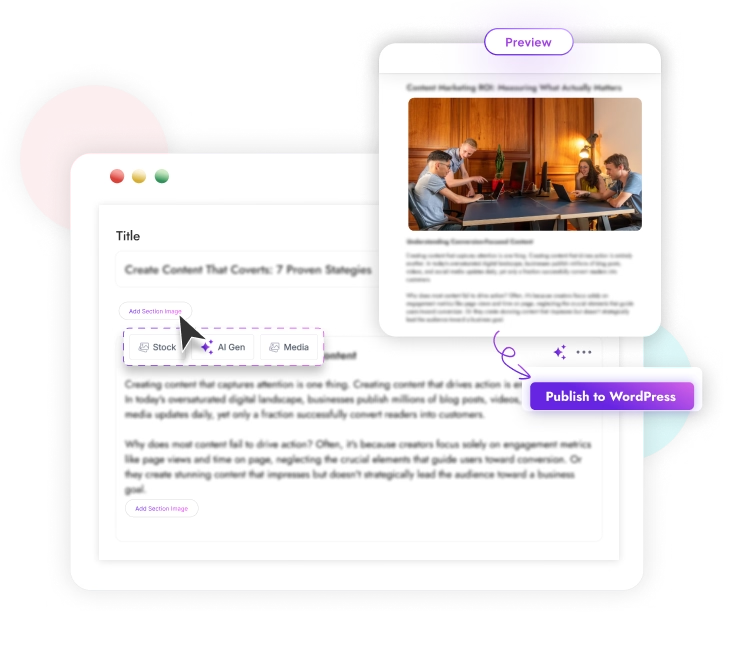
You can usually publish immediately, schedule for later, or save as a draft. For most users, saving as a draft is the safest bet; it lets you review, edit, and optimize before anything goes live.
Why Bloggers, Marketers, and Businesses Use AI Content Writing for WordPress
AI content writing services help break down walls that keep you from publishing regularly.
- No more blank page panic: AI generates first drafts or outlines, battling writer’s block.
- Consistent content calendars: Automated drafts make weekly or monthly posting more realistic.
- Lower upfront costs: Instead of hiring for every draft, you can do more in-house, but editing still matters.
- SEO support: AI can structure posts around keywords, headings, FAQs, and metadata.
- Scale for every workflow: Whether you run a solo blog, manage an agency, or operate a WooCommerce store, AI tools handle blog posts, service pages, landing pages, product copy, email drafts, and more.
Just remember: AI is the assistant, not the expert. The real value shows when you blend fast drafts with your own expertise and brand perspective.
Features to Look For in AI Content Writing Services for WordPress
Choosing the right tool or service can make or break your workflow. Here’s what matters most:
- Deep WordPress Integration: Look for direct draft creation, publishing controls, block editor (Gutenberg) support, and smooth handling of images, tags, and categories.
- SEO-Focused Generation: Keyword optimization, SERP-based outlines, SEO titles, meta descriptions, and FAQ suggestions should be built-in.
- Editorial Control & Brand Voice: Adjust tone, audience, custom instructions, and reuse templates. Ensure you can review everything before publishing.
- Auto-Posting, Scheduling, Bulk Generation: Useful for agencies and content-heavy blogs. Only bulk publish after human review.
- Model & API Flexibility: Some tools include OpenAI or Gemini model access, others need separate API keys. Keep an eye on token costs and usage limits.
- WooCommerce & Business Content Support: Product descriptions, category copy, service/local landing pages, and conversion-focused writing.
- Security & Privacy: Transparent data handling, secure API keys, reliable plugin updates, and responsive support.
When evaluating your options, whether plugins like WriteRush or SaaS platforms, compare how each tool handles workflow fit, editing flexibility, SEO controls, and genuine WordPress integration.
Are AI Content Writing Services for WordPress Safe for SEO?
Using AI for WordPress content can be perfectly safe for SEO, but only if you respect Google’s core quality signals.
- Google’s concern: Helpfulness, originality, accuracy, and genuine value, not whether AI was used.
- Risks: You may get penalized or ignored if you publish unhelpful, generic, or duplicated content just because AI made it easy.
- E-E-A-T in practice: Google wants content with Experience, Expertise, Authoritativeness, and Trust. That means adding author bios, personal examples, screenshots, reliable sources, and honest opinions.
To rank with AI-assisted content:
- Start with real search intent.
- Use a SERP-informed outline.
- Add unique insights and expertise.
- Fact-check everything (AI sometimes invents data).
- Update your posts as tools and trends evolve.
A Safe Workflow for Publishing AI-Written Content on WordPress
Want a blueprint for using AI without ending up with thin, risky posts? Here’s a proven workflow:
- Choose a keyword with clear intent: Is this post informational, commercial, transactional, or local? Don’t write content just “for volume.”
- Analyze the SERP: Check what’s already ranking: what types of pages? What questions do they answer? Identify gaps you can fill.
- Generate a structured outline: Make sure H2s, H3s, FAQs, and examples cover user needs and address the right search intent.
- Create the first draft with AI: Use your chosen tool (e.g., WriteRush) to turn the outline into a working draft, keeping user value front and center.
- Add human expertise and brand perspective: Insert stories, screenshots, local knowledge, expert opinions, and anything that makes your post unique to your brand.
- Fact-check and edit: Double-check facts, statistics, product names, and compatibility. Remove anything you can’t verify.
- Optimize the WordPress post: Add relevant SEO titles, meta descriptions, slugs, alt text, internal links, categories, and tags. Double-check formatting in the Gutenberg editor.
- Publish, monitor, and update: Track results like traffic, rankings, and engagement, and update when needed.
By using AI tools like WriteRush for drafting, then adding human review and SEO polish, you get the best of both worlds: speed and quality.
Common Mistakes That Make AI WordPress Content Look Thin
To avoid running into quality or SEO issues, steer clear of these pitfalls:
- Publishing unedited AI drafts: Raw outputs lack context, brand voice, and credibility.
- Using auto-posting for sensitive topics: For legal, medical, or technical content, manual review is critical.
- Ignoring search intent: Length doesn’t matter if you answer the wrong question.
- Scaling up similar posts: Duplicate content and keyword cannibalization can hurt your rankings.
- Skipping fact checks: AI may hallucinate statistics or misname plugins and features.
- Missing internal links: Your content should support your broader authority, not sit in isolation.
- Overlooking API and privacy settings: Track token usage, costs, service limits, and ensure user data is protected.
- Pretending AI replaces expertise: Remember, AI is a time-saver, not your brand’s expert voice.
Build a Faster WordPress Content Workflow Without Sacrificing Quality
AI content writing services for WordPress can transform your content workflow, speeding up ideation, drafting, and optimization so you don’t fall behind. But the real winning workflow isn’t just automation; it’s using AI for drafts and ideas, backed by thoughtful editing, brand voice, and SEO expertise.
If you want a WordPress-friendly way to generate structured drafts, boost content productivity, and create SEO-focused content, try integrating tools like WriteRush into your workflow. Use AI for the draft, but let your expertise make it stand out. Quality and consistency together are what move the needle.
FAQs
What are AI content writing services for WordPress?
These are tools, plugins, or managed services that use AI to create and optimize WordPress content, such as blog posts, product descriptions, and SEO metadata.
Can AI write full blog posts for WordPress?
Yes, AI can draft entire posts, but you should always review, edit, and fact-check before publishing to maintain quality and credibility.
Can AI automatically publish posts to WordPress?
Many AI plugins or automation tools can auto-publish, but saving as draft first allows for necessary review and editing, recommended for most sites.
Is AI-generated content allowed by Google?
Google accepts AI-assisted content as long as it is helpful, original, accurate, and created for users rather than manipulating search rankings.
Do I need an AI writing service or a WordPress AI plugin?
Services suit those wanting minimal effort and human-edited content, while plugins fit users who want more in-dashboard control and direct editing.
What features should a WordPress AI content writer have?
Key must-haves: WordPress draft integration, SEO metadata and optimization, editing controls, brand voice settings, transparency about API and pricing, strong security.
Do WordPress AI writers need an OpenAI or Gemini API key?
Some plugins require your own API keys, while others include access in their subscription. Always check setup and cost before committing.
Can AI tools create WooCommerce product descriptions?
Yes, many tools can help write product details, category pages, and SEO tags for WooCommerce stores right inside WordPress.
Should I use AI auto-posting?
Use auto-posting only for low-risk workflows. Important, sensitive, or reputation-impacting content should always be reviewed by a human before going live.
This page was last edited on 10 June 2026, at 3:00 pm






