

Creating content for WordPress can take a lot of time.
You need to research a topic, plan an outline, write the draft, edit it, optimize it for SEO, add images, create a title, write a meta description, and finally publish the post.
An AI writer for WordPress helps make that process faster.
It is a plugin, writing assistant, or content generation tool that helps you create, edit, optimize, and sometimes publish content directly inside your WordPress dashboard. Instead of switching between ChatGPT, Google Docs, SEO tools, image tools, and WordPress, an AI writer brings more of that workflow into one place.
For bloggers, agencies, marketers, affiliate site owners, and small businesses, this can save hours of manual work while still keeping humans in control of the final content.
In this guide, you’ll learn what an AI writer for WordPress is, how it works, what features to look for, what it can and cannot do, and how to use one properly to create better content.
Ready to discover how to supercharge your content creation? Let’s get started!
What is an AI Writer for WordPress?
An AI writer for WordPress is a tool that uses Artificial Intelligence (AI) and Natural Language Processing (NLP) to automatically generate high-quality content for your website. It integrates seamlessly with WordPress to help you create SEO-optimized blog posts, product descriptions, social media captions, and more, all while saving you time and effort.
Depending on the tool, it can help you create:
- Blog post ideas
- SEO titles
- Article outlines
- Full blog drafts
- Product descriptions
- Landing page copy
- Meta descriptions
- Social media posts
- Email content
- Image prompts
- Content summaries
- Content rewrites
Some AI writers work as external tools where you copy and paste the output into WordPress. Others work directly as WordPress plugins, allowing you to generate and manage content from your dashboard.
A WordPress AI writer is most useful when it fits into your normal publishing workflow.
Instead of starting with a blank page, you can enter a topic, keyword, or short instruction and let the tool create a first draft. Then you review, edit, improve, fact-check, add examples, and publish the final version.
The important point is this:
An AI writer should assist your writing process, not replace your judgment.
How Does an AI Writer Work for WordPress?
If you’re new to AI writing tools, you might be wondering how exactly an AI writer for WordPress works and how it can help streamline your content creation process. In simple terms, an AI writer uses advanced Natural Language Processing (NLP) and Machine Learning algorithms to generate human-like content based on the input you provide.
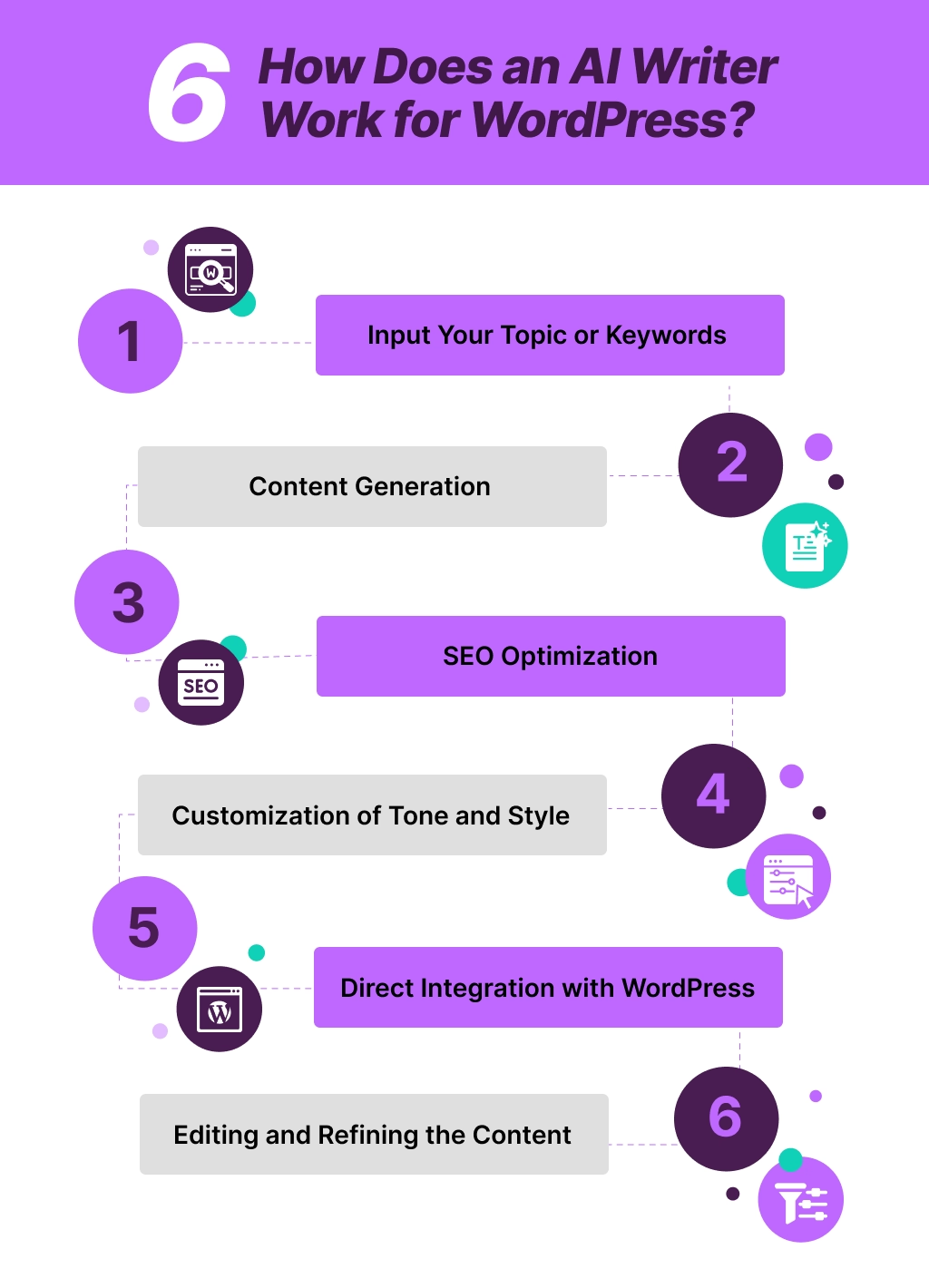
Here’s how the process works:
Step 1: Input Your Topic or Keywords
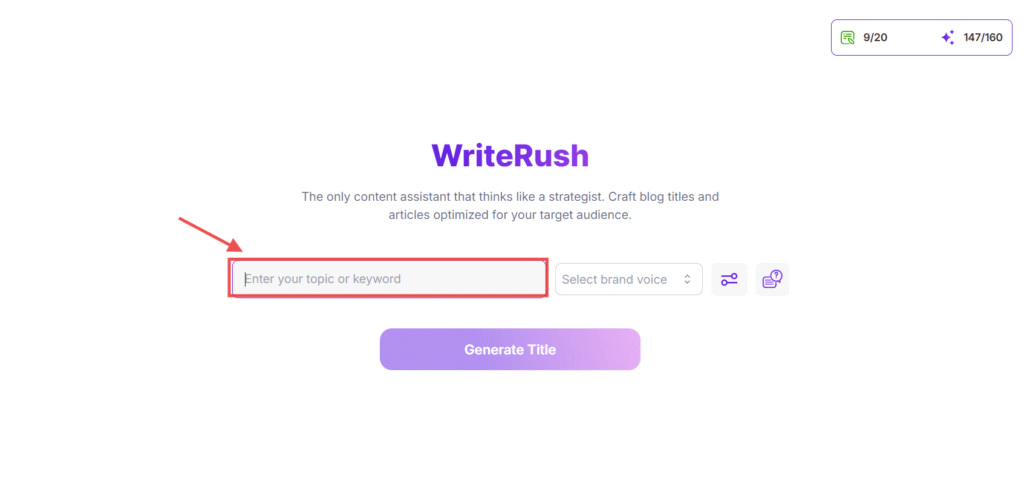
The first step is to provide the AI writer with a topic or keyword that you want to write about. For instance, if you’re writing a blog post on “How to Start a WordPress Blog,” you simply input that into the tool. The AI will analyze your request and understand the context behind the topic using its powerful algorithms.
Step 2: Content Generation
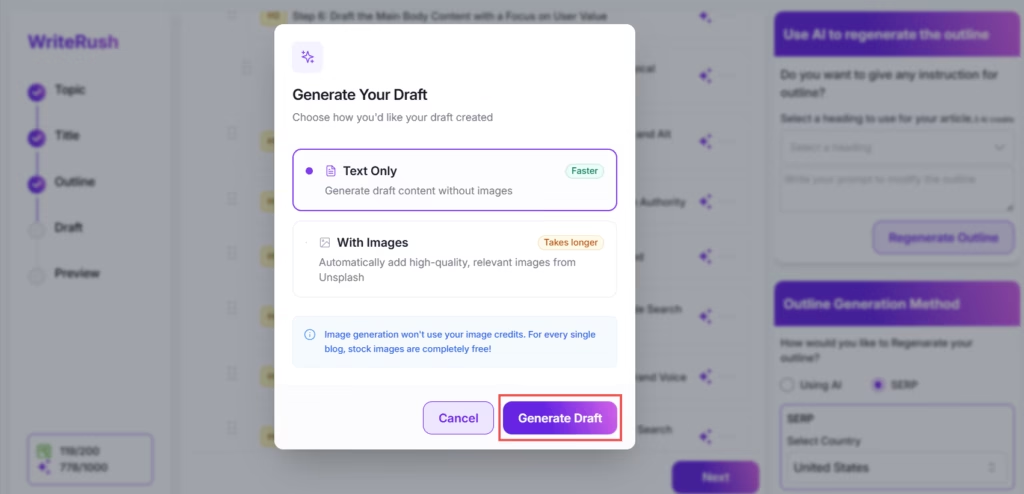
Once the AI receives the input, it starts generating content. This is where the magic happens! Using a vast database of existing content, the AI writes coherent and relevant text that aligns with your provided keywords. Whether you’re looking for an informative blog post, a product description, or a social media caption, the AI writer tailors the content to match the tone and style you’ve set.
Step 3: SEO Optimization
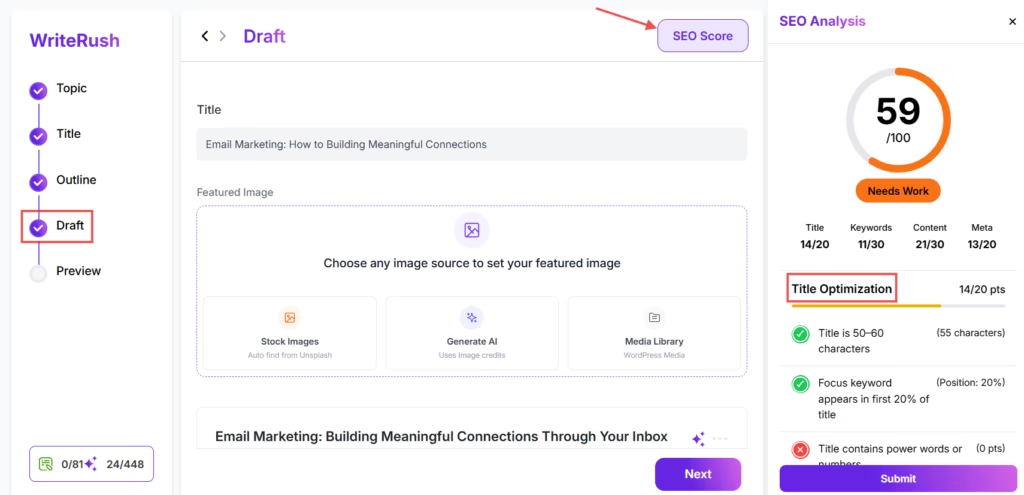
One of the most powerful features of an AI writer for WordPress is its ability to optimize content for SEO. As the AI generates content, it also analyzes it for keyword usage, readability, and other SEO factors like meta descriptions, headings, and keyword density. This ensures your content is ready for search engine ranking, helping your WordPress site rank higher and attract more organic traffic.
Step 4: Customization of Tone and Style
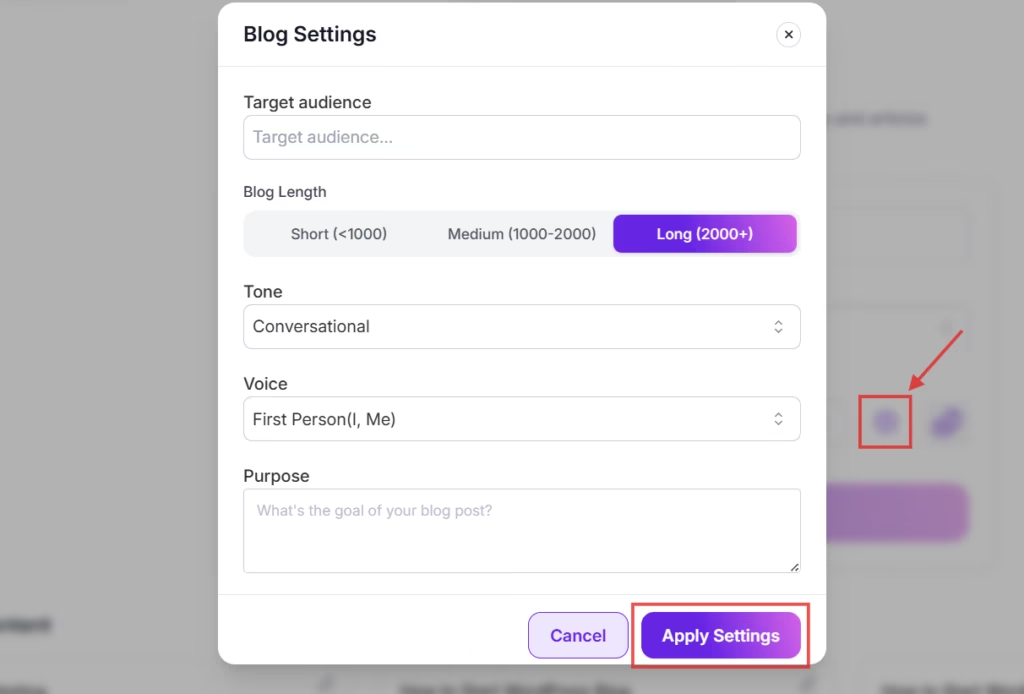
AI tools allow you to customize the brand voice of your content. Whether you need a professional, casual, or humorous tone, you can set preferences, and the AI will adjust accordingly. This feature is especially useful for businesses or bloggers looking to maintain consistency across multiple posts or pages.
Step 5: Direct Integration with WordPress
Once the content is generated and optimized, most AI writers, like WriteRush or Jasper AI, seamlessly integrate with your WordPress site. This means you can create content, make edits, and publish directly from your WordPress dashboard without needing to copy-paste between different platforms.
Step 6: Editing and Refining the Content
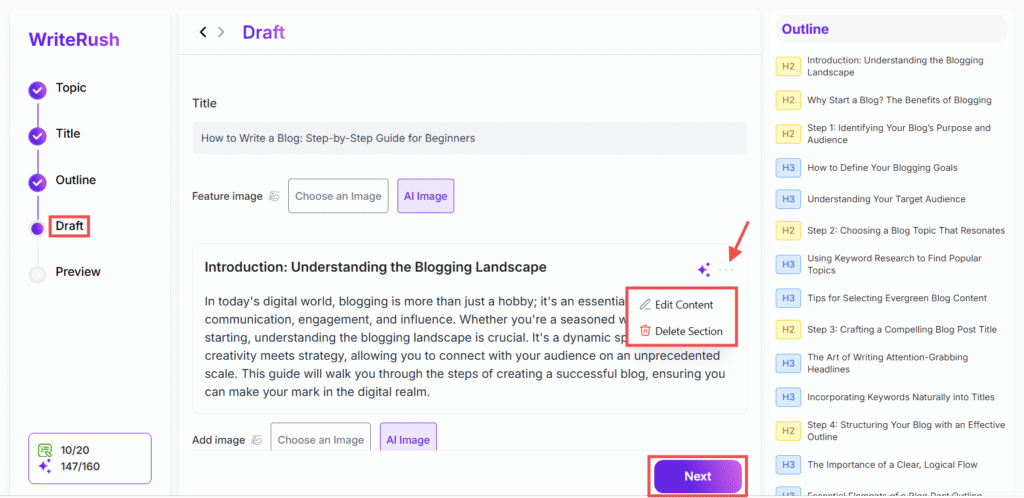
While the AI does a great job of generating initial drafts, it’s always important to review and refine the content. You can use the AI’s editing features to improve readability, fix grammar, or even adjust the content for better flow before hitting “Publish.”
Now that the process feels less mysterious, let’s open the hood and look at the key features and components that make AI writing tools so effective.
AI Writer for WordPress vs Normal AI Writing Tool
Many people ask:
Why use an AI writer inside WordPress when I can just use ChatGPT or another AI tool?
The difference is workflow.
A normal AI writing tool can generate text, but a WordPress AI writer can be more connected to your publishing process.
| Feature | Normal AI Writing Tool | AI Writer for WordPress |
|---|---|---|
| Generates content | Yes | Yes |
| Works inside WordPress | Usually no | Yes, if it is a plugin |
| Saves drafts to WordPress | Usually no | Often yes |
| Helps with blog workflow | Partly | Yes |
| SEO fields support | Limited | Often included |
| Publishing workflow | Manual copy-paste | More direct |
| Brand/content management | Depends on tool | Often built for site owners |
A general AI writing tool is useful for brainstorming and drafting.
A WordPress AI writer is useful when you want to create, optimize, organize, and publish content more efficiently from your website dashboard.
Key Features to Look for in a WordPress AI Writer
An AI writer for WordPress is a powerful tool designed to make content creation faster, more efficient, and highly effective. Whether you’re a blogger, content marketer, or business owner, these tools help you streamline your workflow, improve SEO, and maintain consistency across your content.
Here are the most significant features of an AI writing tool for WordPress:
1. AI-Powered Outline Generation
A key feature of an AI writer for WordPress is the outline generation capability. Based on the topic or keywords you input, the AI automatically generates an SEO-optimized outline. This ensures that your content is well-structured, covers the key aspects of the topic, and aligns with search intent, all while saving you time in the planning phase.
The AI-powered outline can be customized to fit your needs, ensuring you stay focused on the most important elements for your audience.
2. SEO-Optimized Content Creation
For content to rank high in search engine results, it needs to be SEO-optimized. An AI writer for WordPress helps with this by automatically analyzing your keywords, optimizing meta descriptions, and adjusting keyword density to ensure that your content is SEO-friendly.
These built-in SEO features ensure your blog posts, product descriptions, or landing pages are more likely to perform well on Google. Whether you’re targeting specific keywords or aiming for broad coverage, the AI writer’s SEO suggestions will enhance your content’s visibility.
3. Streamlined Content Workflow
Writing long-form content can be time-consuming, especially when you have to manage multiple projects. An AI-powered guided workflow helps you organize your writing process from start to finish. Whether you’re writing a detailed blog post, an in-depth article, or an instructional guide, this feature ensures that every section is optimized for SEO and aligned with your content strategy.
The guided blog workflow keeps your writing process efficient, so you can focus on the creative aspects of content creation.
4. Customizable Tone and Style
Every brand has a unique brand voice, and an AI writer for WordPress gives you complete control over your content’s tone and style. Whether you’re writing in a professional, casual, or conversational tone, the AI tool can adjust to fit your desired voice.
This level of customization ensures that all your WordPress content remains consistent with your brand’s identity, helping you build trust with your audience and deliver messages effectively.
5. Title Generation & Refinement
Crafting compelling titles is crucial to attracting readers and improving your click-through rate. An AI writer for WordPress can generate titles based on your content and target keywords. The AI can also regenerate titles, offering you multiple headline options to help you find the most engaging one.
This feature ensures your titles are catchy and optimized to drive traffic, boosting your content’s visibility in search results and social media platforms.
6. Seamless Integration with WordPress
One of the biggest advantages of using an AI writer for WordPress is its seamless WordPress integration. The AI tool integrates directly into your WordPress site, allowing you to create, edit, and publish content all within one platform.
There’s no need to copy and paste content between different tools, saving you time and effort. The WordPress integration ensures that once your content is ready, you can publish it directly to your site without leaving the writing tool.
7. Social Media Content Creation and Scheduling
In addition to blog posts, many AI writing tools also support social media content creation. You can generate captions for your social media platforms like Facebook, Instagram, LinkedIn, and Twitter.
With some AI tools, you can even schedule and post directly from the platform. This feature is incredibly useful for content marketers and business owners looking to maintain a consistent social media presence without spending hours crafting posts manually.
8. AI Image Generation and Optimization
Visual content is crucial for engagement, and with some AI writing tools, you can also create AI-generated images. Whether you need images to complement your blog posts or social media content, AI tools can generate or regenerate images tailored to your needs.
This feature saves time on sourcing stock images or designing graphics manually, all while keeping your content within the WordPress ecosystem.
9. Direct Publishing to WordPress
Once your content is ready to go, the AI tool makes it easy to publish directly to WordPress. This feature simplifies the process by eliminating the need to copy and paste content between platforms.
You can send your publish-ready content directly to your WordPress drafts, making it quick and easy to schedule and post. This seamless integration between the AI tool and WordPress ensures a smoother workflow and faster publishing.
These features don’t appear out of thin air, so let’s take a closer look at the tools and technologies working quietly in the background.
Benefits of Using an AI Writer for WordPress
Creating content for your WordPress site doesn’t have to be a stressful, time-consuming task. Whether you’re a blogger, content marketer, or business owner, AI writers for WordPress can completely transform your content creation process.
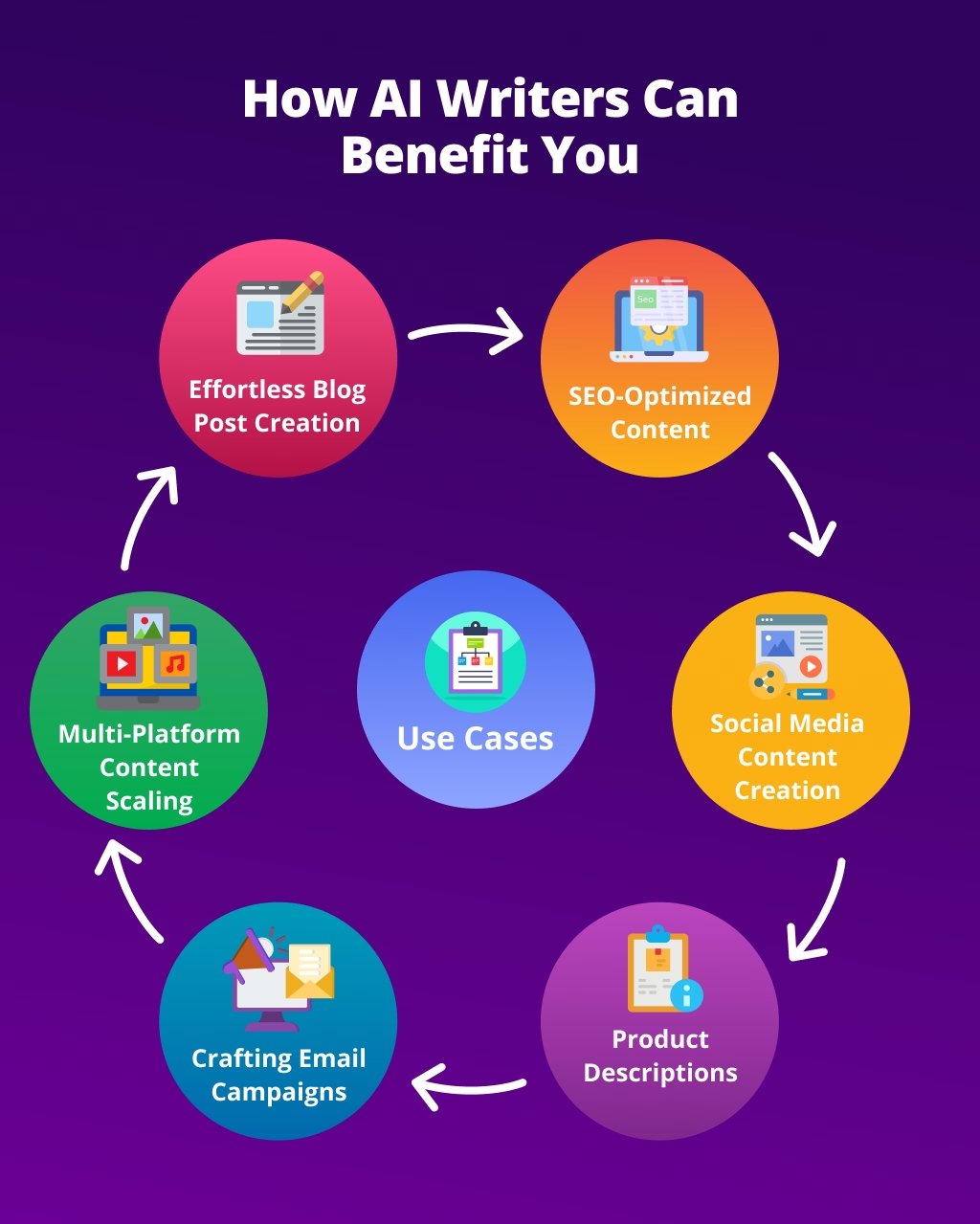
Here’s why you should consider using one:
1. Save Time and Boost Efficiency
Content creation can be time-consuming, especially when you’re managing multiple tasks. With an AI writer for WordPress, you can speed up your content production. AI writers use Natural Language Processing (NLP) and Machine Learning to generate well-structured content in just a few minutes, freeing up more of your time for other business-critical tasks. Whether you’re writing blog posts or product descriptions, AI does the heavy lifting.
2. SEO-Optimized Content
A major advantage of AI content tools is their ability to create SEO-optimized content. These tools analyze keywords and automatically optimize your content for better ranking on search engines. From adding proper keyword density to suggesting meta descriptions, an AI writer for WordPress helps ensure your content is search-engine friendly, driving more organic traffic to your site.
3. Consistent Brand Voice
Maintaining a consistent tone and style across your content is crucial for brand identity. With an AI writer for WordPress, you can easily customize the tone to align with your brand voice, whether it’s professional, casual, or something in between. This ensures consistency across all of your blog posts, product pages, and social media content.
4. Eliminate Writer’s Block
If you’ve ever experienced writer’s block, you know how frustrating it can be. An AI writer helps you overcome this by generating relevant content based on simple prompts or keywords. This makes it easy to get started, even when you’re stuck, and provides a strong foundation to refine and personalize.
5. Scale Your Content Creation
As your website grows, you may need more content, but creating it manually can be overwhelming. With an AI content generator integrated into your WordPress site, you can easily scale your content production. Whether you’re working on blog posts, product descriptions, or social media updates, AI makes it easy to produce large volumes of high-quality content without compromising on quality.
6. Easy WordPress Integration
AI writers are built to integrate seamlessly with WordPress, allowing you to create, edit, and publish content directly from your dashboard. With plugins like WriteRush or Jasper AI, you can get started quickly without the need for complex setups or technical expertise.
If any of these challenges sound familiar, you’re probably wondering one thing next! Okay, but how does an AI writer for WordPress actually work in real life?
Of course, every approach has its ups and downs, which means it’s time to honestly talk about the pros and cons of using an AI writer for WordPress.
Pros and Cons of AI Writers for WordPress
When you’re considering an AI writer for WordPress, it’s important to weigh the pros and cons to understand how these tools can fit into your content creation workflow. While AI writing tools offer many benefits, they also come with some limitations.
Let’s explore both sides to give you a clearer picture.
| Pros of Using an AI Writer for WordPress | Cons of Using an AI Writer for WordPress |
|---|---|
| Quickly generates content for blog posts, social media captions, and product descriptions. | AI-generated content may feel generic or lack the depth and creativity that human writers bring. |
| Helps avoid writer’s block and accelerates the content creation process. | Struggles with emotionally nuanced or complex topics that require personal insight or storytelling. |
| Enables faster content creation, allowing you to produce more content in less time. | AI-generated content may need editing for tone, clarity, and factual accuracy. |
| Ideal for bloggers, content marketers, and business owners looking to scale content output. | Requires human oversight to ensure the content meets quality standards before publishing. |
| AI tools integrate with SEO plugins like Yoast SEO or RankMath to help optimize content for search engines. | Excessive dependence on AI may lead to content that feels impersonal and lacks authenticity. |
| Tools like Jasper AI and Frase assist with keyword analysis and content structure for better SEO performance. | AI might not create the emotional connection that human-written content often achieves. |
| Ensures a consistent brand voice across all content types, whether it’s a blog post, product description, or social media update. | AI is excellent for structured content but may not perform well for deep, creative writing or complex ideas. |
| Helps reinforce your brand identity across platforms. | Content may lack unique perspectives or creative storytelling. |
| Generates content tailored to your target audience by using specific prompts and keywords. | AI tools can have a learning curve, especially when it comes to crafting effective prompts or using SEO features. |
| Helps create more relevant and engaging content for better audience interaction. | Requires time to master how to optimize the output and get the best results. |
Now that you’ve seen both sides of the story, let’s make things practical and explore real use cases where AI writers truly shine.
Best Use Cases for WordPress AI Writers
A WordPress AI writer can be useful for many types of users.
Bloggers
Bloggers can use AI writers to create topic ideas, outlines, drafts, and social media captions.
This is especially helpful when managing multiple posts per week.
Affiliate Marketers
Affiliate marketers can use AI writers for product comparisons, buying guides, pros and cons sections, and FAQs.
However, affiliate content should include real product research and honest opinions.
Generic affiliate content is unlikely to perform well.
Agencies
Agencies can use AI writers to speed up client content production.
For example, an agency can create first drafts, then have editors improve the content based on client requirements, brand voice, and SEO strategy.
SaaS Companies
SaaS companies can use AI writers for educational blog posts, feature explainers, help content, landing page drafts, and email campaigns.
AI can help create the first version, while product marketers refine the final message.
WooCommerce Store Owners
Ecommerce site owners can use AI writers for product descriptions, category descriptions, product FAQs, and promotional copy.
Accuracy is important here because product details must be correct.
Local Businesses
Local businesses can use AI writers to create service pages, blog posts, FAQs, and location-specific content.
For example:
- Plumbing service pages
- Dental clinic FAQs
- Restaurant blog updates
- Real estate area guides
- Salon service descriptions
The content should include real business details, service areas, photos, and customer-focused information.
Example Workflow: How to Use an AI Writer for a WordPress Blog Post
Here is a practical workflow you can follow.
Step 1: Choose a Topic
Start with a clear topic.
Example:
What is an AI writer for WordPress?
Before generating content, think about the reader.
Who is searching for this?
Possible audience:
- Beginner WordPress users
- Bloggers
- Small business owners
- Content marketers
- Agencies
- Website owners comparing AI tools
Their main question is simple:
What does this tool do, and should I use one?
Step 2: Choose a Main Keyword
Pick one main keyword and a few related phrases.
Example main keyword:
AI writer for WordPress
Related phrases:
- WordPress AI writer
- AI writing plugin for WordPress
- AI content writer for WordPress
- AI blog writer WordPress
- WordPress content generator
Do not stuff these keywords everywhere.
Use them naturally in the title, intro, headings, and body.
Step 3: Generate an Outline
Ask the AI writer to create a clear outline.
A good outline may include:
- Definition
- How it works
- Key features
- Benefits
- Limitations
- Use cases
- Examples
- FAQs
- Final recommendation
Review the outline before generating the full draft.
A strong outline usually creates a stronger article.
Step 4: Generate the First Draft
After approving the outline, generate the first draft.
At this stage, do not expect perfection.
The goal is to create a working version that you can improve.
Look for:
- Missing sections
- Weak examples
- Repeated ideas
- Unsupported claims
- Overly promotional language
- Robotic tone
- Long paragraphs
Step 5: Add Human Experience
This is one of the most important steps.
Add information only you can provide.
For example:
- Screenshots from your WordPress dashboard
- Your own workflow
- A real example of a generated draft
- Before-and-after editing example
- A short case study
- Your personal recommendation
- Common mistakes you have seen
This makes the content more useful and more original.
Suggested example block:
Example: We entered the keyword “AI writer for WordPress” and generated a blog outline with sections for definition, benefits, features, limitations, and FAQs. After reviewing the outline, we edited the headings and added real WordPress examples before generating the full draft.
Step 6: Optimize for SEO
After editing the draft, optimize it.
Check:
- Is the main keyword in the title?
- Does the intro answer the topic quickly?
- Are headings clear?
- Are paragraphs easy to read?
- Is there an FAQ section?
- Are internal links added?
- Is the meta description written?
- Is the URL short and clear?
- Are images compressed and named properly?
- Is the content actually helpful?
SEO is not just about keywords.
It is about making the page useful, clear, trustworthy, and easy to understand.
Step 7: Save as Draft and Review
Before publishing, save the article as a WordPress draft.
Then review it again.
Ask:
- Would this help a beginner?
- Is anything inaccurate?
- Does it answer the main question?
- Is the article too promotional?
- Are the examples specific enough?
- Is the conclusion useful?
Only publish after human review.
Getting Started with an AI Writer for WordPress
If you’re looking for a way to streamline your content creation process and boost productivity, WriteRush, an AI writer for WordPress, is the perfect tool. Whether you’re a blogger, content marketer, or business owner, WriteRush can help you generate high-quality, intent-based content quickly, while maintaining consistency with your brand voice.
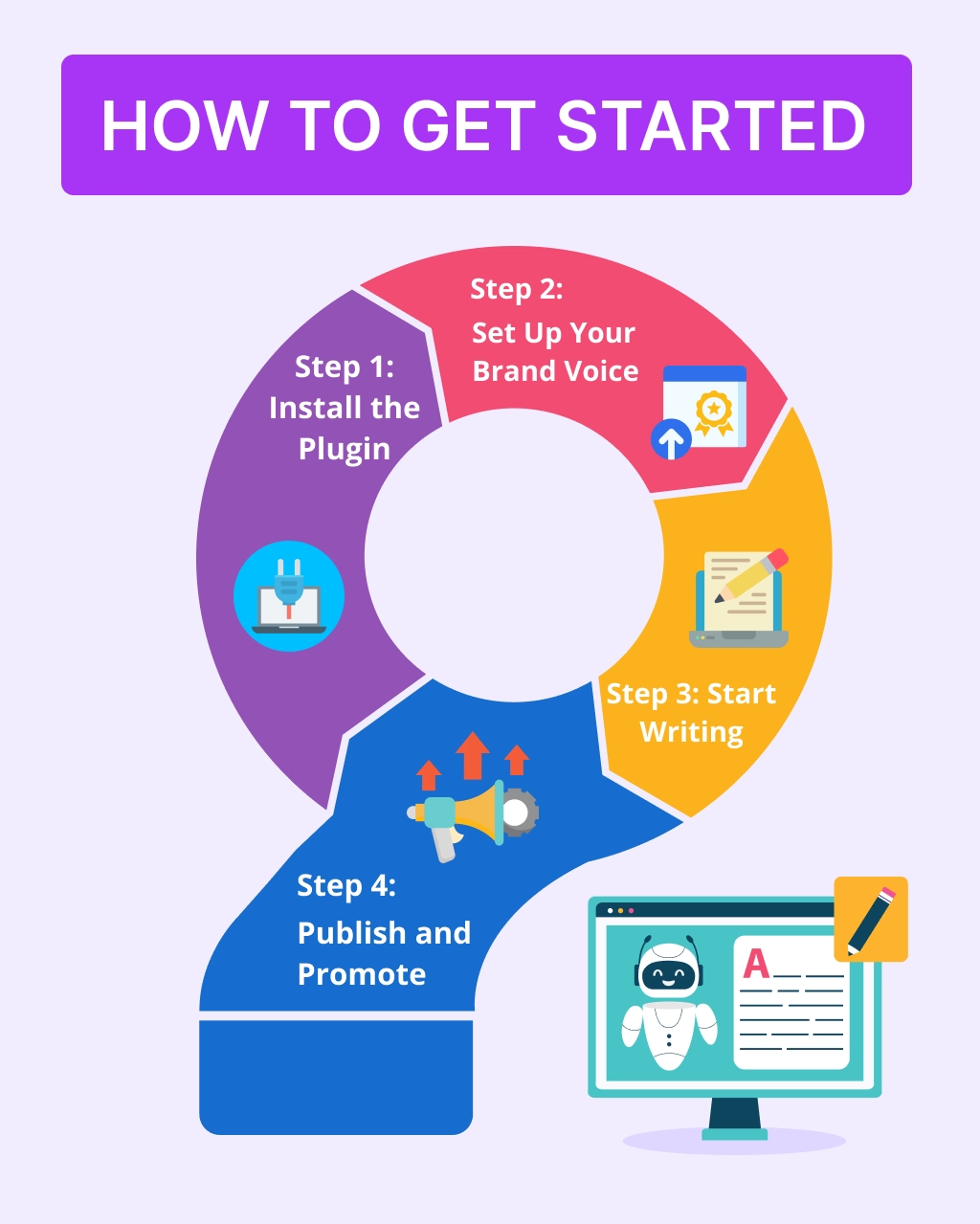
Let’s walk through the process of getting started with WriteRush and how it can revolutionize the way you create content.
Step 1: Install the Plugin
The first step in getting started with WriteRush is to install the plugin on your WordPress site. You can do this directly from your WordPress dashboard. Simply search for WriteRush in the plugin section, click install, and then activate the plugin.
Once installed, the plugin integrates seamlessly with your WordPress site, allowing you to access all the AI writer features right from your dashboard. With the plugin set up, you’re ready to start generating content.
Step 2: Set Up Your Brand Voice
After installing the plugin, the next step is to set up your brand voice. WriteRush offers a feature where you can upload your existing content or documents or use text snippets to teach the AI your unique style and tone.
By providing examples of your previous content, WriteRush learns your preferred writing style, whether formal, casual, conversational, or professional. This step ensures that the content generated by the AI will reflect your brand voice and maintain consistency across all your written materials.
Step 3: Start Writing
With your brand voice set up, it’s time to begin writing. WriteRush provides a guided workflow for creating content, which is perfect for writing blog posts, product descriptions, or even social media content.
You simply need to input a topic, keyword, or any basic instructions, and WriteRush takes care of the rest. It analyzes your keywords, drafts the content, and even generates images if needed. This process makes content creation smoother by automating most of the work while allowing you to focus on refining the message and ensuring it resonates with your target audience.
Step 4: Publish and Promote
Once your content is ready, the next step is to publish it directly to your WordPress site. WriteRush allows you to seamlessly move your content from the AI tool to your WordPress blog with just a few clicks. After reviewing and refining the draft, hit publish, and it’s live on your site.
Additionally, WriteRush has a social media module that makes it easy to share your content across various platforms like Facebook, Twitter, and LinkedIn. You can promote your new blog post, product descriptions, or updates directly from the WriteRush dashboard, ensuring your content reaches a broader audience without additional steps.
Before you jump in, there’s one more thing worth knowing: the common mistakes that can hold you back if you’re not careful.
Where WriteRush Fits Into the WordPress AI Writing Workflow
WriteRush is designed to help WordPress users create and manage AI-assisted content faster.
It can be useful for bloggers, marketers, agencies, and site owners who want a more guided content workflow inside WordPress.
With a tool like WriteRush, users can create content ideas, generate drafts, optimize content, and prepare posts without jumping between too many separate tools.
The goal is not to replace human writers.
The goal is to reduce repetitive work so you can spend more time improving the content, adding experience, and publishing consistently.
A practical WriteRush workflow may look like this:
- Enter your topic or keyword.
- Generate a blog outline.
- Review and edit the structure.
- Create the draft.
- Improve the intro, headings, examples, and conclusion.
- Add SEO title and meta description.
- Save the content as a WordPress draft.
- Review manually before publishing.
- Repurpose the post for social media or email.
This type of workflow is especially useful if you publish regularly and want to reduce the time spent on first drafts.
Mistakes to Avoid with AI Writers
Using an AI writer for WordPress can dramatically improve how you create content, but only when it’s used thoughtfully. Many users jump in expecting instant perfection, which often leads to avoidable mistakes.
Understanding these common pitfalls will help you get better results, stronger SEO, and more authentic content that truly connects with your target audience.
Publishing AI Content Without Human Review
One of the most common mistakes is treating AI-generated content as publish-ready. While an AI writer for WordPress can quickly generate structured drafts, it doesn’t fully understand context, emotion, or nuance the way a human does.
Content published without review may sound repetitive, unclear, or slightly off in tone. Over time, this can reduce trust and engagement on your WordPress site.
AI should handle speed and structure, but humans should handle clarity, accuracy, and final polish.
Ignoring Brand Voice Consistency
Another frequent mistake is failing to align AI-generated content with your brand voice. When AI isn’t guided properly, content can feel generic or inconsistent across blog posts, product pages, and social media content.
Inconsistent tone weakens brand identity and makes your messaging feel disconnected.
Your audience should instantly recognize your content, regardless of where they read it. AI works best when it’s trained or guided to follow a consistent voice.
Overusing Keywords in the Name of SEO
SEO is one of the biggest reasons people use an AI writer for WordPress, but over-optimizing content can hurt more than help. Stuffing keywords into every paragraph makes content harder to read and less engaging.
Modern SEO prioritizes helpful, natural content written for humans, not search engines.
AI should support SEO by improving structure and relevance, not by turning content into a keyword-heavy wall of text.
Overlooking Search Intent and Audience Needs
AI can generate content quickly, but it doesn’t automatically understand why someone is searching unless you guide it. Writing without considering search intent often results in content that looks good but doesn’t perform.
If the content doesn’t answer real questions or solve real problems, it won’t engage your target audience, no matter how polished it is.
Successful content always starts with audience needs, not just keywords or automation.
Relying Too Heavily on Automation
AI is a powerful assistant, but it shouldn’t replace human creativity and judgment. Over-reliance on automation can lead to content that feels repetitive, shallow, or lacking originality.
This is especially noticeable in opinion pieces, storytelling, or content meant to build trust and authority.
AI accelerates content creation, but human insight gives it depth and credibility.
Skipping Final Optimization Before Publishing
Even strong AI-generated drafts can underperform if final optimization is skipped. Missing meta descriptions, weak headings, poor formatting, or unclear internal structure can limit visibility and user engagement.
Before publishing on WordPress, content should always be reviewed for readability, structure, and SEO alignment.
Small finishing touches can make a big difference in rankings, engagement, and conversions.
Once you know what to avoid, you’re already ahead of most users, which brings us to the bigger picture and what all of this really means for your content journey.
Closing Thoughts
So, what is an AI writer for WordPress really about?
At its core, it’s a smarter way to create content without burning out. Instead of staring at a blank screen, you get structured drafts, faster workflows, and content that’s easier to optimize for SEO, all inside your WordPress environment.
More importantly, an AI writer doesn’t replace your creativity; it supports it. You stay in control of your brand voice, messaging, and final edits, while AI handles the heavy lifting, drafting, structuring, and speeding things up. This makes it especially valuable for bloggers, content marketers, and business owners who need consistent, high-quality content without sacrificing time.
When used thoughtfully, an AI writer for WordPress helps you publish more confidently, reach your target audience more effectively, and scale your content efforts with less stress.
So, it’s not just a writing tool, it’s a productivity partner that helps you create better content, faster, and with purpose.
Frequently Asked Questions (FAQs)
1. What is an AI writer for WordPress?
An AI writer for WordPress is a tool that helps users generate content such as blog posts, product descriptions, and marketing copy directly within WordPress. It uses artificial intelligence to create structured drafts faster while supporting SEO and content consistency.
2. Is an AI writer for WordPress suitable for beginners?
Yes, AI writers are beginner-friendly. They simplify content creation by guiding users through the writing process, making them ideal for bloggers, small business owners, and anyone new to WordPress content creation.
3. Can AI writers create SEO-optimized content?
Yes. Most AI writers assist with SEO by helping structure content, improving readability, and supporting keyword placement. However, human review is still important to ensure accuracy and search intent alignment.
4. Will AI-generated content sound generic?
AI-generated content can sound generic if used without customization. To avoid this, users should define their brand voice, add personal insights, and edit drafts before publishing.
5. Do AI writers replace human writers?
No. An AI writer for WordPress is designed to support, not replace, human creativity. It handles drafting and structure, while humans provide strategy, storytelling, and final judgment.
6. Is AI-written content safe for search engines?
Yes, as long as the content is helpful, original, and edited for quality. Search engines prioritize value for users, not whether content is written by AI or humans.
7. Can AI writers help with writer’s block?
Absolutely. AI writers are excellent for overcoming writer’s block by generating ideas, outlines, and first drafts that users can refine.
8. How much editing does AI-generated content need?
Editing is always recommended. While AI provides a strong draft, users should refine tone, verify facts, and ensure the content fits their target audience.
9. Can I use an AI writer for long-form blog posts?
Yes. AI writers are especially useful for long-form content, helping with outlines, section-by-section drafting, and maintaining structure throughout the article.
10. Is an AI writer useful for non-blog content?
Yes. Beyond blog posts, AI writers can assist with product descriptions, landing pages, email drafts, and social media content within WordPress.
11. Does using an AI writer require technical knowledge?
No technical expertise is required. Most AI writers integrate smoothly with WordPress and are designed for everyday users.
This page was last edited on 11 May 2026, at 6:02 pm






