You’ve been there, staring at a blank screen, juggling multiple tools, trying to craft the perfect blog post, and thinking, “Where do I even start?”
You’ve got a blog post to write, but first, you need to do keyword research. Then you open your AI writing tool, but the content it spits out feels… Well, ROBOTIC!
You spend hours tweaking, editing, and copy-pasting into WordPress, hoping the end result doesn’t sound like a machine wrote it.
And let’s not forget the endless tool-switching, one for research, one for images, one for writing. It’s exhausting and time-consuming!
But what if you could skip all the frustration? What if there was an easier way to write faster, stay on-brand, and still produce content that ranks well on Google?
In this blog, we’re going to show you how WriteRush, an AI-powered WordPress plugin, can do all that for you. We’ll walk through how it helps streamline your content creation, keep your writing authentic, and get your posts search-engine ready, all without juggling multiple tools.
Keep reading to see how WriteRush can make content creation effortless and help you get back to what you do best: creating great content!
Tired of Switching Too Many Tools and Still Getting Nowhere?
You’re Not Alone!
Let’s talk about the traditional workflow that so many of us are still stuck in.
If you’ve ever tried to create a blog post from scratch, you know the chaos all too well. It usually starts with good intentions, maybe even a cup of coffee and a fresh idea. But before you write a single sentence, you’re already juggling tools.
One tab for keyword research using SEMrush, Ahrefs, or some other tool. For AI writing, jump over to ChatGPT or another AI writing assistant. A Google Doc or a similar tool to add your personal touch. Finally, you copy-paste it all into WordPress, praying everything formats correctly.
Oh, and let’s not forget the image generation tool like Canva, Midjourney, or Google AI Studio you need to use to add visuals to your posts.
By the time you’re finished, it feels like you’ve spent days, not hours, on a single blog post. And the worst part? Despite all this effort, the content still doesn’t feel 100% “YOU.”
Does this sound familiar?
The AI output feels robotic, the formatting is messy, and your brand persona gets lost somewhere between tool number four and five.
It’s frustrating, exhausting, and honestly, not how content creation should feel.
But here’s the good news. You don’t have to keep fighting with scattered tools and generic AI outputs. There is a way to create content that’s faster, easier, and actually sounds like you. JUST meet WriteRush.
And in the next section, you’ll discover exactly how WriteRush brings everything together right inside WordPress to finally make content creation feel smooth and stress-free.
What is WriteRush?
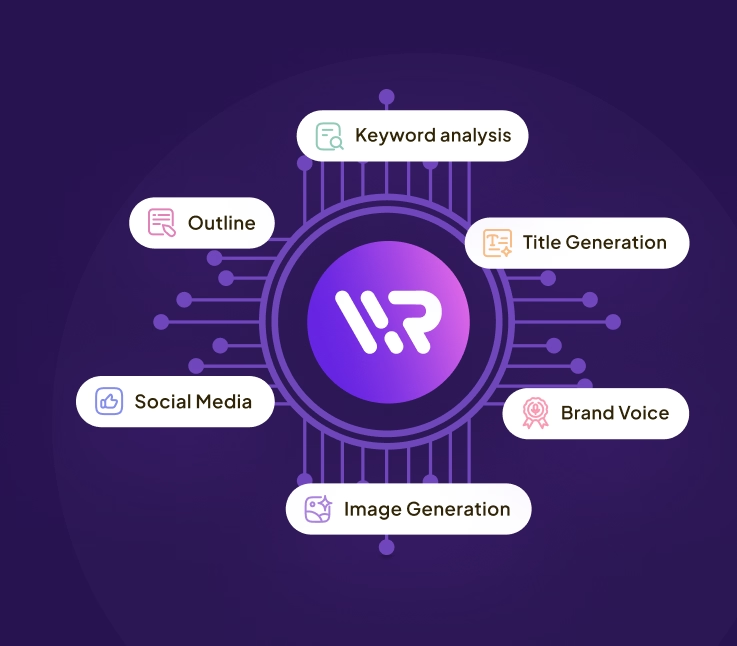
WriteRush is an all-in-one AI-powered content creation and marketing solution designed specifically for WordPress users. It enables you to generate, optimize, and publish high-quality, SEO-ready blog content directly from your dashboard, without relying on multiple tools.
From turning a simple idea into a structured, SERP-based outline to creating long-form articles, optimizing SEO, adding visuals, and even generating social media posts, WriteRush streamlines the entire content workflow in one place.
What sets WriteRush apart is its flexibility and personalization. You can define your target audience, tone, and content goals, and even train the AI to match your brand voice, ensuring every piece of content feels authentic and consistent.
In short, WriteRush helps bloggers, marketers, businesses, and agencies create better content faster, scale their production, and focus more on growth instead of manual tasks.
Pretty cool, right? But this is just the beginning.
Before we see what WriteRush can actually do, let’s talk about the struggles it solves, because chances are, you’ve faced most of them yourself.
Meet Your Secret Weapon for Authentic Writing
Let’s be honest, one of the biggest frustrations with AI writing tools is that the content almost always sounds the same. It might be grammatically perfect, but it doesn’t feel personal. It doesn’t feel authentic. And it definitely doesn’t feel like you.
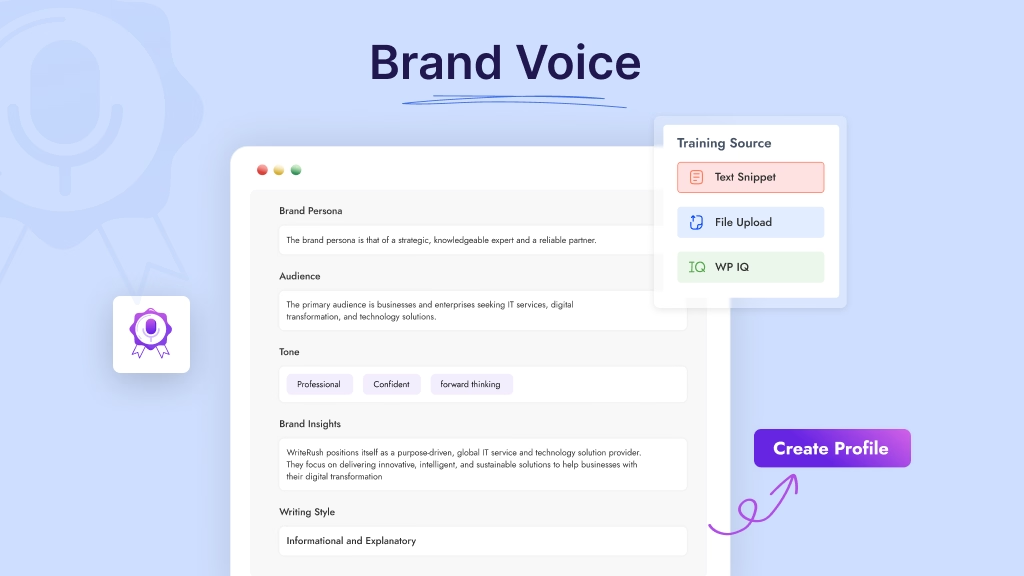
WriteRush comes with a powerful Brand Voice Module that helps your content sound consistent, natural, and aligned with your brand, whether you’re publishing your first blog post or your 500th. Instead of creating generic AI content, WriteRush learns how you write and mirrors your tone, style, and writing personality.
Let’s see how it works.
Train Your Brand Voice in Three Easy Ways
WriteRush gives you flexibility in how you teach the AI to understand your style. You can train your brand voice using any of these simple sources:
1. Text Snippet
If you have a short piece of writing, like a paragraph from a blog, your website copy, or even a social media post, you can paste it directly into WriteRush.
Perfect for:
- New bloggers who don’t have many articles yet
- Businesses that want to match a marketing style
- Content creators who prefer a quick setup
2. File Upload
Have longer content saved as a Word or text file? Just upload it.
Great for:
- Agencies that manage multiple clients
- Brands with existing documentation or content guidelines
- Writers who want a deeper training dataset
3. WP IQ (Your Existing WordPress Content)
This one is a game-changer.
WP IQ allows WriteRush to analyze your existing blog posts and pages directly from your WordPress site. That means WriteRush learns your natural writing style from the content you’ve already published.
Benefits include:
- A more accurate brand tone
- Consistency across past and future posts
- Zero extra effort, you already wrote the content
Example:
If your previous blogs use a casual, witty tone with short sentences and punchy transitions, WriteRush will automatically replicate that tone in every new post.
And once your content finally sounds like the real you, the next question is… how do you get it in front of the people who need it most? Don’t worry, WriteRush has you covered there, too.
How WriteRush Solves Your Content Struggles
Now that we’ve talked about the frustration behind content creation, let’s finally shift to the good part. What if the entire workflow you usually spread across 6-7 different tools could happen inside WordPress… without the chaos? That’s exactly where WriteRush steps in.
WriteRush simplifies the entire content creation process with a guided workflow or one-click blog generator that helps you write smarter, faster, and more strategically. Whether you’re a blogger, a content marketer, or a WordPress-focused creator, these features are designed to remove the overwhelm and make writing feel effortless again.
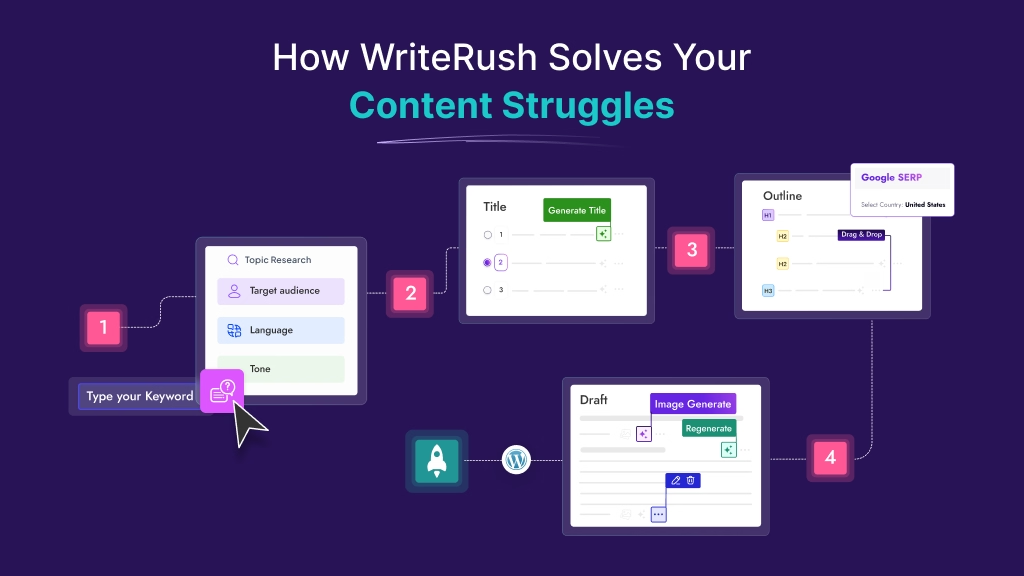
Let’s break down how each feature works, and more importantly, how it solves the everyday content struggles you deal with.
1. One-Click Blog Generation
This is where WriteRush becomes a true productivity powerhouse.
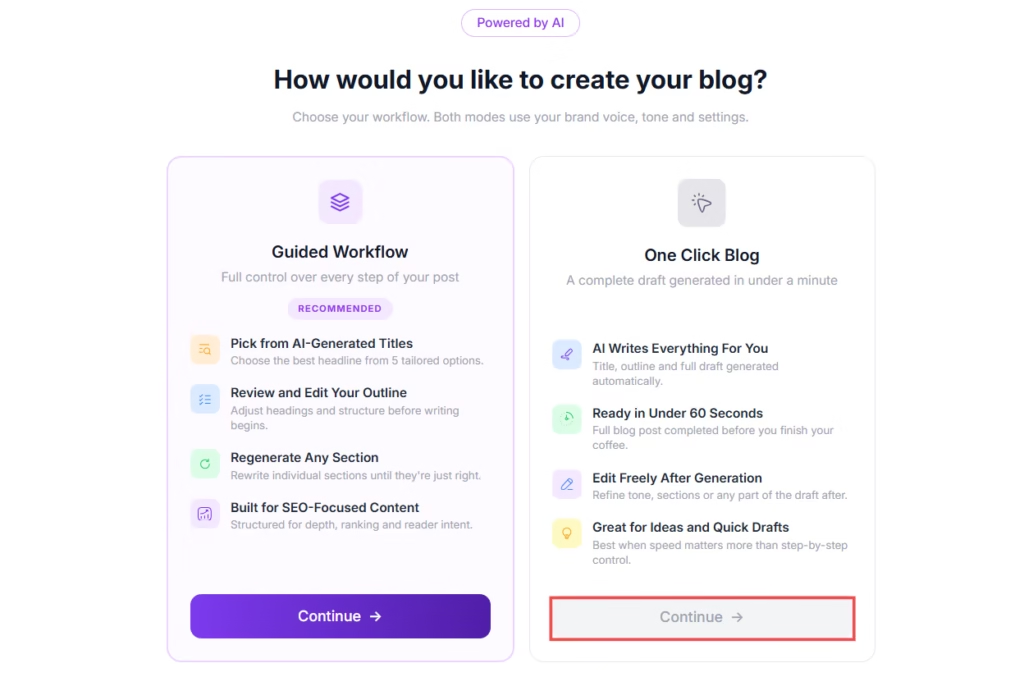
Instead of going through multiple steps manually (topic → title → outline → draft), WriteRush can generate a complete, ready-to-edit blog in a single click.
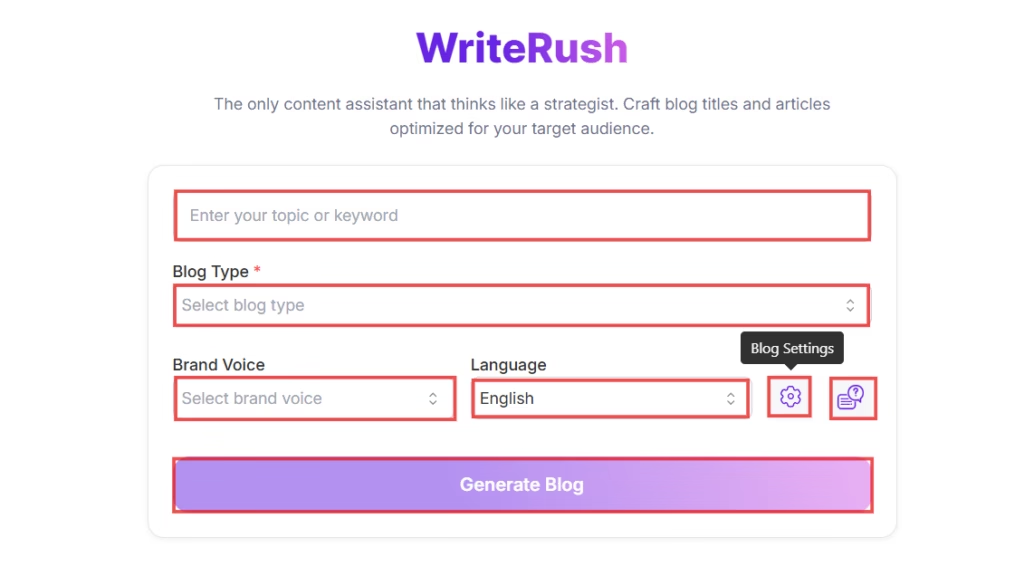
Behind the scenes, it automatically:
- Analyzes your keyword
- Selects the best blog structure
- Generates optimized headings
- Writes a full-length article
- Maintains tone and audience alignment
What you get instantly:
- A structured, formatted blog
- Logical content flow
- SEO-friendly sections
- Readable, human-like writing
Why this matters:
- Turns hours of work into minutes
- Perfect for bulk content creation
- Ideal for agencies and content teams
Use case:
Need 5 blog drafts for the week? You can generate all of them in minutes, then refine instead of starting from zero.
2. Guided Workflow
WriteRush’s Guided Workflow walks you through each step of content creation, from idea generation to final publishing, ensuring nothing is missed. It simplifies complex tasks like research, outlining, writing, and optimization into a smooth, step-by-step process, helping you create high-quality, SEO-ready content with ease.
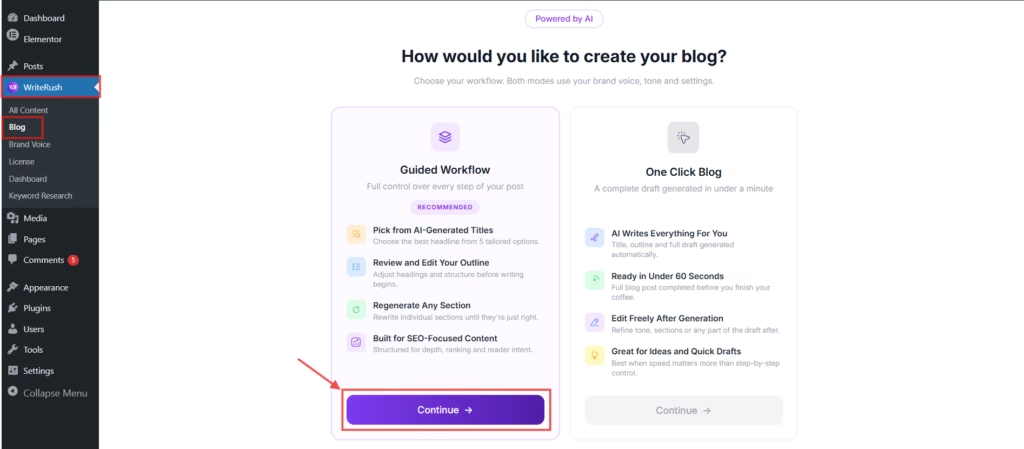
Topic Analysis
Before you even start writing, WriteRush asks the right questions, just like a real content strategist would.
When you enter your keyword, WriteRush analyzes it and uncovers all the important angles, related subtopics, audience pain points, and search intent behind it.
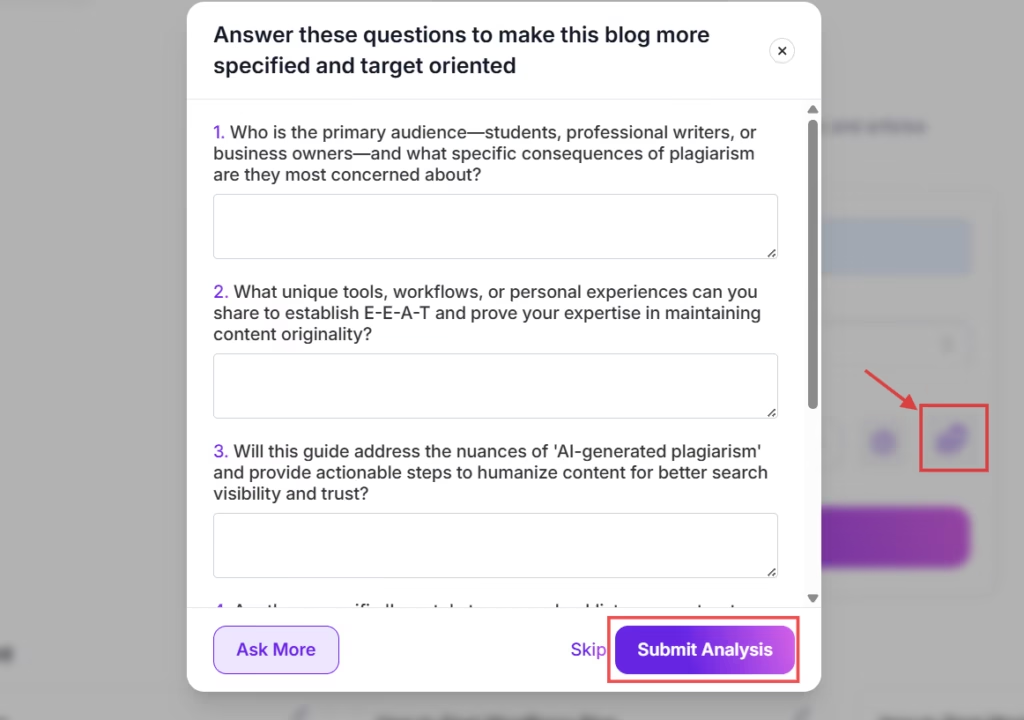
What you get:
- A clearer understanding of what searchers actually want
- Suggestions for subtopics you might’ve missed
- A more targeted, relevant, and high-value blog output
- A stronger foundation for writing with purpose
Example:
If your keyword is “content marketing strategy”, WriteRush may ask:
- Do you want to cover beginner tips?
- Should you include examples or case studies?
- Do you want to talk about AI tools or organic methods?
Suddenly… you’re not starting from scratch anymore.
Advanced Blog Parameters
Once your topic is set, WriteRush gives you the power to customize exactly how you want your blog to sound and perform.
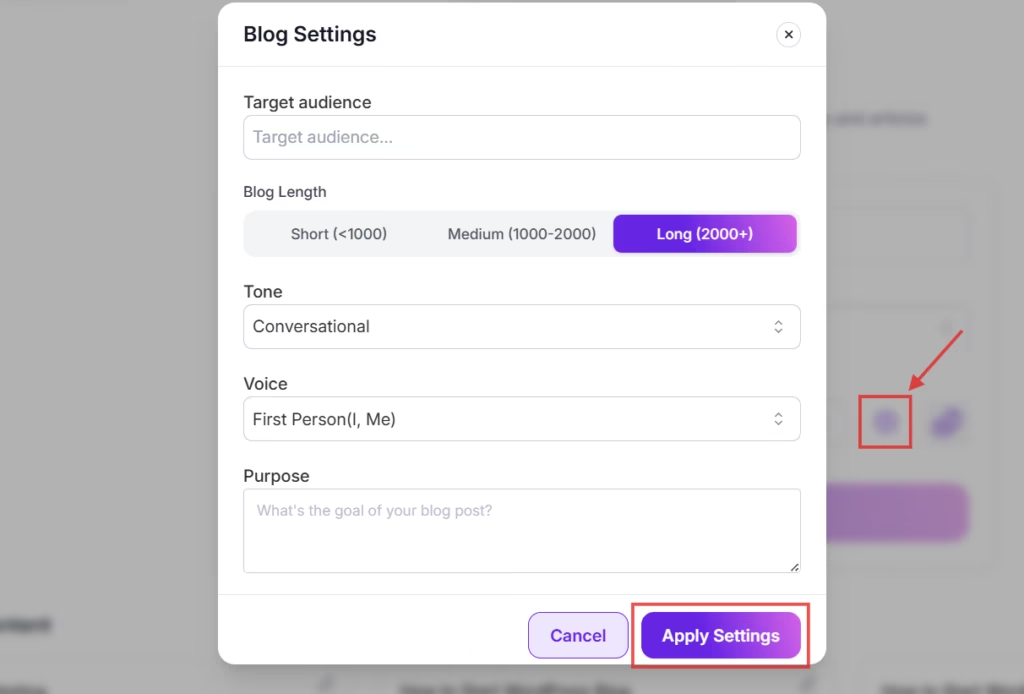
You can specify:
- Target Audience: Beginners, professionals, business owners, marketers
- Purpose: Inform, educate, persuade, convert, inspire
- Tone: Friendly, formal, bold, conversational, humorous, expert
- Language: Choose your preferred writing language
- Blog Length: Short blog, long-form article, in-depth guide
These parameters shape the entire writing output, so you’re not just generating content, you’re creating content that fits your brand, your goals, and your audience.
This is especially useful for:
- Agencies managing content for multiple clients
- Brands maintaining consistent messaging
- Bloggers wanting a signature voice
Blog Type Selection
Not every blog serves the same purpose, and forcing all content into one format is one of the biggest reasons blogs fail to perform.
WriteRush solves this by letting you choose the exact blog type before generation, so the structure, tone, and flow are tailored from the very beginning.
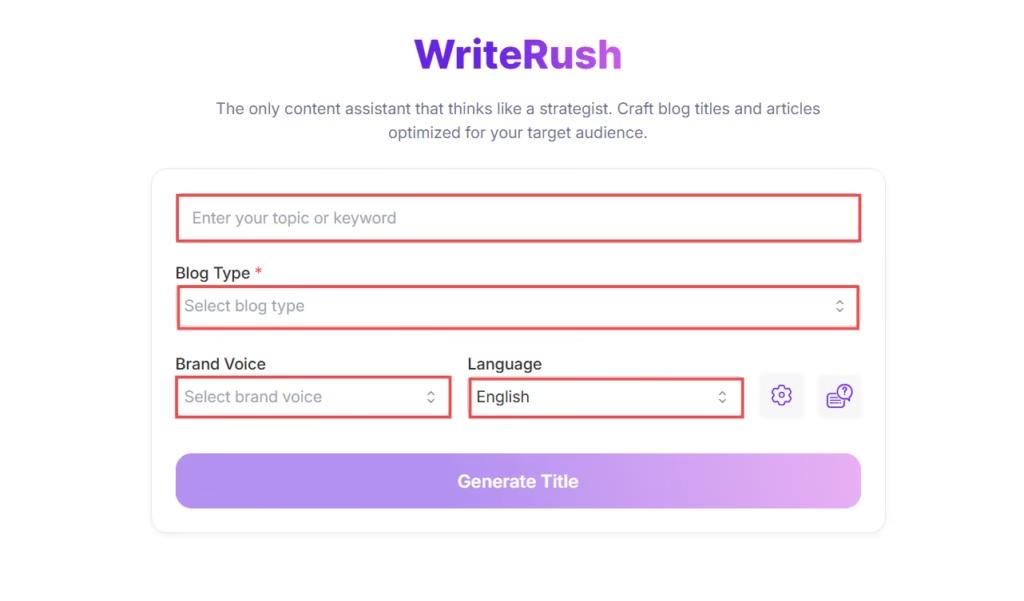
You can create:
- Listicles (e.g., “10 Best AI Tools…”)
- How-to guides (step-by-step tutorials)
- Beginner guides
- Product reviews
- Comparison articles
- Opinion or thought leadership posts
What this unlocks:
- Your content instantly matches search intent
- The structure aligns with what readers expect
- You avoid rewriting or restructuring later
Real impact:
If someone searches “best AI tools,” they expect a list, not a long essay. WriteRush ensures your content fits that expectation automatically.
Title Generation & Regeneration
Your headline determines whether people click or scroll past your content. That’s why WriteRush generates clickworthy, benefit-driven titles in seconds.
If you don’t love the first options, just regenerate until you find the perfect fit.
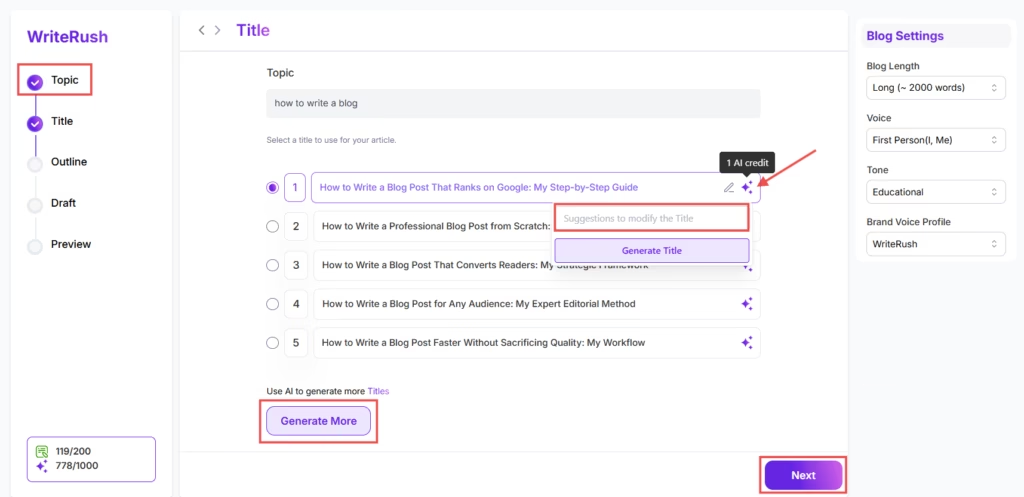
Why this matters:
- Strong titles improve click-through rates
- Headlines help set reader expectations
- Good titles guide your overall content direction
Plus Point:
Many creators spend 20–30 minutes just brainstorming titles. WriteRush cuts that time down to seconds.
AI Outline Generation
Hate staring at a blank page? WriteRush ensures you never have to.
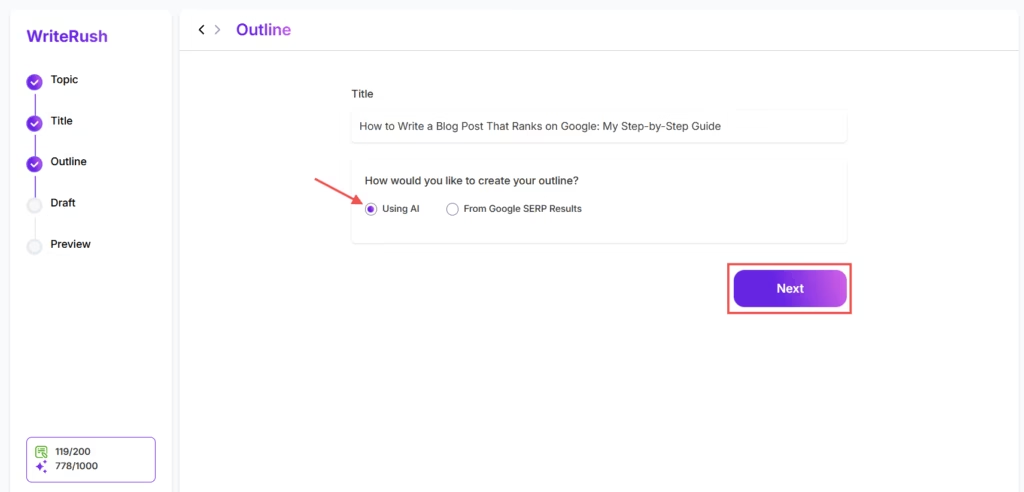
Once you’ve selected your title, WriteRush builds a detailed outline based on:
- Logical content flow
- Topic depth
- Reader expectations
- Best practices for blog structure
- Your selected tone, purpose, and target audience
You get a ready-to-use structure with H2s and H3s that guide your writing from start to finish.
Benefits:
- Faster writing
- Stronger idea flow
- Reduced writer’s block
- More professional structure
It’s like having a content editor organize your thoughts before you even begin. You can choose the headings and subheadings you want, and drag-and-drop them into place to shape the article exactly how you want it.
SERP-Based Outline Generation
This is where WriteRush truly stands out.
Instead of guessing what Google wants, WriteRush analyzes the top-ranking articles for your keyword and builds an outline based on proven high-performing content.

This means you can instantly see:
- What competitors are covering
- Which subtopics are essential
- What structure ranks best
- What content gaps you can fill
- How to create content that outranks existing posts
Example:
If the top 10 blogs on “email marketing strategy” all include case studies and step-by-step tips, WriteRush will prompt you to include similar high-value sections.
This feature alone can save hours of research and significantly increase your chances of ranking.
Draft Generation
Now for the best part: turning your outline into a full-blown article.
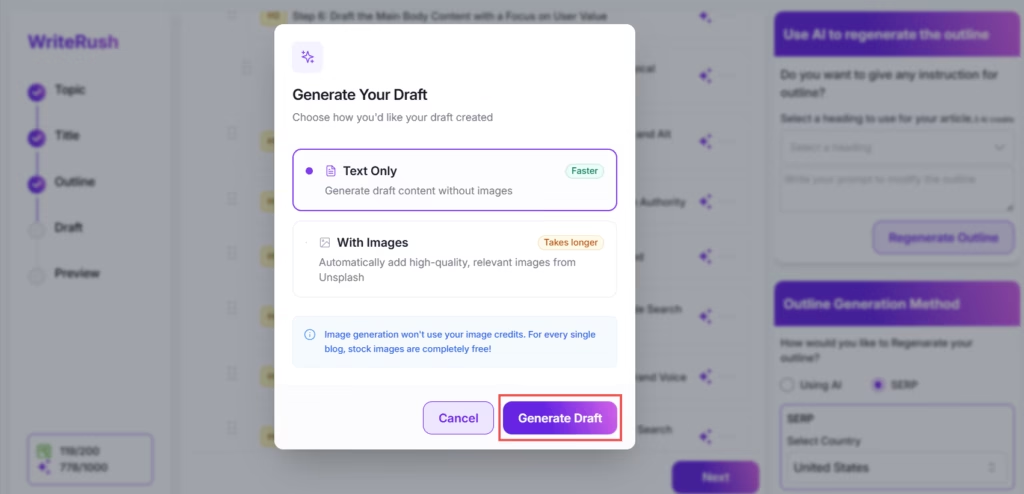
WriteRush generates a complete draft based on:
- Your outline
- Your brand voice
- Your tone and audience settings
- Natural language flow
Unlike generic AI tools that produce robotic or repetitive text, WriteRush is trained to produce human-like content that feels authentic.
You get:
- Cohesive paragraphs
- Engaging intros
- Clear transitions
- Helpful explanations
- Actionable examples
Your draft comes out surprisingly polished, often needing only minor edits before publishing.
Draft Section Regeneration with Prompt
We’ve all read a paragraph and thought, “Hmm… this isn’t hitting right.”
Instead of rewriting everything, WriteRush lets you regenerate specific sections with refined prompts.
You can:
- Rewrite a weak intro
- Add more detail to a section
- Change the tone or voice
- Make explanations simpler or more advanced
This saves enormous amounts of time, especially for long-form content.
Example:
You can highlight a paragraph and say:
- “Rewrite this in a more friendly tone.”
- “Add a real-life example here.”
- “Make this more persuasive.”
It’s like having a personal writing assistant on standby.
3. Image Generation & Regeneration
No more jumping to Canva or stock photo websites.
WriteRush lets you generate relevant images from featured graphics to blog visuals directly inside WordPress.
You can regenerate images as many times as you want until the style matches your content perfectly.
Benefits:
- Creates visuals that align with your topic
- Saves time switching tools
- Keeps your content visually engaging
- Gives your blog a more polished look
4. Auto Image in Draft from Unsplash
Visual content is essential, but finding the right images can slow you down more than writing itself.
WriteRush solves this by automatically inserting relevant, high-quality images from Unsplash directly into your draft.
How it works:
- Scans your content and topic
- Matches it with relevant visuals
- Inserts images in appropriate sections
What you get:
- Clean, professional-looking blog drafts
- Visually engaging content without extra effort
- Proper spacing between text and images
Why this matters:
- Improves user experience
- Keeps readers engaged longer
- Makes your blog look publication-ready instantly
No more switching tabs, downloading images, and manually placing them; everything happens automatically.
4. Show SEO Score
Writing content without knowing how well it’s optimized is like shooting in the dark.
WriteRush removes that uncertainty by giving you a real-time SEO score directly inside your workflow.
It evaluates key factors like:
- Keyword placement and density
- Heading structure (H1, H2, H3 usage)
- Content readability
- Topical coverage
- Overall optimization level
What makes it powerful:
- Instant feedback while writing
- Clear direction on what to improve
- No need for third-party SEO plugins
How it helps you:
- Optimize content before publishing
- Increase chances of ranking higher
- Build better SEO habits over time
Example:
If your keyword isn’t used properly in headings, WriteRush highlights it, so you can fix it instantly instead of guessing later.
5. Send Draft to WordPress
When your blog is ready, just hit Send to WordPress.
WriteRush transfers your entire draft, like formatted, structured, spaced, and styled, straight into your WordPress editor.
No messy copy-paste!
No broken formatting!
No extra cleanup!
Just one smooth, instant transfer.
Perfect for:
- Bloggers
- Agencies
- Teams managing multiple sites
- Anyone who wants a faster publishing workflow
WriteRush doesn’t just generate text; it brings your entire content creation workflow into one clean, simple, powerful system. It removes the overwhelm, reduces your writing time, and helps you publish content that sounds like you and ranks like a pro.
6. Widget Support
WriteRush is designed to fit seamlessly into your existing workflow, no matter which WordPress editor you prefer. With built-in support for multiple editors, you can generate and optimize content right where you work, without switching tools or disrupting your process.
Elementor Widget
If you build pages with Elementor, you know how frustrating it is to jump between editors.
WriteRush eliminates that friction with a native Elementor widget, allowing you to generate and edit AI content directly inside the builder.
What you can do inside Elementor:
- Generate blog sections or full content
- Edit and refine text in real-time
- Maintain design + content flow simultaneously
Why this is a game-changer:
- No switching between the WordPress editor and Elementor
- Faster page creation workflow
- Better alignment between content and design
Perfect for:
- Web designers
- Agencies building client sites
- Landing page creators
You stay in your creative flow without breaking momentum.
Now that we’ve tackled those pain points.
Gutenberg Widget
If you prefer the modern WordPress block editor, WriteRush integrates seamlessly into Gutenberg, allowing you to create and optimize content block by block.
What you can do inside Gutenberg:
- Generate content directly within blocks
- Create structured blog posts with headings, lists, and sections
- Rewrite or improve existing content instantly
Why this is a game-changer:
- Native experience inside the default WordPress editor
- Smooth, distraction-free writing workflow
- Easy content structuring with AI assistance
Perfect for:
- Bloggers
- Content marketers
- SEO-focused writers
You can build well-structured, SEO-friendly content without ever leaving the Gutenberg editor.
Classic Editor
For users who prefer a simpler and more traditional writing experience, WriteRush fully supports the Classic Editor, bringing powerful AI features into a familiar environment.
What you can do inside the Classic Editor:
- Generate full articles or specific sections
- Edit and enhance content with AI suggestions
- Quickly rewrite or expand existing text
Why this is a game-changer:
- Keeps the familiar, distraction-free interface
- No learning curve for long-time WordPress users
- Adds modern AI power to a classic workflow
Perfect for:
- Traditional bloggers
- Non-technical users
- Anyone who prefers simplicity over complexity
You get the best of both worlds, classic editing comfort with powerful AI-driven content creation.
7. Keyword Research
The keyword research feature in WriteRush is designed to help users analyze and optimize keywords effectively within their content creation process. It allows you to analyze how frequently a keyword is searched and assess the difficulty level of ranking for that keyword.
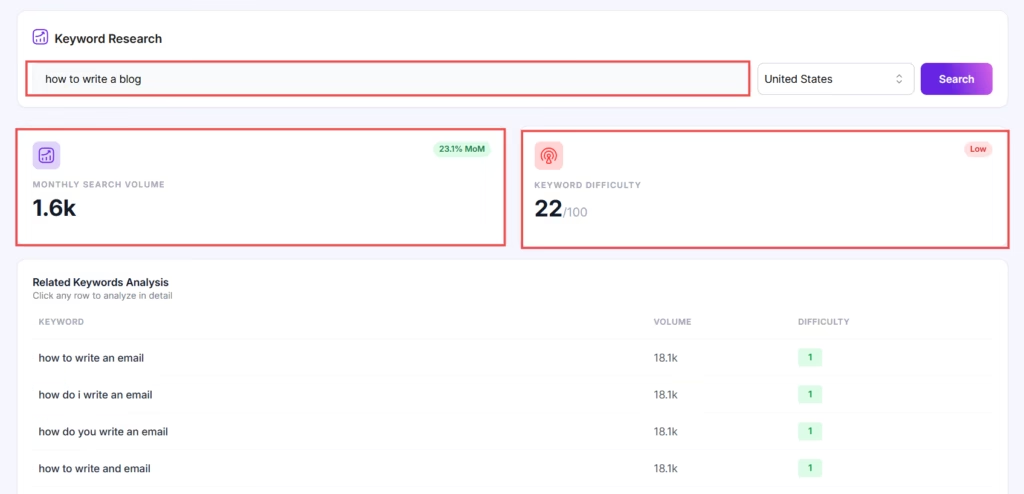
To use this feature, simply navigate to the Keyword Research section within your WordPress dashboard. From there, you input the keyword you’re interested in, choose the targeted country, and click search. The tool will display important metrics such as the monthly search volume and keyword difficulty.
Additionally, WriteRush will generate a list of related keywords, providing valuable insights into other potential terms that could improve content relevance and ranking potential. This tool helps you focus on high-performing keywords while guiding you to avoid overly competitive terms.
8. Product Module
WriteRush’s Product Module offers three powerful tools for creating product-related content directly within your WordPress site, making content generation efficient and tailored to your brand’s voice.
Product Description
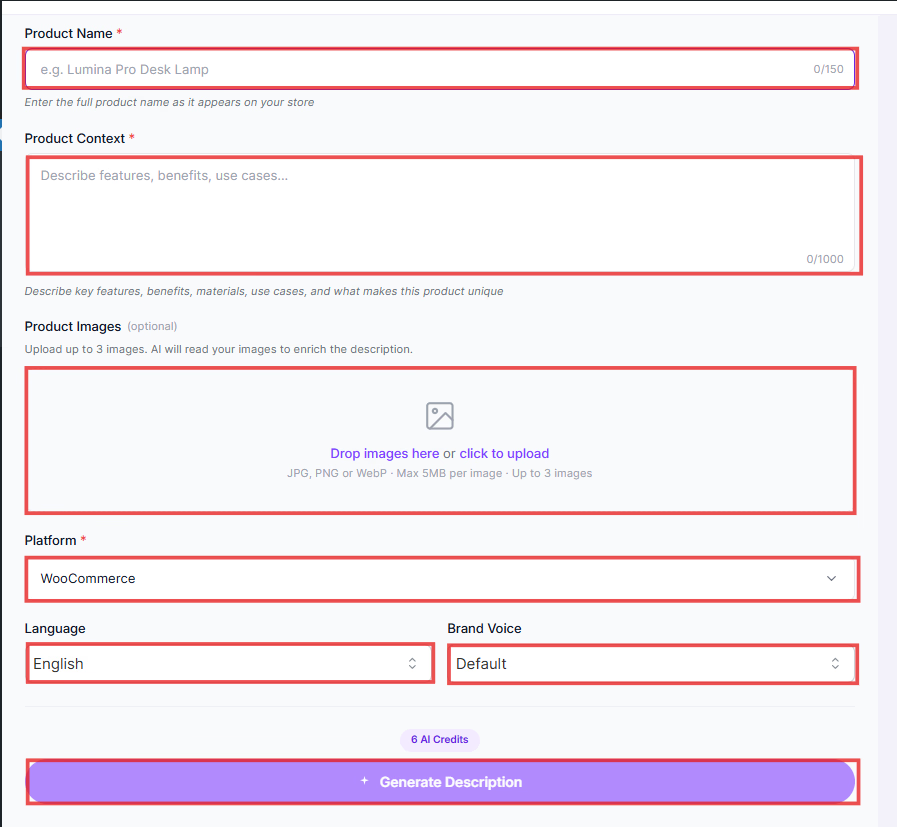
This tool helps you create compelling and clear product descriptions that are both engaging and platform-ready. By inputting the product name, context (features, benefits, unique selling points), and uploading images, you can generate a detailed description highlighting the product’s key value. You also have the option to generate a short description and meta tags for SEO purposes.
Product Page Copy
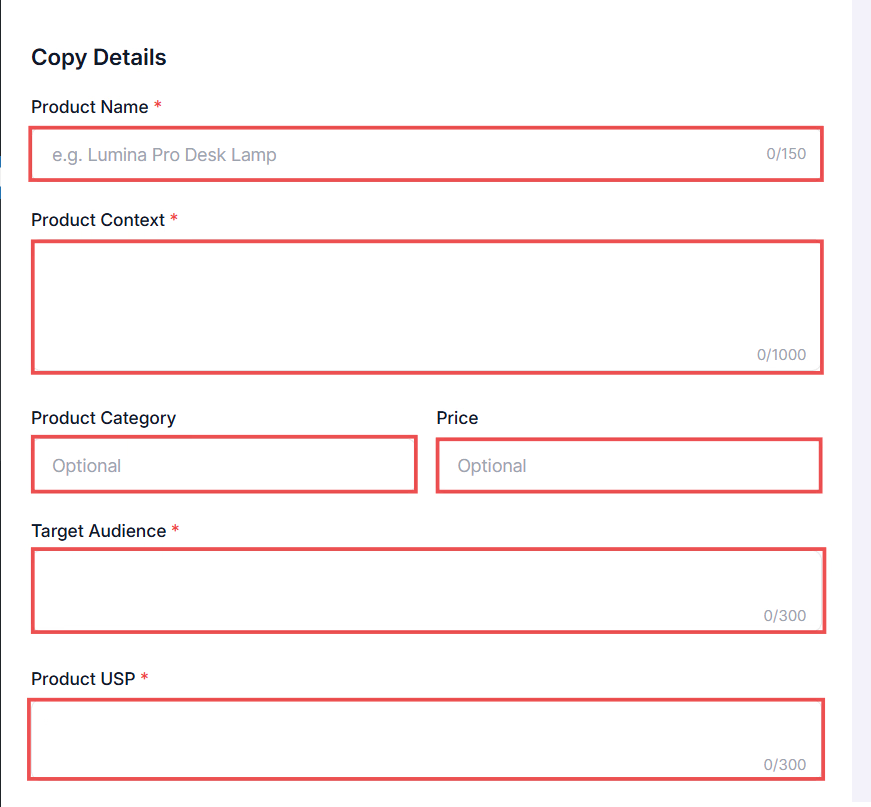
The Product Page Copy tool is tailored to quickly generate persuasive, structured copy for product pages. You input details such as the product name, category, price, target audience, and unique selling points (USP).
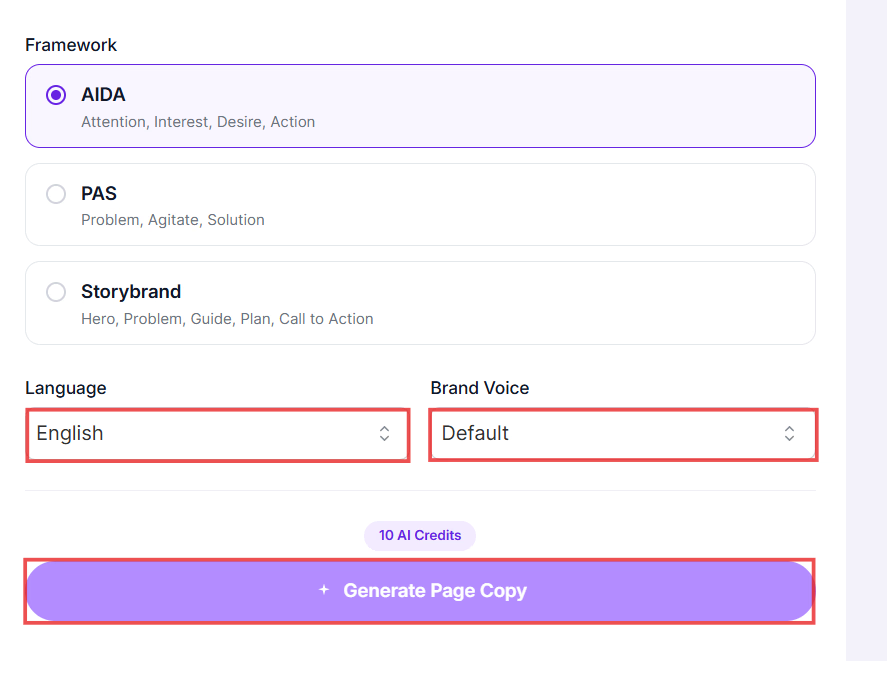
By selecting your preferred brand voice, language, and style, WriteRush will generate persuasive product page content designed to convert visitors into customers. You can preview the generated copy and make adjustments as needed.
Product Review
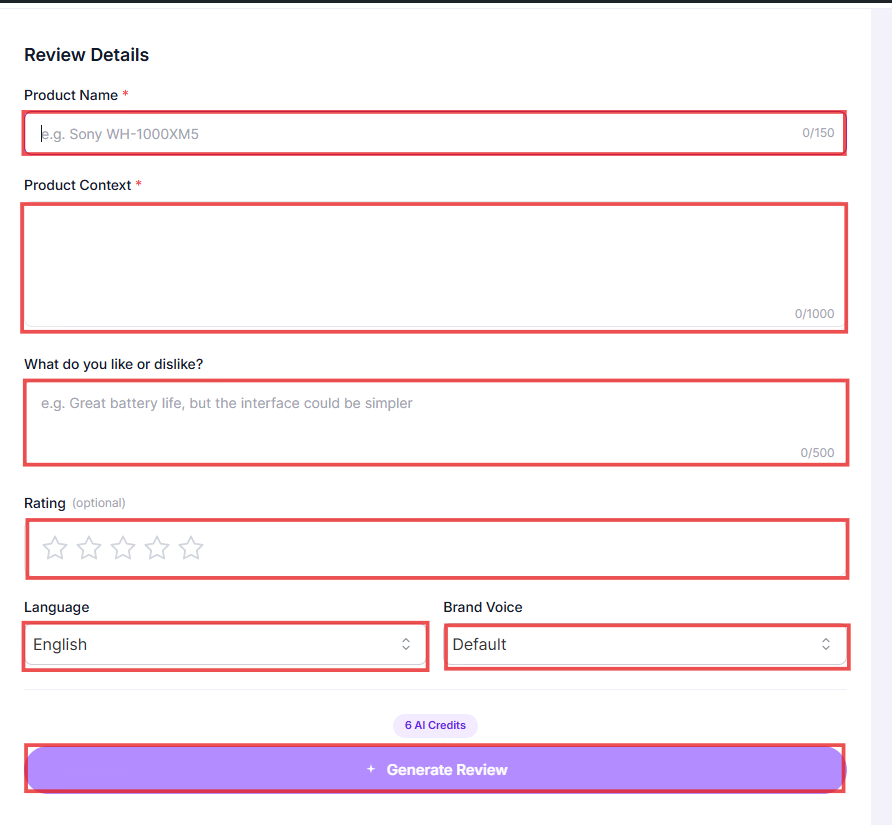
The Product Review tool simplifies the process of writing detailed product reviews. By providing a product name, context, personal opinions (what you like or dislike about the product), rating, language, and brand voice, you can create a review that is both informative and reflective of your brand’s tone.
As with the other tools, you can preview and adjust the review to ensure it aligns with your style before finalizing.
This Product Module ensures consistency across your product content while saving time, allowing you to focus more on marketing strategies and customer engagement.
Let’s move toward something even more exciting… how WriteRush helps you write in a voice that feels unmistakably yours. Ready to meet your secret weapon?
This is where WriteRush breaks the stereotype.
Give Your Content Wings with Social Media Integration
Publishing a great blog post is only half the journey. The real magic happens when you share it across social media and let it reach the people who need it. But if you’re like most content creators or marketers, managing social media often feels like a whole new job, formatting captions, adjusting tone, adding emojis, scheduling posts… and doing it all repeatedly for multiple platforms.

That’s exactly why WriteRush includes a powerful Social Media Integration Module that helps you repurpose your content, stay consistent with your brand voice, and promote your posts effortlessly, all from inside WordPress.
Let’s explore how this works and why it’s such a game-changer.
Create Platform-Ready Social Posts in Seconds
Instead of manually crafting social captions for every platform, WriteRush helps you generate perfectly tailored posts for channels like:
- Facebook
- LinkedIn
- Twitter (X)
- Instagram
You simply choose your settings, and WriteRush generates scroll-stopping posts that match your message and tone.
Customize Every Detail of Your Social Content
To make sure your social posts feel authentic and on-brand, you can customize:
- Brand Context: Tell WriteRush your brand’s personality so your posts feel consistent across all platforms.
- Post Context: Provide context, like:
- Are you promoting a blog post?
- Announcing a new product?
- Sharing tips or insights?
WriteRush adapts the post accordingly.
- Length: Want short, punchy tweets or longer caption-style posts? Just pick the length.
- Purpose: Choose your intention, such as educate, promote, inspire, engage, or entertain.
- Tone: Casual? Professional? Bold? Funny? You control the vibe.
- Language: Generate posts in your preferred language instantly.
- Emojis: Add personality and flair with emojis; use them sparingly or heavily based on your brand.
Plan and Schedule Like a Pro
Here’s where WriteRush truly makes your life easier.
Multi-Post Campaigns
Instead of writing one caption, you can create an entire series of posts for a campaign.
Perfect for:
- Product launches
- Blog promotion sequences
- Newsletter reminders
- Event countdowns
Post Calendar
View all your upcoming posts in a clean, visual calendar. See what’s scheduled, what needs attention, and what’s ready to go live.
Connect to Social Media Platforms
Once you’re done creating, simply link your accounts and publish directly; there’s no need for external schedulers like Buffer or Hootsuite.
So now your content is polished, on-brand, and ready to fly, but how do you actually get started? Let’s walk through the super simple setup so you can put everything into action.
Getting Started with WriteRush
By now, you’ve seen how WriteRush can completely transform your content creation workflow. But the best part?
Getting started is surprisingly simple, even if you’re not tech-savvy or you’ve never used an AI content tool inside WordPress before.

Let’s walk through the setup process step-by-step, so you can start creating reader-friendly, brand-consistent, high-quality content right away.
- Install the Plugin: Simply install WriteRush on your WordPress site.
- Set Up Your Brand Voice: Upload your existing content or documents, or use text snippets to teach WriteRush your unique style and tone.
- Start Writing: Begin creating blog posts with the guided workflow, and let WriteRush take care of the rest, from keyword analysis to drafting to image generation.
- Publish and Promote: Once your draft is ready, publish it directly to WordPress, and use WriteRush’s social media module to share your content across platforms.
You can check out our documentation to learn more details
See how easy that was? And the best part is, this isn’t just about writing faster; it’s about stepping into the future of content creation.
So let’s take a quick peek at what that future looks like.
The Future of Content Marketing
If you’re tired of juggling multiple tools and spending hours on each blog post, WriteRush is the solution you’ve been waiting for. It’s the first AI-powered WordPress plugin that combines content generation, publishing, and brand consistency all in one place.
With WriteRush, you can create content that sounds like you, performs well in search engines, and helps you engage and convert your audience faster and easier than ever before.
Ready to transform your content creation workflow? Download WriteRush today and start generating content that drives results! WriteRush is already waiting to help you lead the way.
This page was last edited on 13 May 2026, at 10:36 am