AI can help you publish content faster, but publishing more pages does not automatically bring more organic traffic. Many AI-assisted websites run into the same frustrating issue: Google crawls their URLs, but the pages stay out of the index.
This usually happens when a site grows faster than its technical SEO system. Pages may be too similar, poorly internally linked, missing clear canonical signals, buried in bloated sitemaps, or published before human review. As a result, Google may discover the content but decide it is not important or unique enough to index.
Technical SEO automation helps prevent these problems before they spread. By automating sitemap control, noindex rules, internal link checks, schema validation, crawl monitoring, and performance alerts, you can keep an AI website cleaner, easier to crawl, and more index-worthy.
In this guide, you’ll learn how to automate technical SEO for AI websites, especially WordPress sites using AI-generated or AI-assisted content. You’ll also get a practical workflow for fixing and preventing the common “Crawled, currently not indexed” issue.
What Is Technical SEO Automation for AI Websites?
Technical SEO automation means using tools, templates, rules, and repeatable workflows to manage the technical parts of SEO at scale.
Instead of manually checking every URL, you can automate tasks like:
- XML sitemap updates
- Internal link suggestions
- Schema markup generation
- Broken link monitoring
- Duplicate title detection
- Canonical tag checks
- Noindex rules for low-value pages
- Core Web Vitals alerts
- Crawl error monitoring
- Indexation tracking in Google Search Console
For AI websites, automation is especially important because content volume can grow quickly. If your site publishes dozens or hundreds of AI-assisted pages without a technical quality system, Google may crawl them but decide not to index many of them.
The goal is not to automate everything blindly. The goal is to automate repetitive checks while keeping human review for quality, accuracy, originality, and search intent.
Why AI Websites Often Have Indexing Problems
AI content websites usually do not struggle because AI was used. They struggle because the site creates too many similar pages without enough editorial control.
Common issues include:
- Too many articles targeting nearly identical keywords
- Generic content that does not add new value
- Weak internal linking
- Poor topical structure
- Duplicate meta titles or descriptions
- Thin category, tag, author, or archive pages
- Incorrect canonical tags
- AI-generated pages published before human review
- Slow templates caused by plugins, scripts, or heavy images
- Schema markup errors from multiple plugins
When these issues stack up, Google may crawl your pages but choose not to index them.
How Search Engines and AI Overviews Process AI Websites
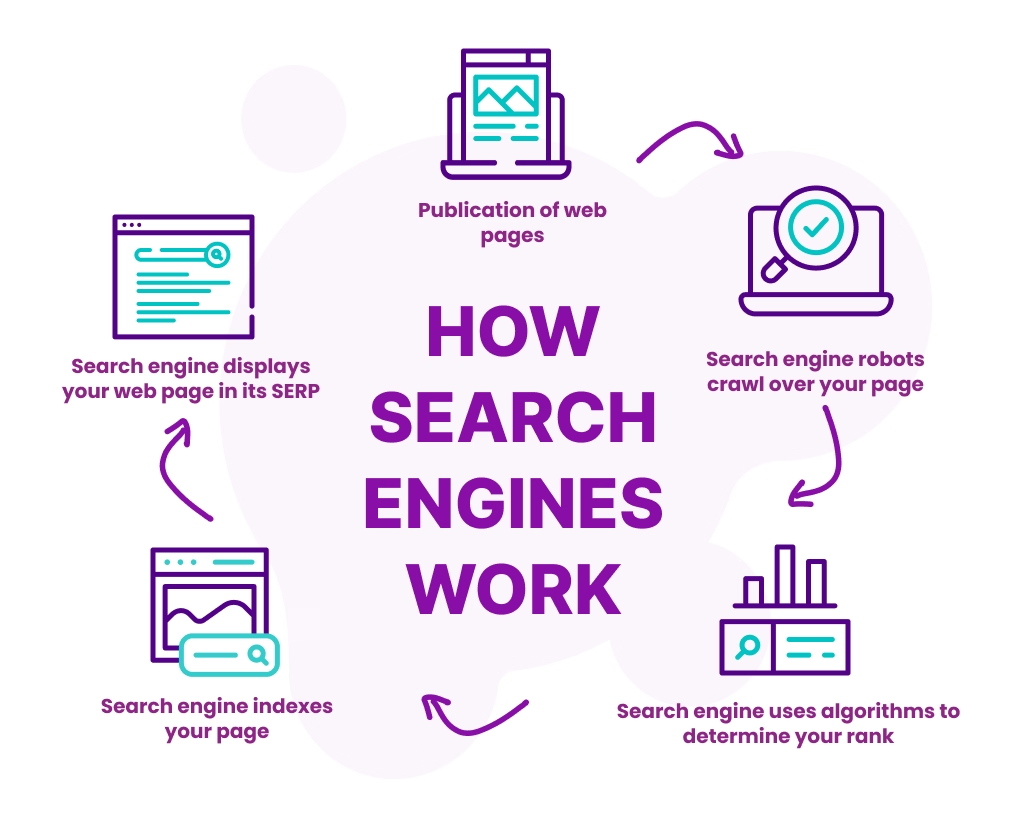
Search engines don’t automatically penalize AI-generated content, but they are extremely strict about quality signals, technical clarity, and consistency. When an AI website grows quickly, even small technical gaps can prevent pages from being crawled, indexed, or surfaced in AI-driven search results.
Clear structure, topical authority, and strong internal linking can also improve your chances of being understood by AI search systems, including those that influence how to appear in ChatGPT answers.
Here’s what search engines and AI overviews pay the most attention to.
Crawlability: Can Bots Access Your Content Efficiently?
If search bots can’t crawl your site properly, nothing else matters.
AI websites often create crawl issues without realizing it, especially through:
- URL parameters and filters
- Auto-generated archives or tag pages
- Uncontrolled pagination
In practice, technical SEO automation helps control crawl paths using robots.txt rules, crawl directives, and structured site architecture so bots focus on pages that actually matter.
Index Selection: Choosing Quality Over Quantity
Indexing isn’t about getting everything indexed; it’s about getting the right pages indexed.
Search engines actively decide:
- Which pages deserve indexing
- Which should be excluded
- Which similar pages should be consolidated under a canonical URL
Automation plays a key role here by enforcing consistent indexing rules, reducing index bloat, and preventing low-value AI pages from competing with your best content.
Entity Understanding: Helping Search Engines “Understand” AI Content
AI Overviews rely heavily on entity recognition and relationships.
Clean site architecture, internal linking, and structured data (such as JSON-LD schema) help search engines:
- Understand topics and subtopics
- Identify how pages relate to each other
- Confidently surface answers in AI-generated results
Without these signals, even well-written AI content can be ignored.
Performance Signals: Trust Is Measured by User Experience
Core Web Vitals, such as loading speed, visual stability, and responsiveness, directly influence trust and usability.
At scale, AI websites can quietly slow down as more pages, scripts, and media are added. Automated performance monitoring helps catch issues early, before they affect rankings or AI visibility.
Ultimately, technical SEO automation aligns your AI website with how both traditional search engines and AI answer systems evaluate content, making it easier for them to crawl, trust, and showcase your pages.
Why AI Website Pages Get “Crawled, Currently Not Indexed”
“Crawled, currently not indexed” means Google has visited the URL but has not added it to the index. This does not always mean something is technically broken. Often, it means Google did not see enough value, uniqueness, or importance in the page at that time.
For AI-heavy websites, this status is commonly caused by:
- Content that is too similar to existing pages
- Content that does not fully satisfy search intent
- Weak internal links pointing to the page
- Low site authority around the topic
- Poor page structure or unclear headings
- Thin content with little original insight
- Duplicate templates across many URLs
- Sitemap bloat from low-value pages
- Incorrect canonical or noindex signals
Before requesting indexing again, improve the page itself. Add original examples, useful tables, screenshots, expert notes, internal links, and clearer answers to the user’s search query.
Quick Indexing Checklist
Before you ask Google to index a page, check the following:
| Question | What to Check |
|---|---|
| Is the page indexable? | No meta noindex, no X-Robots-Tag noindex, not blocked by robots.txt |
| Is the canonical correct? | The page should usually have a self-referencing canonical |
| Is the page in the sitemap? | Only index-worthy URLs should be included |
| Is the content unique? | It should not repeat another article on your site |
| Is the page internally linked? | Add links from relevant articles, categories, and hub pages |
| Does it satisfy search intent? | The article should answer the main query clearly and completely |
| Does it add original value? | Add examples, workflows, screenshots, templates, or expert commentary |
| Is the page fast and usable? | Check mobile layout, Core Web Vitals, and intrusive elements |
What Should You Automate on an AI Website?
Not every SEO task should be automated. Technical checks are good candidates for automation. Editorial judgment is not.
| SEO Area | Automation Level | Human Oversight | Recommended Process |
|---|---|---|---|
| XML sitemaps | High | Low | Automatically include only indexable, valuable URLs |
| Robots.txt monitoring | Medium | Medium | Alert when important sections are blocked |
| Noindex rules | High | Medium | Auto-noindex low-value archives, tags, and internal search pages |
| Canonical tags | Medium | High | Use templates, then manually review important pages |
| Internal linking | Medium | High | Generate suggestions, but approve links manually |
| Schema markup | Medium | Medium | Automate base schema and validate important pages |
| Broken link checks | High | Low | Run scheduled crawls and alerts |
| Core Web Vitals | Medium | High | Monitor automatically, fix manually |
| Content quality | Low | High | Always require human editorial review |
| Search intent matching | Low | High | Keep this manual and strategy-led |
Automation should protect your site from technical mistakes. It should not replace your content strategy.
10-Step Technical SEO Automation Process
The following process shows how to use automation without losing control over quality. Each step focuses on one technical SEO area that affects how search engines crawl, understand, index, and evaluate AI-assisted content. Follow these steps in order if you are building a new AI website, or use them as an audit checklist if your existing pages are already facing indexing problems.
Here is the process we will cover:
Step 1: Build a Clean Site Structure Before Scaling Content
AI websites often fail because they publish content before building a clear topical structure. A strong structure helps search engines understand which pages are important and how topics connect.
Start with a simple hierarchy:
- Homepage
- Main topic hubs
- Supporting blog posts
- Product or service pages
- Resource pages
- Category pages
For example, if your website covers AI writing and SEO, your structure could look like this:
- AI Writing
- AI Blog Writing
- AI Content Editing
- AI Content Workflow
- SEO
- Technical SEO
- On-Page SEO
- Keyword Research
- Content Optimization
- WordPress
- SEO Plugins
- AI Plugins
- Website Performance
Each new article should support one of your main topic hubs. Avoid publishing random AI-generated posts that do not connect to your core topical authority.
Automation Tip
Create a publishing checklist that forces every new article to include:
- One primary category
- One clear target keyword
- One parent topic hub
- Three to five internal links to related pages
- One internal link from an existing page back to the new article
- A decision on whether the page should be indexed
This simple workflow prevents orphan pages and improves the chances of indexing.
For AI-assisted WordPress sites, strong WordPress technical SEO is essential for managing crawlability, indexation, schema, site speed, and search visibility.
Step 2: Automate XML Sitemaps Carefully
An XML sitemap helps search engines discover your important URLs. Most WordPress SEO plugins can generate sitemaps automatically, but automation can become harmful if every low-value page is included.
Your sitemap should include:
- High-quality blog posts
- Important pages
- Product or service pages
- Topic hubs
- Useful resource pages
Your sitemap should usually exclude:
- Internal search pages
- Thin tag pages
- Low-value author archives
- Duplicate category archives
- Paginated pages with little unique value
- AI draft pages
- Test pages
- Thank-you pages
- Filter URLs
For AI websites, sitemap quality matters more than sitemap size. A smaller sitemap with strong pages is better than a large sitemap filled with weak URLs.
WordPress Setup
If you use Rank Math, Yoast SEO, or AIOSEO, review these settings:
- Enable XML sitemaps.
- Include posts, pages, and important custom post types.
- Exclude thin taxonomies.
- Exclude media attachment URLs unless they have unique value.
- Exclude author archives if your site has one main author or weak author pages.
- Submit the sitemap in Google Search Console.
- Check submitted versus indexed URLs monthly.
Automation Rule
Only allow a URL into the sitemap if it meets your minimum quality standard:
- Final editorial review completed
- At least one relevant internal link added
- Unique title and meta description
- Correct canonical tag
- No noindex tag
- Useful content that satisfies search intent
Step 3: Use Noindex Rules to Control Index Bloat
Index bloat happens when search engines discover too many low-value URLs on your website. This is common on WordPress sites because themes and plugins often create extra archive, tag, author, attachment, and parameter URLs.
AI websites are even more vulnerable because they may publish content in bulk.
Use noindex rules for pages that users do not need to find from Google.
Common pages to noindex:
- WordPress tag archives with thin content
- Author archives with little unique information
- Internal search result pages
- Admin or login pages
- Thank-you pages
- Duplicate landing pages
- AI-generated drafts
- Experimental content
- Very thin glossary pages
- Filtered URLs
Do not noindex important pages just because they are new. New pages need better content and internal links, not automatic exclusion.
Practical Rule for AI Content
Create three publishing statuses:
- Draft: not indexable, not in sitemap
- Review: not indexable, human editor checks quality
- Published: indexable only after passing SEO and editorial checks
This prevents low-quality AI drafts from entering your sitemap or being crawled as final content.
Step 4: Automate Canonical Tag Checks
Canonical tags help search engines understand the preferred version of a page. This is important when multiple URLs have similar content.
AI websites may create duplicate or near-duplicate pages accidentally, especially when targeting similar keywords.
For example:
/ai-seo-tools//best-ai-seo-tools//ai-tools-for-seo/
If all three pages say almost the same thing, Google may ignore some or all of them. You should either merge them, differentiate them clearly, or canonicalize the weaker versions to the strongest page.
What to Automate
Use a crawler or SEO audit tool to check for:
- Missing canonical tags
- Canonical tags pointing to the wrong URL
- Multiple canonical tags on one page
- Canonicals pointing to redirected URLs
- Canonicals pointing to noindex pages
- Similar pages with conflicting canonicals
What to Review Manually
Canonical decisions should not be fully automated for important pages. A human should decide whether to:
- Keep both pages because they serve different search intents
- Merge the pages into one stronger article
- Redirect one page to another
- Canonicalize one page to another
- Rewrite one page to make it more distinct
Step 5: Automate Internal Link Suggestions, Not Final Internal Links
Internal links help Google understand which pages are important. They also help users move through your site.
AI websites often have indexing issues because new posts are published without enough internal links. If a page has no internal links, it looks less important.
Internal Linking Workflow
For every new article, add:
- One link to a parent topic hub
- Two to four links to related supporting articles
- One link to a product, service, or conversion page when relevant
- One link from an older article back to the new page
Example
If you publish an article about technical SEO automation, link it to related pages such as the following:
- AI content workflow
- SEO content briefs
- WordPress SEO plugins
- AI-generated content and SEO
- How to appear in ChatGPT
- Internal linking strategy
Also, update older articles to link back to the new technical SEO article.
Automation Tip
Use internal link tools to suggest opportunities, but review every link manually. Automated internal linking can create unnatural anchors, irrelevant links, or repeated link patterns.
Good anchors:
- technical SEO automation
- AI website indexing issues
- WordPress SEO automation
- automate technical SEO tasks
- AI content indexing checklist
Avoid repetitive exact-match anchors on every page.
Step 6: Add Schema Markup Without Creating Conflicts
Schema markup helps search engines understand your content. But many WordPress AI websites create schema problems because multiple plugins output schema at the same time.
For example, your SEO plugin, theme, FAQ plugin, and page builder may all add structured data. This can create duplicate or conflicting schema.
Schema Types to Consider
For blog content, use:
- Article schema
- Breadcrumb schema
- Organization schema
- Person schema for the author
- FAQ schema when the page has a visible FAQ section
- HowTo schema only when the page truly gives step-by-step instructions
Schema Automation Checklist
Automate basic schema, but validate important URLs before requesting indexing.
Check that:
- Only one main Article schema appears
- The author matches the visible author
- The publish and modified dates are accurate
- FAQ schema matches visible FAQ content
- Breadcrumb schema follows the visible site structure
- There are no duplicate schema blocks from competing plugins
Step 7: Monitor Duplicate and Near-Duplicate Content
AI websites can quickly create many pages that sound different but answer the same query. This can cause keyword cannibalization and indexing problems.
Examples of overlapping topics:
- “Best AI writing tools”
- “Top AI writing tools”
- “AI writing tools for bloggers”
- “Best AI content tools”
These articles may all compete with each other unless each one has a distinct purpose.
How to Handle Similar Pages
Use this decision framework:
| Situation | Best Action |
|---|---|
| Two pages target the same keyword | Merge them into one stronger page |
| Two pages target different user intents | Rewrite each page to make the difference clear |
| One page is weak and one is strong | Redirect or canonicalize the weak page |
| Both pages get impressions for different queries | Keep both, but improve internal linking and headings |
| Neither page gets indexed | Combine, improve, and resubmit the stronger URL |
Automation Tip
Run a monthly content audit to find:
- Duplicate titles
- Similar H1s
- Repeated meta descriptions
- Pages targeting the same keyword
- Pages with no impressions
- Crawled but not indexed URLs
- Pages with low word count and no internal links
Do not delete pages only because they are not indexed. First, decide whether they should be improved, merged, redirected, or noindexed.
Step 8: Automate Technical SEO Monitoring and Alerts
Technical SEO automation becomes most useful after publishing. You need a system that catches problems before they grow.
Set up monitoring for:
- Broken internal links
- Redirect chains
- 404 errors
- Server errors
- Sitemap changes
- Robots.txt changes
- Noindex changes
- Canonical changes
- Slow pages
- Core Web Vitals drops
- Schema validation errors
- Pages losing impressions
- Pages crawled but not indexed
Weekly Monitoring Workflow
Every week, review:
- New indexing issues in Google Search Console
- Crawled but not indexed pages
- Discovered but not indexed pages
- Sitemap submitted versus indexed pages
- Top pages losing impressions
- Broken internal links
- Pages with duplicate titles or meta descriptions
- Slow templates or plugin-related performance issues
Monthly Monitoring Workflow
Every month, run a deeper audit:
- Crawl the whole site.
- Export all indexable URLs.
- Compare them with sitemap URLs.
- Compare them with Google Search Console indexed URLs.
- Identify orphan pages.
- Review low-performing AI-assisted content.
- Merge or improve similar articles.
- Update internal links to important pages.
This keeps your AI website clean as it grows.
Step 9: Improve Core Web Vitals and Page Experience
AI websites often use plugins, page builders, chat widgets, tracking scripts, and heavy images. These can slow down the site.
Page speed alone will not make weak content rank, but poor performance can hurt user experience and reduce the effectiveness of your SEO work.
To keep your site fast and functional, choose only the essential WordPress plugins you actually need instead of installing multiple tools that create technical conflicts.
Focus on:
- Fast hosting
- Lightweight themes
- Image compression
- Lazy loading
- Fewer unnecessary plugins
- Reduced JavaScript
- Clean CSS
- Caching
- CDN setup
- Mobile-friendly design
WordPress Performance Checklist
Check these areas:
- Are AI-generated images compressed?
- Are WebP or AVIF image formats used?
- Are unused plugins removed?
- Is caching enabled?
- Is the database cleaned regularly?
- Are fonts loaded efficiently?
- Are page builder scripts slowing down blog posts?
- Are ads or popups hurting mobile usability?
Automated alerts can tell you when a page slows down, but a developer or site owner usually needs to fix the issue manually.
Step 10: Add Human Review Before Publishing AI Content
Technical SEO automation can protect your website, but it cannot guarantee content quality. To avoid publishing low-value AI pages, it is important to understand Google’s approach to AI-generated content before scaling your content production.
Every AI-assisted article should go through human review before publishing. This is especially important for technical SEO, finance, health, legal, or business content.
Human Editorial Checklist
Before publishing, check:
- Does the article answer a real search query?
- Is the information accurate?
- Is the advice specific and useful?
- Does the article include original examples or experience?
- Are there unnecessary repeated sections?
- Are the headings clear?
- Are internal links relevant?
- Is the title natural and clickable?
- Is the meta description useful?
- Does the article add something better than existing search results?
For AI websites, this human layer is what separates useful content from mass-produced content.
A clear AI content marketing workflow helps you move from keyword research and content briefs to human review, internal linking, and final publishing without creating low-quality pages.
Recommended Technical SEO Automation Stack for WordPress AI Websites
Here is a practical setup you can use.
| Task | Tool or Process | Automation Rule | Human Review Needed? |
|---|---|---|---|
| XML sitemap | Rank Math, Yoast, or AIOSEO | Include only indexable posts and pages | Low |
| Noindex rules | SEO plugin settings | Exclude thin archives, tags, internal search pages | Medium |
| Internal links | Link Whisper, LinkStorm, or manual spreadsheet | Suggest links for every new post | High |
| Schema | SEO plugin or custom JSON-LD | Generate Article, Breadcrumb, and FAQ schema | Medium |
| Crawl audits | Screaming Frog, Sitebulb, or cloud crawler | Weekly crawl for errors | Medium |
| Index tracking | Google Search Console | Review non-indexed URLs weekly | High |
| Speed monitoring | PageSpeed Insights, CrUX, or performance plugin | Alert when templates slow down | High |
| Broken links | WordPress plugin or crawler | Run scheduled scans | Low |
| Content duplication | SEO audit tool or spreadsheet | Flag similar titles and keywords | High |
| Editorial review | Human checklist | Approve before indexing | High |
You do not need every tool at once. Start with sitemap control, noindex rules, internal linking, and Google Search Console monitoring. A strong automation setup becomes more effective when combined with the right AI content marketing tools for WordPress.
Example Workflow: Publishing an AI-Assisted Blog Post Safely
Before publishing AI-assisted content, create a clear SEO content brief so every article has a target keyword, search intent, internal links, and original value.
Use this workflow before publishing a new AI-assisted article.
1. Choose the Keyword and Search Intent
Define the main keyword and the user’s problem. Do not publish a page just because the keyword exists. Make sure the topic supports your site’s main authority.
2. Create a Content Brief
Include:
- Primary keyword
- Secondary keywords
- Search intent
- Target audience
- Required headings
- Internal links to include
- Original examples to add
- Expert notes or experience
- FAQ questions
3. Draft the Article
Use AI to help with structure, research organization, outlines, and first drafts. Do not publish the raw output without review.
4. Add Original Value
Improve the article with:
- Real examples
- Screenshots
- Tables
- Templates
- Case studies
- Personal workflow notes
- Tool comparisons
- Practical checklists
5. Review Technical SEO
Check:
- Title tag
- Meta description
- H1 and H2 structure
- Slug
- Canonical tag
- Index status
- Sitemap inclusion
- Internal links
- Schema
- Image alt text
- Mobile layout
6. Publish and Request Indexing
After publishing, check the URL in Google Search Console. If the page is important, request indexing after confirming the page is indexable and internally linked.
7. Monitor Performance
After two to four weeks, review:
- Indexed or not indexed status
- Impressions
- Clicks
- Average position
- Queries the page appears for
- Internal link opportunities
- Content gaps
Then update the article based on real data.
If you publish directly from WordPress, using an AI content writer inside WordPress can make your workflow faster, but every article should still pass technical SEO and editorial checks before indexing.
How to Fix a Page That Is Crawled but Not Indexed
If a page is already crawled but not indexed, follow this process.
1. Check Technical Indexability
Make sure the page:
- Is not blocked by robots.txt
- Does not have a noindex tag
- Has a correct canonical URL
- Returns a 200 status code
- Is included in the sitemap if it should be indexed
- Is accessible without login or scripts that hide main content
2. Improve the Content Quality
Add more value before requesting indexing again.
Improve:
- Introduction clarity
- Search intent match
- Original examples
- Step-by-step guidance
- Internal links
- Tables and checklists
- Author expertise
- FAQs
- Freshness and accuracy
3. Strengthen Internal Links
Add links from relevant pages that are already indexed. This helps Google understand that the page is important.
Use natural anchors like:
- technical SEO automation
- AI website indexing problems
- automate technical SEO
- WordPress SEO automation checklist
4. Remove Duplication
Compare the page with other articles on your site. If another article covers the same topic, merge them or clearly separate the intent.
5. Request Indexing Again
After improving the page, use Google Search Console’s URL Inspection tool and request indexing. Do this after changes are live, not before.
Common Technical SEO Mistakes in AI Websites (and How Automation Helps)
Managing a large AI-generated website can lead to common technical SEO mistakes that quickly snowball if not addressed. As more content is generated, the risk of these issues multiplying increases exponentially.
Fortunately, automation can help identify and fix these problems before they affect your rankings.
1. Indexing Everything
One of the most common issues with AI websites is indexing unnecessary pages, like duplicate or low-quality content. Search engines may end up indexing pages that don’t add value, which can hurt your rankings.
Solution:
Automated noindex rules help control what gets indexed, ensuring that only valuable, unique pages are crawled by search engines. By automatically flagging or excluding non-essential content, AI sites can maintain a cleaner, more effective index.
2. Duplicate Pages
AI tools can generate multiple versions of similar content, leading to duplicate pages. Search engines penalize sites with duplicate content, as it can confuse their algorithms.
Solution:
Automation can handle canonicalization, telling search engines which version of a page should be considered the primary one. With canonical tags, automated systems ensure that search engines recognize the original, reducing the risk of penalties and improving content authority.
3. Slow Performance
AI-generated content can quickly cause site speed issues, particularly when heavy scripts or large image files are involved. Slow-loading pages can negatively impact user experience and SEO, especially since Core Web Vitals are crucial for ranking.
Solution:
Automated performance monitoring flags slow pages as soon as issues arise. Tools can automatically compress images, adjust page elements for faster load times, and recommend performance fixes without waiting for human intervention. Early detection helps ensure that any performance issues are addressed quickly.
4. Ignored Errors
With AI, the sheer volume of content can lead to overlooked technical errors, like broken links, missing meta tags, or issues with structured data. These errors often go unnoticed until they start affecting rankings.
Solution:
Automated error detection and alerts ensure that problems are caught as soon as they appear. By receiving notifications about technical issues, website owners can act fast to fix them, preventing long-term damage to their SEO performance.
Best Practices for Technical SEO Automation on AI Websites
Technical SEO automation works best when it supports a clear content strategy instead of replacing human judgment. Use the following best practices to keep your AI website crawlable, indexable, fast, and useful as you publish more content.
Use these rules to keep your site healthy:
- Publish fewer but better AI-assisted articles.
- Create topic hubs before scaling supporting content.
- Add internal links before requesting indexing.
- Keep low-value pages out of the sitemap.
- Use noindex rules carefully.
- Validate schema on important pages.
- Monitor Google Search Console every week.
- Merge overlapping articles.
- Keep author information visible.
- Add original examples and expert commentary.
- Update older articles when publishing related content.
- Use automation for checks, not final judgment.
Final Thoughts
AI allows you to generate content quickly and at scale, but without the right technical SEO foundation, your content can easily get lost in the noise.
That’s where technical SEO automation comes in. By automating critical tasks like crawl control, indexing rules, and performance monitoring, you’re not just fixing problems as they arise; you’re setting up a framework that allows your AI website to thrive sustainably.
When you automate the technical SEO processes that once consumed so much time and energy, you free up resources to focus on what truly matters: crafting high-quality, user-focused content that gets found, indexed, and ranked. This isn’t about publishing more content; it’s about publishing smarter, with structure, control, and strategic intent guiding every step.
Whether you’re a blogger, content marketer, or WordPress user, technical SEO automation gives you the tools to confidently scale your AI-generated content without worrying about missing technical details. It’s a crucial step toward ensuring that your AI websites aren’t just fast and plentiful, but also optimized for long-term success in search engines.
Frequently Asked Questions (FAQs)
What is technical SEO automation?
Technical SEO automation is the process of using tools and repeatable workflows to manage technical SEO tasks such as sitemaps, indexing rules, internal links, schema, broken links, crawl errors, and performance monitoring.
Can AI-generated pages be indexed by Google?
Yes, AI-assisted pages can be indexed if they are useful, original, accurate, accessible, and aligned with search intent. The problem is not AI usage alone. The problem is publishing low-value or duplicated content at scale.
Why are my AI articles crawled but not indexed?
This often happens when Google crawls a page but does not find enough reason to add it to the index. Common causes include thin content, duplicate content, weak internal links, unclear search intent, poor site authority, or technical signals like incorrect canonicals.
Should I noindex AI-generated content?
You should noindex AI drafts, test pages, thin pages, duplicate pages, and low-value archives. You should not automatically noindex every AI-assisted article. High-quality AI-assisted content can be indexable if it has been reviewed and improved by a human.
How can I automate internal linking for AI content?
Use internal linking tools to find relevant link opportunities, but approve the final links manually. Every new article should link to a parent topic hub and related supporting articles. Older indexed articles should also link back to the new page.
Which WordPress pages should usually be excluded from indexing?
Common pages to exclude include internal search pages, thin tag archives, low-value author archives, media attachment pages, thank-you pages, duplicate landing pages, and filtered URLs.
What technical SEO tasks should not be fully automated?
Search intent analysis, content quality review, canonical decisions for important pages, article merging, expert commentary, and final publishing approval should involve human judgment.
How often should I audit an AI content website?
Review Google Search Console weekly and run a deeper crawl audit monthly. If you publish many AI-assisted articles, you may need more frequent checks.
This page was last edited on 11 May 2026, at 4:42 pm