
You open your WordPress dashboard, ready to write. Today has to be the day you publish that blog post. But a few minutes in, doubt creeps in. What should you write about? Is this topic even worth it?
You open Google to research, then another tab, then another, and before you realize it, your focus is gone, and the editor is still empty.
If this feels familiar, you’re not alone…
Most bloggers, content marketers, and WordPress users don’t struggle because they lack ideas or skills. They struggle because content creation has become messy and disconnected. Writing happens in one place, SEO in another, images somewhere else, and social sharing comes last, if it happens at all. The process feels heavy, slow, and frustrating.
But it doesn’t have to be this way.
With a structured AI content workflow inside WordPress, content creation becomes clearer and calmer. Instead of guessing every step, you follow a guided path from idea to draft, from optimization to publishing, and finally to promotion.
In this blog, you’ll discover how that workflow works, how AI fits into it naturally, and how you can turn content creation into a repeatable system you actually enjoy using.
Let’s walk through this workflow.
What Is an AI Content Workflow inside WordPress?
An AI content workflow inside WordPress is a structured process where Generative AI and Large Language Models help plan, write, optimize, and publish content directly within WordPress. It operates inside WP-Admin, often using Gutenberg, to streamline ideation, drafting, SEO optimization, and publishing in one unified workflow.
In practice, this workflow connects multiple content stages, such as topic research, outlining, drafting, Semantic SEO, plagiarism detection, and final review, into a single system supported by Human-in-the-loop. Instead of replacing writers, AI acts as an assistant that reduces manual effort, improves consistency, and helps bloggers and content marketers publish high-quality, search-optimized content more efficiently inside WordPress.
Step-by-Step AI Content Workflow inside WordPress
A proper AI content workflow inside WordPress is not about letting AI “write everything for you.” Instead, it’s about creating a guided system where AI supports each stage of content creation, while you remain in control. When done correctly, this workflow removes confusion, speeds up production, and improves consistency across your content.
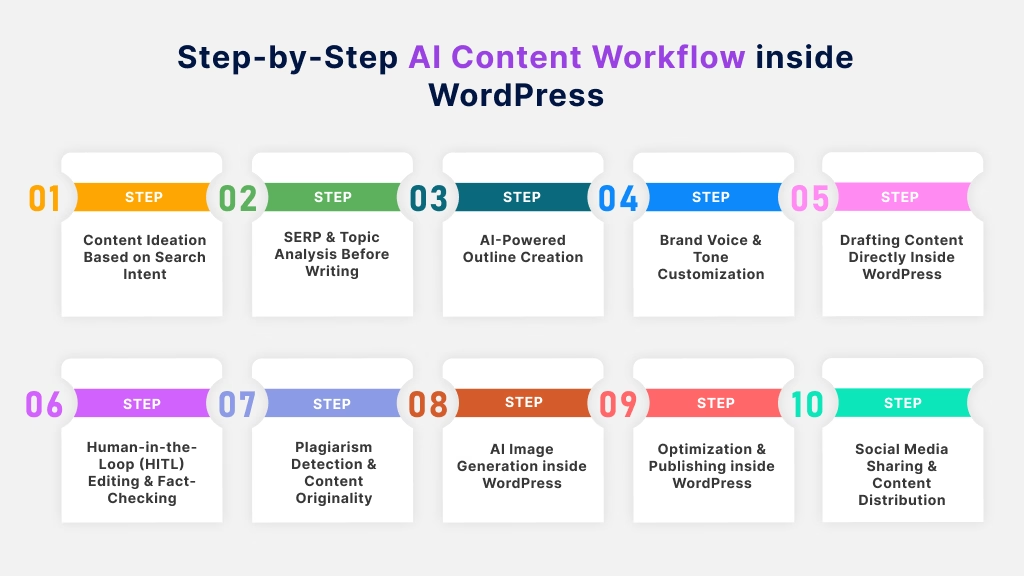
Let’s walk through each step in detail.
Step 1: Content Ideation Based on Search Intent
This is where everything begins, and where many people go wrong.
Most creators start with ideas like “I want to write about SEO” or “Let’s write something about AI.” The problem is that these ideas are too broad and often disconnected from what users actually want.
At this stage, AI analyzes keywords and aligns them with Search Intent. This helps you understand whether users are looking to learn, compare options, or take action. Instead of guessing, you now know why someone is searching and what they expect to find.
AI assists by expanding a single keyword into multiple intent-based topics, uncovering user pain points, and helping you prioritize ideas that have both relevance and traffic potential. This means you start every article with confidence that it’s worth writing.
Step 2: SERP & Topic Analysis Before Writing
Now you study the battlefield before entering it.
Once you have a topic, the next step is understanding what already ranks on Google. AI reviews the top-performing pages and analyzes them using Semantic SEO, focusing on content depth, structure, and topic coverage.
This step reveals which subtopics Google considers essential, what questions users commonly ask, and where competitors fall short. Instead of copying what exists, you identify opportunities to add missing value.
By the end of this step, you’re no longer writing blindly; you’re writing with a clear understanding of what Google and readers expect.
Step 3: AI-Powered Outline Creation
This step turns research into a clear plan.
With insights from SERP analysis, AI generates a detailed outline using proper Title Tags (H1, H2, H3). Each heading serves a specific purpose and contributes to the overall narrative.
AI ensures logical flow, prevents topic overlap, and creates a structure that’s easy to scan. This outline becomes your roadmap, keeping you focused and reducing the chances of rewriting entire sections later.
A strong outline doesn’t just help writing; it improves readability, SEO clarity, and overall content quality.
Step 4: Brand Voice & Tone Customization
Here’s where AI stops sounding like “AI.”
Brand voice & tone customization ensures that every piece of content created through your AI content workflow inside WordPress reflects your unique style, personality, and audience expectations. Instead of producing generic paragraphs, AI adapts its writing based on your defined Tone of Voice / Brand Voice, whether that’s friendly and conversational, professional and authoritative, or simple and beginner-focused.
At this stage, AI leverages Large Language Models to adjust sentence structure, word choice, pacing, and formality level according to your preferences. For example, a SaaS blog may require clear, confident explanations, while a personal blog may benefit from a warmer, more relatable tone. Brand voice settings help maintain this consistency across all posts, pages, and content types.
Why does this matter? Because consistency builds trust. When readers recognize your voice across multiple articles, they’re more likely to engage, return, and convert. This step ensures AI acts as a brand-aligned writing assistant, not a generic content generator, making your content feel cohesive, human, and credible inside WordPress.
Step 5: Drafting Content Directly Inside WordPress
This is the stage where ideas and structure finally turn into real content.
Instead of drafting in external tools and pasting everything later, the entire writing process happens directly inside WP-Admin. Using Gutenberg, you can write, format, and organize your content in the same environment where it will be published.
AI supports this step by expanding outline points into clear paragraphs, suggesting smooth transitions between sections, and helping explain complex ideas in a reader-friendly way. Because you’re writing inside WordPress, the AI understands the page structure, blocks, and layout, which helps maintain proper formatting and flow from the start.
This approach removes the friction of switching between tools, reduces formatting errors, and keeps your focus on storytelling rather than setup. As a result, drafting feels faster, more controlled, and far less overwhelming, turning the WordPress editor into a true content creation workspace instead of just a publishing tool.
Step 6: Human-in-the-Loop (HITL) Editing & Fact-Checking
This step is where AI-generated content becomes reliable, trustworthy, and truly publish-ready.
While AI can draft content quickly, it doesn’t understand context, nuance, or real-world accuracy the way humans do. That’s why Human-in-the-loop is a critical part of an effective AI content workflow inside WordPress.
At this stage, a human editor reviews the AI-assisted draft to:
- Verify facts, data points, and claims
- Improve clarity, flow, and tone
- Add real experience, examples, or insights
- Remove vague or over-generalized statements
Fact-checking is especially important for SEO, as search engines prioritize accuracy and helpfulness. By combining AI speed with human judgment, you ensure the content aligns with your brand voice, meets editorial standards, and builds long-term credibility.
Think of AI as your first draft partner, but the human review is what transforms that draft into content readers and search engines can trust.
Read More: How to Humanize AI-Generated Content
Step 7: Plagiarism Detection & Content Originality
Before publishing, originality must be verified.
AI-powered Plagiarism Detection scans your content against existing sources to ensure it’s unique. Any similarities are flagged so you can rewrite or personalize those sections.
This step protects your site from SEO risks and reinforces your authority. Originality isn’t just about avoiding penalties; it’s about delivering real value.
Skipping this step can undermine everything you’ve built so far.
Step 8: AI Image Generation inside WordPress
At this stage, your content is already taking shape, but visuals are what make it stand out.
AI image generation inside WordPress allows you to create relevant, on-brand images without leaving your dashboard. Instead of searching stock libraries or switching tools, AI helps you generate custom visuals, such as featured images, section illustrations, or concept graphics, directly alongside your content.
Using AI image models like DALL-E or Midjourney, you can describe the image you need in simple prompts and instantly receive visuals that match your topic and tone. These images can then be added straight into your post, maintaining a smooth workflow inside WordPress.
To maximize impact, this step also includes adding descriptive Alt Text, which improves accessibility and supports image SEO. The result is content that’s not only informative but also visually engaging, helping readers stay longer and understand your message more clearly.
Step 9: Optimization & Publishing inside WordPress
This step is where your content moves from “ready” to search-ready.
Once the draft and visuals are in place, optimization happens directly inside WordPress, without exporting content to external tools. AI assists you in refining key on-page SEO elements, so your post meets both user expectations and search engine requirements.
At this stage, AI helps you optimize:
- Meta Descriptions that clearly summarize your content and encourage clicks
- Title Tags (H1, H2, H3) to ensure proper structure and keyword alignment
- Keyword Density so important terms are used naturally, not excessively
- Readability Score to keep sentences clear and user-friendly
To streamline this process further, the workflow integrates smoothly with popular SEO plugins such as Rank Math and Yoast SEO. These tools provide real-time SEO feedback, allowing you to fix issues before publishing rather than after.
Before clicking publish, you also finalize technical details like clean permalinks, internal and external links, and image Alt Text. Once everything is optimized, you can confidently publish, knowing your content is fully prepared to perform well in search results and deliver value to readers from day one.
Step 10: Social Media Sharing & Content Distribution
Publishing your blog post is an important milestone, but it’s not the end of the workflow. In fact, it’s where visibility truly begins.
In this step, AI helps you extend the reach of your content beyond your website by turning a single blog post into multiple social-ready assets. Instead of manually rewriting content for every platform, AI can summarize key points, extract highlights, and generate platform-specific captions tailored for different audiences and formats.
Inside your workflow, AI assists with:
- Creating short, engaging social captions from long-form content
- Adapting tone and length for different platforms
- Highlighting key takeaways, quotes, or insights from the blog
Once shared, performance tracking becomes essential. Tools like Google Search Console help you monitor how social traffic contributes to clicks, impressions, and engagement on your WordPress site. These insights close the loop on the Content Lifecycle, allowing you to refine future topics, improve distribution strategies, and get more value from every piece of content you publish.
Now that you can see how each step fits together, the next question naturally pops up: Should all of this really happen inside WordPress, or is it better to rely on external tools? Let’s talk about that next.
Why Use AI Directly Inside WordPress Instead of External Tools?
At the beginning, external AI tools feel exciting. You paste a prompt, generate content, and think, “This will save me time.” But after a few weeks of real publishing, the reality looks different. Your workflow starts to feel fragmented, slow, and surprisingly tiring.
This is where an AI content workflow inside WordPress makes a meaningful difference.
Let’s look at why working inside WordPress isn’t just convenient, it’s smarter.
1. A Single, Centralized Workflow (No More Context Switching)
When AI lives directly inside WordPress, your entire content process stays in one environment. Ideation, drafting, editing, optimization, and publishing all happen inside WP-Admin.
External tools force you to constantly switch contexts between browser tabs, documents, editors, and dashboards. Each switch breaks focus and slows momentum. Over time, this friction adds up and becomes a productivity killer.
With in-dashboard AI, your thinking stays linear, and your workflow stays uninterrupted.
2. Native Gutenberg Integration Means Cleaner Content
Most external AI tools generate plain text without understanding how WordPress content is structured. When you paste that content into WordPress, you often have to fix headings, spacing, lists, and formatting.
AI that works directly with Gutenberg understands blocks, headings, and layout from the start. Content is generated where it belongs, already formatted and ready to publish.
This doesn’t just save time; it reduces small frustrations that pile up during daily publishing.
3. Better Context Awareness = More Relevant Content
External AI tools don’t know your website.
They don’t understand your existing posts, internal links, post types, or publishing goals. They generate content in isolation, which often leads to generic writing that needs heavy editing.
An AI content marketing WordPress Plugin operates inside your actual site environment. It understands whether you’re writing a blog post, a landing page, or a product update. This context leads to more accurate suggestions, smoother transitions, and content that fits naturally into your site structure.
4. SEO Is Built into the Workflow, Not Added Later
With external tools, SEO usually becomes an afterthought. You write content elsewhere, paste it into WordPress, then start optimizing manually.
An AI content workflow inside WordPress integrates SEO directly into the writing process. AI can assist with:
- Meta descriptions
- Internal linking
- Readability improvements
- Keyword alignment
Because this happens inside WordPress, SEO becomes part of the workflow, not an extra task added at the end of a long writing session. This supports a healthier and more sustainable Content Lifecycle.
5. Human-in-the-Loop Editing Feels Natural, Not Forced
Quality content still needs human judgment. When AI drafts content inside WordPress, Human-in-the-loop becomes seamless.
You can instantly review sections, fact-check claims, rewrite paragraphs, and add personal insights without exporting or re-importing content. This keeps you in control while still benefiting from AI speed.
External tools often interrupt this process, making editing feel like an extra step instead of a natural part of writing.
6. Fewer Tools, Lower Costs, and Less Mental Load
Using multiple external tools usually means multiple subscriptions, multiple interfaces, and multiple learning curves. Over time, this creates confusion and decision fatigue.
A WordPress-native AI workflow simplifies your stack. Writing, optimization, visuals, and publishing happen in one place, reducing complexity and making it easier to stay consistent.
The simpler your workflow, the more likely you are to actually use it, day after day.
Read More: How to use an AI content writer inside WordPress
Once you compare the two approaches, it becomes easier to see why keeping your AI content workflow inside WordPress feels less fragmented, but that still leaves one important question: who is this workflow actually built for?
Who Should Use an AI Content Workflow inside WordPress?
An AI content workflow inside WordPress isn’t limited to one type of user. Whether you publish occasionally or manage content at scale, this workflow adapts to how you work, because it lives directly inside WordPress, where your content already exists.

Let’s explore who benefits most and how this workflow fits into their daily content reality.
Bloggers Who Want Consistency without Burnout
For solo bloggers, content creation often feels overwhelming. You start with an idea, but quickly get stuck between research, writing, SEO, images, and promotion.
An AI content workflow simplifies this entire process inside WP-Admin, guiding you from ideation to publishing step by step. AI helps you choose topics aligned with Search Intent, draft content faster, and optimize posts before publishing. Instead of forcing yourself to “find time to write,” you follow a repeatable system that makes consistency realistic, even with a busy schedule.
Content Marketers Focused on SEO, Strategy, and Results
Content marketers aren’t just writing; they’re planning campaigns, tracking performance, and aligning content with business goals.
An AI content workflow inside WordPress supports Semantic SEO, keyword alignment, internal linking, and ongoing optimization across the Content Lifecycle. Because the workflow is built into WordPress, content can be updated, refreshed, and improved continuously without breaking the process. This helps marketers scale content production while maintaining performance and quality.
WordPress Site Owners & Niche Publishers
If your website relies heavily on organic traffic, such as affiliate sites, niche blogs, or educational platforms, publishing structured, optimized content is critical.
Using AI directly inside WordPress (often through the Gutenberg) allows you to create search-friendly content with proper headings, formatting, and internal links. AI reduces manual effort while helping you maintain control over content quality, originality, and site structure.
Agencies & Freelancers Managing Multiple Clients
For agencies and freelancers, efficiency and consistency are everything.
An AI content workflow allows you to standardize core steps like research, outlining, drafting, SEO checks, and publishing, while still customizing Tone of Voice / Brand Voice for each client. This makes it easier to manage multiple projects without reinventing the process every time, helping you scale output without lowering standards.
Small Teams & Growing Businesses
Not every business has a full content team. Often, one or two people handle everything.
In these cases, AI acts as a support system, assisting with ideation, drafting, optimization, and visuals, while Human-in-the-loop ensures accuracy and brand alignment. This balance allows small teams to produce professional-level content without hiring immediately, making growth more sustainable.
If you spotted yourself in those use cases, you’re already on the right path, but before moving forward, it’s just as important to understand what can go wrong when AI is used the wrong way.
Common Mistakes to Avoid in AI Content Workflow
An AI content workflow inside WordPress can feel like a shortcut to faster publishing, but only if it’s used correctly. Many bloggers and content teams adopt AI with excitement, yet unknowingly introduce mistakes that limit quality, rankings, and long-term growth.
Let’s break down the most common pitfalls in detail so you can avoid them confidently.
1. Expecting AI to Do All the Thinking
One of the biggest misconceptions is believing AI can replace the entire creative and strategic process.
While Generative AI and Large Language Models are excellent at generating drafts, they don’t understand your business goals, audience nuances, or long-term content strategy. Publishing raw AI output often results in surface-level content that lacks originality and depth.
Why this hurts:
Search engines reward value and insight, not volume. Content that feels generic struggles to build authority.
How to fix it:
Use AI as a writing assistant, then layer in human judgment, experience, and strategic intent.
2. Skipping Search Intent at the Ideation Stage
Many users jump straight into writing without validating why someone would search for that topic.
Ignoring Search Intent leads to content that may read well, but doesn’t answer the right questions. AI can generate dozens of ideas, but without intent alignment, those ideas may never rank or convert.
Why this hurts:
Even high-quality content fails if it doesn’t match what users expect to find.
How to fix it:
Always start your workflow by identifying whether the topic is informational, comparative, or action-driven, then shape content accordingly.
3. Writing Outside WordPress and Pasting Everything Later
Using external tools and pasting content into WordPress might seem harmless, but it quietly breaks workflow efficiency.
When content isn’t created inside WP-Admin, formatting issues, heading mismatches, and layout problems become common, especially when working with Gutenberg.
Why this hurts:
You spend extra time fixing the structure instead of improving the content quality.
How to fix it:
Draft, edit, and optimize content directly inside WordPress so structure and layout stay intact from the beginning.
4. Ignoring Brand Voice and Publishing Generic Content
AI defaults to neutral, safe language unless guided otherwise.
Without defining Tone of Voice / Brand Voice, your content may sound inconsistent from post to post, making it harder for readers to connect with your brand or recognize your style.
Why this hurts:
Inconsistent voice weakens trust and brand recall.
How to fix it:
Train AI on your preferred tone and audience level so every piece feels cohesive and intentional.
5. Removing Humans from the Editing Process
Some users assume AI-generated drafts are “good enough” and skip manual review.
This ignores the importance of Human-in-the-loop, which ensures accuracy, clarity, and authenticity.
Why this hurts:
Unchecked AI content can include outdated information, vague claims, or unclear explanations.
How to fix it:
Always review, fact-check, and refine content before publishing, especially for SEO-focused or authority content.
6. Publishing Without Verifying Originality
Even well-written AI content can unintentionally resemble existing material.
Skipping Plagiarism Detection risks publishing content that feels repetitive or derivative, which can harm credibility and SEO performance.
Why this hurts:
Search engines favor original insights, not reworded content.
How to fix it:
Scan content before publishing and personalize sections with examples, opinions, or unique perspectives.
7. Treating SEO as a Final-Step Task
Many creators write first and think about SEO later.
This leads to missed opportunities around headings, internal links, and readability. Without early optimization, content may struggle despite strong writing.
Why this hurts:
SEO works best when integrated throughout the workflow, not added at the end.
How to fix it:
Optimize structure, keywords, and internal linking as part of the writing process, not after publishing.
8. Forgetting Visuals and Distribution Altogether
Hitting “publish” doesn’t mean your content journey is complete.
Ignoring AI image generation, Alt Text, and social sharing limits engagement and reach. Content that isn’t distributed often goes unnoticed, regardless of quality.
Why this hurts:
Great content without promotion rarely performs to its full potential.
How to fix it:
Include visuals and social sharing as part of the full Content Lifecycle, not as optional extras.
Knowing what not to do can be just as powerful as knowing what to do, and once these mistakes are out of the way, the role of the right tool becomes much easier to appreciate.
How the Right WordPress AI Writing Plugin Simplifies This Entire Workflow
A true AI content workflow inside WordPress is not a collection of isolated AI features. It’s a connected system where every action, planning, writing, editing, visual creation, and distribution, flows naturally into the next. The right WordPress AI writing plugin acts like a content operations engine, guiding users from idea to impact without forcing them to manage complexity.

Let’s walk through how each feature works in practice and how it contributes to a smoother, more reliable workflow.
SERP-Based Outline Generator
Most content fails because it’s built on assumptions, not evidence.
A SERP-based outline generator removes that uncertainty by analyzing real search engine result pages. Instead of guessing what to include, the plugin examines how top-ranking pages are structured, what headings they use, how deep they go into subtopics, and which questions appear repeatedly.
Inside WordPress, this means you begin every article with a framework that already aligns with search behavior. You’re not copying competitors, you’re understanding the standards Google expects and building something stronger from that foundation.
This alone eliminates one of the biggest bottlenecks in content creation: knowing what “good enough” actually looks like.
AI Outline Generation
Once SERP insights are collected, AI outline generation transforms that data into a clean, logical structure.
Instead of staring at notes or scattered ideas, you get a clear hierarchy of sections, sub-sections, and flow. Each heading has a purpose, each section supports the main topic, and nothing feels out of place.
This step is critical for long-form content. A strong outline reduces writer fatigue, prevents repetition, and ensures the article feels cohesive from introduction to conclusion.
In other words, writing becomes execution, not exploration.
Guided Long-Form Blog Workflow
One of the most overlooked problems in content creation is decision fatigue.
A guided long-form blog workflow solves this by telling users exactly what stage they’re in and what comes next. Topic selection leads to outlining. Outlining leads to drafting. Drafting leads to refinement. There’s no ambiguity, no wondering if you skipped something important.
For bloggers and small teams, this guidance is invaluable. It replaces mental juggling with a repeatable process that works the same way every time, regardless of topic or experience level.
Topic Analysis for Your Targeted Audience
Traffic alone doesn’t build results; relevance does.
With topic analysis for your targeted audience, the plugin evaluates who the content is for, what problems they’re trying to solve, and how detailed the content needs to be. This prevents common mistakes like writing content that ranks but doesn’t convert, or publishing posts that feel misaligned with your audience’s expectations.
Instead of writing “for everyone,” you write with intention, whether that’s beginners, professionals, buyers, or decision-makers.
Advanced Blog Parameters
Before drafting begins, you can define advanced blog parameters such as audience type, content purpose, tone, and depth.
This step is where strategy meets automation.
By setting these rules upfront, AI understands how to write, not just what to write. The result is content that aligns with brand goals, campaign intent, and audience maturity without needing constant rewrites.
It’s the difference between AI reacting to prompts and AI following editorial direction.
Title Generation & Regeneration
Titles are often the difference between a click and a scroll past.
With title generation and regeneration, you can explore multiple headline variations based on the same content. Whether you want something more educational, more emotional, or more conversion-focused, the plugin lets you refine titles without touching the article body.
This makes headline testing faster, safer, and far more strategic, especially for SEO and social sharing.
Brand Voice Training Using Your Own WordPress Content
One of the biggest challenges with AI content is consistency.
By training AI on text snippets or existing WordPress content, the plugin learns your natural writing style, sentence length, tone, vocabulary, and pacing. Over time, this training ensures new content feels like it belongs on your site, not like it came from a generic AI tool.
This is how AI stops sounding like AI and starts sounding like you.
Section Regeneration with Custom Prompts
Not every section needs rewriting; only one paragraph misses the mark.
With section regeneration using custom prompts, you can refine specific areas without disturbing the rest of the article. You might want more depth, a different tone, or a clearer explanation. Instead of starting over, you regenerate only what needs improvement.
This feature turns editing into a targeted, efficient process rather than a frustrating rewrite cycle.
AI Image Generation & Regeneration inside WordPress
Visuals are created directly inside WordPress, often within the Gutenberg editor.
You can generate featured images or in-content visuals that match the article’s topic and tone. If an image doesn’t feel right, regeneration allows you to refine it, just like text.
Because this happens in the same environment as writing, visuals become part of the workflow, not an extra task added later.
Streamlined Social Media Creation & Scheduling
A blog post shouldn’t live only on your website.
With built-in social media creation and scheduling, AI turns long-form content into short, shareable posts. Key insights, summaries, and hooks are extracted automatically, allowing you to distribute content consistently without manual rewriting.
This ensures every blog contributes to visibility beyond search.
Send Publish-Ready Blogs Directly to WordPress Drafts
Finally, everything connects back to WordPress.
Once content is complete, you can send it directly to WordPress drafts, fully formatted, editable, and ready for review. Publishing remains under your control, while AI handles the heavy lifting.
This closes the loop on a true AI content workflow inside WordPress.
When one plugin brings everything together from planning to publishing, the AI content workflow inside WordPress finally feels complete, which leads us to the bigger picture of how all of this fits into your long-term content strategy.
Final Thoughts
A well-structured AI content workflow inside WordPress removes guesswork from content creation. By bringing ideation, writing, SEO, visuals, and distribution into one connected system, you spend less time managing tools and more time creating content that performs.
When AI works inside WordPress, it supports every stage of the process while human oversight ensures quality, originality, and brand consistency. The result is a faster, clearer, and more scalable way to publish content without sacrificing control.
Ultimately, it’s not about replacing writers with AI. It’s about building a smarter workflow that helps you create better content, consistently, right where your content lives.
Frequently Asked Questions (FAQs)
1. What is an AI content workflow inside WordPress?
An AI content workflow inside WordPress is a structured process that uses Generative AI and Large Language Models (LLMs) to plan, write, optimize, and publish content directly within WordPress, without relying on external tools.
2. Is AI-generated content safe for SEO?
Yes, AI-generated content is safe for SEO when it follows search intent, originality standards, and includes Human-in-the-Loop (HITL) editing. Google rewards helpful, original content regardless of whether AI was used.
3. Can AI-written content rank on Google?
AI-written content can rank well if it’s optimized for Search Intent, Semantic SEO, proper heading structure, and provides real value. Content quality and usefulness matter more than how it’s created.
4. Why is it better to use AI directly inside WordPress?
Using AI inside WordPress keeps ideation, drafting, SEO optimization, images, and publishing in one place inside WP-Admin and often the Gutenberg (Block Editor), which reduces workflow friction and saves time.
5. Do I still need human editing if I use AI?
Absolutely. Human-in-the-loop is essential for fact-checking, tone refinement, originality, and adding real expertise. AI assists, but humans ensure trust and accuracy.
6. How do I avoid plagiarism when using AI for content?
Plagiarism can be avoided by running Plagiarism Detection, rewriting generic sections, and adding original insights or examples. AI should be used as a drafting tool, not a copy-paste solution.
7. Can AI help with images and visuals inside WordPress?
Yes. Many WordPress AI plugins support image creation using tools like DALL-E or Midjourney, allowing you to generate and manage visuals directly inside WordPress.
8. Does an AI content workflow replace writers or content teams?
No. An AI content workflow enhances productivity by handling repetitive tasks, while writers focus on strategy, creativity, and decision-making. It’s about collaboration, not replacement.
9. Is an AI content workflow suitable for beginners?
Yes. A guided AI content workflow inside WordPress is especially helpful for beginners because it provides step-by-step direction for ideation, outlining, writing, and publishing, reducing confusion and learning curves.
10. Who benefits most from an AI content workflow inside WordPress?
Bloggers, content marketers, agencies, niche site owners, and small teams all benefit, especially those who publish content regularly and want a scalable, repeatable system.
This page was last edited on 16 January 2026, at 12:55 pm






