
Let’s be honest, writing content that’s truly original is harder than it sounds.
You spend hours researching, typing, tweaking, and finally hit “publish.”
But just when you’re feeling proud of your masterpiece, a plagiarism checker flashes a red warning:
“18% duplicate content detected.”
Instant PANIC!!!
Wait…You didn’t copy anything (at least not intentionally)… so how did this happen?
If you’ve ever faced this, you’re not alone. In the world of blogging and content marketing, it’s incredibly easy to accidentally sound like everyone else. With thousands of articles on the same topic, our ideas start to overlap, our phrases blend in, and before we know it, originality slips away.
And the worst part?
Search engines notice. Audiences notice.
Your hard work could lose credibility, SEO value, or even rankings, all because your content wasn’t 100% unique.
In fact, according to a study, 29% of websites encounter duplicate content issues, which can significantly impact SEO.
With the right process (and a little help from AI), whether you’re a blogger, freelance writer, or WordPress site owner, you can create fresh, plagiarism-free content.
In this blog, we’ll walk through 10 practical ways to write plagiarism-free content, with real examples, pro tips, and how your AI-powered WordPress plugin can make it ridiculously easy to rank higher and build trust with your audience.
So grab your coffee, open up your blog dashboard, and let’s make your next article authentically yours.
What Is Plagiarism in Content Writing?
Plagiarism in content writing means copying someone else’s words, ideas, or structure without proper credit, intentionally or unintentionally. It occurs when your article or blog includes text that isn’t fully original, which can reduce content authenticity, harm SEO, and damage your brand credibility.
In short, plagiarism in content writing happens when your content lacks originality or proper attribution, but with the right AI tools and awareness, you can maintain complete content authenticity and create AI content detector-safe writing effortlessly.
It’s the opposite of what you want when learning how to write plagiarism-free content that’s unique, valuable, and created in your own voice.
Common Types of Plagiarism in Content Writing
- Direct copying: Using exact phrases or paragraphs from another source.
- Improper paraphrasing: Changing a few words but keeping the same sentence structure.
- Self-plagiarism: Republishing your own old content without major updates.
- Idea plagiarism: Using someone’s ideas or data without credit.
So now that you know what plagiarism really is, you might be wondering, Why does it matter so much? Well, that’s exactly what we’ll talk about next, and trust me, the reasons might surprise you.
Why You Should Always Write Plagiarism-Free Content
Have you ever poured your heart into a blog post only to find out later that it’s flagged as duplicate content? It’s frustrating, and it can quietly undo hours (or even days) of hard work.
That’s why understanding how to write plagiarism-free content isn’t just about avoiding penalties; it’s about building credibility, boosting SEO, and protecting your voice as a creator.
According to Google’s Guidelines,
“Duplicate content can result in penalties, including lower rankings or removal from search results. Google rewards unique, authentic content that offers fresh and valuable insights.”
Let’s break down why originality matters so much
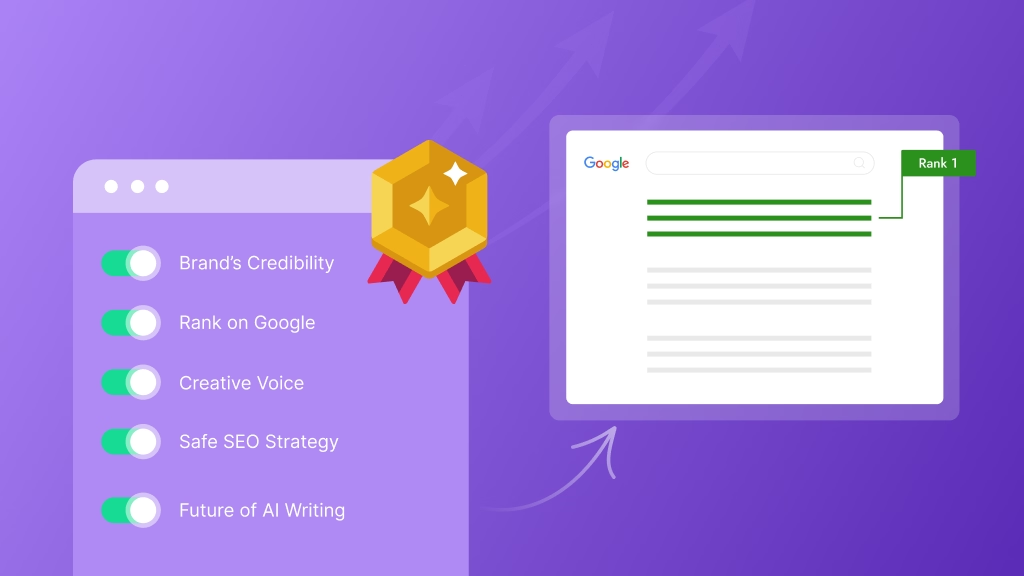
Protects Your Brand’s Credibility
When your content is unique and authentic, it builds trust. Readers and search engines can tell the difference between recycled information and genuine insight. In today’s AI-driven world, content authenticity is your superpower.
Pro Tip:
Use human-like AI writing through tools like a WordPress AI plugin to enhance your tone and flow while keeping your ideas truly your own.
Helps You Rank Higher on Google
Search engines love originality in content writing. Google’s algorithm prioritizes fresh, plagiarism-free articles that offer new value. Duplicated or copied text, on the other hand, can trigger “duplicate content” filters, meaning your post might never reach the first page.
That’s why it’s smart to run your drafts through a duplicate content checker before publishing. A quick scan ensures your piece is unique and AI content detector safe.
Encourages Your Own Creative Voice
When you stop copying and start creating, your personal voice begins to shine. Original content doesn’t just inform, it connects. It lets your readers hear you.
Try this:
If you’re wondering how to make plagiarism-free content, start by outlining your key points in your own words, then use AI tools like WriteRush or ChatGPT to refine the structure and language.
That’s how to write plagiarism-free content using ChatGPT, by leading with your ideas and letting AI polish them.
Keeps Your SEO Strategy Safe and Sustainable
Using copied content can lead to ranking drops or even deindexing, something no blogger or marketer wants. When you prioritize originality, you create SEO-safe content that performs long-term.
If you ever need to remove plagiarism quickly, use your WordPress AI plugin or rewriter tool to refresh the structure.
With features like article rewriting without plagiarism, you can easily transform old posts into unique, updated versions in seconds.
Prepares You for the Future of AI Writing
AI is becoming a co-writer, not a replacement. Learning how to write plagiarism-free content using AI means you’ll stay ahead of the curve, using automation for speed but relying on your creativity for authenticity.
Your readers want human-like AI writing, something that sounds conversational, original, and meaningful. By blending your insight with AI assistance, you get the best of both worlds: speed + soul.
See how originality changes everything? Great!
But here’s the real question: how can you actually make it happen in your daily writing routine? Don’t worry, the next section walks you through practical, easy-to-follow ways you’ll love.
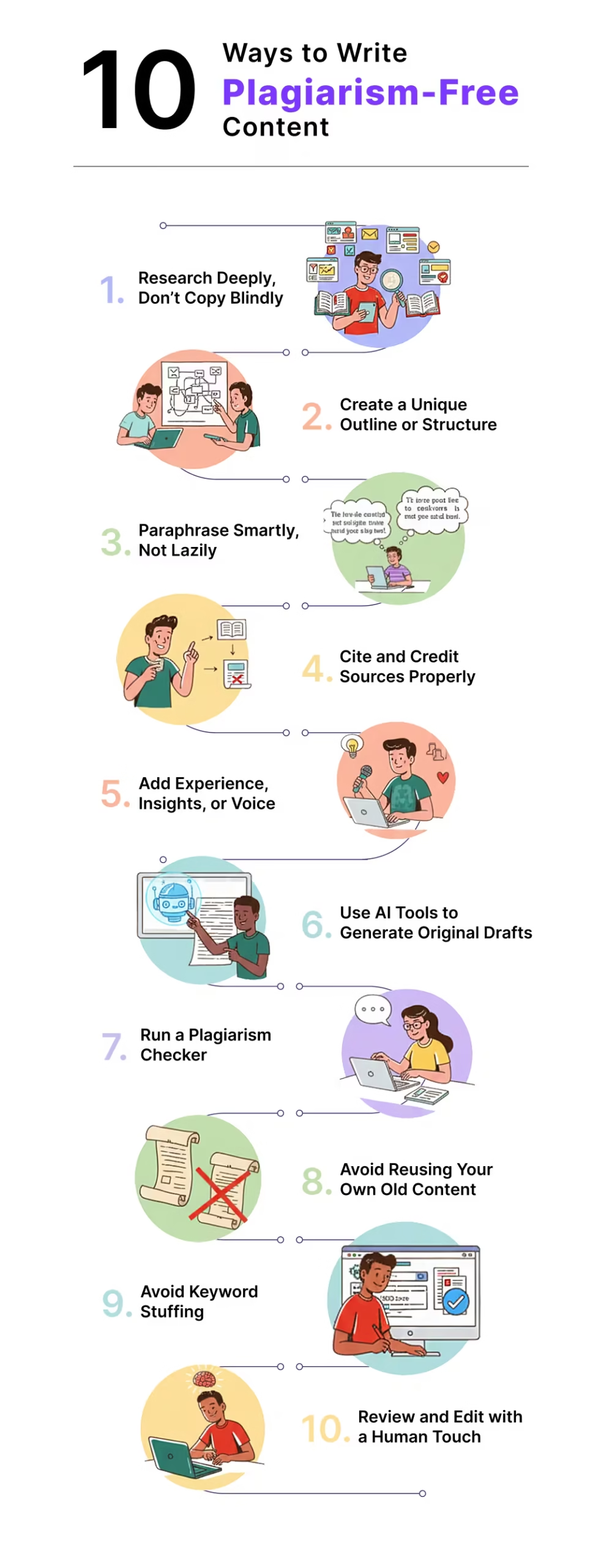
10 Ways to Write Plagiarism-Free Content
You don’t need to be a literary genius or grammar perfectionist to create plagiarism-free content. What you do need is the right mindset, workflow, and a few smart tools.
YES, your WordPress AI plugin can be one of them!
So, if you’re wondering how to make plagiarism-free content that sounds natural, authentic, and Google-friendly, here are 10 proven methods to help you every time you write.
Let’s explore them.
1. Research Deeply, Don’t Copy Blindly
Great writing starts with understanding, not copying. When you rush research, it’s easy to unconsciously repeat someone else’s ideas.
Instead, gather data and insights from multiple credible sources like blogs, studies, or case reports, then summarize in your own words.
Example:
If you’re writing about “AI in digital marketing,” read from 3–4 sources like HubSpot, Statista, and Google Trends. Write down what you learned, not what they said word-for-word.
Paste your research notes into ChatGPT and ask, “Summarize this in a new, conversational way.” That’s a perfect example of how to write plagiarism-free content using ChatGPT while keeping the essence but changing the structure completely.
2. Create a Unique Outline or Structure
After researching your topic, the easiest way to keep your content original is by creating a unique outline, because when your structure is different, your writing naturally becomes plagiarism-free.
You can start manually: check the top SERP results, note how others structured their posts, and identify gaps or angles they missed. Then, ask ChatGPT to suggest fresh perspectives or sections you can add.
This alone helps you break away from common “What–Why–How” formats.
But if you want to make the process even simpler, WriteRush gives you two smart outlining options:
- Using AI to generate a completely new outline based on your title and inputs.
- From Google SERP Results, where you can select up to three ranking articles and either Smart Merge their outlines or Custom Select specific headings to build your own.
Combining manual insight with these tools ensures your outline, and ultimately your content, feels unique, authentic, and structured in a way no one else has published.
3. Paraphrase Smartly, Not Lazily
Paraphrasing isn’t about swapping words; it’s about retelling an idea in a new way. A common mistake writers make is changing a few terms and assuming it’s original. This still gets flagged by plagiarism detectors and weakens your content.
Example:
Lazy rewrite: “Plagiarism-free content helps you rank higher on search engines.”
Smart rewrite: “Search engines reward fresh, authentic writing, which gives original content a natural SEO advantage.”
To paraphrase effectively:
- Understand the idea first, then rewrite it without looking at the original sentence.
- Add your own example or explanation to make it unique.
- Avoid matching sentence structure, even if the words differ.
- Mix short and long sentences for natural flow.
If you need help, tools like QuillBot or SmallSEOTools Paraphraser can give you a starting point. Just remember to edit the output so it feels natural. Your AI content writing tool can also perform article rewriting without plagiarism, producing human-like text that stays AI content detector safe.
Smart paraphrasing keeps your writing original without losing meaning, and that’s the real goal.
4. Cite and Credit Sources Properly
Anytime you use data, statistics, quotes, or research, make sure to credit the original source. Proper citations protect your credibility, strengthen content authenticity, and help you avoid accidental plagiarism.
Example:
According to a 2024 Semrush report, websites publishing original research earn up to three times more backlinks than those that don’t.
Instead of dropping raw links or manually formatting citations, let your tools help. A good AI content writing plugin inside WordPress can:
- Automatically detect referenced text
- Suggest relevant source links
- Auto-format citations in a clean, consistent style
- Insert hyperlinks with one click
This keeps your content polished, professional, and properly attributed without interrupting your writing flow.
Crediting your sources doesn’t just avoid plagiarism; it positions you as a trustworthy, ethical writer who respects original creators.
5. Add Your Own Experience, Insights, or Voice
The easiest way to make your content plagiarism-free?
Be yourself.
Google’s E-E-A-T (Experience, Expertise, Authoritativeness, Trustworthiness) framework rewards personal experience.
Example:
If you’re writing about “email marketing tools,” share how you improved your open rates or which tool worked best for your niche.
Even if AI helps you write, infuse it with your real examples, lessons, and tone. That’s what builds content authenticity and makes your writing unmistakably yours.
6. Use AI Tools to Generate Original Drafts
AI can be your biggest ally when used correctly.
If you’re learning how to write plagiarism-free content using AI, treat the tool like a collaborator, not a content copier.
A WordPress AI plugin can:
- Generate draft paragraphs based on your outline
- Rewrite or expand sections while ensuring originality in content writing
- Suggest tone improvements for human-like AI writing
Example:
Let’s say your plagiarism checker flags this sentence:
“Creating unique content is essential for better SEO performance.”
You can paste it into ChatGPT and ask:
“Rewrite this sentence to be original, maintain the meaning, and improve readability.”
ChatGPT might give you something like:
“Search engines reward originality, so producing fresh, authentic content naturally boosts your SEO.”
This way, you maintain the context, improve clarity, and get a rewritten version that feels natural and plagiarism-free.
Using AI tools this way helps you fix issues quickly while ensuring every part of your content remains unique and valuable.
7. Run a Plagiarism Checker Before Publishing
Even expert writers can accidentally repeat phrases. That’s why you should always run a duplicate content checker before hitting publish.
Tools like Copyscape, Grammarly, or Quetext can scan your post for similarities.
Example:
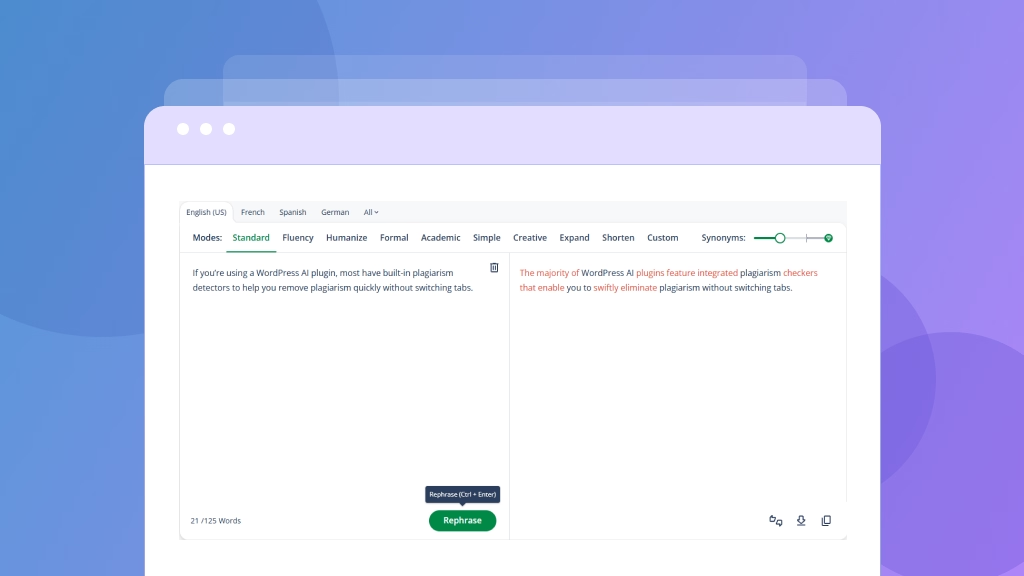
If you’re using a WordPress AI plugin, most have built-in plagiarism detectors to help you remove plagiarism quickly without switching tabs.
If a sentence is flagged, use your AI tool to rephrase it intelligently instead of deleting it; you retain your meaning and originality.
8. Avoid Reusing Your Own Old Content (Self-Plagiarism)
Copying from yourself may feel harmless, but Google sees it as duplicate content. Instead, refresh your old posts with new insights, keywords, or updated examples.
Example:
If your 2023 post was “Best SEO Tools for Bloggers,” repurpose it as “Best AI SEO Tools in 2025, What’s Changed?”
Your WordPress AI plugin can quickly help you perform article rewriting without plagiarism while maintaining your style and tone.
9. Optimize for SEO Without Keyword Stuffing
Keyword stuffing doesn’t just make your writing sound robotic; it can also trigger accidental duplication and hurt your SEO. When learning how to write plagiarism-free content, it’s important to use keywords intentionally, not excessively.
A good rule of thumb is to use your primary keyword 1%–1.5% of your total word count.
For example, in a 1,500-word blog, you only need your main keyword around 10–15 times, naturally placed.
Blend your primary term with semantic variations to keep your content readable and context-rich. For example:
- “How to write plagiarism-free content using AI”
- “originality in content writing”
- “AI content detector safe writing”
This helps search engines understand your topic without forcing repetitive phrasing that feels stuffed or unnatural.
A good AI writing plugin automatically adjusts keyword frequency while preserving readability and content authenticity.
By focusing on clarity and natural flow, and letting AI handle optimization, you avoid keyword stuffing while keeping your content fresh, readable, and original.
10. Review and Edit with a Human Touch
AI can draft, but only you can give it life. After writing, take a short break, then read your post out loud. Listen for flow, tone, and naturalness.
Ask yourself:
- Does this sound like something I’d actually say?
- Does it reflect my experience or just generic info?
Example:
Before publishing, run a quick manual check, maybe add a personal story, a quote, or a real example to make it sound less robotic.
Your WordPress AI plugin can assist with readability improvements and grammar corrections, but you bring emotion, relatability, and authenticity that no algorithm can replicate.
Simple, right?
Once you start using these methods, writing unique content becomes second nature. But what if you could do all this faster and smarter with a little help from AI? Let’s see how that works.
How AI + WordPress Plugin Simplifies All This
By now, you already know that writing plagiarism-free content takes time, researching, paraphrasing, citing, checking for duplication, and polishing for SEO.
It’s a lot, right?
But here’s the good news: you don’t have to juggle 10 different tools or waste hours editing manually.
With the right WordPress AI plugin, you can automate 80% of the process and still maintain 100% content authenticity.
Let’s see how AI and your WordPress setup make this easy, efficient, and effortless.
AI Helps You Create Original Drafts Effortlessly
Instead of starting with a blank page, use AI to brainstorm ideas, generate outlines, and write fresh paragraphs.
Modern AI tools (like WriteRush integrated into your WordPress editor) can help you write plagiarism-free content using AI that feels natural, informative, and you.
In seconds, you’ll get human-like AI writing that’s completely original and ready for your personal touch.
Smart Paraphrasing for Authenticity
Good AI writing tools don’t just replace words; they rethink sentences. This makes it easier to avoid plagiarism in writing while keeping your content relevant and engaging.
For example, if your blog includes repetitive phrases or standard definitions, your plugin can:
- Rephrase them in a new structure
- Suggest examples for context
- Improve flow for readability
That’s how AI content detector safe writing becomes simple; it feels natural and undetectably AI-assisted.
Streamlined Workflow From Draft to Publish
Here’s what a typical “AI + WordPress” workflow looks like:
- Input your topic: e.g., “how to write plagiarism-free content.”
- Generate outline: Your plugin suggests headings, flow, and tone.
- Write or expand sections: Use WriteRush or your AI assistant to draft paragraphs.
- Run plagiarism & originality check: Instantly scan with a duplicate content checker.
- Fix issues: Use “Rephrase” or “Rewrite” buttons for article rewriting without plagiarism.
- Optimize & publish: Add keywords, meta descriptions, and publish directly from WordPress.
And just like that, you go from idea to a fully optimized, plagiarism-free post in minutes.
Maintaining the Human Touch
Even though AI does the heavy lifting, your final edit adds soul to your post. After AI generates and checks your draft, take a moment to:
- Add personal anecdotes or opinions.
- Adjust phrasing for emotional connection.
- Ensure your brand’s tone shines through.
AI ensures accuracy; you ensure authenticity. That’s the perfect partnership between automation and art.
So the next time you’re wondering how to write plagiarism-free content using AI, remember that with the right WordPress plugin, originality doesn’t have to be hard work. It can be your superpower.
Amazing, isn’t it?
AI makes originality effortless, especially when built right into your WordPress workflow. But before you hit publish, let’s make sure you’re not falling into a few sneaky traps that could ruin all your hard work.
Common Mistakes to Avoid When Writing Plagiarism-Free Content
Even with the best intentions, many bloggers and marketers still make small mistakes that lead to unintentional plagiarism.
If you’re learning how to write plagiarism-free content, understanding these pitfalls early can save you hours of editing and a big hit to your SEO credibility.
Let’s look at the most common traps and how to steer clear of them.
1. Copying and “Lightly Editing” Existing Content
It’s tempting to take a top-ranking article, swap a few words, and call it new. But this approach destroys content authenticity and gets flagged by duplicate content checkers.
Fix it:
Instead of rewriting someone else’s structure, start fresh. Use your WordPress AI plugin or ChatGPT to brainstorm a new angle or outline.
That’s how to make plagiarism-free content that’s both original and aligned with your niche.
2. Relying Entirely on AI Without Personal Editing
AI tools are powerful, but they still need your touch. If you copy AI-generated text word for word, it can lack human-like AI writing and might not pass AI content detector safe writing checks.
Fix it:
Use AI as your co-writer, not your ghostwriter. Add your experience, insights, and examples to each section. That’s the right way to write plagiarism-free content using AI while keeping it natural and credible.
3. Forgetting to Cite or Credit Sources
You might not mean to copy, but using someone else’s research, stats, or quotes without credit is still plagiarism.
Fix it:
- Use quotation marks for direct quotes.
- Add hyperlinks to original studies or blogs.
- Mention authors or data sources naturally in text.
Your readers (and Google) will appreciate your transparency, and it’s a simple way to avoid plagiarism in writing.
4. Neglecting to Check for Duplicates
Even original content can accidentally overlap with existing material, especially in popular niches like marketing or tech.
Fix it:
Always run your drafts through a duplicate content checker or the built-in plagiarism tool in your WordPress AI plugin.
If it detects issues, you can remove plagiarism quickly by rephrasing or regenerating that section using article rewriting without plagiarism.
5. Ignoring Your Own Old Content (Self-Plagiarism)
Republishing or reusing paragraphs from your previous blogs might seem harmless, but Google views it as duplicate content.
Fix it:
Instead of copy-pasting, update and repurpose. For example, if you wrote “SEO Tips for 2023,” rewrite it as “SEO Strategies for 2025” using your AI plugin.
It’ll maintain originality in content writing while saving you time.
6. Keyword Stuffing in the Name of SEO
Many writers repeat their target keyword so much that it sounds robotic, and ironically, it can make their writing look “spun.”
Fix it:
Focus on semantic keywords like “how to make plagiarism-free content,” “AI content detector safe writing,” or “human-like AI writing.”
Your AI assistant or plugin can help balance keyword density without compromising readability or originality.
7. Not Reviewing the Final Draft Yourself
AI can write. Tools can check. But only you can give your content a genuine voice. Skipping that final review makes your post sound generic and risks losing your tone.
Fix it:
Read your post out loud before publishing.
Ask: Does it sound like me? Would my readers find this helpful or robotic?
This simple step ensures content authenticity and keeps your article relatable and trustworthy.
Now that you know what not to do, you’re ready to create content that’s not just plagiarism-free but powerful, personal, and unforgettable.
So, let’s wrap this up with a few thoughts to keep you inspired.
Closing Lines
Writing plagiarism-free content isn’t about perfection; it’s about intent, creativity, and authenticity. When you genuinely aim to bring fresh value to your readers, originality follows naturally.
With the help of a powerful WordPress AI plugin, you can create original, SEO-friendly articles that maintain content authenticity and feel completely human-like. Use AI tools thoughtfully to research, rephrase, and refine your work, ensuring every piece reflects your experience and expertise.
Whether you’re using WriteRush or any other AI writer, let technology enhance your creativity, not replace it. The goal isn’t merely to pass a duplicate content checker; it’s to share ideas that are fresh, valuable, and uniquely yours.
In the end, originality isn’t a feature; it’s your brand’s signature.
FAQs
1. What is plagiarism in content writing?
Plagiarism in content writing means using someone else’s words, ideas, or structure without giving credit. It can harm your SEO, reputation, and credibility.
2. How can I make plagiarism-free content easily?
You can make plagiarism-free content by researching multiple sources, rewriting ideas in your own words, citing references properly, and using a duplicate content checker or a WordPress AI plugin for originality verification.
3. How to write plagiarism-free content using AI?
Use AI as your writing assistant, not a copy machine. Tools like WriteRush or your WordPress AI plugin can help you generate unique, human-like content, paraphrase ethically, and ensure content authenticity through built-in plagiarism checks.
4. Can ChatGPT help me write plagiarism-free content?
Yes! ChatGPT can assist you in drafting, rewording, and expanding ideas while keeping them original. Just make sure to personalize the output with your insights and run a plagiarism check before publishing.
5. How can I remove plagiarism quickly from my content?
To remove plagiarism quickly, use article rewriting without plagiarism features available in your AI writing tool or plugin. You can also manually paraphrase sections and verify originality with a duplicate content checker.
6. Is AI-generated content safe from plagiarism?
It depends on how it’s used. If generated responsibly and edited for tone and structure, AI content is generally AI content detector safe writing. Always review and personalize to ensure originality in content writing.
7. How can a WordPress AI plugin help me avoid plagiarism?
A WordPress AI plugin can automatically generate unique text, rewrite old articles, suggest improvements, and check for duplication, saving you time while maintaining content authenticity.
8. Why is plagiarism-free content important for SEO?
Search engines favor originality. Plagiarized or duplicated content can hurt rankings, while unique, value-driven posts improve visibility, backlinks, and reader trust.
This page was last edited on 1 December 2025, at 10:42 am






