Let’s start with a situation many content creators are quietly experiencing.
You publish a well-researched blog post.
It ranks decently on Google.
It gets some traffic.
Then one day, a client, colleague, or friend says:
“I asked ChatGPT about this topic… and it recommended some other website.”
And your first thought is:
“Why not mine?”
If you’ve searched for “how to appear in ChatGPT,” you’re not alone. As AI tools like ChatGPT become a starting point for research, recommendations, and buying decisions, appearing in AI-generated answers is becoming just as important as ranking on Google.
This guide will show you how to make your content eligible, understandable, and worthy of appearing in ChatGPT answers, without hype, shortcuts, or black-hat tricks.
And YES, this works especially well if you run a WordPress site and create content regularly.
What Does “Appearing in ChatGPT” Actually Mean?
Before we dive into how to appear in ChatGPT, let’s pause for a second and clear up a very common misunderstanding.
Many people assume that “appearing in ChatGPT” works just like ranking on Google. However, that’s not exactly how it works.
Your content may be considered as “appearing in ChatGPT” when:
- ChatGPT mentions your brand, website, or product by name
- Your blog or webpage is cited or linked in ChatGPT answers (especially when browsing is enabled)
- ChatGPT recommends your content as a helpful resource
- AI-generated responses summarize or reference ideas that clearly originate from your articles
In other words, you’re not competing for a traditional ranking position; you’re competing for AI visibility and trust.
How ChatGPT Finds and Uses Content
To understand how to make your content appear in ChatGPT, it helps to know how AI-powered search and large language models work.
ChatGPT prioritizes content that is:
- Easy to access (not blocked by technical restrictions)
- Well-structured and semantically clear
- Written in natural, conversational language
- Backed by topical authority and credibility signals
This is where concepts like Generative Engine Optimization (GEO), semantic SEO, and entity-based optimization come into play.
Instead of asking,
“How do I rank in ChatGPT?”
A better question is:
“How do I make my content easy for AI to understand, trust, and reuse?”
Once you shift to this mindset, everything becomes clearer.
To successfully appear in ChatGPT answers, your content needs to pass three essential checkpoints:
- Accessibility: Can AI systems discover and read your content?
- Extractability: Can ChatGPT easily pull clear answers from your page?
- Authority: Does your site demonstrate expertise, experience, and trust?
Throughout this guide, we’ll walk through each of these steps in detail, so by the end, you’ll have a practical roadmap for improving your ChatGPT visibility without relying on shortcuts or guesswork.
ChatGPT Answers vs ChatGPT Search Results
Appearing in ChatGPT can mean different things depending on how the answer is generated. Sometimes ChatGPT may mention your website, brand, product, or content without showing a link. Other times, especially when ChatGPT Search is used, your page may appear as a cited source.
ChatGPT Search works more like an AI-powered search experience. When a user asks a question that may need current or web-based information, ChatGPT can search the web and may include inline citations or a Sources panel.
Here is the difference:
| Type of visibility | What it means | How to optimize |
|---|---|---|
| ChatGPT answer mention | ChatGPT mentions your brand, website, product, or idea in an answer | Build topical authority, publish helpful content, and create clear brand signals |
| ChatGPT Search citation | Your page appears as a source or citation in ChatGPT Search | Make your page crawlable, updated, useful, and easy to extract |
| Product or brand recommendation | ChatGPT recommends your tool, service, plugin, or website | Build reviews, comparisons, third-party mentions, and strong use-case content |
| AI summary influence | Your content helps shape the answer even without a direct click | Add original insights, examples, definitions, FAQs, tables, and practical steps |
This is why your goal should not only be to “rank in ChatGPT.” A better goal is to make your content easy for AI systems to discover, understand, trust, and cite.
One of the best ways to do this is by improving your AI-friendly content structure, including clear headings, answer-first paragraphs, FAQs, examples, and useful tables.
For example, if someone asks, “How do I make my WordPress blog appear in ChatGPT?”, your content should clearly answer that question with crawlability tips, content structure guidance, schema recommendations, examples, and a practical checklist.
Use related phrases naturally in this section, such as:
- how to appear in ChatGPT Search results
- ChatGPT citations
- how to get cited by ChatGPT
- how to get mentioned by ChatGPT
- AI search visibility
- ChatGPT source panel
How ChatGPT Decides What to Include in Its Answers
Now that we understand what it means to appear in ChatGPT, the next logical question is:
How does ChatGPT actually decide which content makes it into its answers?
While the process isn’t identical to Google’s ranking algorithm, it’s also not random. ChatGPT follows clear patterns that content creators can optimize for, once they know what to look for.
ChatGPT Doesn’t “Rank” Pages, It Selects Information
First things first: ChatGPT does not rank websites in a traditional SEO sense.
Instead of ranking pages from position #1 to #10, ChatGPT:
- Analyzes relevant information related to the user’s question
- Pulls from high-quality, semantically clear sources
- Generates answers using natural language understanding
So when you’re thinking about how to appear in ChatGPT, the goal isn’t ranking, it’s being selected as a trusted source.
The Key Signals ChatGPT Looks For
To decide what information to include, ChatGPT relies on a combination of AI-driven signals, including:
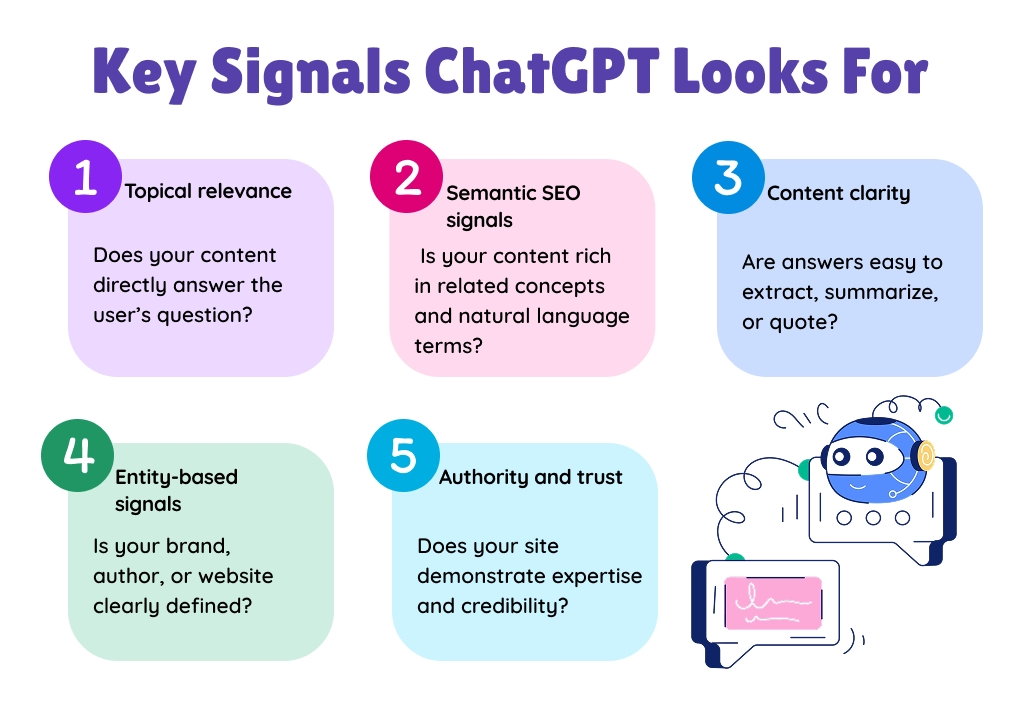
- Topical relevance: Does your content directly answer the user’s question?
- Semantic SEO signals: Is your content rich in related concepts and natural language terms?
- Content clarity: Are answers easy to extract, summarize, or quote?
- Entity-based signals: Is your brand, author, or website clearly defined?
- Authority and trust: Does your site demonstrate expertise and credibility?
This is why Generative Engine Optimization (GEO) is becoming just as important as traditional SEO.
Different ChatGPT Modes, Different Content Behavior
Another important thing to keep in mind is that ChatGPT doesn’t always work the same way.
Depending on the situation, ChatGPT may:
- Generate answers based on its language model training
- Use AI-powered search or browsing features to pull live information
- Cite or link to websites when relevant and accessible
That’s why optimizing for AI search visibility and ensuring your site is crawlable and well-structured plays a crucial role in how your content appears in ChatGPT answers.
Why Clear Structure Matters More Than Ever
Here’s something many creators overlook:
ChatGPT prefers content that already looks like an answer.
Content with:
- Clear headings and subheadings
- Bullet points and numbered steps
- Short, direct explanations
- FAQ-style sections
is far more likely to be reused in AI-generated responses.
If your content:
- Answers real questions
- Uses natural, conversational language
- Demonstrates topical authority
- Follows structured, semantic formatting
You dramatically increase your chances of being included in ChatGPT answers, both now and as AI search continues to evolve.
So, if your content is easy for humans to scan, it’s easier for AI to understand too.
Step-by-Step Process to Make Your Content Appear in ChatGPT Answers
Now that you understand how ChatGPT selects information, let’s get practical.
If you’re wondering how to appear in ChatGPT, the good news is this: you don’t need hacks or shortcuts. Instead, you need a repeatable, content-first system that aligns with how AI-powered search and large language models work.
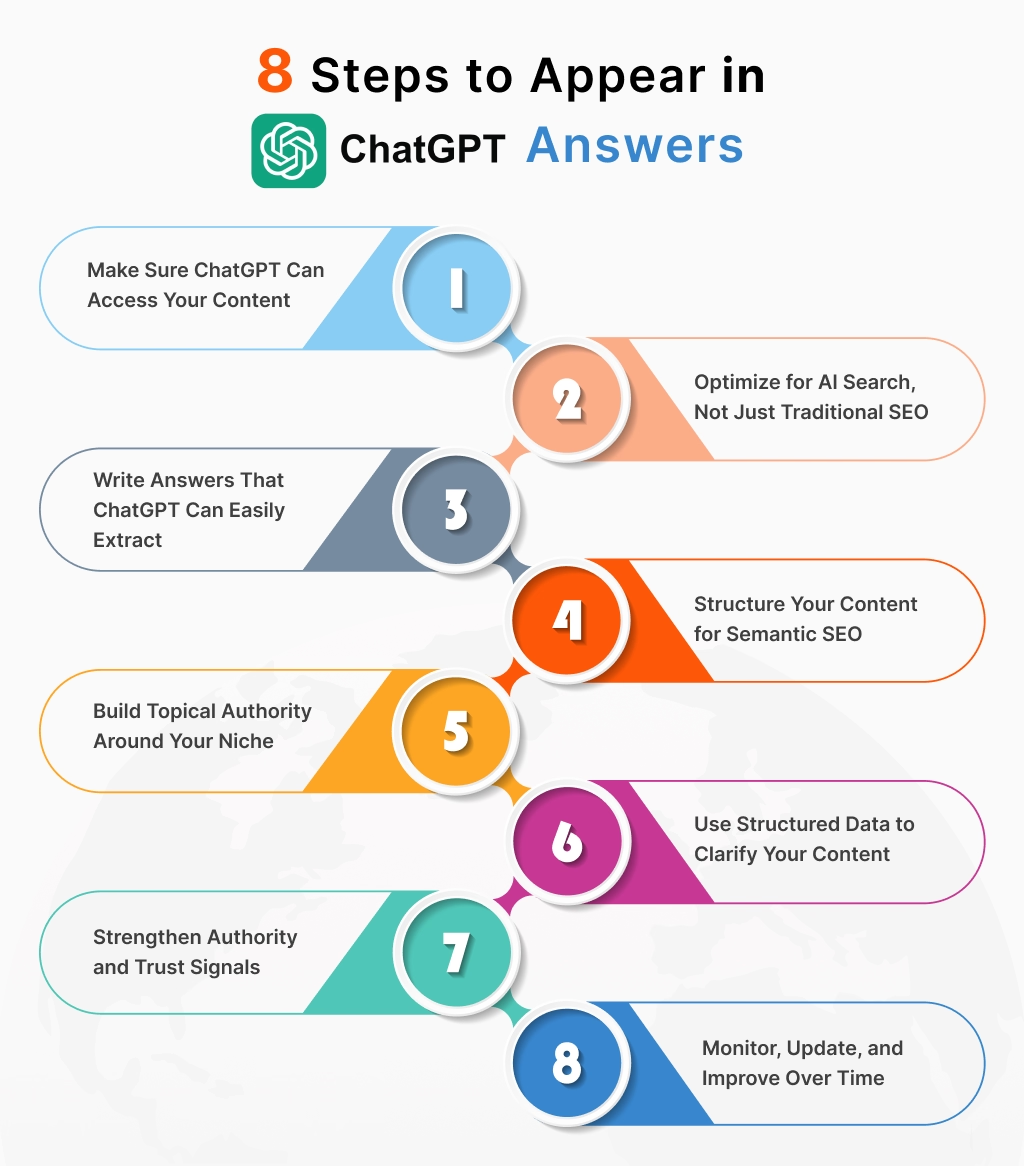
Let’s break it down step by step.
Step 1: Make Sure ChatGPT Can Access Your Content
The first step to appearing in ChatGPT is making sure your content can actually be discovered and read. If your important pages are blocked by robots.txt, noindex tags, login walls, security plugins, or CDN rules, AI search systems may not be able to access them.
For ChatGPT Search visibility, this step is especially important. OpenAI says that ranking in ChatGPT Search depends on several factors and there is no way to guarantee top placement. However, OpenAI also says that allowing OAI-SearchBot to crawl your site is important for inclusion in ChatGPT Search.
OpenAI uses different crawlers for different purposes:
| Crawler | Purpose |
|---|---|
| OAI-SearchBot | Used to surface websites in ChatGPT Search results |
| GPTBot | Used to crawl content that may help improve OpenAI’s generative AI models |
| ChatGPT-User | Used for certain user-triggered actions in ChatGPT, not automatic crawling for Search |
OpenAI’s crawler documentation says these settings can be managed independently. For example, a site owner can allow OAI-SearchBot for ChatGPT Search visibility while making a separate decision about GPTBot.
What to check before optimizing for ChatGPT
Make sure your website passes these basic access checks:
- Your important blog posts are indexable.
- Your page does not have a
noindextag. - Your robots.txt file does not block OAI-SearchBot.
- Your XML sitemap includes the blog URL.
- Your content is not hidden behind login walls or popups.
- Your main content is visible in the HTML and not fully dependent on JavaScript.
- Your CDN, firewall, or security plugin is not blocking OpenAI crawlers.
- Your internal links help crawlers discover related content.
- Your page loads fast and works properly on mobile devices.
If you manage content inside WordPress, using a WordPress AI content optimization plugin can help you review SEO basics, improve readability, optimize metadata, and strengthen internal linking before publishing.
Example robots.txt rule for OAI-SearchBot
If your goal is to appear in ChatGPT Search results, you can allow OAI-SearchBot like this:
User-agent: OAI-SearchBot
Allow: /
If you also want to allow GPTBot, you can add:
User-agent: GPTBot
Allow: /
However, OAI-SearchBot and GPTBot are not the same. OAI-SearchBot is related to search visibility in ChatGPT, while GPTBot is related to crawling content that may be used to improve generative AI models.
Before making changes to robots.txt, check your current settings carefully. A small mistake can block search engines or AI crawlers from important pages.
Pro tip:
Many WordPress site owners rely on SEO or AI content plugins to automatically manage crawl access and sitemaps, which is especially helpful if you’re not technical.
Step 2: Optimize for AI Search, Not Just Traditional SEO
Next, shift your mindset. Once access is handled, the next question is:
Are you writing for real ChatGPT-style queries?
Traditional SEO focuses on keywords and rankings. AI search optimization (GEO) focuses on answers and context.
- To improve AI visibility:
- Target question-based queries, not just short keywords
- Use natural language content that mirrors how people talk to ChatGPT
- Include related terms and concepts (LSI keywords) naturally
People don’t talk to ChatGPT the way they type in Google.
Instead of:
“ChatGPT SEO”
They ask:
“How do I make my content appear in ChatGPT answers?”
Example
Instead of writing a generic post titled:
“AI and the Future of SEO”
Create focused sections like:
- “How does ChatGPT choose which websites to mention?”
- “Can bloggers appear in ChatGPT answers?”
- “How long does it take to show up in ChatGPT?”
These questions map directly to conversational search optimization.
Search Queries You Should Include for ChatGPT Visibility
To improve your chances of appearing in ChatGPT answers, you should optimize your content around real questions people ask in AI tools. Traditional SEO often focuses on short keywords, but ChatGPT users usually ask complete questions.
For WordPress content teams, learning how to write SEO blog posts with AI can help combine keyword research, search intent, AI-assisted drafting, human editing, metadata, and internal links in one workflow.
For example, a Google user may search:
ChatGPT SEO
But a ChatGPT user may ask:
How do I make my website appear in ChatGPT answers?
That is why your content should include both short-tail and long-tail queries. Do not repeat the same keyword unnaturally. Instead, use related search queries across headings, FAQs, examples, tables, and answer-style paragraphs.
Here are related search queries you can naturally include in this blog:
| Query group | Search queries to include |
|---|---|
| Core topic | how to appear in ChatGPT, how to show up in ChatGPT, how to get featured in ChatGPT |
| Website visibility | how to get my website in ChatGPT, how to make my blog appear in ChatGPT, how to make content appear in ChatGPT answers |
| ChatGPT Search | how to appear in ChatGPT Search results, ChatGPT Search optimization, rank in ChatGPT Search |
| Citations | how to get cited by ChatGPT, ChatGPT citations, how to become a ChatGPT source |
| AI SEO | AI search optimization, Generative Engine Optimization, GEO SEO, Answer Engine Optimization, LLM SEO |
| Technical SEO | OAI-SearchBot, GPTBot, OpenAI crawler, robots.txt ChatGPT, ChatGPT crawler |
| WordPress | WordPress ChatGPT SEO, optimize WordPress content for ChatGPT, AI SEO for WordPress |
| Tracking | ChatGPT visibility tracking, ChatGPT prompt tracking, ChatGPT referral traffic, AI search traffic |
You can also use AI prompts for blog writing to turn these search queries into outlines, FAQs, metadata, and answer-first sections for your blog.
The best way to use these queries is to match them with the correct section. For example, use OAI-SearchBot and robots.txt ChatGPT in the crawlability section. Use ChatGPT prompt tracking in the monitoring section. Use how to get cited by ChatGPT in the citation and authority section.
Pro tip:
Look at your Search Console “queries” or forums like Reddit and Quora, these often mirror ChatGPT-style questions.
Step 3: Write Answers That ChatGPT Can Easily Extract
Here’s the golden rule for learning how to appear in ChatGPT:
If your answer isn’t clear in 10 seconds, it’s probably too vague for AI.
Bad Example (Hard for AI to Use)
“With the rise of artificial intelligence, content strategies must evolve to meet new standards of discoverability…”
Good Example (AI-Friendly)
“To appear in ChatGPT answers, your content must be accessible, clearly structured, and written in a way that directly answers user questions.”
Clear. Direct. Reusable.
How to Do This Consistently:
- Start sections with a direct answer
- Keep key explanations under 80 words
- Use bullet points for clarity
- Avoid long storytelling before the answer (story can come after)
Step 4: Structure Your Content for Semantic SEO
Once your answers are clear, structure them in a way that both humans and AI love.
Use:
- Descriptive H2 and H3 headings
- FAQ-style sections
- Lists, tables, and step-by-step formats
- Logical content flows from basic to advanced
This improves semantic SEO, conversational search optimization, and overall readability, all key factors for appearing in ChatGPT answers.
Best Content Formats to Appear in ChatGPT Answers
Some content formats are easier for ChatGPT to understand, summarize, and reuse. If your goal is AI search visibility, choose formats that answer questions clearly and organize information logically.
ChatGPT is often used for question-based searches, comparisons, summaries, recommendations, and step-by-step guidance. So your content should not be written as one long block of text. It should be broken into helpful sections that answer specific user intents.
The best content formats for ChatGPT visibility include:
1. How-to guides
How-to guides work well because users often ask ChatGPT for step-by-step help.
Example queries:
- How do I get my website to appear in ChatGPT?
- How do I optimize WordPress content for ChatGPT?
- How do I make my blog show up in AI search results?
A strong how-to guide should include clear steps, examples, tools, mistakes to avoid, and a final checklist.
If you want to create these guides faster, you can follow a practical workflow on how to use AI for blog writing while still keeping human review, originality, and SEO quality in place.
2. FAQ sections
FAQ sections help you target question-based prompts. They also make your content easier to scan.
For example, instead of only saying “Use schema markup,” add FAQ questions like:
- Does schema help content appear in ChatGPT?
- What is OAI-SearchBot?
- Why does ChatGPT mention my competitors but not my website?
One important note: Google has deprecated FAQ rich results for most websites as of May 2026, so FAQs should not be added only for rich snippets. Add them because they improve content clarity, user experience, and AI-friendly structure.
3. Comparison posts
Comparison content can help when users ask ChatGPT to compare options.
Examples:
- ChatGPT Search vs Google Search
- SEO vs Generative Engine Optimization
- GPTBot vs OAI-SearchBot
- Traditional SEO vs AI search optimization
Comparison tables make your content easier for users and AI systems to understand quickly.
4. Best tools lists
Tool list content can help you appear for recommendation-style prompts.
Examples:
- Best AI writing tools for WordPress
- Best SEO tools for AI search visibility
- Best plugins for optimizing WordPress content
If you publish tool lists, include clear criteria, use cases, pros and cons, and honest recommendations. If your audience wants tool recommendations, you can also create or internally link to helpful lists of WordPress AI content marketing tools that compare features, use cases, and SEO benefits.
5. Definition pages
Definition-style content works well for “what is” queries.
Examples:
- What is Generative Engine Optimization?
- What is AI search optimization?
- What is ChatGPT Search?
- What is OAI-SearchBot?
A good definition section should answer the question in the first few sentences, then explain examples, use cases, and related terms.
6. Troubleshooting guides
Troubleshooting content is useful because users often ask ChatGPT why something is not working.
Examples:
- Why is my website not appearing in ChatGPT?
- Why is ChatGPT not citing my content?
- Why does ChatGPT recommend competitors instead of my brand?
This type of content can attract high-intent traffic because the user already has a specific problem.
7. Checklists
Checklists are easy to scan and useful for both readers and AI systems.
Example checklist:
- Is the page indexable?
- Is the page included in the sitemap?
- Is OAI-SearchBot allowed?
- Does the article answer the main question directly?
- Are headings clear?
- Is Article schema added?
- Are internal links included?
- Is the content updated?
- Are author and brand signals clear?
8. Case studies
Case studies build trust because they show real results. If you can show how a blog improved visibility after updating content structure, adding FAQs, improving internal links, or fixing crawl issues, that can make the article more useful.
9. Original research or data-backed content
Original data can make your content more cite-worthy. If your website shares unique statistics, tests, workflows, or examples, other websites and AI search systems may have stronger reasons to reference your page.
For example, you could test 50 ChatGPT prompts related to AI writing, WordPress SEO, and blog optimization. Then publish the results as part of your article.
Step 5: Build Topical Authority Around Your Niche
One article is rarely enough to consistently appear in ChatGPT.
To strengthen your chances:
- Create topic clusters around your main subject
- Interlink related blog posts strategically
- Cover the topic from multiple angles (definitions, guides, comparisons, FAQs)
This signals to AI systems that your site has topical authority, making your content more trustworthy and reusable.
Example
Instead of only publishing:
“How to Appear in ChatGPT”
Support it with:
- “What Is Generative Engine Optimization (GEO)?”
- “SEO vs GEO: What’s the Difference?”
- “Best Content Formats for AI Search”
- “How WordPress Sites Can Optimize for ChatGPT”
Interlink these posts.
Step 6: Use Structured Data to Clarify Your Content
Structured data helps machines understand exactly what your content represents.
For better AI clarity, implement:
- Article or BlogPosting schema
- FAQPage schema for question sections
- HowTo schema for step-by-step guides
- Organization and Author (Person) schema
While schema doesn’t guarantee inclusion, it significantly improves AI content understanding.
Example
If you have an FAQ section:
- Mark it with FAQ Page schema
If you explain the steps:
- Use How To schema
If you publish blogs:
- Apply Article schema
Important:
Don’t overdo it. One clean schema setup is better than multiple conflicting ones.
Step 7: Strengthen Authority and Trust Signals
Even the best-structured content won’t appear in ChatGPT if it lacks credibility.
To build trust:
- Clearly show author expertise and experience
- Maintain an informative About page
- Earn mentions or links from reputable sources
- Keep content accurate, updated, and well-referenced
Example
A blog written by:
“John – Content Marketer with 8+ years of experience in SEO & AI tools”
is far more trustworthy than:
“Admin”
This aligns with E-E-A-T principles and helps AI systems identify your content as reliable.
Why Third-Party Mentions Help You Appear in ChatGPT
Your own website is important, but it is not the only place where your brand authority is built. AI systems may also understand your brand based on how it appears across the wider web.
If your website, product, or brand is mentioned on trusted third-party sources, it becomes easier for AI systems to connect your brand with your niche.
If you want ChatGPT to recommend your AI writing plugin, your own product page is helpful, but it may not be enough. You also need supporting signals from reviews, comparison articles, tutorials, listicles, case studies, directories, and community discussions.
For example, your core product page about an AI content marketing plugin for WordPress should be supported by tutorials, comparisons, reviews, and use-case articles that help AI systems understand the product clearly.
Third-party mentions can include:
- Guest posts on relevant websites
- Product reviews
- Tool comparison articles
- Expert roundups
- Industry directories
- Case studies
- Podcast or webinar mentions
- Community discussions
- Brand mentions from trusted blogs
- Social proof from real users
These mentions help build entity authority. Entity authority means search engines and AI systems can better understand who you are, what your brand does, and which topics your website is connected with.
For example, if your brand is repeatedly mentioned around topics like AI blog writing, WordPress SEO, AI writing plugin, and content optimization, it becomes easier for AI systems to associate your brand with those topics.
To improve third-party authority, you can:
- Publish guest posts on niche-relevant websites.
- Get listed in trusted tool directories.
- Encourage honest user reviews.
- Create comparison content that other websites can reference.
- Share original research or case studies.
- Build partnerships with relevant blogs or SaaS websites.
- Make sure your brand name, website URL, and product description are consistent across the web.
This can help you capture searches like:
- how to make ChatGPT mention my brand
- how to get ChatGPT to recommend my product
- brand visibility in ChatGPT
- AI brand visibility
- AI search reputation
- entity authority for AI search
The goal is not to manipulate ChatGPT. The goal is to make your brand easier to verify, understand, and trust.
Step 8: Track Your ChatGPT Visibility Over Time
Appearing in ChatGPT is not a one-time task. AI search visibility can change as new content is published, competitors update their pages, and AI search systems improve.
That is why you should track your ChatGPT visibility regularly. This helps you understand whether your content appears for important prompts and which competitors are being recommended instead.
Start by creating a simple prompt tracking sheet.
| Prompt | Tool tested | Your site appeared? | Competitor appeared? | Cited source | Missing topic | Action needed |
|---|---|---|---|---|---|---|
| How do I make my website appear in ChatGPT? | ChatGPT Search | Yes/No | Competitor name | Source URL | Missing crawler section | Add OAI-SearchBot details |
| How do I optimize WordPress content for ChatGPT? | ChatGPT Search | Yes/No | Competitor name | Source URL | Missing WordPress example | Add WordPress workflow |
| What is Generative Engine Optimization? | ChatGPT Search | Yes/No | Competitor name | Source URL | Missing definition | Add GEO explanation |
If this prompt is important for your audience, link it to a complete guide on AI writing for WordPress so readers can learn how to create, optimize, and manage content directly inside WordPress.
Test prompts that match your target audience’s real questions.
Example prompts:
- How do I make my website appear in ChatGPT?
- How do I get my blog cited by ChatGPT?
- How can WordPress sites appear in AI search results?
- What is the best way to optimize content for ChatGPT?
- What is ChatGPT Search optimization?
- How do I allow ChatGPT to crawl my website?
- What is OAI-SearchBot?
- How do I track traffic from ChatGPT?
- What is Generative Engine Optimization?
- Which AI writing tools are best for WordPress bloggers?
When you test these prompts, record whether your website appears, whether competitors appear, and which sources ChatGPT uses. If your competitors appear but your website does not, check what their content includes that yours is missing.
Look for gaps such as:
- Better definitions
- More updated information
- Stronger examples
- Better schema
- More third-party mentions
- Clearer headings
- Better internal links
- More direct answers
- More complete FAQs
Then update your article based on those gaps.
You should repeat this process monthly. ChatGPT visibility is not fixed. A page that does not appear today may appear later if it becomes more useful, better structured, and easier to crawl.
How to Check If ChatGPT Is Sending Traffic to Your Website
Once your content starts appearing in ChatGPT Search or AI-generated answers, you should track whether it sends visitors to your website.
However, ChatGPT visibility does not always work like traditional Google traffic. Sometimes users may read the answer inside ChatGPT and never click. Other times, they may visit your site through a citation, source panel, or branded search later.
That is why you should track both direct referral traffic and indirect visibility signals.
1. Check referral traffic in GA4
Open Google Analytics 4 and review your referral traffic sources. Look for sources related to:
- ChatGPT
- OpenAI
- Perplexity
- Copilot
- Gemini
- Other AI search tools
If ChatGPT sends traffic to your website, it may appear as referral traffic depending on how the visit is passed into GA4.
2. Check landing pages
Look at which pages receive traffic from AI-related sources. If your blog post about appearing in ChatGPT starts receiving AI referral traffic, that means the topic is gaining visibility from AI search behavior.
Track:
- Sessions
- Engagement rate
- Average engagement time
- Conversions
- Scroll depth
- Clicks on internal links
3. Check Google Search Console
Google Search Console will not directly show “ChatGPT rankings,” but it can show whether your content refresh improved long-tail search visibility.
After updating the blog, check whether impressions increase for queries like:
- how to appear in ChatGPT
- how to get my website in ChatGPT
- ChatGPT Search optimization
- OAI-SearchBot
- AI search optimization
- Generative Engine Optimization
If impressions grow after the update, your content is likely covering more relevant search intent.
4. Check server logs
Server logs can show whether crawlers are accessing your content. If you have technical access, check whether OpenAI user agents are visiting your site.
This is useful for confirming whether your robots.txt, CDN, or firewall settings are allowing crawler access.
5. Track brand mentions
Not all AI visibility produces immediate traffic. Sometimes users discover your brand in an AI answer and search for it later.
Track:
- Branded search growth
- Direct traffic growth
- Product page visits
- Demo or signup clicks
- Mentions on third-party websites
- Referral traffic from review or comparison pages
This gives you a better picture of whether ChatGPT visibility is helping your overall brand awareness.
To improve these signals over time, build a repeatable AI content marketing workflow that connects keyword research, content creation, optimization, publishing, and content updates.
Pro tip:
Updating older posts is often faster and more effective than writing new ones.
More: How to Write Better AI Prompts
Common Mistakes That Stop You from Appearing in ChatGPT
At this point, you know what to do to improve your chances of appearing in ChatGPT. However, here’s the catch: even great content can fail if a few critical mistakes slip through.
According to Backlinko,
“ChatGPT has 700 million weekly active users worldwide.”
So, appearing in these responses offers a powerful way to increase exposure and drive relevant traffic to your site.
If you’ve been trying to figure out how to appear in ChatGPT but haven’t seen results yet, one of these issues is often the reason.
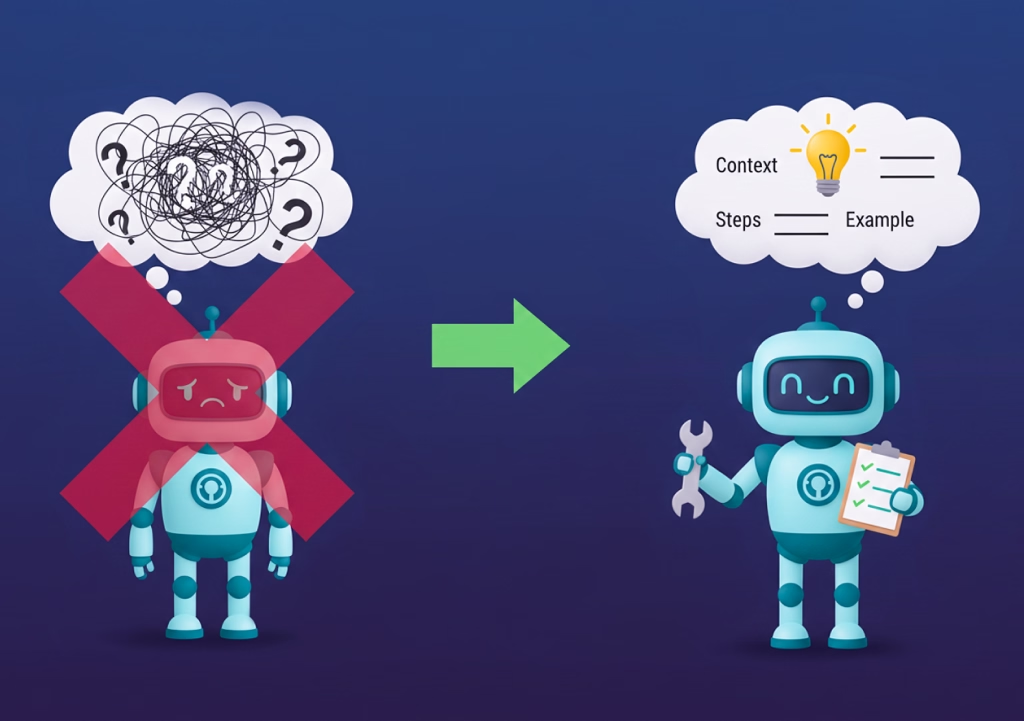
Let’s walk through the most common (and fixable) mistakes.
1. Accidentally Blocking AI Crawlers
This is one of the most overlooked problems, especially for WordPress users.
If your site blocks AI-related crawlers, ChatGPT’s search and browsing features can’t access your content, no matter how valuable it is.
Common causes include:
- Overly restrictive robots.txt rules
- Security plugins are blocking unknown bots
- Staging or “noindex” settings left enabled after launch
Quick check: Make sure AI search bots are allowed to crawl important pages.
2. Writing Content That’s Too Vague or Overly Long
Another frequent issue is content that sounds impressive but doesn’t actually answer the question.
ChatGPT favors clear, direct, and extractable answers.
What hurts AI visibility:
- Long introductions before getting to the point
- Buzzwords without explanations
- Paragraphs that don’t directly answer a question
What works better:
- Answer-first writing
- Short, focused paragraphs
- Bullet points and summaries
Remember: If ChatGPT can’t summarize your answer easily, it probably won’t use it.
3. Focusing Only on Keywords Instead of Search Intent
Traditional SEO often trains us to think in keywords. However, AI search optimization (GEO) is more about intent and context.
A common mistake:
- Repeating “how to appear in ChatGPT” without actually explaining the process
A better approach:
- Answer related questions naturally
- Use semantic SEO and LSI keywords in context
- Write the way people ask ChatGPT questions
This improves both conversational search optimization and user experience.
4. Ignoring Content Structure and Semantic SEO
Even high-quality content can be ignored if it’s poorly structured.
ChatGPT prefers content that is:
- Logically organized
- Easy to scan
- Clearly divided into sections
Mistakes to avoid:
- Walls of text
- Missing or generic headings
- No FAQs or step-by-step sections
Instead, use:
- Descriptive H2s and H3s
- Lists and sub-sections
- Clear question-and-answer formats
Good structure helps both humans and AI systems understand your content.
5. Not Showing Any Authority or Trust Signals
ChatGPT doesn’t treat all websites equally.
If your site lacks credibility signals, it may struggle to appear in AI-generated answers.
Common trust issues include:
- No author bio or “About” page
- Generic bylines like “Admin”
- Outdated or inaccurate information
- No external references or mentions
To improve:
- Highlight the author’s experience
- Keep content fresh and accurate
- Build a consistent brand identity across your site
These elements support E-E-A-T and improve AI trust.
6. Forgetting Structured Data (or Using It Incorrectly)
Structured data helps AI understand what your content represents, but only if it’s done right.
Common schema mistakes:
- No schema at all
- Multiple plugins generating duplicate schema
- Using the wrong schema type
For example:
- Use FAQ Page schema for FAQs
- Use How To schema for step-by-step guides
- Use Article schema for blog posts
Clean, consistent schema improves AI content interpretation.
7. Publishing Once and Never Updating
Finally, one of the biggest mistakes is treating content as “set and forget.”
AI-powered systems prefer fresh, accurate, and regularly updated content.
If your article:
- Has outdated examples
- Misses new questions users are asking
- Isn’t internally linked to newer content
…it becomes less relevant over time.
8. Ignoring ChatGPT Search Optimization
Many website owners only optimize for traditional Google rankings. But ChatGPT Search works differently because users often ask full questions, compare options, and expect direct answers.
For example, instead of searching only “AI SEO”, a user may ask:
How do I make my WordPress blog appear in ChatGPT Search results?
To fix this mistake:
- Add answer-first paragraphs.
- Use conversational search queries.
- Include question-based H2s and H3s.
- Add useful tables and summaries.
- Keep the article updated.
- Make sure OAI-SearchBot can access your important pages.
- Add examples that directly match user prompts.
Your content should be useful for both search engines and AI answer engines.
9. Not Building Brand Mentions Outside Your Website
If your brand is only mentioned on your own website, AI systems may have fewer signals to understand your authority.
This is especially important for product-based searches. If you want ChatGPT to recommend your plugin, tool, or service, your brand should appear in more than one place online.
To fix this mistake:
- Publish guest posts.
- Get included in relevant tool lists.
- Encourage real user reviews.
- Create comparison content.
- Share case studies.
- Build partnerships with niche websites.
- Keep brand information consistent across platforms.
The more clearly your brand is connected with your topic, the easier it becomes for AI systems to understand your relevance.
10. Not Testing Real ChatGPT Prompts
You cannot improve ChatGPT visibility if you never test what ChatGPT currently shows.
Many website owners update content based only on Google keywords. But ChatGPT users ask different types of questions. They ask for recommendations, comparisons, summaries, checklists, examples, and step-by-step help.
To fix this mistake:
- Create a list of 20 to 30 important prompts.
- Test them in ChatGPT Search.
- Record which websites appear.
- Study which competitors are cited.
- Find missing sections in your own content.
- Update your blog with clearer answers.
- Repeat the test every month.
Prompt tracking helps you improve the article based on real AI search behavior, not guesses.
Pro tip:
Updating an existing post is often faster and more effective than creating a new one when trying to improve AI visibility.
How Your AI Writing Plugin Supports the Workflow
By now, you’ve seen that learning how to appear in ChatGPT isn’t about one single trick. Instead, it’s about following a repeatable content workflow from research and structure to optimization and updates.
However, doing all of this manually for every blog post can quickly become overwhelming, especially if you’re publishing regularly on WordPress.
That’s exactly where an AI writing plugin fits into the picture, not as a replacement for strategy, but as a smart assistant that keeps everything consistent.
From Idea to AI-Ready Outline (In Minutes, Not Hours)
The first challenge most bloggers and content marketers face is where to start.
An AI content writing plugin helps by:
- Turning a seed keyword like “how to appear in ChatGPT” into a structured, SERP-informed outline
- Suggesting related questions and LSI keywords that people actually ask ChatGPT
- Organizing content into logical sections (definitions, steps, FAQs)
Instead of staring at a blank screen, you begin with a framework that’s already aligned with AI search intent.
Writing Clear, Extractable Answers
As we discussed earlier, ChatGPT favors content that is easy to extract and summarize.
This is where your AI plugin quietly does the heavy lifting:
- Helps generate answer-first paragraphs
- Encourages short, focused explanations
- Structure content using bullet points, steps, and headings
- Maintains a natural, conversational tone
The result?
Content that feels human, but is also optimized for AI-powered search and large language models.
Built-In Support for Semantic SEO and GEO
Another advantage of using an AI writing plugin is consistency.
Instead of manually remembering every optimization step, the plugin can:
- Suggest semantic keywords and related concepts
- Support Generative Engine Optimization (GEO) strategies
- Improve entity clarity by reinforcing brand, topic, and author context
- Reduce keyword stuffing while improving topical relevance
This helps your content perform well not only in Google search but also in ChatGPT answers and conversational AI results.
FAQ and Schema-Ready Content without Extra Tools
One of the most effective ways to appear in ChatGPT is by using FAQ-style content and structured formats.
With the right AI plugin, you can:
- Generate relevant FAQs automatically
- Create HowTo or step-by-step sections
- Prepare content that’s schema-ready for WordPress
- Avoid common mistakes like duplicate or conflicting structured data
This saves time and improves AI content understanding at the same time.
Easier Updates and Long-Term AI Visibility
Appearing in ChatGPT isn’t a one-time task; it’s an ongoing process. An AI writing tool supports long-term success by:
- Helping you refresh older posts with new insights
- Identifying missing questions or gaps in existing content
- Maintaining consistency across topic clusters
- Supporting content updates without rewriting from scratch
For content teams and solo bloggers alike, this makes AI visibility scalable, not stressful.
When your content workflow aligns with how AI systems discover, understand, and reuse information, appearing in ChatGPT becomes a natural outcome, not a guessing game.
If you’re already investing in content, the right tools simply help you get more visibility from the work you’re already doing.
Final Thoughts
Appearing in ChatGPT is not about using tricks or repeating keywords. It is about making your content accessible, clear, trustworthy, and useful enough for AI systems to understand and reference.
Start with the basics. Make sure your important pages are indexable, included in your sitemap, and accessible to relevant crawlers like OAI-SearchBot. Then structure your content around real questions your audience asks. Use direct answers, helpful examples, clear headings, comparison tables, FAQs, and practical checklists.
To improve your chances of appearing in ChatGPT answers, you also need to build topical authority. That means publishing supporting articles around your main topic, linking them together, adding expert insights, and keeping your content updated.
For WordPress users, the best approach is to combine traditional SEO with AI search optimization. Traditional SEO helps your content rank in search engines, while AI search optimization helps your content become easier for ChatGPT and other AI systems to understand, summarize, and cite.
As ChatGPT Search and AI-powered discovery continue to grow, websites that publish clear, helpful, well-structured, and trustworthy content will have a better chance of earning visibility in AI answers, citations, and recommendations.
FAQs
How do I make my content appear in ChatGPT?
To appear in ChatGPT, your content needs to be accessible to AI systems, clearly structured, and written to directly answer user questions. Focus on natural language, semantic SEO, and topical authority rather than keyword stuffing or shortcuts.
Can ChatGPT recommend my website or blog?
Yes, ChatGPT can recommend websites or blogs, especially when its browsing or search features are enabled. Sites that publish clear, helpful, and authoritative content are more likely to be referenced or cited in ChatGPT answers.
Does ChatGPT use Google search results?
ChatGPT does not directly pull results from Google’s rankings. Instead, it relies on a combination of its language model training and AI-powered search or browsing features when available. That’s why optimizing for AI visibility and semantic clarity is important alongside traditional SEO.
How long does it take to appear in ChatGPT answers?
There is no fixed timeline. Appearing in ChatGPT depends on factors like content quality, topical authority, crawl accessibility, and consistency. In most cases, improvements happen gradually as your content becomes clearer, more authoritative, and more widely referenced.
Is SEO still important for appearing in ChatGPT?
Yes. SEO still matters, but it now works alongside Generative Engine Optimization (GEO). Strong SEO foundations, such as clear structure, internal linking, and trust signals, help AI systems understand and reuse your content more effectively.
Does structured data help content appear in ChatGPT?
Structured data does not guarantee inclusion, but it helps AI systems better understand your content. Using schema for articles, FAQs, and how-to sections improves clarity and makes your content easier to extract for AI-generated answers.
Can new or small websites appear in ChatGPT?
Yes, even new websites can appear in ChatGPT if they publish focused, high-quality content that answers specific questions clearly. While authority helps, clarity, relevance, and usefulness are often more important than site age.
Should I allow AI crawlers on my website?
If you want your content to appear in AI-powered search and ChatGPT browsing features, you should avoid blocking AI-related crawlers. Blocking them may prevent your content from being discovered or cited.
Do AI writing tools help with appearing in ChatGPT?
AI writing tools can help by improving content structure, clarity, and consistency. When used correctly, they support semantic SEO, GEO strategies, and scalable content workflows, making it easier to optimize for ChatGPT visibility without sacrificing quality.
Is appearing in ChatGPT guaranteed?
No. There is no guaranteed way to appear in ChatGPT. However, following best practices, clear answers, structured content, topical authority, and trust signals significantly improve your chances over time.
This page was last edited on 25 May 2026, at 3:56 pm