You open your laptop, fire up your AI writing tool, and type a quick prompt like:
“Write a 1500-word blog about X.”
…and 30 seconds later you’re staring at a perfectly structured, totally lifeless wall of text.
Technically CORRECT. Emotionally DEAD!!!
It sounds okay, like every other AI-written article on the internet… but not like you.
So you spend an hour fixing robotic phrases, adding personality, deleting clichés, and start wondering if AI is actually saving you time at all.
If you’re a blogger, content marketer, or WordPress user, you’ve probably been there.
So, the fact?
Most of the problem isn’t the AI.
It’s the prompt.
In this guide, we’ll walk through how to prompt AI to write like a human as well as some proven tactics, and along the way, I’ll show you how a WordPress AI plugin can make this process smoother, faster, and way more fun.
By the end, you’ll know how to prompt AI in a way that results in clearer, more natural-sounding content without the typical robotic tone.
How Do You Prompt AI to Write Like a Human?
To prompt AI to write like a human, give it a clear audience, tone, purpose, writing style, examples, and words to avoid. Instead of saying “write a blog post,” tell the AI who it is writing for, how the content should sound, what structure to follow, and which robotic phrases to remove. The best human-like AI prompts include conversational tone instructions, sentence variation, examples, storytelling, and a final editing pass.
Why “Human-Like” AI Writing Matters More Than Ever
Let’s be real: anyone can open an AI tool, type a prompt, and get 1,500 words in seconds. But if that content feels flat, robotic, or copy-paste generic… your readers click away just as fast.
That’s where human-like AI writing comes in.
Your audience will know in a moment that this is an AI-generated blog and bounce immediately. They want content that feels:
- Natural
- Relatable to what they have searched for
- Conversational
- Actually written for them
And the secret isn’t just “better AI.” It’s knowing how to prompt AI to write like a human.
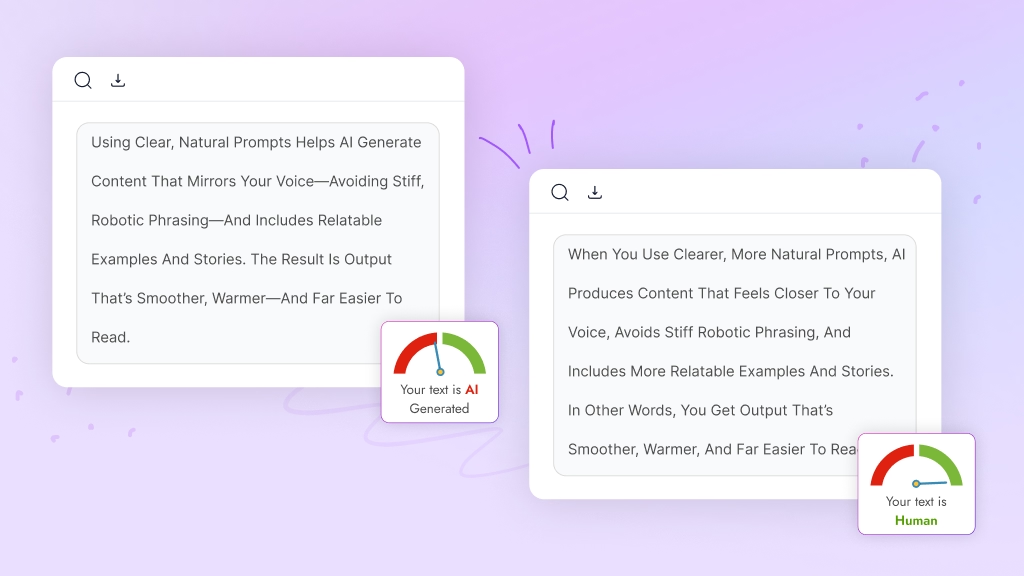
When you use clearer, more natural prompts, AI produces content that feels closer to your voice, avoids stiff robotic phrasing, and includes more relatable examples and stories. In other words, you get output that’s smoother, warmer, and far easier to read.
Plus, your readers are getting smarter. They can feel when something is shallow, rushed, or obviously auto-generated. Search engines are also prioritizing helpful, people-first content, not just keyword-stuffed articles.
So, learning how to:
- Guide tone and style
- Define audience and intent
- Structure smarter prompts
…isn’t a “nice-to-have” skill anymore. It’s how bloggers, content marketers, and WordPress users stay competitive without burning out.
In the rest of this blog, we’ll walk through exactly how to do that, step by step, so your AI starts sounding less like a robot and more like you.
What Makes AI Writing Feel Natural, Authentic, and Human
Before you can learn how to prompt AI to write like human, you need a clear picture of what “human-like” writing actually looks and feels like. Because here’s the truth: AI doesn’t naturally sound human; it sounds like a probability machine. You make it human with the right prompts.
An analysis shows,
“Up to 89% of marketers say they now use generative AI tools in their workflow.”
So your content isn’t just competing with other humans anymore. It’s competing with AI-assisted content from almost everyone. Almost all of them still need to edit the AI output because it sounds generic, repetitive, or off-brand.
So what does human-like AI writing really mean?
It’s More Than Just “Passing AI Detection”
Some people think human-like writing means tricking AI detectors. But that’s not the goal. Instead, it’s about creating natural, meaningful, and emotionally rich content that feels like a real person wrote it.
Key Traits of Human-Like AI Writing
Human writing has patterns, quirks, and emotional layers that generic AI text simply doesn’t replicate unless you guide it. Typically, human-like content includes:
- Conversational tone: feels like a friendly chat, not a technical manual
- Emotional depth: shows empathy, understanding, and a real human perspective
- Natural sentence flow: a mix of short punches and longer thoughts
- Personal storytelling: relatable scenarios, mini-stories, real-world examples
- Context-aware responses: tailored to a specific audience or situation
- Brand voice consistency: sounds like your unique personality or brand style
Why Prompts Make All the Difference
AI can generate endless paragraphs, but without the right direction, it defaults to generic, stiff, and overly formal content. That’s why mastering natural AI writing prompts, tone instructions, and context is essential.
With clear guidance, you can help AI:
- Avoid robotic writing
- Mimic human sentence patterns
- Use relatable language
- Write with intention, not repetition
- Blend storytelling with helpful insights
The Goal: Content That Feels “Alive”
Ultimately, human-like AI writing should feel like something you’d proudly publish, not something you need to apologize for.
And the good news?
In the next sections, you’ll learn exactly how to structure prompts that make AI write with warmth, clarity, personality, and authenticity, just like a real human storyteller.
Generic AI Prompt vs Human-Like AI Prompt
A generic AI prompt usually gives the tool a basic task, but it does not explain the audience, tone, purpose, or writing style. That is why the result often sounds broad, robotic, or too formal. A human-like AI prompt gives more context and direction, helping the AI produce content that feels natural, specific, conversational, and easier for readers to connect with.
| Prompt Type | Example | Result |
|---|---|---|
| Generic prompt | Write a blog post about email marketing. | Formal, broad, robotic content |
| Human-like prompt | Write a blog post for small business owners who feel confused about email marketing. Use a friendly tone, simple examples, contractions, and short paragraphs. Avoid buzzwords. | More natural, specific, and reader-friendly content |
| Editing prompt | Make this better. | Unclear improvement |
| Humanizing prompt | Rewrite this paragraph so it sounds like a person explaining the idea to a smart friend. Keep the meaning, but improve flow and remove robotic phrases. | Clearer, warmer, more natural writing |
How AI Responds to Prompts (In Simple Terms)
Before you can master how to prompt AI to write like a human, you need to understand how AI actually thinks. And don’t worry, no technical jargon here.
Let’s keep it simple and human-friendly.
AI Doesn’t “Understand”, It Predicts
When you type a prompt, AI isn’t thinking, reflecting, or analyzing emotions as we do. Instead, it’s predicting the next word based on patterns it has learned from billions of sentences.
That means:
- Vague prompts = vague, robotic writing
- Clear, detailed prompts = natural, human-like content
So when people say, “AI sounds too generic,” it’s usually not the AI’s fault; it’s the prompt.
The Magic Ingredients AI Needs
To sound human, AI needs clarity around:
1. Who it’s writing for: Readers, their pain points, and their goals.
2. How you want it to sound: Friendly, witty, simple, bold, your brand voice matters.
3. What structure you want: An outline, specific steps, examples, or stories.
4. What to avoid: Clichés, corporate buzzwords, generic advice.
In Other Words…
AI doesn’t automatically generate relatable, human-like text. But when you learn how to speak its language through clear, strategic prompts, it becomes a powerful co-writer capable of producing content that feels:
- Engaging
- Authentic
- Context-aware
- Easy to read
- And truly helpful to your audience
Google has explicitly said that,
“AI-generated content isn’t against their guidelines as long as it’s helpful, original, and not created just to manipulate rankings.”
And in the next sections, you’ll learn the exact prompting framework to make this happen, step by step.
Prompting Techniques for Human-Like AI Writing
Now that you know how AI responds to instructions, let’s break down a simple, actionable system that helps you prompt AI to write like a human every single time. Think of this as your go-to roadmap for creating natural, conversational, and emotionally rich content with AI.
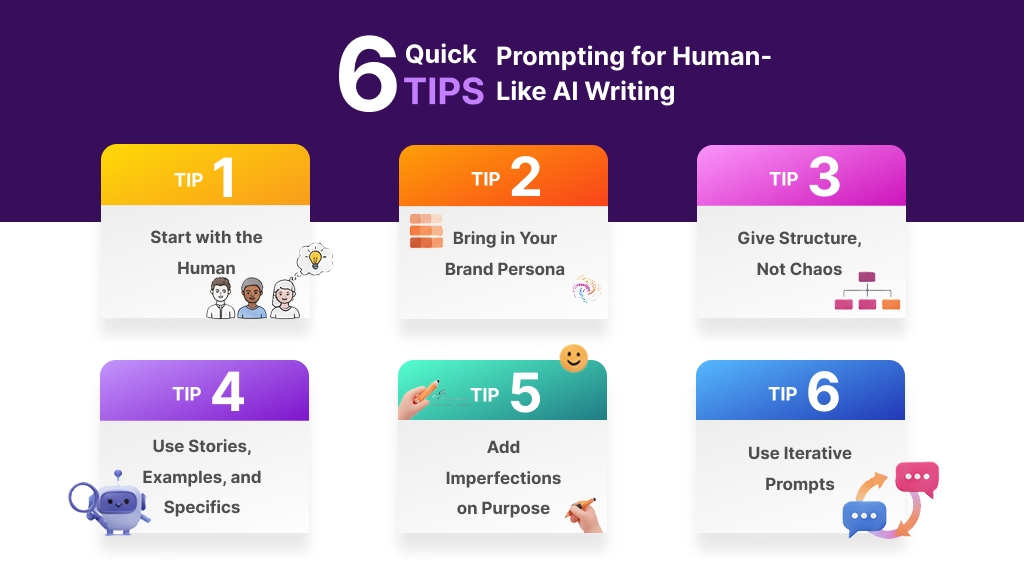
Let’s turn this into a practical, repeatable system.
Tip 1: Start with the Human (Audience → Purpose → Outcome)
To help AI produce clearer, more natural, and human-friendly content, you must first give it the context a real writer would need. AI only sounds robotic when it doesn’t understand who it’s writing for or why the content matters. This simple 5-part setup gives the model the foundation it needs.
Let’s break them down.
Set the Role (Tell the AI who it should act as)
Tell AI who it should act as. This instantly shapes tone and writing style.
Examples:
- “Act as a friendly blogging coach.”
- “Act as a senior content strategist.”
Define the Audience (Who are you speaking to?)
AI writes more naturally when it knows exactly who the reader is.
Example:
- Beginner bloggers
- WordPress users
- Content marketers
- Anyone struggling with robotic AI output
Identify What They Want (Their goal or challenge)
This tells AI what problem it should help solve.
Example:
They want smoother, clearer, and more natural AI-generated content, not stiff, generic text.
Clarify Why They Should Care (The benefit)
Explain why the topic matters to them.
Example:
Better prompts save time, reduce rewrites, and help them create more engaging, reader-friendly posts.
State the Purpose and Outcome
Purpose = why this content exists
Outcome = what readers should walk away with
Example:
The purpose is to educate them on simple prompting methods.
The outcome is that they feel confident guiding AI toward more natural, human-friendly writing.
Prompt Example:
“Act as a friendly content strategist. Write for beginner bloggers who struggle with stiff, robotic AI output and want clearer, more natural content. They care because better prompts help them save time and create more engaging posts. Your purpose is to teach them simple prompting methods. By the end, they should feel confident guiding AI toward smoother, more natural-sounding writing.”
Tip 2: Bring in Your Brand Persona
Human-like content isn’t just conversational, it’s consistent. To avoid that generic AI tone, include clear voice instructions or give the AI a writing sample to mimic.
Use LSI-related voice cues like:
- “Use a conversational tone.”
- “Sound natural and relatable.”
- “Avoid robotic writing.”
- “Write like a real human with personality.”
Pro Tip:
Add a 2–3 paragraph writing sample so AI can mirror your style.
Prompt Example:
“Mirror this writing style:
[Paste 2–3 paragraphs of their existing blog content]
Match the same tone, energy, and sentence flow. Keep it friendly and engaging, and avoid stiff, corporate-style language.”
Tip 3: Give Structure, Not Chaos
AI writes best when it knows the shape of what you want.
Instead of:
“Write a blog about how to prompt AI to write like a human.”
Try Prompt:
“Create a blog post outline about ‘how to prompt AI to write like a human’ for bloggers, content marketers, and WordPress users.
Include:
- A story-based intro
- A section on why human-like AI content matters
- A section explaining how AI responds to prompts
- A step-by-step framework
- Practical prompt templates
- Common mistakes
- A checklist
- A conclusion with a soft call to action for a WordPress AI plugin.”
Then:
- Review and tweak the outline
- Approve it
- Generate each section one by one
This is exactly what SERP-based outline + guided workflow in a WordPress plugin can automate:
- Analyze top-ranking content
- Suggest H2/H3s based on what’s already winning
- Let the user adjust the outline inside WordPress before any words are written
Tip 4: Force AI to Use Stories, Examples, and Specifics
Humans remember stories, not bullet points.
Humans use analogies, experiences, and micro-stories; you should prompt AI to do the same.
Include phrases like:
- “Start with a relatable scenario…”
- “Add a real-life example…”
- “Explain this with simple language…”
These cues transform AI-generated content into natural AI writing that feels alive.
Example Prompt:
“Write a 300-word section explaining why vague prompts create robotic AI content.
Start with a story of a blogger who used a vague prompt and got a boring result. Then break down why it happened. End with 2–3 practical tips to fix it. Use a conversational tone and contractions.”
Tip 5: Add “Imperfections” on Purpose
Human writing isn’t perfect, and that’s exactly why it feels real. Perfectly polished AI content can feel… weirdly inhuman.
We talk like this:
- “Yeah, this part? Kinda boring.”
- “Let’s be honest…”
- “Here’s the thing.”
We don’t talk like:
“In today’s rapidly evolving digital landscape, leveraging cutting-edge technologies is no longer optional—it’s essential.”
You can train AI to be more relaxed:
“Write in a conversational tone.
- Use contractions (don’t, can’t, isn’t).
- Mix short and long sentences.
- Avoid clichés like ‘in today’s digital age’ and ‘cutting-edge solutions.’
- Occasionally ask rhetorical questions.
- Sound like a real person, not a textbook.”
Tip 6: Use Iterative Prompts (Not One Giant Prompt)
Here’s where most people go wrong:
They try to get AI to write the entire article in one prompt.
Professionals do this instead:
- Generate outline
- Approve it
- Generate intro
- Generate each section
- Generate conclusion & CTA
- Run a final pass for tone, flow, and clarity
Example workflow:
Prompt 1: “Generate a detailed outline for…”
Prompt 2: “Write the intro only…”
Prompt 3: “Write section 1 based on this heading…”
Prompt 4: “Rewrite this paragraph to sound more casual and story-driven.”
Use follow-up instructions like:
- “Make this more conversational.”
- “Add a story here.”
- “Remove repetitive sentences.”
- “Humanize this paragraph.”
This step-by-step approach gives AI room to evolve and prevents generic outputs.
Follow these techniques consistently, and your AI-generated content will sound more like you and far less like a stiff, robotic assistant.
AI Phrases That Make Your Writing Sound Robotic
One of the easiest ways to make AI writing sound more human is to tell the AI what not to say. Many AI drafts use the same overused phrases, which makes the content feel generic even when the information is useful.
| Avoid These AI Phrases | Use Instead |
|---|---|
| In today’s digital age | Right now / These days |
| Delve into | Explore / Look at |
| Unlock the power of | Use / Get more from |
| Game-changing | Useful / Important |
| Seamless experience | Smooth experience |
| Leverage | Use |
| Cutting-edge | Modern / Advanced |
| It is important to note | Remember / Keep in mind |
| Robust solution | Strong option / Useful tool |
| Transform your workflow | Improve your workflow |
Practical Prompt Templates You Can Steal
Now that you understand the framework behind how to prompt AI to write like a human, let’s make your life even easier. Below are plug-and-play prompt templates you can copy, customize, and use instantly. These prompts are designed to help you create more natural, conversational, and human-like AI writing without overthinking the process.
Feel free to bookmark this section; you’ll use these a lot.
1. Human-Like Blog Intro Prompt
Perfect for crafting intros that feel relatable, emotional, and engaging.
“You are an experienced content strategist writing for [audience]. Create a 150–200 word introduction for a blog titled ‘[Your Topic]’. Start with a relatable story that reflects the audience’s struggles. Use a conversational tone, contractions, and simple language. Avoid robotic phrases and clichés like ‘in today’s digital age’. Make the reader feel understood, then introduce what they will learn.”
Why this works:
It forces the AI to use storytelling, emotional depth, and a natural writing flow, key traits of humanized AI content.
Read More: AI prompts for blog writing
2. Deep-Dive Section Prompt
Use this to generate rich, detailed, easy-to-read sections of your blog.
“Write a 250–350 word section about [subtopic]. Begin with a short scenario or real-life example. Explain the concept in simple, conversational language. Add 1–2 specific examples to avoid generic writing. Include a mini action step at the end. Maintain a natural, relatable tone throughout.”
Why this works:
It pushes the AI toward context-aware responses, avoiding generic filler content.
3. Human-Like Storytelling Prompt
If you want AI to sound less robotic and more personal, use this.
“Explain [topic] using a short story (3–5 sentences) that feels real and relatable. Keep the tone conversational. Mix short and long sentences. Include one emotional insight or moment of reflection. Avoid buzzwords, jargon, and overly formal writing.”
Why this works:
Stories naturally humanize AI content and make it more engaging for readers.
4. Social Media Repurposing Prompt
Perfect for turning long-form content into short, engaging posts.
“Create 3 LinkedIn posts and 3 X/Twitter posts based on this content: [paste text]. Each post should start with a strong hook. Use a conversational tone and avoid robotic writing. Make the insights actionable and relatable. Keep the platform style in mind.”
Why this works:
It helps AI understand tone shifts across platforms, improving its natural writing flow.
5. Examples & Analogies Prompt
Great for clarifying complex ideas while keeping the writing friendly.
“Explain [topic] using a simple analogy that a beginner would understand. Use conversational language and real-life comparisons. Keep it short, specific, and easy to visualize. Avoid robotic or overly technical explanations.”
Why this works:
Analogies create emotional connection, which is essential for human-like writing.
6. Human-Friendly Conclusion Prompt
End your content naturally, not like a stiff academic paper.
“Write a warm, conversational conclusion for this blog post. Summarize the key points without sounding repetitive. Add 1 motivational line that encourages the reader to take action. Keep the tone friendly, human, and simple.”
Why this works:
It ensures your ending feels natural and leaves readers with a clear takeaway.
7. ChatGPT Prompt to Write Like a Human
“Rewrite the following content so it sounds like a real person wrote it. Keep the meaning the same, but make the tone more conversational, natural, and easy to read. Use contractions, vary sentence length, and remove robotic phrases.”
8. Prompt to Make AI Writing Sound Less Robotic
“Rewrite this paragraph to remove robotic tone, repetitive sentence patterns, and generic phrases. Make it sound clear, warm, and human without making it too casual.”
9. Prompt to Humanize AI Blog Content
“Humanize this AI-generated blog section for [audience]. Keep the information accurate, but improve the flow, add natural transitions, simplify stiff wording, and make the writing feel more helpful and reader-focused.”
10. Prompt to Add Personal Voice
“Rewrite this content in a personal, experience-based voice. Add subtle opinions, natural phrasing, and a more human rhythm. Do not overdo emotion or make unsupported claims.”
11. Prompt to Improve Sentence Variation
“Improve the rhythm of this content by mixing short and long sentences. Remove repetitive sentence openings and make the paragraph flow more naturally.”
12. Prompt to Remove AI Clichés
“Rewrite this content without using phrases like “in today’s digital world,” “unlock,” “leverage,” “game-changing,” “delve into,” or “seamless.” Keep the tone simple, direct, and natural.”
13. Prompt to Make AI Content More Conversational
“Rewrite this section like you are explaining it to a smart friend over coffee. Keep it accurate, but make the tone relaxed, clear, and conversational.”
14. Prompt to Add Examples
“Add 2–3 practical examples to this section so readers can understand the point more easily. Keep the examples realistic and relevant to [audience].”
15. Final Human Editing Prompt
“Review this content as a human editor. Find robotic phrases, weak transitions, repetitive ideas, and unclear sentences. Then rewrite it to sound natural, helpful, and publication-ready.”
Best Human-Like AI Prompts for Different Use Cases
Not every AI writing prompt should follow the same structure. A blog post, SEO article, marketing copy, product description, and social media caption all need different tones, formats, and goals. To make AI writing sound more human, you need to guide the AI based on the content type, target audience, and purpose.
Use these human-like AI prompts to create more natural, conversational, and useful content for different writing tasks.
1. For Bloggers
Blog content should sound helpful, clear, and easy to read. Instead of asking AI to simply “write a blog post,” tell it who the readers are, what problem they have, and how the tone should feel.
Prompt:
Write a blog section about [topic] for [target audience]. Use a friendly, conversational tone. Keep the language simple, explain ideas clearly, and add practical examples. Avoid robotic phrases, generic advice, and overly formal wording. Make it sound like a real person is guiding the reader.
Read More: AI prompt examples for bloggers
2. For SEO Writers
SEO content should include keywords naturally without sounding forced. A human-like SEO prompt should focus on search intent, readability, semantic keywords, and helpful answers.
Prompt:
Write an SEO-friendly section about [topic] for the keyword [primary keyword]. Include related search queries and secondary keywords naturally. Keep the tone human, helpful, and conversational. Avoid keyword stuffing. Answer the reader’s main question clearly and add examples where useful.
3. For Content Marketers
Marketing content should be persuasive but not too salesy. The goal is to connect with the reader’s problem and explain the benefit in a natural way.
Prompt:
Rewrite this marketing copy for [target audience]. Make it clear, benefit-focused, and persuasive without sounding pushy. Use natural language, short paragraphs, and a confident but friendly tone. Highlight the reader’s problem, explain the value, and end with a smooth call to action.
4. For WordPress Users
WordPress users often want practical, step-by-step guidance. The content should be simple, direct, and beginner-friendly.
Prompt:
Write this content for WordPress users who want to [goal]. Use a simple, practical, and beginner-friendly tone. Explain each point clearly, avoid technical jargon, and include examples related to WordPress websites, plugins, blogs, or content publishing.
5. For Product Descriptions
Product descriptions should feel natural and helpful, not like generic AI sales copy. Focus on benefits, use cases, and the buyer’s real needs.
Prompt:
Write a human-like product description for [product name]. Focus on the main benefits, who it is for, and how it solves a real problem. Use natural, simple language. Avoid exaggerated claims, buzzwords, and robotic phrases. Make the description clear, trustworthy, and easy to understand.
6. For Email Marketing
Emails should feel personal, direct, and easy to act on. A strong prompt should guide the AI to write like a real person, not a corporate announcement.
Prompt:
Write an email about [topic] for [audience]. Use a warm, personal, and conversational tone. Keep the message short, clear, and focused on one main goal. Avoid sounding too formal or salesy. Include a natural subject line and a simple call to action.
7. For Social Media Captions
Social media writing should sound natural, quick, and engaging. The tone should match the platform and audience.
Prompt:
Write a social media caption for [platform] about [topic]. Make it sound natural, engaging, and human. Use a conversational tone, a strong opening line, and a clear takeaway. Avoid generic AI wording and keep it suitable for [target audience].
8. For Landing Pages
Landing page copy needs clarity, trust, and action. A human-like prompt should focus on the reader’s pain point, benefit, proof, and next step.
Prompt:
Write landing page copy for [product/service]. Target [audience] who want to [goal]. Use clear, benefit-driven language. Make the copy persuasive but natural. Include a strong headline, short supporting text, key benefits, trust-building points, and a clear call to action.
9. For Rewriting Robotic AI Text
Sometimes the first AI draft sounds too stiff or generic. Use a humanizing prompt to improve tone, rhythm, and flow.
Prompt:
Rewrite this AI-generated text so it sounds more human, natural, and conversational. Keep the meaning accurate, but remove robotic phrases, repetitive sentence patterns, and overly formal wording. Improve flow, vary sentence length, and make it easier to read.
10. For Editing Existing Content
Editing prompts are useful when you already have a draft but want to improve clarity, tone, and reader engagement.
Prompt:
Edit this content like a human editor. Improve clarity, flow, tone, and readability. Remove fluff, repeated ideas, robotic wording, and unnatural keyword placement. Keep the message accurate and make the final version sound helpful, polished, and human-written.
How to Humanize AI Content Directly Inside WordPress
If you want to master how to prompt AI to write like a human, your workflow should support that goal, not work against it. And honestly, switching between 6-7 different tools (SERP tools, outline builders, AI writers, image generators, social schedulers, etc.) makes it much harder to maintain a consistent, natural writing style.
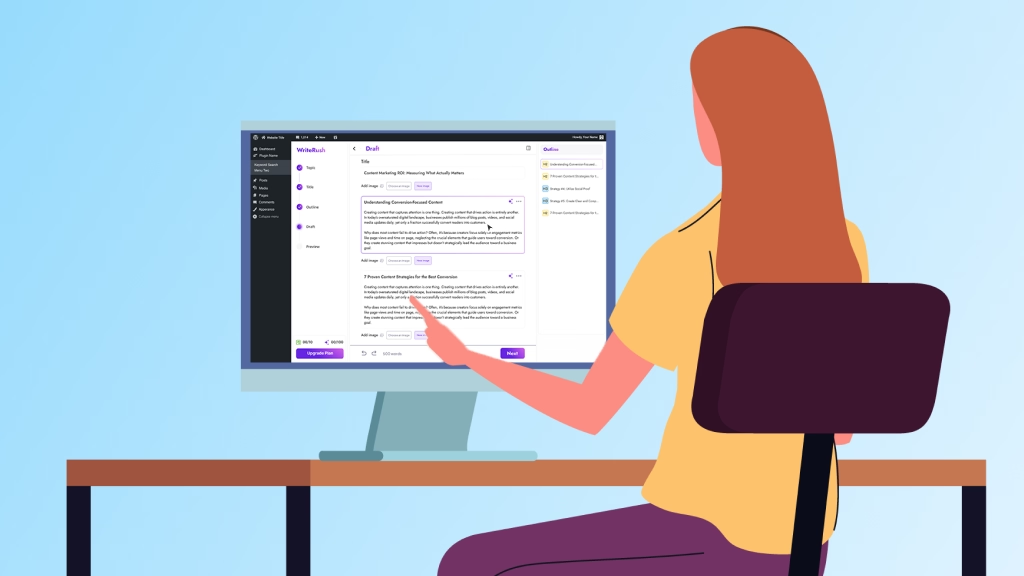
That’s exactly why WriteRush was built.
It brings your entire human-like content creation process inside WordPress, helping AI write naturally while keeping your voice, tone, and strategy aligned.
Let’s break down how WriteRush helps you humanize AI content effortlessly.
- SERP-Based & AI-Powered Outlines: Start with outlines built from real search intent, not generic AI structure. WriteRush analyzes SERPs and generates smart outlines directly inside WordPress, giving your content a reader-friendly foundation.
- Guided Long-Form Writing Workflow: Instead of generating one giant robotic draft, WriteRush guides you through the blog section by section. This makes your writing more natural, conversational, and human-focused from the start.
- Targeted Topic Analysis & Advanced Blog Parameters: Define Audience, Purpose, Tone, Reading Level, and Style before writing. This ensures AI produces context-aware, relatable, brand-aligned content every time.
- Brand Voice Training (Your Voice, Not Generic AI): Train WriteRush using your text snippets or existing WordPress content. The result? AI that writes with your tone, rhythm, and personality.
- Section Regeneration with Custom Prompts: Easily tweak sections by using prompts
- Built-In AI Image Generation: Create and regenerate blog images without leaving WordPress, keeping your visuals consistent with your tone and topic.
- One-Click Social Media Content: Turn your blog into platform-ready social posts instantly, no external tools required.
- Publish-Ready Drafts Sent Directly to WordPress: When you’re done, send your entire article straight into WordPress Draft with one click. No exporting. No formatting headaches.
For example, instead of generating a full blog in one prompt, a WordPress user can use WriteRush to create an outline, choose the tone, generate each section, and then run a humanizing pass before publishing. This makes the content feel more natural and easier to edit.
This is where the real magic happens, micro-adjustments that create a human-like tone in seconds.
Common Prompting Mistakes That Make AI Sound Robotic
Let’s talk about what to avoid (and you can turn these into warnings or tips in your UI).
Mistake 1: “Be Professional”
“Be professional” often translates to “be boring.”
Fix it by being specific:
- “Friendly and confident, like a helpful colleague.”
- “Warm, simple, and no jargon.”
- “Playful but clear, no cheesy jokes.”
Mistake 2: Writing to the AI Like a Person
Overly polite prompts like:
“Hi, could you please write me a 2000-word article when you have a minute, thank you so much!!”
…don’t help.
AI responds better to clear instructions than small talk.
Fix:
“Write a 1,500-word article. Use this structure: [outline]. Use this tone: [description]. Include: [stories/examples]. Avoid: [clichés].”
Mistake 3: No Context: No Audience, No Channel, No Goal
If you don’t say “who this is for” or “where it goes,” AI defaults to generic blog content.
Always add:
- Audience
- Platform (blog, email, LinkedIn, etc.)
- Goal (educate, convert, attract, nurture, etc.)
Mistake 4: Never Editing the Output
AI is a co-writer, not a full replacement.
Even in AI-heavy workflows, 97% of marketers say they still edit AI-generated content before publishing.
Encourage your readers (and users of your plugin) to:
- Read every piece once
- Remove anything off-brand
- Add personal opinions, experiences, and internal examples
Read More: AI writing mistakes
How to Edit AI Writing So It Sounds More Human
Even with a strong prompt, AI-generated content often needs a human editing pass before publishing. The goal is not only to fix grammar. You also need to improve tone, flow, sentence rhythm, examples, and reader connection. This is how you turn robotic AI text into natural, helpful, and human-like writing.
When editing, focus on making the content sound like a real person explaining the topic clearly. Use simple words, natural transitions, varied sentence lengths, and specific examples. This helps you humanize AI writing, make AI content sound conversational, and reduce the robotic tone that many AI drafts have.
1. Read the Content Out Loud
The easiest way to spot robotic AI writing is to read it out loud. If a sentence sounds too stiff, repetitive, or unnatural when spoken, it will probably feel the same to your readers.
Look for sentences that sound overly formal, generic, or too polished. Human writing usually has a more natural rhythm. It mixes short and long sentences, uses clearer transitions, and sounds more like a helpful explanation than a machine-generated answer.
Editing prompt you can use:
Rewrite this paragraph so it sounds natural when read out loud. Keep the meaning the same, but make the tone more conversational, smooth, and human-like.
2. Remove Robotic and Repetitive Phrases
AI often uses the same phrases again and again, such as “in today’s digital age,” “it is important to note,” “delve into,” “unlock the power of,” or “game-changing.” These phrases can make AI-generated content sound generic and less trustworthy.
To make AI writing sound less robotic, replace overused phrases with simple, direct language. Instead of trying to sound impressive, aim to sound clear and helpful.
Example:
Robotic:
In today’s digital age, it is important to leverage AI tools to unlock the power of content creation.
More human:
AI tools can help you create content faster, but the final draft still needs your voice and judgment.
Editing prompt you can use:
Rewrite this content to remove robotic AI phrases, buzzwords, and repetitive wording. Use simple, natural language that sounds like a real person wrote it.
3. Improve Sentence Variety and Flow
One common sign of AI-written content is repetitive sentence structure. Many AI drafts start several sentences the same way or use the same rhythm throughout the paragraph. This makes the writing feel flat.
To make AI-generated text sound more human, vary the sentence length and structure. Use short sentences for emphasis. Use longer sentences when you need to explain a detailed idea. Add transitions where needed, but avoid forcing them into every paragraph.
Editing prompt you can use:
Improve the sentence variety and flow of this section. Mix short and long sentences, remove repeated sentence patterns, and make the writing sound more natural and engaging.
4. Add Specific Examples
AI writing often sounds robotic because it stays too general. It may explain what something means, but it does not always show how it works in a real situation.
Adding examples is one of the best ways to humanize AI-generated content. Examples make the content more useful, easier to understand, and more relatable for readers.
Example:
Generic AI text:
Good prompts help AI create better content.
More human and useful:
For example, instead of asking, “Write a blog intro about SEO,” you can say, “Write a friendly blog intro for beginner WordPress users who feel confused about SEO. Keep it simple, avoid jargon, and explain why SEO matters before giving tips.”
Editing prompt you can use:
Add 2–3 specific examples to this section so the content feels more practical, useful, and human. Keep the examples relevant to the target audience.
5. Add Your Own Experience, Opinion, or Insight
AI can organize information, but it cannot replace your real experience. If you want your content to sound human, add your own perspective. This could be a lesson you learned, a client example, a common mistake you have noticed, or a simple opinion based on experience.
This is especially important for SEO because helpful content should show real value, not just repeat information that already exists online. Personal insight can make your article more original and trustworthy.
You can add lines like:
From our experience, the best AI prompts are not the longest ones. They are the clearest ones.
Or:
A common mistake we see is asking AI to write everything in one step instead of improving the draft section by section.
Editing prompt you can use:
Suggest places where I can add personal experience, practical insight, or expert opinion to make this AI-generated content more original and trustworthy.
6. Match the Tone to Your Audience
Human-like AI writing depends on who you are writing for. A blog for beginner WordPress users should not sound the same as a guide for advanced SEO professionals. Before publishing, check whether the tone matches your readers’ knowledge level, problems, and expectations.
For example, if your audience is beginners, use simple explanations and avoid technical words. If your audience is marketers, focus more on strategy, workflow, and results. If your audience is business owners, keep the writing practical and benefit-focused.
Editing prompt you can use:
Rewrite this content for [target audience]. Make the tone clear, helpful, and conversational. Use language they would understand and examples that match their needs.
7. Cut Fluff and Repeated Ideas
AI-generated content often repeats the same point in different words. This can make the article longer, but not better. To make AI content more natural, remove filler sentences, repeated explanations, and unnecessary introductions.
A good human edit should make the writing tighter. Every paragraph should add something useful, such as a new idea, example, step, warning, or explanation.
Editing prompt you can use:
Edit this section to remove fluff, repeated ideas, and unnecessary sentences. Keep the useful information and make the writing clearer, shorter, and more natural.
8. Do a Final Humanizing Pass
Before publishing, run one final review focused only on tone and readability. This final step helps you make AI writing sound more human without changing the meaning of the content.
Check for:
- Robotic phrases
- Repetitive sentence patterns
- Overly formal wording
- Missing examples
- Weak transitions
- Generic advice
- Long paragraphs
- Unnatural keyword usage
Final editing prompt you can use:
Review this content as a human editor. Make it sound natural, conversational, and helpful. Remove robotic phrasing, improve sentence flow, add smoother transitions, and keep the meaning accurate. Avoid keyword stuffing and keep the writing easy to read.
Treat AI Like a Co-Writer, Not a Content Machine
Here’s the truth: mastering how to prompt AI to write like a human isn’t about forcing it to “sound human” or outsmarting detection tools. It’s really about giving AI the kind of guidance you’d give a junior writer sitting beside you. When you tell it who you’re writing for, what you want to achieve, and the voice you want to use, the output suddenly feels more natural, more you.
And with the right workflow inside WordPress, it becomes even easier. Instead of wrestling with robotic-sounding drafts, you get to focus on shaping ideas, adding stories, and bringing personality to the content, while AI handles the heavy lifting. It becomes a genuine partner in your creative process, not just a machine spitting out words.
So think of AI as your co-writer. Give it direction, add your perspective, and let it support you, not replace you. With thoughtful prompts and the right setup, you’ll be surprised at how easily AI can help you create content that feels real, relatable, and unmistakably human.
FAQs
1. Can AI really write like a human?
It can get very close, especially when you guide it with clear prompts, brand voice, and structure. Many marketers already use AI for drafting, then add their human experience and nuance on top.
2. Will humanized AI content bypass all AI detectors?
No tool can guarantee that. Detectors are notoriously unreliable. The goal isn’t to “fool” systems, it’s to create useful, people-first content that feels natural and delivers value. That’s what search engines are optimizing for.
3. Is Google against AI-written content?
Not by default. Google’s stance is that high-quality, helpful content is rewarded regardless of how it’s produced, as long as it’s not spammy or created mainly to game rankings.
4. Do I still need a human editor if I prompt well?
Yes. Even the best prompts can’t replace your lived experience, opinions, and strategic judgment. Think of AI as the first draft generator, not the final decision-maker.
5. Is a WordPress AI plugin better than a standalone AI tool?
For WordPress users, usually, yes. A plugin lets you:
1. Stay inside your existing workflow
2. Use your live content as training data for tone
3. Send drafts straight to WordPress, schedule posts, and generate social snippets on the spot
This page was last edited on 18 May 2026, at 4:47 pm