Have you ever stared at your screen, typed a prompt into an AI tool… and waited… only to get output that almost makes sense but not really?
Maybe it’s too generic. Or it missed your point. Or it sounds like a robot wrote it (well… because it did).
You’re not imagining it; this happens to almost everyone who uses AI without a solid prompt strategy. The problem isn’t the AI itself; it’s that most prompts are either too vague or too basic to guide the AI effectively. And that’s why your days can slip by rewriting first drafts instead of publishing faster.
In this blog, we’ll flip the script. You’ll discover how to write better AI prompts and ChatGPT prompt tips to help you get the best results from AI writing tools, so you can generate blog posts, SEO content, social copy, and WordPress-ready drafts that feel on-brand and human.
We’re going to walk you through a practical framework of AI prompt optimization, common prompt mistakes (and how to fix them), real examples you can use today, and a sneak peek at tools that make this process smooth and repeatable.
So, let’s start from the beginning.
What Does “Writing Better AI Prompts” Really Mean?
When people search for how to write better AI prompts, they often assume the solution is to write longer or more “technical” instructions. In reality, writing better AI prompts doesn’t mean writing longer prompts.
It means writing clear, structured, and intentional instructions.
Think of AI as a highly skilled assistant that works strictly on instructions. If those instructions are vague, incomplete, or unclear, the output will reflect that confusion. This is why many AI-generated results feel generic, off-topic, or robotic. For example, if you say:
“Write a blog post about SEO.”
You’ll probably get something generic. Why? Because you didn’t explain:
- Who the audience is
- What the goal is
- What tone you want
- How detailed it should be
Now compare that with this:
“Write a 1,200-word SEO blog post for beginner bloggers. Use a friendly, conversational tone. Include examples, practical tips, and a short conclusion with a CTA.”
Same AI. Different result.
So, What Makes an AI Prompt “Better”?
A better AI prompt gives the model a clear direction instead of guesswork. It explains not just what you want, but how and why you want it.
Effective AI prompts usually include:
- Clear context so the AI understands the situation
- Specific goals that define what success looks like
- Audience and tone instructions to guide style and voice
- Structured output requirements for readability and usability
When these elements are missing, AI relies on assumptions, which often leads to unfocused or repetitive content.
Once you understand how to write clearer, more structured prompts and apply simple AI prompt optimization techniques, AI content creation becomes faster, more consistent, and far more effective.
Up next, we’ll break down a simple prompt framework you can reuse for blog writing, SEO content, and WordPress publishing without starting from scratch every time.
AI Prompt Framework That Works Every Time
Now that you understand why prompts fail, let’s talk about how to fix them permanently.
If you’ve been wondering how to write better AI prompts without reinventing the wheel every time, the answer is simple: use a repeatable prompt framework. This blueprint removes guesswork and replaces it with structure, clarity, and control.
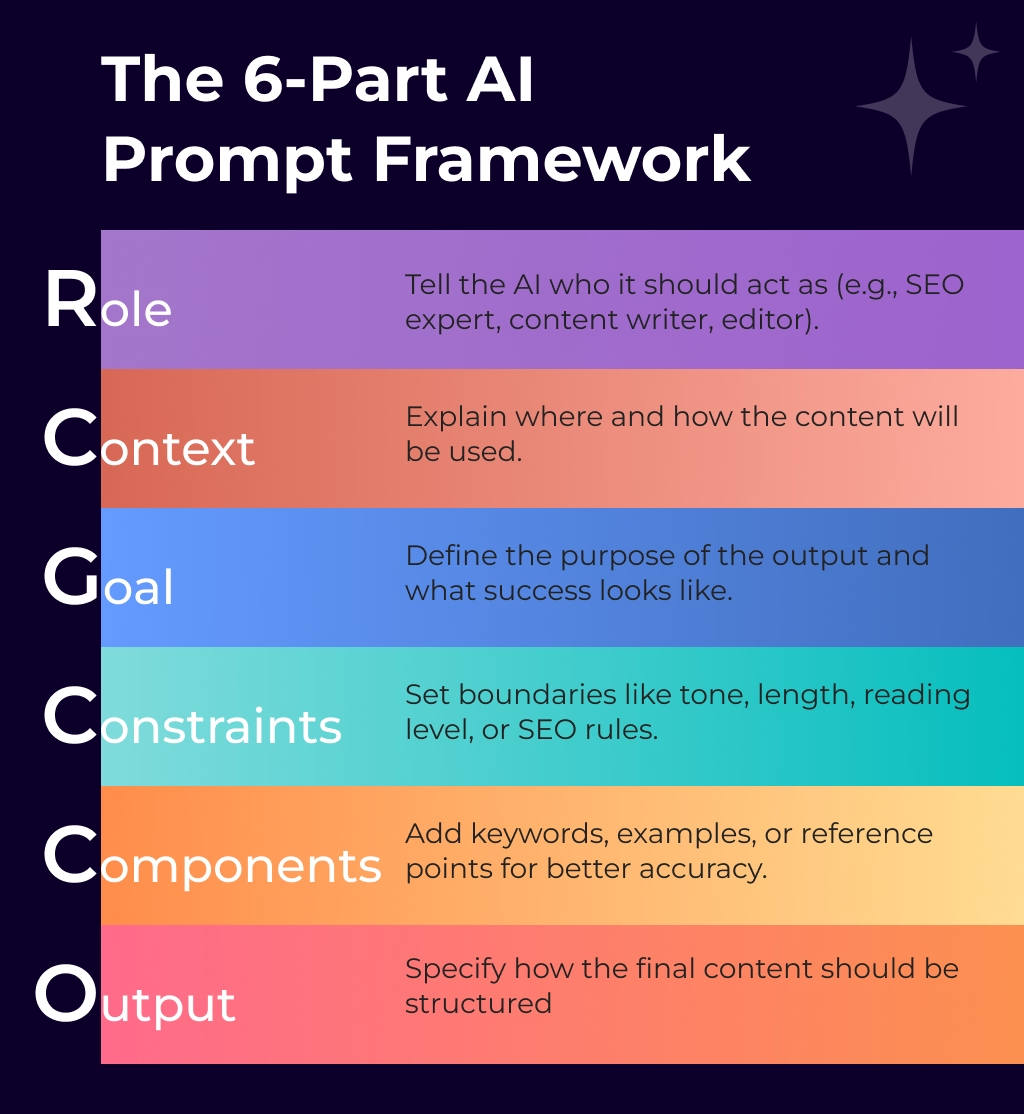
Instead of typing random instructions and hoping for the best, this approach uses prompt engineering techniques that guide the AI step by step, resulting in clearer, more relevant, and more human-sounding content.
The 6-Part AI Prompt Framework
A well-structured, context-based AI prompt usually includes these six elements:
- Role: Tell the AI who it should act as (e.g., SEO expert, content writer, editor).
- Context: Explain where and how the content will be used.
- Goal: Define the purpose of the output and what success looks like.
- Constraints: Set boundaries like tone, length, reading level, or SEO rules.
- Components: Add keywords, examples, or reference points for better accuracy.
- Output Format: Specify how the final content should be structured.
When these pieces work together, AI prompt optimization becomes effortless, and AI stops guessing what you want.
A Copy-Paste Prompt Template You Can Reuse Anytime
Here’s a practical, fill-in-the-blank template you can adapt for blogs, SEO content, or WordPress posts:
“Act as a [role].
I’m creating [type of content] for [target audience].
The goal is to [desired outcome].
Use a [tone/style] tone and keep it within [length].
Include [keywords, examples, or specific elements].
Format the output as [blog, steps, table, headings, etc.].”
Next, we’ll explore different types of AI prompts, so you know exactly when to use short prompts, detailed prompts, or example-based prompts for the best results.
Prompt Types You Should Use with Detailed Examples
Knowing how to write better AI prompts isn’t just about structure; it’s also about choosing the right type of prompt for the right task. Think of AI prompts like conversations. You wouldn’t speak to a designer, editor, and strategist the same way, right?
The same logic applies here.

Below are the most effective AI prompt types, explained in detail with real, usable examples.
1. Zero-Shot Prompts (Best for Speed and Brainstorming)
Zero-shot prompts give the AI a task without any examples. They’re ideal when you need quick ideas, rough drafts, or inspiration.
However, because there’s no reference point, clarity is critical. The more specific your instruction, the better the output.
When to use zero-shot prompts:
- Brainstorming blog ideas
- Creating quick outlines
- Generating first drafts
Example:
“Write a detailed blog outline on how to write better AI prompts for beginner bloggers. Use a friendly tone and include practical tips.”
Why this works: It adds audience, tone, and output format, key elements of AI prompt optimization.
2. Few-Shot Prompts (When Tone and Style Matter Most)
Few-shot prompts include one or two examples to show the AI exactly what you expect. This is one of the most powerful prompt engineering techniques for maintaining consistency.
When to use few-shot prompts:
- Writing branded content
- Maintaining a consistent voice
- Creating publish-ready blog posts
Example Prompt:
“Here’s an example of my writing style:
‘AI writing doesn’t replace creativity, it removes friction so ideas can flow faster.’
Now write a blog introduction on how to write better AI prompts using the same tone and style.”
Why this works: AI mirrors your example instead of guessing your voice.
3. Role-Based Prompts (For Expertise-Driven Content)
Role-based AI prompts assign the model a specific identity, which helps shape perspective, depth, and accuracy.
When to use role-based prompts:
- SEO content creation
- Strategy-focused articles
- Educational or technical blogs
Example Prompt:
“Act as an SEO content strategist.
Explain how to write better AI prompts for SEO blog writing.
Include keyword placement tips and common mistakes to avoid.”
Why this works: The role provides context and influences the quality of insights.
4. Iterative Prompts (For Polished, High-Quality Output)
Iterative prompting breaks a task into multiple steps instead of forcing perfection in one go. This method produces cleaner, more refined AI content.
When to use iterative prompts:
- Long-form blog writing
- Editing and rewriting
- Improving clarity and flow
Step-by-Step Example:
Step 1: Draft
“Write a 300-word section explaining why AI prompts fail.”
Step 2: Review
“Review this section and point out areas that lack clarity or structure.”
Step 3: Refine
“Rewrite the section using the feedback. Improve flow and readability.”
Why this works: Each step narrows the AI’s focus, improving output quality.
5. Task-Specific Prompts (For Blogs, SEO, and WordPress)
Task-specific prompts are context-based AI prompts designed for a single purpose. These are especially effective for WordPress users and content marketers.
When to use task-specific prompts:
- Writing SEO-optimized blog posts
- Generating meta titles and descriptions
- Formatting content for WordPress
Example (WordPress Blog Section):
“Write an H2 section for a WordPress blog on how to write better AI prompts.
Use short paragraphs, H3 subheadings, and a conversational tone.
Optimize for readability and SEO.”
Example (SEO Meta Prompt):
“Generate an SEO-friendly meta title and meta description for a blog targeting ‘how to write better AI prompts.’ Keep it compelling and under character limits.”
Why this works: The AI understands exactly where and how the content will be used.
When you combine the right prompt type with a clear structure, AI stops producing random outputs and starts delivering content that feels intentional, relevant, and human.
Next, we’ll explore the most common AI prompt mistakes and how to fix them, so every prompt you write delivers better results consistently.
10 Common AI Prompt Mistakes and How to Fix Them
Even if you understand prompt frameworks and types, your results can still fall flat if a few small mistakes sneak in.
The good news?
Most prompt failures come from simple, fixable issues, not from a lack of skill or experience.
If you’re learning how to write better AI prompts, spotting and correcting these mistakes will instantly improve your AI-generated content.
Mistake #1: “Write a blog post about X”
Fix: Define audience, goal, tone, and length.
Mistake #2: Asking for everything at once
Fix: Break content into sections.
Mistake #3: No role assigned
Fix: “Act as an SEO expert/content strategist/editor.”
Mistake #4: No formatting instructions
Fix: Specify headings, bullets, and tables.
Mistake #5: No SEO intent
Fix: Mention search intent and keywords.
Mistake #6: Expecting real-time facts without guidance
Fix: Ask for assumptions or evergreen insights.
Mistake #7: Ignoring brand voice
Fix: Add voice rules (friendly, clear, no hype).
Mistake #8: One-size-fits-all prompts
Fix: Customize prompts by content type.
Mistake #9: Not reviewing or refining output
Fix: Use editor-style prompts.
Mistake #10: Starting from scratch every time
Fix: Save reusable prompt templates.
Once you eliminate these common errors, AI prompt optimization becomes second nature. Your AI outputs become clearer, more relevant, and easier to publish, especially for blogs, SEO content, and WordPress workflows.
Up next, we’ll dive into practical AI prompt examples you can copy, customize, and reuse to create high-quality content faster and more consistently.
Read More: AI writing mistakes
Top ChatGPT Prompt Tips for Better AI Output
Writing effective prompts for ChatGPT can make a huge difference in the quality of AI-generated content. By following these ChatGPT prompt tips, you can ensure your AI outputs are accurate, engaging, and tailored to your needs. Whether you’re creating blog posts, social media content, or email drafts, mastering these strategies will save you time and improve results.
1. Be Clear and Specific
Vague prompts often lead to generic or off-target responses. To get human-like AI prompts, provide context, define the tone, and specify the format.
Example: Instead of asking “Write about travel,” try:
“Write a 500-word blog post about eco-friendly travel tips in Europe, using a friendly and informative tone.”
2. Use Step-by-Step Instructions
Breaking your prompts into smaller, actionable steps helps ChatGPT understand exactly what you want. This is one of the most effective ChatGPT prompt tips for generating structured content.
3. Include Examples
Providing examples of what you expect allows the AI to mimic the style and format. Using AI prompt examples for content writing in your prompt can guide the model to produce more accurate outputs.
Example: “Create an introduction like this sample blog opening: [insert example].”
4. Specify the Audience
Tailoring prompts to a specific audience ensures your content is relevant and engaging. For instance, if your target readers are marketers, mention it in the prompt:
“Write a social media post about AI tools for content marketers in a professional tone.”
5. Experiment and Iterate
Don’t expect perfection on the first try. Adjust your prompts, refine your instructions, and experiment with variations. Over time, you’ll develop a library of human-like AI prompts that consistently generate high-quality content.
AI Prompt Examples for Content Writing
Using well-crafted prompts is key to generating high-quality AI content. These AI prompt examples for content writing show how to structure your instructions to get accurate, engaging, and human-like outputs from ChatGPT or other AI writing tools.
1. Blog Post Prompts
To write effective blog content, be clear about the topic, word count, tone, and style. This helps create human-like AI prompts that deliver polished results.
Examples:
- “Write a 600-word blog post about eco-friendly travel tips in Europe, using an informative and friendly tone.”
- “Create a step-by-step guide for beginners on starting a sustainable lifestyle blog, with actionable tips and examples.”
2. Social Media Prompts
Social media content needs to be concise, engaging, and tailored to the platform. These ChatGPT prompt tips help generate posts that resonate with your audience:
- “Write an Instagram caption promoting a new eco-friendly product line in a fun and catchy tone.”
- “Create a Twitter thread explaining AI content strategies for small businesses in 5 steps.”
3. Email Marketing Prompts
Effective email copy requires clear calls-to-action and a professional tone. Use these AI prompt examples for content writing to guide AI-generated emails:
- “Draft a promotional email introducing our latest AI writing tool, highlighting benefits and encouraging sign-ups, in a professional yet approachable tone.”
- “Write a newsletter update summarizing the top AI content trends of 2026 for marketing professionals.”
4. Encourage Experimentation
Don’t hesitate to modify and test prompts to suit your content goals. Using these AI prompt examples for content writing as templates allows you to create human-like AI prompts tailored to your audience, whether for blogs, social media, or emails.
“Start with these examples, then iterate and refine your prompts to achieve the best AI-generated content for your projects.”
Best AI Prompt Examples for Bloggers, Marketers & WordPress Users
Now that you understand the framework, prompt types, and common mistakes, it’s time to put everything into action. One of the fastest ways to master how to write better AI prompts is by learning from real, practical AI prompt examples, the kind you can copy, tweak, and use immediately.
Below are proven, context-based AI prompts designed for bloggers, content marketers, and WordPress users who want consistent, high-quality results.
AI Prompts for Blog Planning and Outlines
A strong blog starts with a solid plan. These prompts help the AI think like a strategist before it starts writing.
Example Prompt:
“Act as a content strategist.
Create a detailed blog outline for the keyword ‘how to write better AI prompts’.
Target beginner bloggers and content marketers.
Match informational search intent and include H2 and H3 headings.”
Why it works:
It uses role-based prompting, defines search intent, and sets a clear output format.
AI Prompts for Writing Blog Sections
Instead of generating an entire article at once, break it into sections for better clarity and control.
Example Prompt:
“Write a detailed H2 section explaining why most AI prompts fail.
Use a conversational tone, short paragraphs, and practical examples.
Audience: WordPress users and bloggers.”
This type of structured AI prompt improves readability and relevance.
AI Prompts for SEO Content Optimization
SEO-focused prompts help align content with rankings and user intent.
Example Prompt:
“Act as an SEO expert.
Generate a meta title and meta description for a blog targeting ‘how to write better AI prompts’.
Keep the title under 60 characters and the description under 155 characters.”
Pro tip: Adding constraints like character limits dramatically improves SEO accuracy.
AI Prompts for Editing and Improving Content
AI isn’t just for writing; it’s also a powerful editor when guided correctly.
Example Prompt:
“Edit this content to improve clarity, flow, and readability.
Remove fluff, shorten sentences, and keep a friendly expert tone.”
This is one of the most effective prompt optimization techniques for polishing AI-generated drafts.
AI Prompts for WordPress-Ready Content
WordPress users need content that’s formatted, readable, and publish-ready.
Example Prompt:
“Write a WordPress-ready blog section on how to write better AI prompts.
Use H2 and H3 headings, short paragraphs, and bullet points.
Suggest internal link opportunities and include a short excerpt.”
This context-based AI prompt ensures the content fits seamlessly into WordPress.
AI Prompts for Content Repurposing and Social Media
Once your blog is published, reuse it across platforms with smart prompts.
Example Prompt:
“Turn this blog into a LinkedIn post, a Twitter thread, and an Instagram caption.
Keep the tone professional yet friendly and adapt the length for each platform.”
Each example uses:
- Clear intent
- Structured instructions
- Prompt engineering techniques
- Context-based AI prompts
Together, these elements eliminate guesswork and help AI deliver content that feels intentional, human, and ready to publish.
Up next, we’ll explore how to control AI tone, structure, and brand voice, so your content stays consistent across every blog, page, and platform.
Read More: AI prompts for blog writing
How to Control AI Output (Tone, Style, and Brand Voice)
One of the biggest frustrations people face when learning how to write better AI prompts is this: “Why does AI sound nothing like me?”
The truth is, AI doesn’t naturally understand your brand voice, writing style, or tone preferences. Instead, it follows the instructions you give, or the ones you forget to give. Once you learn how to guide AI more intentionally, you gain real control over how your content sounds and feels.
Let’s break down how to do that.
Start with Clear Tone Instructions
Tone is the emotional layer of your content. Without guidance, AI defaults to a neutral, generic voice.
To avoid that, always specify the tone you want, such as:
- Friendly and conversational
- Professional but approachable
- Educational and beginner-friendly
- Confident, expert-level, but not salesy
Example Prompt:
“Write in a friendly, expert tone that sounds natural and conversational. Avoid jargon and buzzwords.”
This simple step instantly improves content quality and readability.
Use Style Rules to Shape the Writing
Style determines how ideas are presented. Structured AI prompts that include style rules help reduce fluff and improve clarity.
Consider adding instructions like:
- Use short paragraphs and simple sentences
- Avoid clichés and repetitive phrases
- Include examples where helpful
Example Prompt:
“Keep sentences concise, use short paragraphs, and explain ideas with practical examples.”
These prompt optimization techniques help AI produce cleaner, more human-like content.
Lock in Your Brand Voice with Context-Based Prompts
Brand voice goes beyond tone; it reflects personality and consistency across all content.
To maintain that consistency, define:
- Who your brand speaks to
- What it avoids (overhype, overly technical language, etc.)
- How it explains complex ideas
Example Prompt:
“Write in a brand voice that is helpful, clear, and trustworthy. Explain concepts simply, as if guiding a beginner.”
This approach is especially useful for bloggers and WordPress users publishing regularly.
How to Craft Human-Like AI Prompts
Creating human-like AI prompts is essential for generating content that reads naturally and engages your audience. By focusing on clarity, tone, and structure, you can guide ChatGPT to produce high-quality outputs for blog posts, social media, emails, or other content types. Below are advanced strategies and ChatGPT prompt tips to help you craft prompts that consistently deliver precise and creative results.
When you combine tone, style, and brand voice into your prompts, AI stops sounding robotic and starts sounding intentional. Instead of rewriting content from scratch, you’ll spend less time fixing tone and more time publishing polished drafts.
Up next, we’ll explore how to turn these techniques into a repeatable workflow, so writing better AI prompts becomes fast, consistent, and stress-free.
The Workflow: From Prompt to Publish in WordPress
Learning how to write better AI prompts is powerful, but the real magic happens when you turn that knowledge into a repeatable workflow. Instead of improving AI writing prompts from scratch every time or fixing messy drafts, you can follow a simple process that takes you from idea to published WordPress post with far less effort.

Let’s walk through a practical, real-world workflow many content teams and bloggers rely on.
Step 1: Start with a Clear Goal and Keyword
Before you write a single prompt, define:
- Your main topic or keyword
- The target audience
- The purpose of the content (educate, rank, convert)
Example Prompt:
“Create an SEO-focused blog outline for the keyword ‘how to write better AI prompts’ targeting beginner bloggers.”
Clear goals lead to clearer AI outputs.
Step 2: Generate a Structured Outline First
Jumping straight into writing often creates scattered content. Instead, use structured AI prompts to build a roadmap.
Why this matters:
Outlines ensure logical flow, proper heading hierarchy, and better search intent alignment, especially important for long-form WordPress blogs.
Step 3: Write Content Section by Section
Now comes the writing, but in controlled steps. Generate one section at a time using context-based AI prompts.
Example Prompt:
“Write the H2 section explaining common AI prompt mistakes. Use short paragraphs and a conversational tone.”
This approach improves accuracy and reduces heavy editing later.
Step 4: Refine with Editing and Optimization Prompts
Once the draft is ready, switch roles. Use AI as an editor to improve clarity, flow, and tone.
Pro tip:
Iterative prompting can significantly improve content quality without rewriting everything manually.
Step 5: Prepare WordPress-Ready Elements
Before publishing, generate everything WordPress needs:
- Meta title and description
- Excerpt
- FAQ sections
- Internal link suggestions
These task-specific AI prompts save time and ensure consistency across posts.
Step 6: Publish, Repurpose, and Reuse
Finally, publish your content in WordPress, and don’t stop there. Repurpose it for social media, email newsletters, or future blog updates using reusable prompt templates.
This step-by-step process transforms prompt writing from guesswork into a system. With clear prompt optimization techniques and reusable frameworks, AI becomes faster, more predictable, and far easier to manage.
Where Your WordPress AI Plugin Fits in This Workflow
At this point, you might be thinking:
“This workflow makes sense, but do I really have to manage all these prompts manually every time?”
That’s exactly where a WordPress AI plugin becomes a game-changer.
Instead of switching between tools, rewriting prompts, or copy-pasting content back and forth, a purpose-built AI writing plugin brings this entire prompt workflow directly inside your WordPress dashboard.
Here’s how it fits seamlessly into each step:
- Prompt templates built-in: You don’t start from scratch. The plugin provides structured, reusable AI prompt templates for blogs and content editing.
- Guided content creation: From outline generation to section writing, prompts follow a logical, step-by-step flow, so AI knows exactly what to generate next.
- Brand voice consistency: Once you define your tone and style, the plugin applies it across every prompt automatically, keeping content consistent.
- WordPress-ready outputs: Headings, formatting, excerpts, and metadata are generated in a format that’s ready to publish, no cleanup required.
- Faster iteration: Regenerate sections, refine outputs, or image generation with a single click instead of rewriting prompts.
The plugin doesn’t replace your prompting skills; it amplifies them. It turns everything you’ve learned about how to write better AI prompts into a smooth, repeatable WordPress workflow that saves time and improves content quality at scale.
Better Prompts Lead to Better AI Content
At the end of the day, learning how to write better AI prompts isn’t about mastering complicated prompt engineering terms; it’s about communicating clearly with your AI tool.
Once you stop treating AI like a magic button and start treating it like a skilled assistant, everything changes. Clear, structured, and context-based AI prompts remove guesswork. They help AI understand your intent, your audience, and your goals, resulting in content that feels purposeful, readable, and human.
More importantly, better prompts help you:
- Spend less time fixing weak drafts
- Maintain a consistent tone and brand voice
- Create SEO-friendly content with confidence
- Build a repeatable content workflow instead of relying on trial and error
As you apply these prompt optimization techniques, you’ll notice a shift. AI stops producing random outputs and starts supporting your creative process, especially for blogging, content marketing, and WordPress publishing.
So, start small. Refine your prompts. Save what works. Over time, writing better AI prompts becomes second nature, and AI becomes a true productivity partner, not a source of frustration.
The better your prompts, the better your content. It really is that simple.
FAQs
What are the best AI writing prompts for beginners?
The best AI writing prompts for beginners are short, clear, and specific. Here are some simple examples you can try:
Summarize: “Summarize this article in 5 bullet points.”
Explain Simply: “Explain blockchain in simple terms for a 12-year-old.”
Content Creation: “Write a friendly product description for a coffee shop.”
Brainstorming: “Give me 10 blog post ideas about healthy eating.”
Tone Practice: “Rewrite this paragraph in a casual, conversational style.”
Start with small, focused prompts, add context (who, what, tone), and refine step by step. This helps AI give clear, useful, beginner-friendly responses.
What are good prompts for AI?
Good prompts are clear, specific, and goal-oriented. They explain what you want, who it’s for, and how it should be delivered, so the AI has enough context to generate useful results instead of generic output.
How to write great AI prompts?
Great AI prompts combine clarity, context, and constraints. State the task, define the audience, and set boundaries like tone, length, or format. This helps AI produce focused, high-quality responses.
Why does prompt engineering matter?
Prompt engineering matters because the way you phrase a request directly shapes the quality of the output. Strong prompts save time, improve accuracy, and turn AI into a reliable tool for work, study, or creativity.
Do AI prompts work the same across different tools?
Not always. While well-structured prompts usually transfer well, different AI tools have unique strengths. A great prompt on one platform may need small adjustments in tone, format, or detail to perform best on another.
What are the most common mistakes in writing AI prompts?
The biggest mistakes are being too vague, overloading with unnecessary details, forgetting the audience, or stopping after the first draft. Iterating and refining is what takes a prompt from average to effective.
Can anyone learn to write better AI prompts?
Absolutely. You don’t need to be a prompt engineer to get results. With practice and a focus on clarity, anyone can learn to write prompts that consistently deliver value.
This page was last edited on 19 May 2026, at 1:58 pm