
Imagine pouring hours into the perfect blog for your business, only to watch it vanish on Google because it wasn’t crafted with SEO blog writing in mind. Frustrating, isn’t it?
Every blog is a chance to attract customers, strengthen your brand, and grow your business but without optimized content designed for search engines, that opportunity can slip away.
With over 93% of online experiences starting with a search engine and Google handling more than 90% of global search traffic, ranking on the first page is critical. Strategic SEO blog writing ensures your content gets noticed, drives organic traffic, and reaches the right audience.
In this guide, you’ll discover actionable strategies to craft optimized blogs that get read, shared, and turned into a powerful tool for growing your business.
What is SEO Blog Writing?
SEO blog writing means creating blog posts designed to rank well on search engines like Google. It focuses on using the right keywords naturally, writing valuable and engaging content, and applying proven SEO techniques. The goal is to boost your site’s visibility in search results and bring in more organic traffic.

Key Elements of SEO Blog Writing:
- Content Optimization
Use those keywords naturally in your title, headings, body text, meta description, and image alt tags to help search engines understand your content. - High-Quality Content
Write articles that are informative, engaging, and valuable. Content that answers questions and keeps readers interested will perform better. - User Experience
Make your blog easy to read and navigate. A clean layout, clear structure, and smooth browsing experience encourage visitors to stay longer.
The difference between regular writing and SEO blog writing is simple: one gets read by chance, the other gets read because it was designed to be found.
Pro Tip: Write for people first, but never forget that search engines are the bridge connecting you to those people.
Understanding the elements is helpful, but you might wonder why SEO blog writing even matters. Let’s explore its real impact on your visibility and traffic.
Why is SEO Blog Writing Important?
Here’s why it matters: no matter how brilliant your article is, if it doesn’t appear in search results, it might as well not exist.

SEO blog writing helps you:
- Better Visibility
SEO blog writing helps your posts show up higher in search results, increasing the chances that your ideal audience will find them. - More Organic Traffic
Higher rankings bring more free, organic visitors to your site, attracting readers and potential customers without paid ads. - Reaching the Right Audience
When people discover your blog through keywords they’re actively searching for, they’re more likely to be interested in your content and what you offer. - Lasting Impact
Over time, consistently optimized posts and valuable content build your site’s domain authority, which helps all your new blogs rank more easily.
The big picture? SEO blog writing isn’t just about ranking; it’s about helping your content deliver more value for your business.
Pro Tip: Think of every blog as a long-term asset. Unlike ads, a good SEO blog can bring in traffic for years.
With the “why” clear, it’s time to roll up our sleeves. Here’s a step-by-step guide that takes you from idea to a blog post ready to rank.
SEO Blog Writing Step-by-Step Guide for Beginners
Want your blog posts to rank on Google and keep readers engaged? This guide takes you from idea to promotion with simple steps, clear examples, and beginner-friendly tips to help you publish content that gets noticed.
Quick Steps to SEO Blog Writing Success:
Step 1: Keyword Research – Find the right keywords that connect your content with your audience’s search intent.
Step 2: Plan Your Blog Post Structure – Outline your content to make it easy to read and SEO-friendly.
Step 3: Write High-Quality, SEO-Friendly Content – Write for humans first, optimize for search engines second.
Step 4: On-Page SEO Optimization – Polish your post with optimized titles, URLs, meta descriptions, and images.
Step 5: Technical SEO Basics Checking – Ensure your site is fast, mobile-friendly, and indexed properly.
Step 6: Publish and Promote Your Blog – Get eyes on your content through social media, backlinks, and indexing.
Step 7: Monitor and Update Your Blog – Regularly update content to maintain rankings and relevance.
Now let’s dive in:
Step 1: Keyword Research
Keywords are the connection between your blog and your audience. A keyword is the word or phrase that users type into search engines when they are looking for information, products, or services.
If you don’t take time to find the right ones, you’re basically writing blind.
How to Do It?
Follow these steps, and in no time, you’ll have the right optimized keywords to make your niche blog discoverable and engaging:
1. Understand Search Intent
Before you choose keywords for your blog, it’s crucial to understand why people are searching for certain things online. This is called user intent. Knowing user intent helps you create content that answers your audience’s questions—and gets your blog noticed by search engines.
People search for different reasons:
- Informational: Looking to learn something (“how to write a blog”).
- Commercial: Researching options (“best laptops for writers”).
- Transactional: Ready to buy (“buy MacBook Air 2025”).
For blog content, you’ll usually focus on informational or commercial keywords.
Quick trick: Google your idea. Look at the top results.
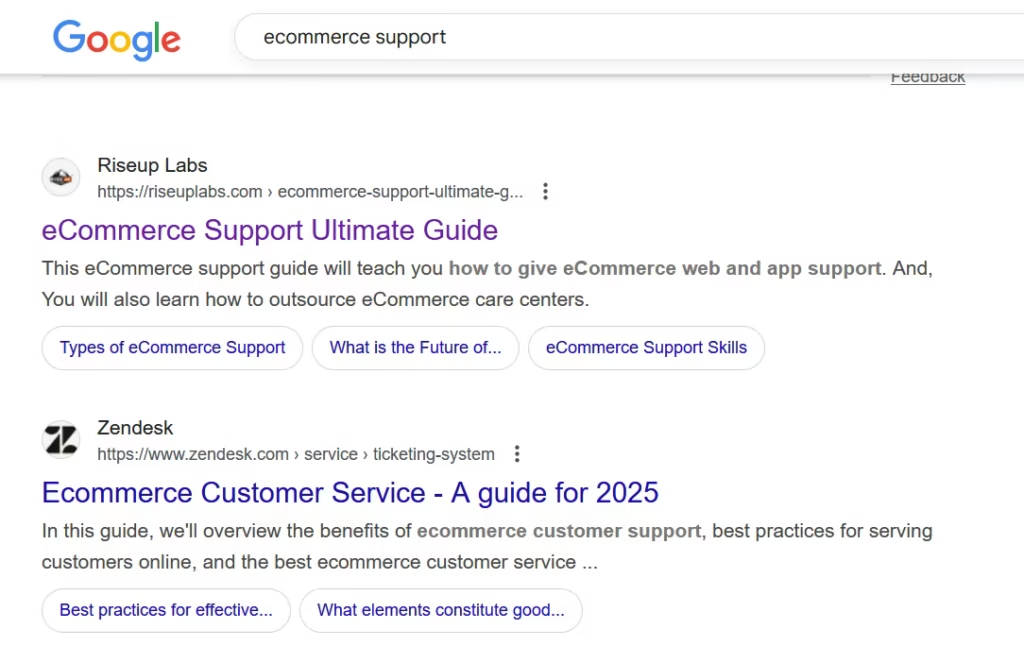
If they’re mostly guides or list posts, that’s what readers want.
2. Choosing the Right Keyword
Using the right tools and criteria will help you identify keywords that can drive targeted traffic to your website.
Start by generating a list of potential keywords using the following tools:
- Google Keyword Planner (Free): Perfect for beginners; shows search volume and basic competition levels.
- Ahrefs / Semrush (Paid): Offers deeper insights, including keyword difficulty, search volume, and competitors’ top-ranking keywords.
How to Use These Tools?
Here is short guideline for using these tool for your keyword research:
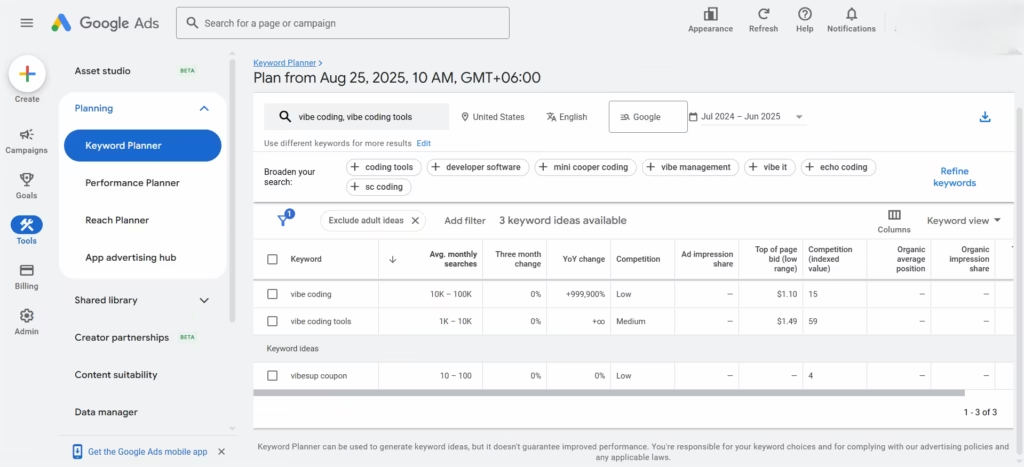
Google Keyword Planner:
- Log in to Google Ads → go to Keyword Planner.
- Select Discover New Keywords and enter a broad topic (e.g., “Vibe coding”).
- Set your target location and language.
- Review the keyword ideas → look at Average Monthly Searches (demand) and Competition (ad competitiveness).
- Export or note down the most relevant keywords for your blog.
It would look like this :
Semrush / Ahrefs:
- Open Keyword Magic Tool (Semrush) or Keywords Explorer (Ahrefs).
- Type in your seed keyword (e.g., “SEO blog”) and choose your target country.
- Browse the keyword suggestions → check Search Volume and Keyword Difficulty (KD) (lower KD = easier to rank).
- Use the Questions/Related tab to find long-tail keywords (e.g., “how to write SEO blog posts”).
- Save the keywords with a balance of good volume, low difficulty, and high relevance to your topic.
Now Evaluate and Choose Keywords
Once you have a list of potential keywords, assess them based on:
- Search Volume: Higher search volume can bring more traffic but usually comes with more competition.
- Keyword Difficulty (KD): For new websites, focus on low-difficulty keywords (under 30–40 KD) to increase your chances of ranking quickly.
- Relevance: Always make sure the keyword aligns with your content and business goals.
3. Choose Long-Tail Keywords
Long-tail keywords are basically super-specific search phrases. Instead of targeting broad terms like “meal prep,” you focus on something more detailed, like “weekly meal prep ideas for busy professionals.”
Why does this matter?
- Less competition: Fewer websites are trying to rank for these exact phrases, which gives your content a better chance to appear on Google.
- Clear intent: People searching for detailed phrases usually know what they want, so they’re more likely to click and engage with your post.
Pro tip: When picking long-tail keywords, think about what your ideal reader would type into Google if they were looking for exactly what you’re offering. The more specific, the better.
4. Check Your Competitors
Checking out competitors can help you discover keywords you might have missed. Here’s how to do it:
- Use tools like Ahrefs or Semrush.
- Enter a competitor’s blog URL.
- Look at the keywords they’re ranking for.
But here’s the key: Don’t just copy them. Instead, focus on:
- Keywords that aren’t too competitive.
- Topics you can explain better or in more detail than your competitor.
Example:
Instead of going after the broad and highly competitive term “meal prep,” target “weekly meal prep ideas for busy professionals.” It’s more specific, easier to rank for, and clearly matches what people are searching for.
Step 2: Plan Your Blog Post Structure
A blog post without structure is like a book without chapters—confusing and hard to follow. Outlining your content before writing makes it easier to read and helps search engines understand your topic.
Start with a simple framework:
- Introduction: Hook readers and explain what they’ll gain.
- Body: Break your main points into clear, digestible sections.
- Conclusion: Summarize key insights and encourage action.
Headings (H2s and H3s) aren’t just for looks—they help Google understand your content and make it easier for readers to scan. For example, if you were writing a post about setting up a home office, the structure could be:
- H2: Setting Up Your Workspace
- H3: Choosing the Best Spot at Home
- H3: Getting Good Lighting
- H2: Essential Desk Items
- H2: Staying Comfortable While You Work
- H2: Helpful Apps and Tools
- H2: Easy Ways to Stay Organized
With the heading and outline optimized, the next step is to start writing.
Step 3: Write High-Quality, SEO-Friendly Content
Now it’s time to write. SEO-friendly content is content optimized to rank highly in search engine results pages (SERPs). It involves creating content that is relevant, readable, and valuable to users while also being easily understood and indexed by search engines.
So your goal is to create content that’s helpful, clear, and naturally optimized for search engines. Here is how you can do it:
- Write for Humans First:
Use simple language, short paragraphs, and a conversational tone. Pretend you’re explaining it to a friend. - Make It Engaging:
Add examples, visuals, bullet points, and real tips to keep people reading. - Use Keywords Naturally:
Sprinkle your primary keyword a few times in the intro, headings, and body, but don’t force it. Google rewards natural, helpful writing—not keyword stuffing. - Show Experience and Credibility:
Share personal experiences or insights. Link to reputable sources and include author information to build trust.
Instead of:
“Exercise is very important for your health, and your health will suffer if you don’t exercise.”
Write:
“Think of exercise as fuel for your body. Skip it, and your energy dips. Do it regularly, and you’ll feel stronger and more alert every day.”
Step 4: On-Page SEO Optimization
Your content is ready, but before publishing, it’s important to fine-tune it so both readers and search engines can understand and value it.
On-page SEO means improving both the content users see and the hidden technical elements on a blog post to boost its search rankings and make it more enjoyable to read.
You can optimize your blog post directly within your Content Management System (CMS), the platform where you create and manage your content, or through other tools and platforms that support SEO and content optimization. Think of this step as polishing your post to make it more visible and clickable. Let’s break down the key elements to focus on.
Here’s how to make your blog SEO-friendly:
- Title Tag:
Think of the title like a sign outside a shop – it should tell people exactly what they’ll get inside. In your platform’s editor, there’s usually a field or plugin where you can enter your SEO title. Try to use the main word or phrase people might type into Google.
Example: “10 Easy Home Workout Tips for Beginners” – simple, clear, and tells people what they’re about to read. - Meta Description:
This short snippet appears under your title in search results. Keep it under 160 characters and make it enticing so people want to click. You can add it in your dashboard or SEO tool within the platform.
Example: “Discover simple home workout tips that help beginners stay fit without any equipment.” - URL:
Your URL (or permalink) doesn’t need to be fancy. In your editor, you can edit it to be short, simple, and include your keyword.
Example: https://writerush.ai/ai-content-marketing/ – easy to read, easy to remember. - Images:
Pictures make your blog more fun to read, but search engines can’t “see” them like we do. In your platform, you can add alt text to describe each image. Also, smaller image files = faster loading = happier visitors.
Example Alt Text: “woman doing a home workout on a yoga mat” - Links:
Adding links is like giving your readers a little map. You can insert internal links to other posts on your site and external links to useful sources directly in your editor. This helps both readers and search engines understand your content better.
Optimizing these elements through your blog platform ensures your post is readable, trustworthy, and search-engine friendly, giving it a better chance to rank higher and attract more visitors.
Step 5: Technical SEO Basics Checking
Even the best content won’t perform well if your website isn’t technically optimized. Technical SEO ensures your blog loads quickly, looks great on all devices, and is easy for Google to crawl.
Here are some essential Technical SEO checks to review before publishing:
- Page Speed
A slow website frustrates visitors and hurts rankings. Use tools like Google PageSpeed Insights to test performance. Test the speed of your page by entering your URL in Google PageSpeed Insights. Compress images, enable caching, and consider faster hosting to reduce load times. A fast-loading blog keeps readers engaged and improves SEO. - Mobile-Friendliness
Over half of web traffic comes from mobile devices. Make sure your theme is responsive and use your CMS’s preview mode to check and edit the mobile view. Test your blog on phones and tablets. Mobile-friendly design improves user experience and search rankings. - Schema Markup
Adding simple schema, like BlogPosting schema, helps Google understand your content better and can lead to rich snippets in search results. Schema markup gives your blog an SEO boost and improves visibility. - Indexing
Ensure your blog appears in your sitemap and isn’t blocked by robots.txt. Submit your sitemap in Google Search Console so Google can discover new posts quickly. Proper indexing ensures your content can be found and ranked.
Step 6: Publish and Promote Your Blog
Publishing isn’t the finish line, it’s when the real work begins. Even great content won’t get traction if no one sees it. Take these actions to make it happen:
- Request Indexing:
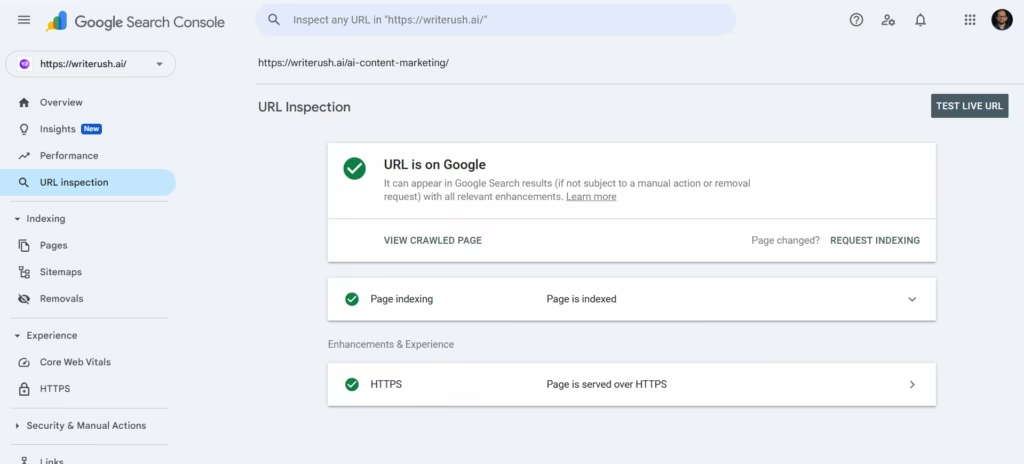
Use Google Search Console → “URL Inspection” → paste your blog URL → click “Request Indexing.” This speeds up how quickly your post appears in search results.
- Promote Everywhere:
Share on social media: LinkedIn, Twitter, or Facebook groups relevant to your topic. Send it to your email subscribers. Post snippets in forums or communities like Reddit, where your audience hangs out. - Build Backlinks:
Reach out to other bloggers, websites, or influencers in your niche. Offer your post as a helpful resource or write a guest post linking back to your content. Backlinks are one of the strongest ways to improve search rankings.
Example: If you wrote a blog on “10 Easy Home Workout Tips,” reach out to fitness blogs and suggest your guide as a resource for beginners.
Step 7: Monitor and Update Your Blog
SEO isn’t a one-time effort. Rankings, search trends, and competitor content change over time, so your posts need regular maintenance to stay relevant.

Try these steps:
- Track Performance:
Use Google Analytics to see traffic, and Search Console to check which keywords bring visitors. - Update Regularly:
Every 6–12 months, revisit your posts: refresh outdated statistics or tips, update screenshots or examples, and expand sections that aren’t performing well or are missing key information. - Improve Titles and Meta Descriptions:
If your post shows in search results but gets few clicks, rewrite the title or meta description to make it more appealing. Small adjustments can significantly increase traffic.
Example: Changing a meta description from “Learn about home workouts” to “Discover 10 simple home workouts that anyone can do without equipment” can boost click-through rates.
How to Optimize Your Blog for Google’s AI Overviews?
As we all know ranking in the SERPs isn’t enough anymore. Many searches now show AI-generated summaries at the top, highlighting the best answers from multiple sources. Even if your blog ranks #1, missing these snippets can cost visibility and clicks. That’s why optimizing for AI-powered summaries is important.

Think of it this way: these snippets act like a spotlight on Google, highlighting concise, trustworthy content. Being featured here can drive traffic, build authority, and make your blog the go-to answer for readers.
Here’s how you can give your blog the best chance of appearing in AI overviews:
1. Structure Your Content Clearly
AI loves well-organized posts. Use H2s and H3s, bullet points, and numbered lists so the AI can quickly extract the main ideas. Clear structure helps readers and increases snippet visibility.
2. Answer Questions Directly
Snippets pull short, precise answers from your content. Think about the exact questions your audience searches for and answer them in 1–2 clear sentences. For example:
“Photosynthesis is the process by which plants convert sunlight, water, and carbon dioxide into energy and oxygen.”
3. Focus on Trustworthy, High-Quality Information
Google’s AI prefers content that’s reliable and well-researched. Include facts, examples, and references to authoritative sources. The clearer and more credible your answers, the better your chance of being featured.
4. Keep Paragraphs Short
Break ideas into 2–3 sentence blocks. Long paragraphs are harder for AI to parse and less likely to be picked up for snippets.
5. Use Keywords Naturally
Include your main keywords in headings and answers without stuffing them. Natural phrasing helps Google understand relevance while keeping your content reader-friendly.
Pro Tip: Write as if you’re answering a friend’s question—concise, clear, and helpful. That’s exactly the type of content Google’s AI loves to feature.
If you’re concerned about whether AI-generated content can affect your SEO, take a look at our article on Is AI-Generated Content SEO-Friendly? to discover how to use AI content effectively and safely while boosting your blog’s visibility.
How AI is Changing SEO Blog Writing
AI isn’t taking over SEO blogs—it’s giving writers a turbo boost. Think of it like having a research assistant who never sleeps. Here’s how it makes a difference:
- Keyword Research & Content Strategy: AI spots trending topics and identifies content gaps faster than any human could.
- Drafting & Consistency: Stuck on writer’s block? AI can suggest drafts, headings, or even alternative phrasings while keeping your tone consistent.
- SEO Optimization: AI tools can recommend better meta descriptions, improve readability, and suggest where to place keywords.
- Content Personalization: By analyzing user behavior, AI can help you tailor content for different audience segments, improving engagement.
But here’s the golden rule: AI should assist, not replace you. Readers and Google still crave authenticity, personal insights, and creativity. Use AI to save time, but let your voice and expertise shine.
Check out our expert guide on How to Use AI in Content Marketing
Common Use Cases of SEO Blog Writing
You might be wondering, “Who really benefits from all this SEO effort?” The short answer: anyone trying to grow an online presence. Let’s break it down.
- Businesses & Startups
Imagine your potential client Googling a solution to a problem you solve. If your blog isn’t there, someone else will be. SEO blogs help companies show up exactly when people need them, answer questions, and build authority in their niche. Think of it as planting seeds—each post has the potential to grow new leads over time. - Bloggers & Content Creators
For bloggers, SEO isn’t just a technical exercise—it’s the bridge between your hard work and readers who actually find your content. Even one well-optimized post can become a traffic magnet, opening doors for collaborations, sponsorships, or ad revenue. - E-commerce Brands
Online stores can turn blog posts into guides that showcase products in action. For instance, a “how-to” post featuring your products naturally leads to conversions, while also boosting organic traffic for free. - Service Providers & Freelancers
SEO blogs can act like a digital portfolio. By sharing helpful insights, tips, or case studies, you build credibility, making it easier for potential clients to trust and hire you.
The takeaway? No matter your industry, a well-optimized blog is more than words on a page—it’s a long-term growth tool.
Common Mistakes to Avoid in SEO Blog Writing

Even experienced bloggers stumble. Let’s talk about a few pitfalls that can quietly sabotage your SEO efforts:
- Overstuffing Keywords: Yes, keywords matter—but stuffing them everywhere makes your content awkward and can even hurt your rankings.
- Ignoring User Intent: Writing only for SEO robots is like throwing a party with no guests. Always consider what your audience actually wants.
- Low-Quality Content: Generic, surface-level posts fail to rank and won’t capture readers’ interest. Focus on creating content that offers depth, clarity, and real value.
- Mobile Neglect: According to Google’s Mobile-First Indexing guidelines, the mobile version of your site is now the primary basis for indexing and ranking. With more than half of web traffic coming from smartphones, a blog that isn’t mobile-friendly risks losing a large share of its audience.
- Skipping Technical SEO: Missing alt text, duplicate content, or slow load times can silently tank your performance.
Pro Tip: Focus on creating content that helps your readers first. SEO will follow naturally.
Future Trends in SEO Blog Writing
SEO isn’t static—it evolves as users and technology do. Here’s what you need to watch:
- Voice Search: More people are talking to their devices than typing. Optimize for conversational, long-tail phrases.
- Mobile-First Indexing: Google now prioritizes mobile experiences. A fast, clean, responsive site is essential.
- Semantic SEO: Focus on topics, not just keywords. Cover subjects comprehensively so readers—and search engines—see your content as authoritative.
- AI & Generative Content: AI is here to stay. Use it to research and draft, but never let it replace human insight.
The key? Keep your writing natural, thorough, and useful. Solve your readers’ problems, and you’ll stay competitive—even as trends shift.
Conclusion
At the end of the day, SEO blog writing is about combining strategy and storytelling. By doing proper keyword research, structuring your post clearly, writing for readers first, and optimizing for search engines, you create content that both ranks and resonates.
Think of it as a cycle: research, write, optimize, promote, update—and repeat. Each step compounds over time, building your authority and visibility.
As Bill Gates famously said, “Content is king.” But in today’s digital world, SEO is the crown that makes that content shine. Start applying these steps today, and your blog will not only attract traffic but also turn readers into loyal followers and customers.
Frequently Asked Questions About SEO Blog Writing
What is SEO blog writing?
SEO blog writing involves crafting valuable and engaging blog posts that are optimized for search engines, helping your website rank higher and attract more organic visitors
How to rank websites on google first page?
To reach the first page on Google, create valuable content, use relevant keywords naturally, and make your website easy and enjoyable for visitors to navigate.
What are the essential elements of SEO blog writing?
Key elements of SEO blog writing include researching keywords, creating valuable content, optimizing titles and headings, using links and visuals, and planning content to build authority.
How long should an SEO blog post be for better rankings?
For better SEO, blog posts are usually longer—around 1,500 to 2,500 words—but the ideal length depends on the topic, type of content, and what your audience is looking for.
Can AI tools help with SEO blog writing?
Yes, AI can help with SEO blogs by suggesting keywords, generating ideas, and improving readability, but human creativity is still essential.
How long does it take for an SEO blog to rank?
SEO blogs usually take 3 to 12 months to start ranking, depending on keyword competition, content quality, and the site’s authority.
This page was last edited on 23 November 2025, at 5:55 pm