Have you ever clicked “generate” on your AI tool, waited with excitement, and then sighed because the draft sounded… well, like a very polite robot trying its best?
Yeah, we’ve all been there.
A WordPress blogger recently told me,
“Every time I use AI, the draft feels clean but… soulless. Like it forgot humans are supposed to read this.” And that’s the exact frustration so many creators face today.
And honestly?
She’s not wrong.
AI is fast.
AI is efficient.
But it still struggles with the things that make writing feel alive, like personality, emotion, subtlety, and those little human quirks that make readers feel understood. Without those elements, your content may look fine at first glance but fall flat where it matters most: CONNECTION.
The good news is that humanizing AI content isn’t some mysterious skill reserved for expert storytellers. With the right approach and the right assistant in your writing workflow, you can transform stiff, robotic drafts into natural, relatable, reader-friendly writing that actually sounds like you.
This blog will guide you through that entire journey with some proven strategies and a step-by-step process, so by the end, you’ll know exactly how to humanize AI-generated content that your audience will genuinely enjoy.
Ready to give your AI-generated content a real voice?
Let’s start.
What Does It Mean to “Humanize” AI-Generated Content?
Before we jump into the how, it helps to understand what “humanizing” really means, especially when your goal is to make AI-generated content feel natural, authentic, and genuinely relatable to real readers.
When people search for how to humanize AI-generated content, they’re not just looking for grammar fixes. They want writing that carries emotion, personality, and a conversational tone, the kind that makes a reader think, “Wow, a real person wrote this.”
It usually includes:
- A natural writing flow: sentences that sound like real conversation, not formulaic patterns.
- Authentic tone & voice: a style that reflects your brand or personal identity.
- Emotional nuance: showing empathy, excitement, curiosity, or even vulnerability when needed.
- Audience awareness: speaking directly to the reader with context, clarity, and purpose.
- Relatable storytelling: examples, experiences, or small anecdotes that make the content feel alive.
In simple terms, humanized content bridges the gap between AI efficiency and human creativity. It preserves the speed and structure AI provides while adding the warmth, depth, and personality only you can bring.
And as you’ll see in the next sections, humanizing AI isn’t about rewriting everything from scratch; it’s about enhancing the core message so it feels more engaging, more conversational, and far more human.
Why AI Content Often Feels Robotic
Now that we understand what it means to humanize AI content, it’s worth looking at why AI-generated text so often feels flat or mechanical in the first place. If you’ve ever wondered why your draft sounds “off,” even when the grammar is perfect, you’re not imagining it.
AI is brilliant at processing data, but it doesn’t naturally understand emotion, context, storytelling, or the subtle cues that make writing feel human. And that’s exactly why many creators search for ways to humanize AI-generated content because the raw output rarely captures the warmth readers expect.
Here’s why AI content can feel unnatural or robotic:
- Generic or repetitive phrasing: AI tends to fall back on safe, predictable sentence patterns, which can make your content sound bland or overly formal.
- Lack of emotional depth: It can mimic tone, but it doesn’t truly feel, so the writing may miss empathy, excitement, or relatability.
- Surface-level explanations: AI provides correct information, but often without the personal insights, nuance, or real-life examples that humans naturally include.
- Missing audience awareness: Without guidance, AI doesn’t fully understand who you’re speaking to, leading to content that feels disconnected or too broad.
- No lived experience: AI can generate ideas, but it can’t draw from personal stories, struggles, or opinions, all essential for authentic content.
When you look at it this way, the challenge becomes clearer: AI gives you structure, speed, and clarity, but you provide the personality, emotion, and human touch.
And that’s exactly what the next sections will help you achieve: transforming robotic drafts into content that feels natural, engaging, and truly human.
8 Proven Strategies to Humanize AI-Generated Content
Now that we’ve uncovered why AI often sounds stiff or robotic, let’s move into the heart of what most creators truly want to know: how to humanize AI-generated content in a way that feels natural, expressive, and genuinely reader-friendly. The goal isn’t to erase AI’s contribution but to elevate it, blending AI efficiency with the emotional depth and personality that only humans can add.
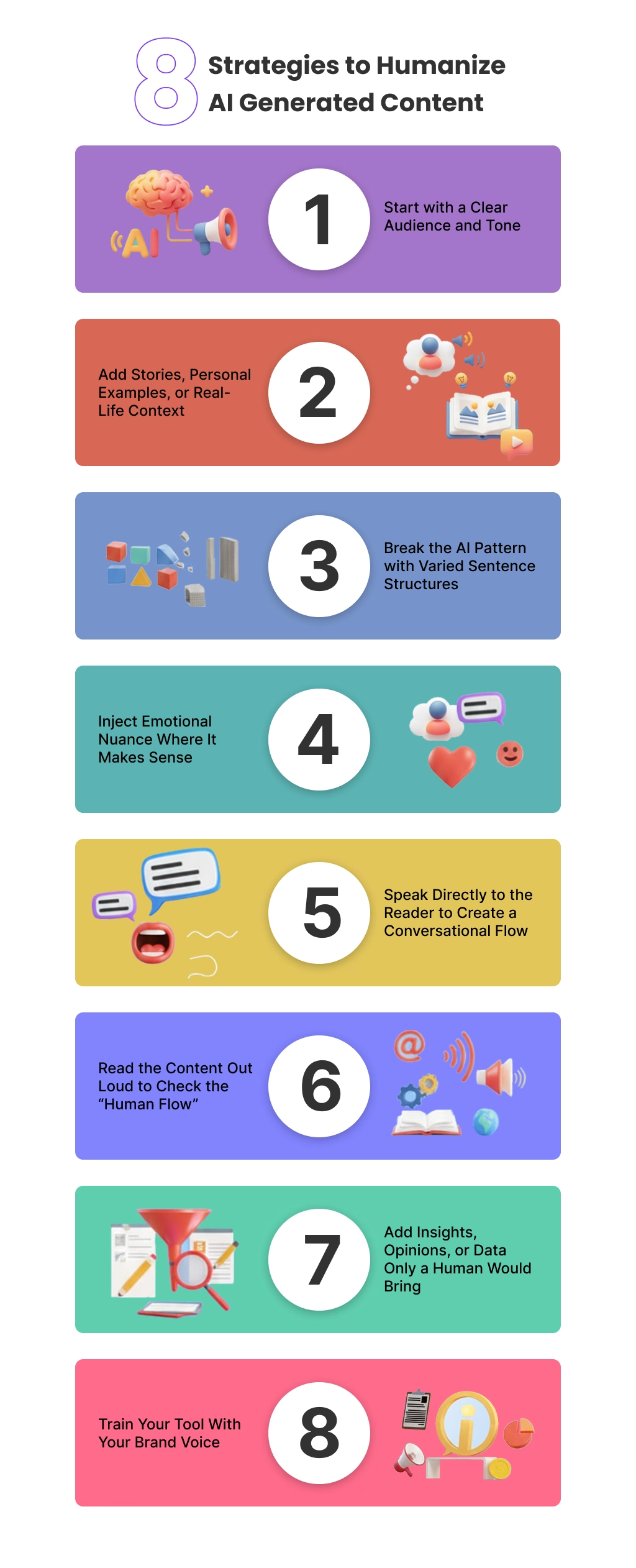
Below, you’ll find detailed, practical strategies that will transform any AI draft into content that feels authentic, conversational, and engaging from start to finish.
1. Start with a Clear Audience and Tone
When AI doesn’t know who it’s speaking to, it defaults to a generic, one-size-fits-all style, which almost always feels robotic. That’s why defining your audience is the first step in learning how to humanize AI-generated content.
Think about their pain points, level of knowledge, intentions, and expectations. The more clarity you have, the easier it becomes to shape the tone. Whether you want the content to sound friendly, motivational, expert-level, or playful, communicating this upfront (or adjusting during editing) gives your writing a more natural and purposeful flow.
A well-defined tone turns flat content into something instantly relatable.
Try this prompt:
“Rewrite this paragraph for beginner bloggers using a friendly, conversational tone. Make the writing feel encouraging and easy to understand.”
2. Add Stories, Personal Examples, or Real-Life Context
AI has knowledge but no experience. You have both.
Even adding a small anecdote, like a frustration, a win, a discovery, or a “this happened to me” moment, instantly makes your content relatable. Stories humanize ideas, deepen emotional connection, and help readers trust your guidance.
Real-life context is one of the most powerful tools for humanizing AI-generated content because it adds depth and authenticity that can’t be artificially replicated.
Try this prompt:
“Add a short personal story or relatable example to illustrate this point. Keep it natural, conversational, and human-sounding.”
3. Break the AI Pattern with Varied Sentence Structures
AI often writes in repetitive, predictable patterns that feel flat when read aloud. Humans, however, naturally vary in sentence lengths, rhythms, and transitions.
To make your content more human:
- Use short, punchy statements where emphasis is needed.
- Expand certain thoughts with longer sentences for storytelling or detail.
- Add conversational transitions like “Here’s the thing,” “Let’s break this down,” or “You might relate to this…”
- Use rhetorical questions to create dialogue.
These techniques disrupt robotic structure and make the writing feel alive.
Try this prompt:
“Rewrite this paragraph with varied sentence lengths and a more conversational flow. Add rhetorical questions or natural transitions where needed.”
4. Inject Emotional Nuance Where It Makes Sense
AI can mimic tone, but it doesn’t feel emotion. That’s why many AI drafts lack warmth, excitement, empathy, or vulnerability.
To humanize your text:
- acknowledge common struggles
- express curiosity or enthusiasm
- describe frustration or relief
- celebrate small wins
Emotion adds personality, making your content sound like it came from a real human with real experiences.
Try this prompt:
“Enhance this paragraph with light emotional nuance. Add subtle feelings like excitement, frustration, or relief while keeping the tone authentic.”
5. Speak Directly to the Reader to Create a Conversational Flow
Great writing feels like a conversation, not a lecture. Speaking directly to the reader with words like you, your, and let’s builds connection and makes your message feel more personal.
Ask questions. Share observations. Anticipate their concerns. This creates an interactive experience, something AI rarely accomplishes on its own.
Try this prompt:
“Rewrite this in second person and make it conversational. Address the reader directly using ‘you,’ ‘your,’ and ‘let’s.”
6. Read the Content Out Loud to Check the “Human Flow”
One of the simplest but most powerful ways to humanize AI-written content is to read it aloud. Anything that sounds awkward, overly formal, or unnatural will immediately stand out.
When you read aloud, you naturally adjust the rhythm, tone, and pacing of the writing, making it smoother and more conversational. This is a technique professional editors swear by because it instantly reveals robotic language.
Try this prompt (after reading aloud):
“Rewrite this section to sound more natural when spoken aloud. Make the sentences flow like casual speech.”
7. Add Insights, Opinions, or Data Only a Human Would Bring
AI can pull knowledge from patterns, but humans bring perspective, preference, and interpretation. When you give your genuine thoughts, even briefly, you differentiate your content from every other AI-generated piece online.
You can also include:
- recent statistics
- personal experiences
- professional insights
- lessons learned
- behind-the-scenes stories
These details add credibility, relatability, and depth.
Try this prompt:
“Insert one relevant statistic or expert insight into this paragraph, and explain it in a simple, human-friendly way.”
OR
“Add a short opinion or personal viewpoint to make this section sound more human and authentic.”
8. Train Your Tool With Your Brand Voice
This is a strategy many creators overlook, but it’s one of the most powerful ways to humanize AI-generated content consistently.
If your writing tool or WordPress AI content marketing plugin allows brand voice training, use it. Training your AI assistant with examples of your past writing, like blog posts, emails, landing pages, and social captions, helps the AI understand your:
- tone
- vocabulary
- sentence rhythm
- personality
- emotional style
- level of formality
When the AI learns from your real writing, it produces content that already sounds 70–80% closer to your natural voice. That means fewer edits, more authenticity, and significantly better alignment with your brand identity.
It’s like giving the AI a “blueprint” of how you speak so it can mimic your style more accurately, making your final content feel more human right from the start.
Try this prompt:
“Using the writing samples I provided, rewrite this paragraph in my brand voice: warm, conversational, slightly witty, and relatable.”
Read More: How to Write Better AI Prompts
A Practical Step-by-Step Workflow to Humanize AI Content
Knowing the strategies is one thing, but understanding how to apply them in a real workflow is where everything becomes easier. If you’re wondering how to humanize AI-generated content without spending hours rewriting every sentence, this step-by-step process will help you turn raw AI drafts into natural, polished, and authentic writing.
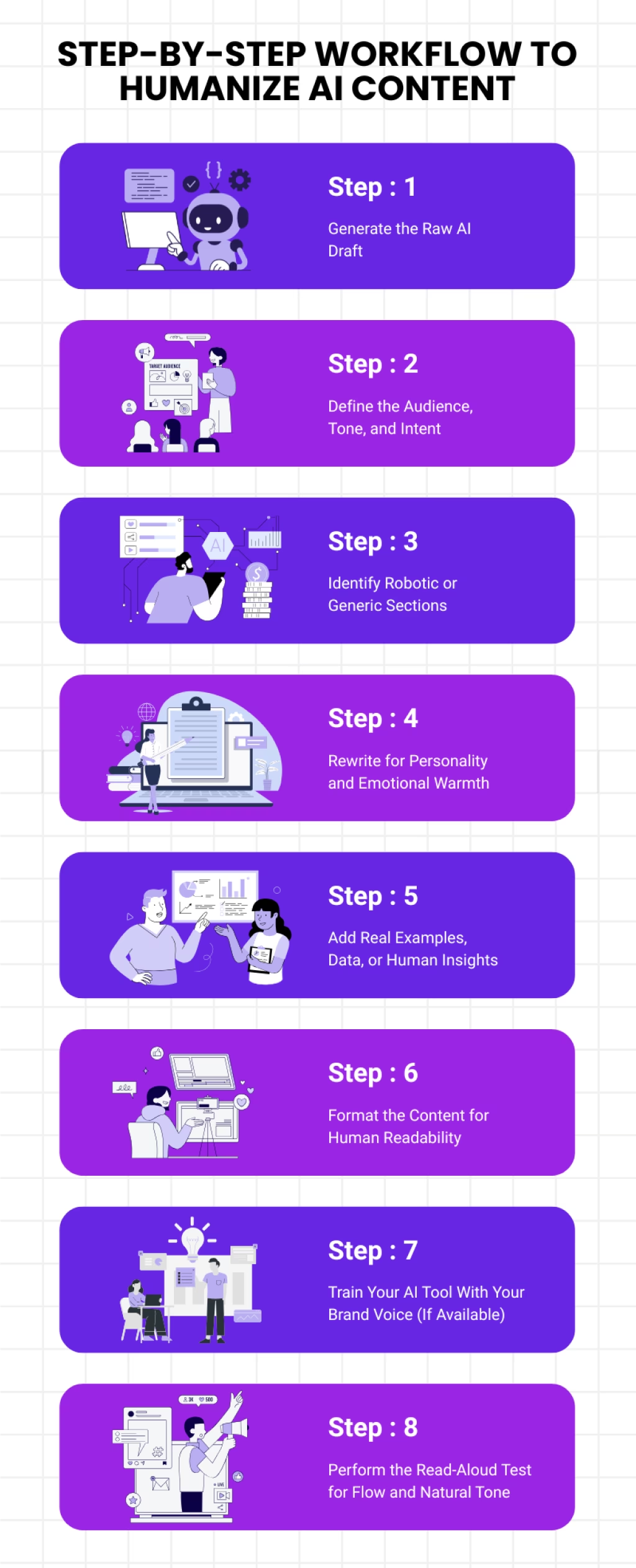
Think of this as your go-to editing framework: simple, repeatable, and designed to bring out a more human tone in every piece of content you create.
Step 1: Generate the Raw AI Draft
Start by letting the AI do what it does best: give you a structured, foundational draft. Don’t aim for perfection here. The goal is to create a base you can shape into a more human-friendly version. AI is excellent at overcoming blank-page syndrome, so use this moment to gather ideas, key points, and initial direction.
Step 2: Define the Audience, Tone, and Intent
Before editing, pause and ask: Who am I writing for, and how should this sound?
This clarity influences every decision that follows. When the tone and audience are defined, you’ll know whether your writing should feel expert, conversational, motivational, or playful, which helps you guide the content toward a natural writing flow and authentic voice.
Step 3: Identify Robotic or Generic Sections
Read the draft with fresh eyes and highlight parts that feel:
- repetitive
- overly formal
- emotionally flat
- too vague or generic
- lacking real-world context
These are the areas that need the most humanizing. AI-generated text often sounds mechanical because it misses emotional depth and personal perspective, so spotting these weak spots early makes the editing process smoother.
Step 4: Rewrite for Personality and Emotional Warmth
Now comes the fun part: shaping the content with your own voice. Add stories, personal insights, conversational transitions, or emotional nuance. This is where you replace robotic phrasing with relatable language, making the content feel alive and genuine.
Ask yourself: Would I naturally say it this way?
If not, rewrite it in a tone that reflects your personality or brand voice.
Step 5: Add Real Examples, Data, or Human Insights
One of the easiest ways to humanize AI content is by adding something AI cannot produce, like your lived experience, opinions, and up-to-date insights. Include:
- examples from your work
- anecdotes from your journey
- recent statistics
- expert commentary
This transforms generic content into something credible, engaging, and uniquely yours.
Step 6: Format the Content for Human Readability
Readers love clarity. Break long paragraphs, use meaningful headings, and create a logical flow. Humanized content isn’t just about tone; it’s also about structure. Clean, scannable formatting keeps readers engaged and makes your writing feel approachable and digestible.
Step 7: Train Your AI Tool With Your Brand Voice (If Available)
If your AI writing tool or WordPress plugin supports brand voice training, this is where the magic happens. Upload writing samples or past blog posts so the AI learns your:
- tone
- pacing
- vocabulary
- emotional style
- sentence rhythm
Once trained, the AI will produce content that’s already closer to your natural voice, cutting your editing time drastically and helping every draft sound more human from the start.
Step 8: Perform the Read-Aloud Test for Flow and Natural Tone
Finally, read your content out loud. This simple step reveals stiff phrasing, unnatural rhythm, or sentences that don’t sound like something a real person would say. If it feels awkward to speak, it will feel awkward to read, so adjust it until it flows naturally.
This final polish ensures your content has a conversational tone, emotional clarity, and smooth readability.
Before vs. After: How AI Content Transforms When You Add a Human Touch
Seeing the transformation side-by-side is one of the clearest ways to understand how to humanize AI-generated content. Below is the same idea expressed in two very different ways, first in a plain, robotic tone, and then in a warm, conversational, reader-focused style.
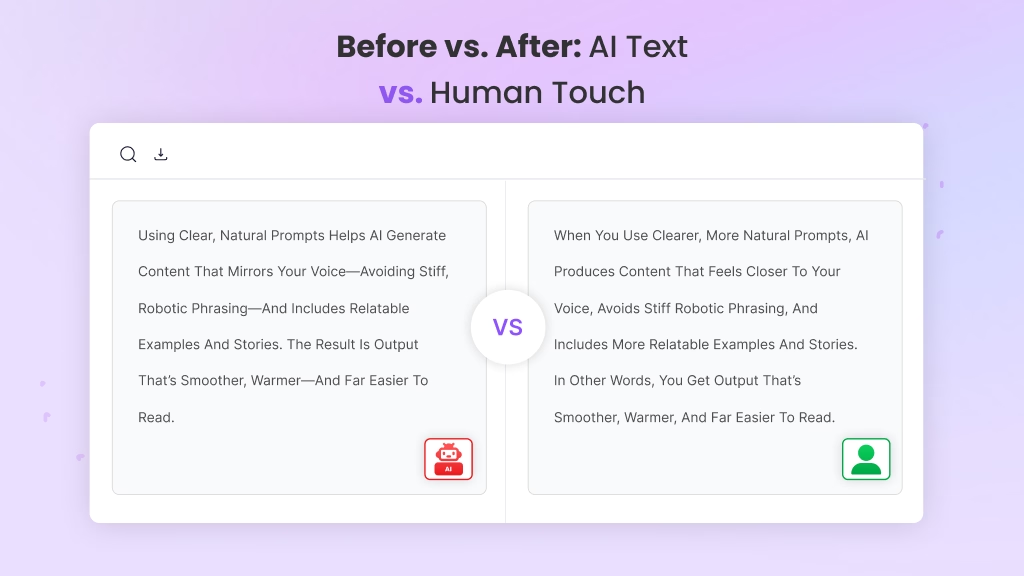
Before (AI-Generated, Robotic Tone)
“Clear headings are useful for improving user experience and SEO. They make the text easier to navigate — allowing search engines to identify the main topics. Headings help manage content structure.”
This version is straightforward, but it sounds stiff and disconnected. There’s no personality, no relatable element, and no natural flow, which is why it reads like AI-generated content.
After (Humanized, Conversational Tone)
“Ever clicked on a blog and felt lost because everything blended into one big paragraph? That’s exactly why headings matter. They break your content into meaningful sections, guide readers, and even help Google figure out what your page is all about. Think of them as tiny road signs that make your blog easier to scan and way more enjoyable to read.”
This version keeps the original meaning but adds warmth, flow, and a relatable scenario showing exactly what humanizing AI-generated content looks like in practice.
Common Mistakes to Avoid When Humanizing AI-Generated Content
As you apply different strategies to humanize your writing, it’s equally important to understand what not to do. Many creators unknowingly sabotage their own efforts by making simple mistakes that pull the content right back into robotic territory.
And since you’re learning how to humanize AI-generated content effectively, avoiding these pitfalls will help you maintain a natural, authentic tone throughout your work.
Here are the most common errors, and how to stay clear of them.
1. Overediting Until the Content Feels Forced
Sometimes, in an attempt to sound “more human,” writers over-correct. They add too many emotional cues, rewrite every line, or force humor where it doesn’t fit. This can make the content feel unnatural instead of natural.
Avoid this by:
Keeping edits purposeful and focused on improving clarity, flow, and connection, not dramatizing every sentence.
2. Leaving the AI Draft Untouched
On the opposite end, some writers publish AI-generated text as-is, assuming it’s “good enough.” But unedited AI content often lacks emotional nuance, personal insight, and relatable storytelling.
Avoid this by:
Reviewing the draft with a critical eye and adding your own voice, perspective, and examples to make it feel genuinely human.
3. Inconsistent Tone Across Sections
AI sometimes shifts tone mid-draft; one paragraph might feel formal, while the next sounds conversational. This inconsistency can confuse readers and disrupt the natural writing flow.
Avoid this by:
Maintaining a steady tone, whether it’s friendly, expert, casual, or motivational, and revising sections so they sound cohesive.
4. Overusing Generic AI Phrases
AI tends to rely on predictable wording like “in today’s world,” “it is important to note,” or “in conclusion.” Too many of these phrases signal AI involvement and weaken your authenticity.
Avoid this by:
Replace generic lines with natural phrasing, personal observations, or more specific transitions.
5. Forgetting the Reader’s Perspective
AI often writes from an informational standpoint, not a conversational or emotional one. When you skip the reader’s needs, questions, or emotions, the content loses impact.
Avoid this by:
Addressing the reader directly, acknowledging their challenges, and offering clear, relatable explanations.
6. Ignoring Brand Voice
If you don’t guide the AI to match your brand tone, or you don’t edit the output for voice consistency, the content may feel disconnected from your identity.
Avoid this by:
Training your AI tool with brand voice samples when possible, or manually editing for tone, vocabulary, and emotional style.
7. Neglecting the Final Read-Aloud Test
Skipping this step is one of the biggest mistakes. What looks fine on the screen might sound stiff or unnatural when spoken.
Avoid this by:
Reading your content out loud to catch awkward phrasing, unnatural rhythms, or anything that doesn’t sound like something a real person would say.
By steering clear of these mistakes, you’ll make it much easier to humanize AI-generated content while preserving authenticity, emotional connection, and readability. These small adjustments go a long way in ensuring your AI-assisted writing truly feels like it was created by a real human, one who understands and connects with the reader.
How WordPress Users Can Humanize AI Content Faster
If you’re a WordPress blogger or content marketer, you already know how chaotic the publishing workflow can feel like juggling drafts, formatting posts, optimizing for SEO, and trying to keep your writing sounding natural and human.
The good news? WordPress users have a unique advantage: the ability to integrate AI tools directly into their writing environment, making the editing workflow faster, smoother, and far more intuitive.
Here’s how WordPress users can humanize AI content more efficiently:
1. Refine AI Drafts Directly Inside the Gutenberg Editor
Instead of switching between multiple tools, you can edit, rewrite, and humanize AI-generated text right where you publish. This seamless workflow helps you quickly adjust tone, add personality, and maintain a natural writing flow without breaking your creative momentum.
2. Use Real-Time Rewrite and Tone Adjustment Features
Many WordPress AI plugins now offer instant rewriting, tone selection, and personalized suggestions. This allows you to transform robotic phrasing into conversational, reader-friendly writing with just a few clicks, perfect for bloggers who need a fast, consistent approach to humanization.
3. Generate SERP-Based Outlines Directly in WordPress
Humanizing content becomes easier when your structure is already aligned with search intent. By generating topic-driven or SERP-informed outlines inside WordPress, you start with a strong foundation that naturally guides the AI toward a more engaging and context-aware draft.
4. Analyze Your Target Audience and Context While Writing
Some WordPress AI assistants can analyze your topic and provide insights on the audience you’re writing for. This helps you adjust tone, style, and complexity, key elements in making AI-generated content feel more relatable and authentic.
5. Train the AI With Your Existing WordPress Content
One of the most powerful shortcuts for humanizing AI-generated content is brand voice training. By feeding the AI tool snippets of your previous blog posts, About page, or email copy, it starts mimicking your natural writing style, like sentence patterns, tone shifts, emotional cues, and all.
This means your content comes out sounding closer to you right from the very first draft.
6. Fix Robotic Sections Before You Publish
WordPress AI plugins can scan your writing and highlight parts that feel repetitive, overly formal, or unnatural. This makes the humanization process more intentional by showing you exactly where to improve tone, phrasing, and readability before hitting “Publish.”
And if you’re using a WordPress AI assistant like WriteRush, this process becomes even simpler. WriteRush is built around SERP-focused outlines, audience analysis, guided long-form workflows, brand-voice training, and so on.
This means you spend less time fixing AI-generated text and more time shaping it into something that feels authentic, relatable, and aligned with your voice, exactly what modern WordPress creators need to keep their workflow smooth and human-centric.
AI Gives You Speed, You Give Content Its Soul
At the end of the day, AI can help you write faster, organize ideas, and overcome the dreaded blank page, but it can’t replace the emotional depth, personal perspective, or authentic tone that make content truly memorable. That’s why understanding how to humanize AI-generated content is essential for any creator who wants their writing to connect, not just inform.
When you add your stories, refine the tone, adjust the natural writing flow, and speak directly to your audience, you transform robotic text into something real and relatable. AI may handle the structure, but you bring the heart, the intention, and the personality your readers crave.
And that’s the beauty of combining human creativity with AI assistance: you get efficiency without losing authenticity. So as you continue crafting your blog posts or WordPress content, use AI as a supportive tool, but let your voice shape the final message.
Remember, AI may give you speed, but only you can give your content its soul.
FAQs
1. What does it mean to humanize AI generated content?
It means editing AI-written text to sound natural, personal, and emotionally aware. You add tone, rhythm, and real examples so readers feel a human wrote it.
2. Why should I humanize AI content?
Humanized content builds trust, keeps readers engaged longer, and aligns with Google’s people first and E-E-A-T standards.
3. How can I tell if the content sounds too robotic?
If every sentence is the same length, full of buzzwords, or lacks emotion or personal insight, it’s probably too mechanical.
4. Can I humanize content directly in ChatGPT?
“Rewrite this paragraph to sound natural and human. Add light emotion, vary rhythm, and use a conversational tone.”
5. Does humanizing AI text help SEO?
Yes. Natural tone, clarity, and authenticity improve engagement metrics like dwell time and reduce bounce rates, signals that boost SEO.
6. Should I disclose when the content was AI-assisted?
If transparency fits your brand or industry ethics, yes. Readers appreciate honesty, and it can reinforce credibility.
7. What’s the fastest way to humanize a long AI article?
Focus on the intro, transitions, and examples. These carry the most emotional weight and shape how authentic the piece feels.
8. How do I keep my brand voice consistent when using AI?
Train your AI tool with examples of your style or create a short tone guide. Always review and edit final drafts manually.
9. Can AI detectors tell if my text is humanized?
Usually, less accurately. Well-edited humanized text blends natural flow, varied structure, and personal context that confuse detectors.
10. What tools help humanize AI content faster?
Grammarly, Hemingway Editor, and tone analyzers help polish language. You can also use AI rewriting tools guided by strong prompts.
This page was last edited on 29 January 2026, at 3:09 pm